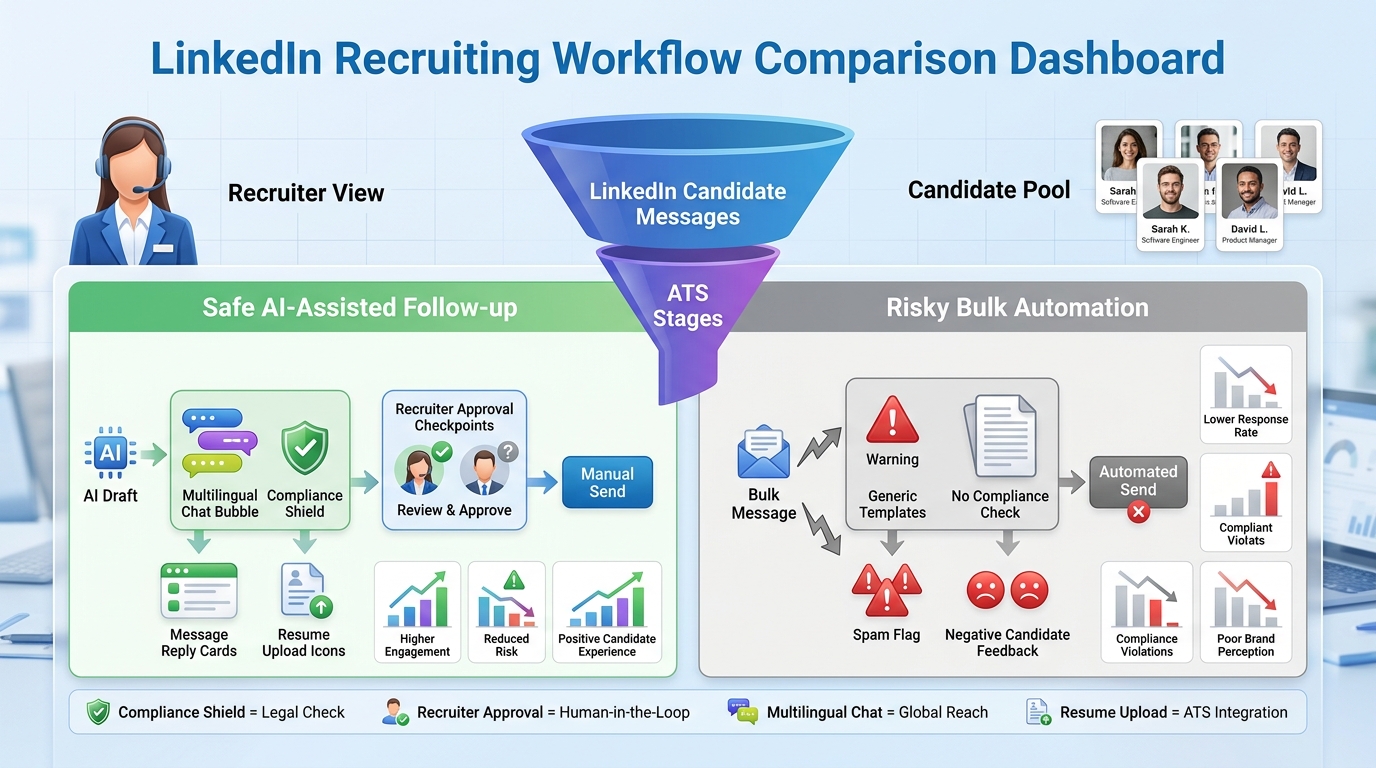
Recruiting leaders comparing linkedin tools can use this article to spot risky automation, fix handoff gaps, and protect reply quality.
That distinction matters more than most teams admit. In agency recruiting, the real cost of a weak automation setup is not just wasted time. It shows up as scattered candidate records, follow-ups that happen too late, hiring managers who lose confidence in the pipeline, and outreach that feels generic enough to hurt response rates. For in-house teams and small search firms alike, the damage is operational and reputational at the same time.
That is also where I have found a narrower AI-supported workflow more useful than the usual promise of full autopilot. In testing StrategyBrain AI Recruiter on LinkedIn-heavy searches, the practical value was not “replace the recruiter.” It was using always-on follow-up, multilingual candidate messaging, and structured resume or contact collection to keep conversations moving after hours while I still handled final judgment, resume review, and interview decisions myself.
A useful way to frame the problem comes from how recruiter quality gets judged in real markets. In Winnipeg, for example, employers do not evaluate recruiting partners as one generic category. They look across manufacturing, logistics, healthcare, information technology, construction, and agriculture, then decide which firms can actually handle the local skill mix. A recruiter working those desks is not just sending messages. They are comparing reqs across sectors, checking who can cover industrial labor versus finance or office administration, and deciding which outreach deserves immediate attention before the shortlist goes stale.
Once that recruiter starts moving between specialized searches, the friction becomes obvious. One candidate replies from an aerospace background, another asks for compensation details in a different language, a third sends a resume after business hours, and the recruiter still has to update status notes, remember the next touchpoint, and keep clients aligned on what is moving. That is the real transition into linkedin recruiting automation: not how to automate everything, but how to choose linkedin tools, linkedin content tools, and linkedin management tools that support specialized recruiting work without creating compliance risk or process confusion.
Table of Contents
- Why market context changes your automation needs
- What LinkedIn recruiting automation really means
- How recruiters actually buy LinkedIn tools
- Tool categories by use case
- Native vs third-party workflows
- Where the ATS should sit in the stack
- When linkedin content tools and linkedin management tools matter
- Three platform approaches recruiters compare
- Compliance and risk signals to review
- How to build a safer workflow
- Common mistakes
- FAQ
Why market context changes your automation needs
Recruiting automation decisions make more sense when you start with the labor market you serve. The reference point from Winnipeg is useful because it reflects a common recruiting reality: one city can support a diverse economy across manufacturing, logistics, healthcare, IT, construction, and agriculture, and each segment expects different candidate handling. Recruiters are not operating in a single, clean funnel. They are moving between specialized conversations, different urgency levels, and different client expectations.
That is why no serious buyer should search for linkedin tools as if all tools solve the same problem. A desk supporting advanced manufacturing hires needs disciplined sourcing and follow-up. A team handling office administration or finance may care more about clean pipeline visibility and quick handoffs. A talent brand function may need stronger linkedin content tools to keep employer visibility steady. The market mix shapes the automation need.
Practical takeaway: Before you compare features, define the labor environment, role mix, and recruiter handoffs you are actually trying to support.
What LinkedIn recruiting automation really means
LinkedIn recruiting automation is any workflow support that reduces repetitive LinkedIn-related recruiting work without removing the recruiter from the decision loop. In practice, that can include sourcing support, reminder-based sequencing, reply handling, scheduling prep, note capture, candidate data collection, and analytics.
The distinction that matters most is between assistance and impersonation. Helpful automation supports recruiter work. Risky automation tries to act like the recruiter at scale with too little review, too much outreach volume, or weak control over data handling.
In real operating terms, the main categories look like this:
- Sourcing support: search organization, tags, notes, saved filters
- Outreach support: templates, follow-up prompts, message staging, reply tracking
- Conversation continuity: after-hours response handling, multilingual communication, resume collection
- Pipeline coordination: moving candidates into the ATS, assigning tasks, standardizing next steps
- Content support: drafting and scheduling hiring-related posts
- Management support: approvals, calendars, analytics, team visibility
From experience, the best setups are usually the least theatrical. They remove repetitive admin, preserve personalization, and make it easier to track what happened, who replied, and what needs a human decision next.
How recruiters actually buy LinkedIn tools
Recruiters rarely start shopping because they want “automation” in the abstract. They start shopping because the desk is leaking time or losing control. Maybe follow-ups happen late. Maybe candidate replies sit overnight. Maybe outreach is happening on LinkedIn but the formal record in the ATS is incomplete. Maybe one recruiter posts hiring content consistently while the rest of the team disappears for weeks.
That buying motion looks a lot like how employers compare recruiters in a local market. In Winnipeg, firms become known for strength in certain sectors or functions, not for being good at everything equally. Tool selection should work the same way. Buy for the bottleneck, not for the broadest promise.
| Operational issue | What teams say they want | What they usually need |
|---|---|---|
| Slow sourcing | More automation | Better search workflow and cleaner handoff to ATS |
| Missed replies | Auto-messaging | Controlled conversation support and follow-up coverage |
| Messy records | One all-in-one tool | ATS-centered process discipline |
| Weak LinkedIn presence | More posting | Dedicated linkedin content tools or linkedin management tools |
| Too much recruiter overtime | 24/7 outreach | After-hours response support with human review on qualification |
Tool categories by use case
1. Candidate sourcing and search organization
If you recruit across multiple verticals, sourcing quality matters more than bulk activity. A recruiter covering industrial labor in one search and IT talent in the next cannot rely on a generic profile scrape and hope the shortlist works out.
Look for systems that help with:
- search organization and segmentation
- saved criteria and notes
- tagging and prioritization
- movement into a recruiting CRM or ATS
The best sourcing setup still depends on judgment. Good software shortens admin time. It does not eliminate the need to read profiles carefully.
2. Outreach continuity and follow-up support
This is where many teams overreach. They want messaging to happen while recruiters are asleep, in meetings, or switching between client priorities. That need is real. The mistake is assuming the answer must be bulk, aggressive automation.
My more positive experience came from using AI Recruiter as a controlled support layer for candidate replies and interest capture rather than a substitute for recruiter judgment. It helped keep after-hours LinkedIn conversations moving, answered common role questions, and gathered resumes or contact details from interested candidates. I still reviewed fit myself. For busy agency desks or lean in-house teams, that division of labor is much more realistic than pretending fully automated qualification is enough.
3. Pipeline movement and internal coordination
The handoff from LinkedIn activity into a formal recruiting process is where a lot of desks break. Once a candidate responds, someone has to update stage, create the next action, capture context, and keep the hiring side informed.
That is why strong linkedin tools should be judged partly by what happens after the message reply. If the workflow stops at outreach, the recruiter still absorbs the mess manually.
4. Scheduling and next-step control
Scheduling does not look glamorous in software demos, but in day-to-day recruiting it saves more real friction than many outreach features. Good automation here reduces waiting time and missed momentum.
5. LinkedIn visibility and content execution
Recruiters who depend on inbound credibility need a separate layer of support for posting, thought leadership, and hiring updates. That is where linkedin content tools can be useful. They are not sourcing tools. They help maintain visibility and rhythm.
6. Team governance and social coordination
When multiple recruiters, coordinators, or employer brand stakeholders are involved, linkedin management tools become relevant. Their value is usually calendar control, approval flow, and analytics rather than candidate pipeline execution.
Native vs third-party workflows
One of the first practical decisions is whether to stay mostly inside native LinkedIn recruiting workflows or add outside layers. My advice is simple: begin with the safest workflow that solves the bottleneck, then expand only where the process truly needs it.
| Category | Native LinkedIn workflow | Third-party workflow |
|---|---|---|
| Best use | Core recruiter activity and approved in-platform actions | Specialized sourcing, reply support, analytics, content coordination |
| Main advantage | Closer to standard platform behavior | More customization around recruiter operations |
| Main risk | May not solve every edge case | Can push volume, scraping, or browser dependence too far |
| Who it suits | Teams prioritizing compliance and consistency | Teams with clear process gaps and strict guardrails |
If a tool’s main promise is acting at scale with very little recruiter oversight, treat that as a warning. If the promise is helping recruiters keep up with candidate communication, maintain records, and move qualified interest into a real process, that is a more credible fit.
Where the ATS should sit in the stack
Most LinkedIn-heavy teams improve faster when they stop treating LinkedIn as the system of record. The ATS should still own stage control, auditability, team visibility, and reporting.
An applicant tracking system for recruiters matters because it preserves the parts of recruiting that become chaotic without structure:
- stage consistency
- candidate status visibility
- feedback capture
- scheduling handoff
- reporting on source and conversion
These are real applicant tracking system benefits, not just software copy. If a candidate replies from LinkedIn after hours and sends a resume, the important next step is not just “great, we got a response.” It is whether that response gets moved into a controlled process with the right owner and next action.
That is one reason I like AI-supported reply handling only when it leads into stronger process discipline. In my own use, the useful part of StrategyBrain AI Recruiter was not novelty. It was keeping candidate conversations alive overnight and across languages so I could come back to clearer signals and a better starting point for review.
When linkedin content tools and linkedin management tools matter
Search results for linkedin tools often mix recruiting software with publishing software. That overlap confuses buyers, especially recruiters who wear several hats.
What linkedin content tools are for
Linkedin content tools support planning, writing, scheduling, and performance review for posts. In recruiting, that means hiring updates, recruiter brand content, market commentary, and employer visibility work.
Use them when your issue is consistency of publishing, not candidate pipeline management.
What linkedin management tools are for
Linkedin management tools usually add approval workflows, shared calendars, permissions, reporting, and account oversight. These are especially useful for larger talent teams or employer brand functions.
Use them when multiple contributors need governance and coordination.
| Tool type | Main purpose | Best fit | What it does not replace |
|---|---|---|---|
| Recruiting automation tools | Sourcing, reply handling, sequencing, campaign support | Recruiters and sourcers | ATS discipline |
| Linkedin content tools | Drafting, planning, scheduling | Recruiters building presence, talent brand teams | Candidate workflow |
| Linkedin management tools | Approvals, calendars, analytics, governance | Employer brand and ops leaders | Recruiting CRM or ATS |
| Applicant tracking systems | Stages, records, handoffs, reporting | Hiring teams | Top-of-funnel discovery |
Three platform approaches recruiters compare
Because this topic is software-related, it helps to compare the main platform approaches recruiters usually weigh when building a LinkedIn-centered workflow.
1. Native LinkedIn recruiting products
Experience: Familiar environment and lower workflow friction for teams already living in LinkedIn.
Effectiveness: Strong for in-platform sourcing and recruiter activity, but not always enough for after-hours continuity or broader orchestration.
Cost perspective: Often justifiable for teams that recruit heavily on LinkedIn, though cost tolerance depends on seat usage and team size.
Best for: In-house talent teams and agencies that want platform-aligned workflows first.
How it works with StrategyBrain AI Recruiter: Best as the foundation. A support layer like AI Recruiter can help continue conversations, collect resumes, and reduce manual overnight follow-up while the recruiter keeps final control.
2. ATS-centered recruiting suites
Experience: Better for process control, team visibility, and reporting than for top-of-funnel relationship building.
Effectiveness: Excellent once the candidate is in process; weaker if used as the only answer to LinkedIn-heavy outreach challenges.
Cost perspective: Usually most efficient when a team hires across multiple channels and needs compliance, records, and workflow standardization.
Best for: Mid-market and enterprise teams that need consistency more than prospecting flair.
How it works with StrategyBrain AI Recruiter: Strong pairing. AI-supported LinkedIn communication can feed interested prospects into the ATS, where recruiters handle review, disposition, and stakeholder collaboration.
3. Social publishing and management suites
Experience: Helpful for content calendars and cross-team visibility, but often disconnected from the recruiting funnel.
Effectiveness: Strong for employer brand and posting consistency, limited for candidate outreach and qualification.
Cost perspective: Makes sense when recruiting shares resources with marketing or talent brand functions.
Best for: Teams prioritizing inbound visibility and approval-based publishing.
How it works with StrategyBrain AI Recruiter: Complementary rather than overlapping. Publishing suites support attention and trust; AI-supported recruiting workflow handles candidate conversations and follow-up once interest appears.
Compliance and risk signals to review
The biggest buying mistake I see is evaluating LinkedIn automation on convenience first and governance second. That order should be reversed.
Risk signals include:
- claims of unlimited outreach or unrestricted scale
- heavy dependence on browser automation for repetitive actions
- weak explanation of how candidate data is handled
- little room for recruiter review before important messages or next steps
- no clear handoff into ATS or structured records
- metrics focused only on activity volume
If the workflow looks more like imitation than assistance, assume the risk profile is higher. Candidates notice this too. Poorly controlled automation does not just threaten account stability. It lowers trust.
Key insight: The safest automation usually helps a recruiter respond, organize, and capture interest faster; the riskiest automation tries to simulate recruiter behavior at scale.
How to build a safer workflow
Step 1: Start with the handoff problem, not the feature list
Go back to the market context. Are you juggling searches across manufacturing, healthcare, logistics, and office roles with different urgency and candidate behavior? Then your first problem is handoff control, not flashy automation.
Step 2: Keep human judgment where fit matters most
Final qualification, resume review, compensation nuance, and interview progression still belong to the recruiter. That is non-negotiable if you care about candidate quality.
Step 3: Use AI support where repetition is highest
That includes after-hours responses, multilingual communication, interest capture, and reminder-driven follow-up. These are the exact areas where I found StrategyBrain AI Recruiter most practical. It reduced dead air in candidate conversations without removing my responsibility for fit decisions.
Step 4: Move qualified interest into the ATS quickly
Once a candidate is genuinely engaged, get them into the system of record. That is where the advantages of applicant tracking system structure start paying off.
Step 5: Measure quality, not output
Track reply quality, resume conversion, time to next step, and candidate progression. Those metrics tell you whether your automation is helping the desk or just increasing noise.
Common mistakes
- Buying for volume when the real issue is handoff quality
- Using linkedin content tools to solve recruiter workflow problems
- Assuming linkedin management tools can replace candidate systems
- Letting outreach automation run ahead of recruiter review
- Keeping LinkedIn conversations outside the ATS too long
- Judging success by message counts instead of qualified movement
- Ignoring how different sectors require different recruiter pacing
The opening Winnipeg example is a good reminder here. A diversified market does not reward generic recruiting. It rewards recruiters who can stay organized across specialized searches and keep communication quality high even when volume rises.
FAQ
Is LinkedIn recruiting automation always risky?
No. Risk depends on how the workflow works. Supportive automation for reminders, response continuity, and candidate data collection can be much safer than aggressive bulk outreach or scraping behavior.
What are the safest linkedin tools for recruiters?
The safest linkedin tools are usually the ones that preserve human review, support pacing, and connect cleanly to an ATS or recruiting CRM. Start there before considering higher-volume automation layers.
Where do linkedin content tools fit in recruiting?
Linkedin content tools fit on the visibility side of recruiting. They help with writing, planning, and scheduling posts, but they do not replace sourcing, outreach, or candidate tracking workflows.
Where do linkedin management tools fit?
Linkedin management tools help with approvals, shared calendars, analytics, and governance across multiple contributors. They are useful for employer brand and recruiting operations, not as a substitute for ATS discipline.
Can AI handle candidate replies without replacing recruiters?
Yes, that is often the best use case. A tool like StrategyBrain AI Recruiter can keep conversations moving, answer common role questions, and collect resumes or contact details, while the recruiter still makes the final call on fit and next steps.
Do I still need an ATS if most sourcing happens on LinkedIn?
Yes. An applicant tracking system for recruiters is still the best place for stage management, records, reporting, and collaboration with hiring teams.
What should I prioritize first when comparing best recruiting software?
Start with the bottleneck. If candidate replies are getting missed, prioritize response continuity. If records are messy, strengthen the ATS workflow. If posting is inconsistent, review content or management tools. The best recruiting software depends on the job you need it to do.
Conclusion
LinkedIn recruiting automation works when it reflects how recruiters actually work in specialized, fast-moving markets. The lesson from a place like Winnipeg is not about one city. It is about complexity: multiple sectors, different candidate expectations, and a recruiter who has to maintain quality while moving quickly.
That is why better buying decisions start with workflow design. Choose linkedin tools that support response control, cleaner handoffs, and recruiter judgment. Use linkedin content tools for visibility, linkedin management tools for governance, and keep the ATS at the center of formal process control. If you add AI support, use it where repetition is high and human judgment is still preserved. That is the practical path to safer recruiting automation.