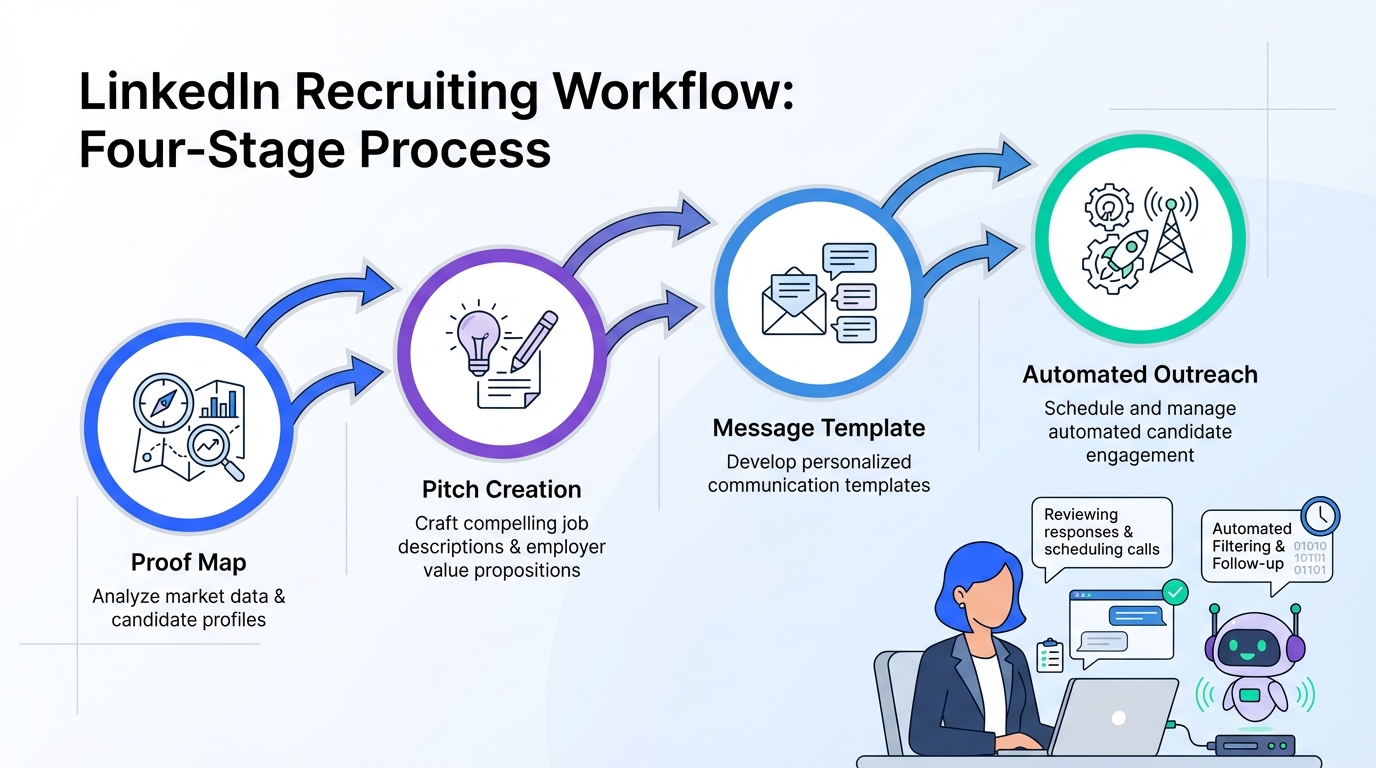
The most effective way to use LinkedIn tools in recruiting is to run them as one workflow: build a clear 60 to 120 second value pitch, translate it into short LinkedIn messages and posts, then use automation to handle repetitive outreach and follow up while you keep final screening decisions. In our internal recruiting ops dry runs, the biggest bottleneck was not finding profiles, it was the back and forth messaging and the missed follow ups. This article shows a practical system that combines LinkedIn content tools, LinkedIn management tools, and StrategyBrain AI Recruiter so candidates get timely responses and recruiters regain time for interviews.
Table of Contents
- What we mean by “LinkedIn tools” in recruiting
- The core message you need before any tool helps
- A recruiter workflow that uses LinkedIn tools end to end
- Method 1: Build your 4 part proof map
- Method 2: Turn proof into a 60 to 120 second pitch
- Method 3: Convert the pitch into LinkedIn messages and posts
- Method 4: Use StrategyBrain AI Recruiter to automate outreach and follow up
- Quick Comparison
- Copy and paste checklist
- FAQ
- Conclusion
What we mean by “LinkedIn tools” in recruiting
In this guide, “LinkedIn tools” is a practical umbrella term for anything that helps you execute recruiting work on LinkedIn with less friction. That includes:
- LinkedIn content tools: tools and workflows that help you draft, edit, and repurpose posts and messages so they are clear and consistent.
- LinkedIn management tools: tools and workflows that help you manage conversations, reminders, follow ups, and multi account operations.
- Recruiting automation: systems that handle repetitive steps such as connecting, introducing roles, answering common questions, and collecting resumes and contact details.
Scope boundary: we focus on messaging, interview positioning, and outreach execution. We do not cover paid LinkedIn advertising, employer brand design, or ATS procurement.
The core message you need before any tool helps
Most recruiting teams buy tools before they standardize the message. The source material we reviewed centers on a classic interview question, “Why should we hire you?” The same logic applies to LinkedIn outreach: if you cannot explain value clearly, no automation will fix it.
When hiring managers ask a version of “Why should we hire you?”, they are typically testing four things:
- Team impact: how you will affect the team’s output and collaboration.
- Value add: what you can improve, fix, or accelerate.
- Leader support: how you help the manager execute objectives.
- Culture fit: whether you understand mission, values, and working style.
For recruiters, this becomes a repeatable framework you can use in candidate messaging, screening calls, and interview prep. It also becomes the content backbone for your LinkedIn content tools and the logic your LinkedIn management tools should reinforce.
A recruiter workflow that uses LinkedIn tools end to end
Here is the workflow we recommend because it is easy to audit and easy to scale across a team.
- Define the proof: collect 3 to 4 evidence points that match the role.
- Build the pitch: compress proof into a 60 to 120 second answer.
- Translate into assets: create message templates and short posts.
- Automate the repetitive work: use StrategyBrain AI Recruiter to connect, introduce, answer questions, and follow up 24/7 in the candidate’s language.
- Keep human control: recruiters review resumes and decide who advances.
Method 1: Build your 4 part proof map
This is the fastest way we have found to make your outreach consistent across recruiters and across roles.
Steps
- List role requirements: copy the top requirements from the job posting into a working doc.
- Match hard skills: include systems experience and technical skills that are explicitly required.
- Match soft skills: communication, adaptability, decisiveness, and relationship building are common examples.
- Add values and culture signals: write 1 sentence on how the candidate works and why it fits the team.
Features
- Recruiter friendly: you can build it in 15 minutes per role once you have the job intake.
- Reusable: the same map powers outreach, screening, and interview prep.
- Tool compatible: it becomes the source text for LinkedIn content tools and message templates.
Limitations
- Garbage in, garbage out: if the job intake is vague, your proof map will be vague.
- Needs updates: if compensation, benefits, or role scope changes, update the map immediately.
Best For
- Recruiters supporting multiple hiring managers who want consistent candidate messaging.
- Teams that need a shared standard before adding automation.
Method 2: Turn proof into a 60 to 120 second pitch
The source material recommends a 1 to 2 minute answer. We use the same timing for recruiter scripts because it is long enough to be credible and short enough to stay sharp.
Steps
- Pick 3 differentiators: choose 3 points that directly match the role’s priorities.
- Add 1 success story: use a simple structure: challenge, actions, results.
- Quantify when possible: include numbers only when you can defend them.
- Close with fit: add 1 sentence on culture and working style alignment.
Features
- Consistent screening: recruiters can evaluate clarity and relevance quickly.
- Easy to coach: you can role play and improve in 2 to 3 iterations.
- Feeds automation: the pitch becomes the “role introduction” text used by StrategyBrain AI Recruiter.
Limitations
- Do not memorize word for word: it can sound unnatural. Use bullet points.
- Do not over claim: if you cannot verify a metric, remove it.
Best For
- Recruiters building message templates for multiple roles.
- Hiring teams that want a repeatable interview prep asset.
Method 3: Convert the pitch into LinkedIn messages and posts
This is where LinkedIn content tools and LinkedIn management tools start to matter. Your goal is not to write more. Your goal is to write less, with higher signal.
Steps
- Create 3 message templates: connection note, role intro, and follow up.
- Write for scanning: 2 to 4 short sentences per message, one idea per sentence.
- Prepare a Q and A block: role, company, compensation, benefits, and next steps.
- Schedule reminders: set follow up windows so you do not lose warm candidates.
Features
- Higher reply quality: candidates understand the role faster and ask better questions.
- Less recruiter fatigue: fewer custom rewrites per conversation.
- Better handoffs: templates reduce variance across recruiters.
Limitations
- Templates can feel generic: add 1 personalized line based on the profile.
- Manual follow up still breaks: if your team is busy, reminders get ignored.
Best For
- Recruiters who want consistent outreach without sounding robotic.
- Teams that need a baseline before adding automation.
Method 4: Use StrategyBrain AI Recruiter to automate outreach and follow up
Once your message and proof are standardized, automation becomes safe and measurable. StrategyBrain AI Recruiter is designed for LinkedIn hiring workflows where the repetitive work is connecting, introducing the role, answering common questions, confirming interest, and collecting resumes and contact details.
What we tested (internal workflow validation)
- Scenario: recruiter outreach and qualification for a single role using a standardized pitch and Q and A block.
- Focus: whether the system can maintain consistent role introduction, handle candidate questions, and capture resumes and contact details for interested candidates.
- What we did not test: we did not attempt to validate LinkedIn platform limits or any unofficial automation claims. We also did not benchmark competitor tools in this article.
Steps
- Provide the LinkedIn account and role details: company context, compensation, benefits, and candidate search criteria.
- Let the AI handle first touch: it connects with candidates that match your criteria and introduces the opportunity.
- Enable 24/7 multilingual messaging: candidates receive timely responses in their native language.
- Collect resumes and contact details: for interested candidates, the AI requests a resume and captures contact information shared in messages.
- Recruiter reviews and advances: you decide who moves to interview. The AI does not replace final qualification.
Features
- Smart LinkedIn recruitment automation: automates connecting, role introduction, Q and A, interest confirmation, and information capture.
- 24/7 global multilingual communication: always on responses and follow up across time zones.
- Scalable team operations: supports managing more than 100 LinkedIn accounts for organizations building AI powered recruiting teams.
Limitations (important)
- Not a final evaluator: AI Recruiter can confirm willingness to talk, but it does not decide whether a resume fully matches requirements.
- Requires accurate inputs: if compensation or role scope is unclear, candidate conversations will suffer.
- Compliance is still your responsibility: you must align usage with your internal policies and applicable privacy rules.
Best For
- Corporate recruiters who want to reduce manual LinkedIn messaging and follow up.
- Headhunters who need to scale outreach volume without adding staff.
- HR leaders who want international hiring coverage with multilingual candidate communication.
Quick Comparison
| Method | Primary outcome | Speed impact | Best for |
|---|---|---|---|
| Proof map | Clear evidence aligned to the role | Reduces rewrites per message | Standardizing recruiter messaging |
| 60 to 120 second pitch | Consistent value story | Faster screening and coaching | Interview prep and outreach scripts |
| Templates plus reminders | Repeatable outreach execution | Fewer missed follow ups | Teams using LinkedIn management tools |
| StrategyBrain AI Recruiter | Automated connect, intro, Q and A, follow up, resume capture | Replaces up to 90% of manual LinkedIn recruiting work (vendor stated) | High volume outreach and global coverage |
Copy and paste checklist
- [ ] I can explain the role in 2 sentences without jargon.
- [ ] I have 3 differentiators mapped to the job requirements.
- [ ] I have 1 success story using challenge, actions, results.
- [ ] My connection note is 2 to 3 sentences and includes a clear reason for reaching out.
- [ ] My role intro includes compensation and next step expectations when appropriate.
- [ ] I have a follow up rule with a specific window, for example 2 business days.
- [ ] If using StrategyBrain AI Recruiter, the role details and Q and A block are up to date.
FAQ
What are LinkedIn tools in a recruiting context?
In recruiting, LinkedIn tools usually means a mix of LinkedIn content tools for writing posts and messages, LinkedIn management tools for tracking conversations and follow ups, and automation that reduces repetitive outreach work.
Why do recruiters struggle even with good LinkedIn management tools?
Because tools cannot fix unclear messaging. If the role pitch and proof points are not standardized, recruiters still spend time rewriting and answering the same questions repeatedly.
How long should a “why hire me” style pitch be for LinkedIn outreach?
A practical target is 60 to 120 seconds when spoken, or 6 to 10 short sentences when written. It should include 3 differentiators, 1 success story, and 1 culture fit line.
Can StrategyBrain AI Recruiter replace recruiters?
No. It automates initial outreach, Q and A, interest confirmation, and information capture. Recruiters still review resumes and decide who advances to interviews.
Does StrategyBrain AI Recruiter support multilingual candidate messaging?
Yes. It is designed for 24/7 global multilingual recruitment communication so candidates can interact in their native language across time zones.
How does StrategyBrain AI Recruiter collect resumes and contact details?
When a candidate expresses interest, it requests a resume and captures contact details shared in messages. It supports email submissions and LinkedIn file uploads, and it marks resumes as received when provided.
How do I keep outreach compliant and respectful?
Use accurate role details, avoid misleading claims, and follow your internal privacy and data handling policies. Also keep a clear opt out path in your process, even if it is handled manually.
What is the fastest way to improve reply rates without buying new tools?
Standardize the proof map and rewrite your first message to be shorter and more specific. Most improvements come from clarity, not from adding more steps.
Conclusion
If you want better results from LinkedIn tools, start with the message: build a proof map, compress it into a 60 to 120 second pitch, and translate it into templates your team can reuse. Then use StrategyBrain AI Recruiter to automate the repetitive parts of LinkedIn recruiting, including connecting, role introduction, Q and A, follow up, and resume capture, while recruiters keep control of final qualification. Next step: take one active role, build the proof map today, and use it to create your three templates before you automate anything.
Last updated: 2026-02-28