


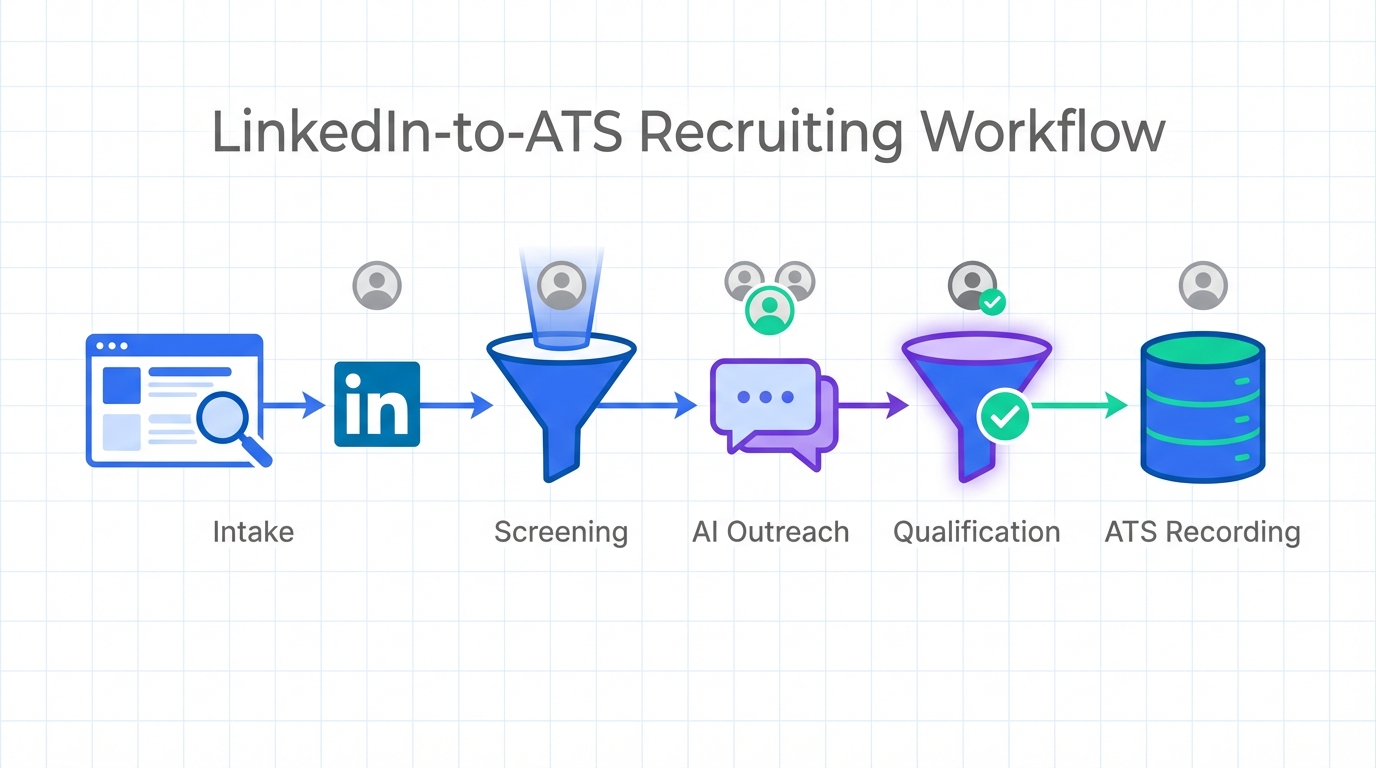
Recruiting and applicant tracking software helps hiring teams handle growth by centralizing job intake, candidate pipelines, and compliance records, while automation reduces manual follow up. In practice, the workflow is simple: capture applicants from multiple sources, screen and route them, then track interviews and offers in one system. If you also recruit on LinkedIn, StrategyBrain AI Recruiter can automate first touch outreach, answer candidate questions, and collect resumes and contact details, so your ATS stays clean and your recruiters focus on final qualification. This guide explains how ATS works, what the May employment growth snapshot implies for hiring capacity, and a practical setup you can implement in under 1 week.
Key Takeaways
- Employment growth creates pipeline pressure: Canada added 22,000 manufacturing jobs and 21,000 health care jobs in May, while the unemployment rate stayed at 6.8%, meaning more candidates are active without reducing competition for top talent.
- U.S. momentum can raise competition: The U.S. added 280,000 jobs in May and average wages rose 2.3%, which can pull candidates across borders and increase offer pressure.
- How ATS works in one sentence: An ATS is a system that captures applicants, routes them through stages, and records decisions for speed and compliance.
- Fastest operational win: Standardize stages and required fields so every candidate record is decision ready before interviews start.
- LinkedIn throughput boost: StrategyBrain AI Recruiter can run first touch and follow up conversations 24/7 in the candidate’s native language, then pass interested candidates into your ATS with resumes and contact details captured.
- Scope boundary: This article covers workflow, governance, and automation patterns; it does not provide legal advice or claim that any tool guarantees hiring outcomes.
Employment growth snapshot and why it matters for hiring ops
When hiring demand rises, the first thing that breaks is not sourcing. It is process capacity. More openings and more inbound interest create more messages, more scheduling, and more status updates. That is exactly where recruiting and applicant tracking software earns its keep.
In the May snapshot referenced in the source material, Canada’s employment growth was led by manufacturing and health care, adding 22,000 and 21,000 jobs respectively. Even with those gains, the national unemployment rate stayed at 6.8% because more people entered the job search. Employment was up 192,000 compared to May 2014. The practical takeaway is that candidate volume can rise without making hiring easier.
Regionally, Ontario added 43,900 jobs and British Columbia added 30,600. Alberta shed 6,400 jobs and its unemployment rate increased by 0.3 percentage points to 5.8%. These differences matter because they change where candidates are, how quickly they respond, and how competitive offers become.
In the U.S., the same snapshot shows 280,000 jobs added in May, unemployment at 5.5% (up from 5.4%), and average wages up 2.3%. If you hire in North America, wage movement and cross border opportunity can increase competition for Canadian employers. That is why your ATS workflow and your outreach automation need to be designed for speed and consistency.
How ATS works in real hiring teams
An ATS, short for Applicant Tracking System, is the system of record for recruiting. It stores candidate profiles, resumes, interview notes, and decisions. It also enforces workflow so every applicant moves through the same stages.
If you have ever asked “how does ATS work” in practice, here is the operational view. An ATS typically does five jobs: intake, capture, screening, coordination, and reporting. The value is not only speed. It is also traceability, because every decision can be tied to a stage, a reviewer, and a timestamp.
Typical ATS stages
- New applicant: profile created from a job board, referral, email import, or manual entry.
- Screening: knockout questions, resume review, and initial qualification.
- Interview: scheduling, scorecards, and feedback collection.
- Offer: compensation, approvals, and offer letter tracking.
- Hired or rejected: final disposition and compliance record.
Where ATS workflows commonly fail during growth
- Unstructured data: missing location, work authorization, or compensation expectations forces repeated follow up.
- Slow response time: candidates disengage when first contact takes days instead of hours.
- Stage drift: recruiters use different meanings for the same stage, breaking reporting and handoffs.
- Manual messaging overload: LinkedIn and email follow ups consume time that should go to final qualification.
Method 1: Build a clean ATS workflow that scales
The fastest way to make recruiting and applicant tracking software work for you is to standardize the workflow before you add more tools. I have seen teams buy automation and still struggle because the underlying stages and required fields were inconsistent.
Steps
- Define 6 to 8 stages that match your real decisions, not your org chart.
- Set required fields for each stage, such as location, notice period, and compensation range.
- Create a disposition rule so every rejection has a reason code.
- Lock stage ownership so handoffs are explicit, for example recruiter owns screening, hiring manager owns interview feedback.
Features to configure
- Knockout questions: simple yes or no questions that prevent unqualified applicants from entering interview stages.
- Scorecards: consistent evaluation criteria across interviewers.
- Templates: standardized outreach and rejection messaging to reduce time and risk.
Limitations
- Standardization takes alignment: you need agreement across recruiters and hiring managers, which can take multiple meetings.
- Overly strict stages can slow hiring: if you require too many fields too early, recruiters will create workarounds.
Best For
- Teams hiring across multiple regions such as Ontario and British Columbia where candidate pools behave differently.
- Organizations that need consistent reporting during periods of employment growth.
Method 2: Add LinkedIn automation with StrategyBrain AI Recruiter
Once your ATS stages are stable, the next bottleneck is usually outbound messaging and follow up. This is where StrategyBrain AI Recruiter fits naturally into recruiting and applicant tracking software workflows. It does not replace your ATS. It feeds it with cleaner, more complete candidate records.
What StrategyBrain AI Recruiter does in the workflow
- Automates first touch: connects with candidates that match your search criteria and introduces the role.
- Handles Q and A: answers questions about the role, company, compensation, and benefits based on the information you provide.
- Confirms interview interest: identifies candidates willing to proceed.
- Collects resumes and contact details: captures what recruiters need for final qualification and scheduling.
- Runs 24/7 multilingual conversations: communicates in the candidate’s native language to reduce misunderstandings and delays.
Steps
- Prepare a job brief with company details, compensation, benefits, and candidate criteria.
- Connect your LinkedIn account to StrategyBrain AI Recruiter with explicit authorization.
- Define the handoff point such as “interested and resume received” as the trigger to create or update the ATS record.
- Review the shortlist and complete final qualification in your ATS, because StrategyBrain AI Recruiter is designed to automate outreach and interest confirmation, not final fit assessment.
Limitations
- Not a final evaluator: it identifies willingness to proceed, but recruiters still decide whether the resume matches requirements.
- Requires clear inputs: if compensation and role details are vague, candidate conversations will be less effective.
Best For
- Recruiters who spend hours per day on LinkedIn outreach and follow up.
- Teams hiring across time zones who need responses outside local business hours.
- Organizations scaling outreach across many LinkedIn accounts, including teams managing more than 100 accounts.
Method 3: Use structured screening to reduce rework
During growth, screening quality often drops because recruiters are trying to move faster. The fix is not more meetings. It is structured screening that produces decision ready records inside your ATS.
Steps
- Define 5 screening questions that map to job requirements, such as certifications, shift availability, and travel.
- Require a compensation expectation before scheduling interviews to reduce late stage drop off.
- Use a single summary format for recruiter notes, such as “role fit, motivation, constraints, next step.”
Features
- Screening forms: consistent data capture across recruiters.
- Auto tagging: labels for region, trade, seniority, and availability.
- Routing rules: send candidates to the right hiring manager based on location or specialization.
Limitations
- Too many questions reduce completion: keep it to what you will actually use to decide.
Best For
- High volume roles in manufacturing, health care, hospitality, and construction where speed matters.
Method 4: Improve recruiter response time with service levels
Candidate experience is often a response time problem. When unemployment is stable but participation rises, candidates have options. A simple service level agreement inside your recruiting and applicant tracking software can prevent silent pipeline decay.
Steps
- Set a first response target for inbound applicants, such as same business day.
- Set a follow up cadence for outbound prospects, such as a second message within 48 hours if there is no reply.
- Use automation where it is safe, such as status updates and scheduling prompts.
Where StrategyBrain AI Recruiter helps
If your bottleneck is LinkedIn messaging, StrategyBrain AI Recruiter can maintain consistent follow up and answer candidate questions in real time, including outside business hours. That keeps your ATS pipeline moving without forcing recruiters to be online 24/7.
Limitations
- Service levels require monitoring: if you do not measure them weekly, they become aspirational instead of operational.
Best For
- Teams competing with U.S. wage momentum where delays can cost candidates.
Method 5: Keep compliance and reporting audit ready
One reason leaders invest in recruiting and applicant tracking software is defensibility. When hiring accelerates, documentation tends to get messy. A clean ATS record protects the business and improves forecasting.
Steps
- Standardize rejection reasons and require them at disposition.
- Use interview scorecards so feedback is comparable across interviewers.
- Store offer approvals and compensation notes in the ATS record, not in private inboxes.
- Review data retention and privacy settings with your legal or compliance team.
Security and privacy notes for automation
When you add automation, privacy expectations rise. StrategyBrain AI Recruiter states that customer provided data is not used to train AI models, and that candidate information is encrypted and isolated with customer specific keys. Treat these as requirements to verify during procurement, alongside your own internal security review.
Limitations
- This is not legal advice: compliance requirements vary by jurisdiction and policy.
Best For
- Organizations hiring across Canada, the United States, and the European Union where privacy expectations differ.
Quick Comparison
| Method | Speed Impact | Cost Impact | Best For |
|---|---|---|---|
| Clean ATS workflow | High | Low | Reducing stage drift and reporting errors |
| StrategyBrain AI Recruiter for LinkedIn | High | Medium | Automating outreach, Q and A, follow up, and resume collection |
| Structured screening | Medium | Low | Improving decision quality under high volume |
| Response time service levels | Medium | Low | Preventing candidate drop off |
| Compliance and audit readiness | Medium | Low | Reducing risk and improving forecasting |
FAQ
How does ATS work from application to hire?
An ATS captures an application, places the candidate into a pipeline stage, and records screening, interview feedback, and offer decisions. The system then stores the final disposition so reporting and compliance are consistent.
What is the difference between recruiting software and an ATS?
An ATS is the system of record for applicants and hiring stages. Recruiting software is broader and can include sourcing, messaging, scheduling, assessments, and analytics that may integrate with the ATS.
Why does employment growth make ATS setup more important?
Growth increases message volume, scheduling load, and the number of stakeholders involved in decisions. Without standardized stages and required fields, teams spend time fixing records instead of hiring.
Can StrategyBrain AI Recruiter replace an ATS?
No. StrategyBrain AI Recruiter is designed to automate LinkedIn outreach, candidate conversations, and resume and contact capture. Your ATS remains the place where you manage stages, interviews, offers, and final decisions.
Does StrategyBrain AI Recruiter decide if a candidate is qualified?
It confirms willingness to proceed and collects information, but it does not determine final fit against job requirements. Recruiters complete final qualification after reviewing the resume and details captured.
How does StrategyBrain AI Recruiter handle multilingual candidates?
It can communicate in the candidate’s native language and respond 24/7, which helps reduce delays and misunderstandings across time zones. Recruiters then review the captured information in their normal workflow.
What data should be required in the ATS before scheduling interviews?
At minimum, capture location, work authorization status if applicable, availability, compensation expectations, and a short recruiter summary. Requiring these fields early reduces late stage surprises.
What is a practical first step if our ATS reports are unreliable?
Audit stage definitions and disposition reasons, then enforce required fields at each stage. Once the workflow is consistent, reporting accuracy improves because the data is comparable.
Is this article legal advice about hiring compliance?
No. It is operational guidance on how recruiting and applicant tracking software can support documentation and process consistency. For legal requirements, consult qualified counsel in your jurisdiction.
Conclusion
Recruiting and applicant tracking software is most valuable when hiring demand rises, because it turns growth into a manageable workflow instead of a flood of messages and spreadsheets. Start by standardizing how ATS works in your team with clear stages and required fields. Then, if LinkedIn outreach is your bottleneck, integrate StrategyBrain AI Recruiter into the front of the funnel so candidate conversations, follow up, and resume collection happen consistently while your ATS stays accurate.
Next step: pick one open role, implement the clean stage model, and define a single handoff point from LinkedIn outreach into the ATS. After 7 days, review response time, stage aging, and how many candidates reached interview ready status.














