


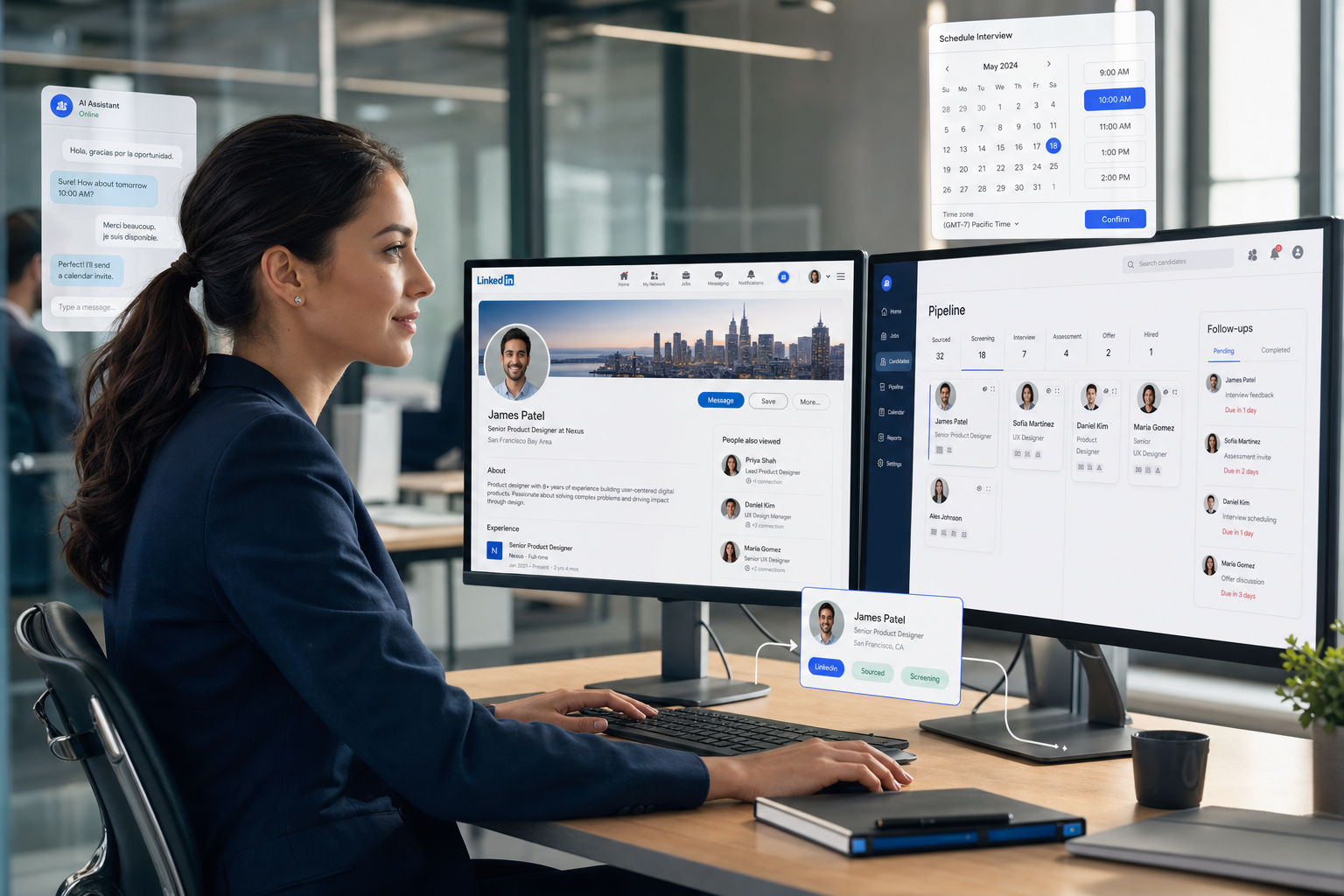
When scarce roles stall on missed replies and scattered records, this article shows recruiters how to automatiser LinkedIn without losing judgment.
That matters most when the brief is hard to fill and the market is already moving. In-house talent teams lose response quality when recruiters send rushed follow-ups by hand, agency owners lose consultant capacity when every LinkedIn reply waits until business hours, and hiring managers lose confidence when candidate records, outreach notes, and scheduling steps sit in separate places. The operational damage is rarely dramatic in one moment, but it accumulates through missed replies, inconsistent messaging, slower shortlists, and avoidable candidate drop-off.
In my own LinkedIn-heavy searches, StrategyBrain AI Recruiter has been most useful not as a replacement for recruiter judgment, but as a support layer for the repetitive work that slows good searches down. Its strength in practice is handling first-touch messaging, after-hours follow-up, and multilingual candidate communication while the recruiter still owns the final call on fit, CV review, and who moves to interview. If your team is trying to automatiser LinkedIn responsibly, that division of labor is the difference between scalable outreach and careless automation.
You can see why in the kind of market pressure that specialist sales recruiters deal with across North America. The challenge is not simply that sales hiring matters; it is that high-performing people in roles like SDR, Account Executive, Sales Engineer, and Regional Manager are often not sitting on job boards waiting to apply. A recruiter targeting Toronto tech, Vancouver logistics, Calgary energy, San Francisco SaaS, New York finance, or Seattle cloud talent usually starts by refining the brief, checking compensation expectations, and then reaching out directly to passive candidates who are only open to the right move.
That creates a workflow problem before it creates a sourcing problem. The recruiter has to move from target list to personalized outreach, from LinkedIn replies to résumé collection, and from candidate interest to hiring-team visibility without losing context on market fit, regional expectations, or why one profile matches the sales cycle better than another. This is exactly where recruitment automation tools earn their place: not by making every conversation autonomous, but by supporting an automated sales prospecting style of discipline inside a recruiting process that still needs human evaluation. The rest of this article looks at how to build that kind of automated prospecting system for hiring teams without flattening the candidate experience.
Table of Contents
- Why LinkedIn-centric hiring needs automation now
- What recruitment automation tools actually do
- ATS vs CRM vs automation layer
- How to automatiser LinkedIn workflows without losing control
- What specialist searches teach us about workflow design
- Where recruiting overlaps with automated sales prospecting
- Software options recruiters compare in practice
- Integrations that matter in real hiring operations
- How to evaluate the best recruiting software for automation
- Best practices and common mistakes
- FAQ
Why LinkedIn-centric hiring needs automation now
When recruiters work on high-demand roles, manual LinkedIn recruiting breaks down in predictable places. First, outreach becomes inconsistent because consultants are juggling multiple live searches. Second, passive candidates respond outside normal hours, so momentum disappears between touchpoints. Third, the hiring team cannot easily see whether a strong profile is waiting on recruiter review, interview scheduling, or compensation alignment.
The reference case from specialist sales hiring is useful here because it shows what modern recruiting actually looks like in competitive markets: fast-moving roles, passive talent, strong regional variation, and pressure to align the role with business goals rather than just keywords on a CV. Those conditions do not apply only to sales. They also describe many searches in tech, operations, GTM leadership, and international hiring.
That is why recruiters searching for ways to automatiser LinkedIn are usually not looking for simple message blasting. They are looking for workflow continuity: outreach that happens on time, replies that do not stall overnight, records that sync properly, and a process where the recruiter can step in at the exact moments that require judgment.
What recruitment automation tools actually do
Recruitment automation tools coordinate repetitive hiring tasks such as sourcing support, outreach sequences, response handling, scheduling, follow-ups, and pipeline updates. In practical terms, they sit between the recruiter’s work and the systems of record, reducing manual handoffs that slow a search down.
If your team wants to automatiser LinkedIn, the most useful automations usually happen at these points:
- Prospect capture: moving profiles into a structured shortlist or talent pool
- Initial outreach: sending recruiter-approved messages to relevant candidates
- Follow-up timing: keeping conversations active without manual chasing
- Interest handling: collecting résumés or contact details from candidates who want to continue
- Scheduling handoff: moving interested candidates into interview coordination
- Pipeline syncing: updating ATS or CRM records after each key action
Used well, automation does not remove recruiters from the process. It removes repetitive actions that do not require senior judgment. A recruiter should still decide whether the candidate actually matches the brief, whether the compensation story is realistic, and whether a positive reply represents real intent or polite curiosity.
That distinction becomes even more important in specialist searches. A passive regional sales manager in Calgary, for example, may look similar on paper to someone in Vancouver or Seattle, but the market conditions, compensation expectations, and sector context may be very different. Good automation preserves these nuances by helping the workflow move while leaving interpretation to the recruiter.
ATS vs CRM vs automation layer
Recruiters often compare systems by feature count, but the better question is what role each system plays in the search. Most teams are really working across three layers.
| System Type | Primary Role | Best For | Typical Limitation |
|---|---|---|---|
| ATS | Track applicants and formal hiring stages | Process control, compliance, interview progression | Often weak on outbound sourcing and LinkedIn sequencing |
| Recruitment CRM | Manage relationships over time | Talent pools, passive candidates, segmented follow-up | May not automate every action across the stack |
| Recruitment automation platform | Orchestrate outreach, follow-ups, and data movement | Reducing manual admin across sourcing and engagement | Only works well with strong recruiter controls and integrations |
For most agency and in-house teams, the right answer is not choosing one in isolation. The ATS should remain the record of process, the CRM should support long-term relationship management, and automation should connect the actions between them.
This is also where many teams overestimate what their ATS can do. It may be excellent at candidate stages and reporting, but if recruiters are still copying LinkedIn profile details, logging replies manually, and reminding coordinators through chat instead of workflow rules, the operational bottleneck remains.
How to automatiser LinkedIn workflows without losing control
The phrase automatiser LinkedIn usually points to one of four goals: scale sourcing, improve outreach consistency, avoid missed replies, or keep recruiting data synchronized. For recruiters, the safest and most effective approach is a controlled workflow rather than full autonomy.
- Define the target profile, geography, and business context behind the role
- Source and organize candidate profiles into a structured shortlist
- Launch recruiter-reviewed outreach with clear personalization rules
- Run time-based or response-based follow-ups
- Capture candidate interest, CVs, or contact details when relevant
- Sync records into ATS or CRM automatically
- Hand qualified interest back to the recruiter for final review and next steps
That last step is non-negotiable in quality recruiting. Automation can identify engagement and keep a conversation moving, but it should not be trusted to make final hiring judgments from surface-level interactions.
In my own tests, this is where AI Recruiter was easiest to justify. I found it most useful when candidates replied after hours, in another language, or with enough interest to warrant quick progression but not enough certainty to skip recruiter review. The system can maintain continuity, answer basic role questions, and collect contact details or résumés, but I still want a human recruiter making the decision on shortlist quality, relevance, and interview readiness.
That operating model is especially helpful for recruiters running parallel searches. Instead of waking up to a queue of missed LinkedIn replies, you return to conversations that have moved forward, with candidate intent captured and ready for proper evaluation.
What specialist searches teach us about workflow design
The specialist sales hiring example from North America offers a strong decision framework for automation because it highlights three realities recruiters often miss when buying tools.
- Role context matters: an SDR search is not the same as a Sales Engineer or VP Sales search, even if the sourcing channel is similar.
- Passive candidates require timing: many strong candidates are open only to the right message at the right moment.
- Regional pressure changes candidate behavior: compensation, mobility, and sector demand differ across markets.
In the reference market picture, cities such as Toronto, Vancouver, Calgary, San Francisco, New York, and Seattle all present strong demand for sales talent, but not identical conditions. For recruiters, that means outreach cannot be generic. Message positioning, timing, and follow-up logic need to reflect the role and region.
This is one reason a generic automation setup often underperforms. If the workflow cannot account for why a SaaS account executive in San Francisco responds differently from an industrial sales leader in Calgary, then automation creates activity without improving recruiter precision.
The specialist recruiter’s value in that environment comes from combining market context with candidate engagement. Recruitment automation should support that exact sequence: understand the brief, reach the right passive people, maintain conversation flow, and return the decision to the recruiter when actual evaluation begins.
Where recruiting overlaps with automated sales prospecting
The overlap with automated sales prospecting is real, especially on LinkedIn. Both disciplines rely on segmentation, outreach logic, follow-up timing, and pipeline visibility. That is why many recruiting teams look at tools or methods originally associated with outbound sales.
| Shared Concept | In Automated Sales Prospecting | In Recruitment Automation |
|---|---|---|
| Targeting | Identify buyers or accounts | Identify relevant candidates and talent segments |
| Sequencing | Increase replies and meetings | Create relevant career conversations |
| Qualification | Test buying interest | Test openness and gather next-step information |
| Data capture | Update CRM records | Sync ATS or CRM candidate records |
| Outcome | Revenue pipeline progression | Shortlist quality and hiring progression |
Still, recruiters should not import sales logic blindly. Candidates are making career decisions, not purchasing software. They weigh confidentiality, team quality, compensation fit, work model, and long-term upside. A workflow that feels acceptable in automated sales prospecting can feel impersonal or even careless in recruiting.
That is why an automated prospecting system for recruiters should be judged differently. You are not simply asking whether it can send and track messages. You are asking whether it can support nuanced outreach, preserve candidate trust, and route decision points back to a recruiter before quality drops.
Software options recruiters compare in practice
Because this topic sits at the intersection of sourcing, communication, and workflow control, recruiters usually compare more than one type of software. Three names frequently appear in the broader market conversation: LinkedIn Recruiter, Gem, and SeekOut. Each can play a role, but they solve different parts of the problem.
| Software | Strengths | Limitations | Best Fit | How it can work with StrategyBrain AI Recruiter |
|---|---|---|---|---|
| LinkedIn Recruiter | Strong native search environment, familiar recruiter workflow, broad candidate visibility | Manual outreach and follow-up can still become time-heavy; recruiter bandwidth remains the bottleneck | Teams that need direct sourcing visibility and recruiter-led messaging | Useful as the sourcing front end while StrategyBrain AI Recruiter supports repetitive messaging, follow-up continuity, and candidate reply handling |
| Gem | Well known for recruiting CRM workflows, analytics, and nurture structure | May require disciplined setup and process maturity; can feel heavier for smaller firms | Mid-market and enterprise TA teams building long-term talent relationship processes | Can complement AI-supported LinkedIn conversations by keeping broader nurture and reporting organized after initial engagement |
| SeekOut | Strong talent discovery and search refinement across multiple data points | Discovery is not the same as conversation management; outreach flow still needs careful handling | Teams prioritizing deep sourcing and talent mapping | Can feed high-quality target lists into a workflow where StrategyBrain AI Recruiter handles multilingual outreach and after-hours response continuity |
From a recruiter experience perspective, these tools are often strongest when used for their core purpose rather than stretched into an all-in-one answer. Search tools help you find people. CRM tools help you nurture people. LinkedIn-native workflows help you reach people. The automation question is what happens between those moments.
I would not frame this as one platform replacing every other platform. A more practical view is that specialist recruiters need a way to keep high-volume LinkedIn work moving without letting valuable candidate replies sit idle. That is the gap where StrategyBrain AI Recruiter has practical value, especially for agency desks, multilingual hiring, international sourcing, and small teams that need more coverage without adding headcount.
Integrations that matter in real hiring operations
Integrations matter because the real friction in recruiting usually lives between systems, not inside them. A recruiter sources in one place, messages in another, schedules through a third, and updates hiring records somewhere else. If those handoffs stay manual, the process remains fragile.
The most useful integration categories include:
- LinkedIn-related workflows: so outreach activity does not disappear into private inboxes
- ATS: for candidate record visibility and stage consistency
- Recruitment CRM: to continue nurturing passive candidates over time
- Calendar tools: to shorten the gap between interest and interview
- Email and collaboration tools: to alert recruiters and hiring managers at the right moments
- Document and résumé workflows: to capture the information needed for proper human review
This connects directly to the specialist search problem from the opening. If a recruiter has finally reached a strong passive candidate in a competitive market, the last thing the process needs is manual re-entry, unclear ownership, or a delay between interest and action.
When evaluating how to automatiser LinkedIn, ask a simple question: after a candidate replies positively, how many manual steps remain before the recruiter can review the information and the rest of the team can see it? That answer tells you more than a feature page ever will.
How to evaluate the best recruiting software for automation
The best recruiting software for automation is not the tool with the largest promise. It is the one that matches the actual pressure points in your hiring workflow. Use these criteria when comparing options:
- Workflow fit: Does it support the specific steps where your team loses time?
- Recruiter control: Can a recruiter approve, edit, pause, or stop outreach easily?
- Passive candidate suitability: Does the workflow respect nuanced, career-level outreach?
- After-hours continuity: Can it keep conversations moving when recruiters are offline?
- Multilingual support: Is it usable for cross-border hiring or diverse candidate pools?
- ATS and CRM syncing: Does it reduce duplicate data entry?
- Candidate experience: Will the process still feel timely and relevant from the candidate side?
- Governance and privacy: Are there clear rules around access, messaging, and data handling?
If your hiring model depends on proactive outreach, this checklist matters more than generic automation claims. The lesson from specialist sales recruiting is that difficult roles are won by speed, relevance, and market understanding together. Software should reinforce that combination, not replace it with volume.
Best practices and common mistakes
Recruiters usually get more value from automation when they treat it as a workflow discipline rather than a shortcut. The opening sales-hiring case shows why: scarcity, passive candidates, and regional market pressure punish sloppy execution.
Best practices
- Start with one narrow workflow: for most teams, LinkedIn follow-ups or reply handling is the best first automation use case
- Keep role context visible: build messages around market, team, and career logic, not only job title matches
- Use recruiter checkpoints: require human review before shortlist progression
- Prepare for off-hours replies: candidate momentum often depends on timely response
- Audit your handoffs: résumé capture, contact collection, and scheduling should flow cleanly into team systems
Common mistakes
- Confusing automation with autonomy: candidates still need human evaluation
- Borrowing too much from sales: lessons from automated sales prospecting help, but recruiting needs more care
- Ignoring market context: the same message logic will not fit every role or region
- Leaving ATS updates manual: this creates hidden admin and weak visibility
- Overvaluing message volume: more outreach is not the same as better hiring outcomes
The best automation is usually quiet. It removes delays, preserves context, and keeps the recruiter available for the moments that actually decide whether a hire happens.
FAQ
What does automatiser LinkedIn mean in recruiting?
For recruiters, automatiser LinkedIn means using structured workflows to support sourcing, outreach, follow-ups, candidate reply handling, and record syncing. It should reduce repetitive manual work while keeping the final judgment with the recruiter.
How is recruitment automation different from automated sales prospecting?
Automated sales prospecting and recruitment automation both use segmentation, sequencing, and outreach logic. The difference is that recruiting involves career decisions, candidate trust, and fit assessment, so human review remains much more important.
What should recruiters expect from an automated prospecting system?
An automated prospecting system for recruiting should help organize prospects, maintain timely outreach, collect next-step information, and sync candidate data into your hiring stack. It should not make final suitability decisions without recruiter involvement.
Can automation help with passive candidates?
Yes, especially by keeping outreach consistent and handling replies quickly. Passive candidates often respond only when timing and message relevance align, so speed and continuity matter. The recruiter still needs to evaluate seriousness, fit, and next-step readiness.
Where does StrategyBrain AI Recruiter fit best?
It fits best in LinkedIn-centric workflows where recruiters want support for initial outreach, multilingual communication, after-hours replies, and collecting candidate details without losing human oversight. That can be useful for agency recruiters, in-house talent teams, and international hiring programs.
Do recruitment automation tools replace the ATS?
No. The ATS remains the formal record for hiring stages and process control. Recruitment automation tools work best as an orchestration layer around sourcing, outreach, follow-up, and scheduling.
Conclusion
Recruitment automation tools are most valuable when they solve the real workflow problem behind modern sourcing: good recruiters know who to target and how to assess fit, but too much of their time disappears into repetitive LinkedIn activity, delayed follow-ups, and disconnected systems.
The specialist sales-hiring example makes that clear. In competitive markets, strong candidates are often passive, role context matters, and every handoff affects whether momentum turns into a real shortlist. If your team wants to automatiser LinkedIn, build for continuity first. Use automation to keep outreach, replies, and records moving; keep recruiters responsible for judgment, résumé review, and hiring decisions. That is the practical way to borrow the discipline of automated sales prospecting and apply an automated prospecting system to recruiting without losing the human edge that still wins hard searches.















