


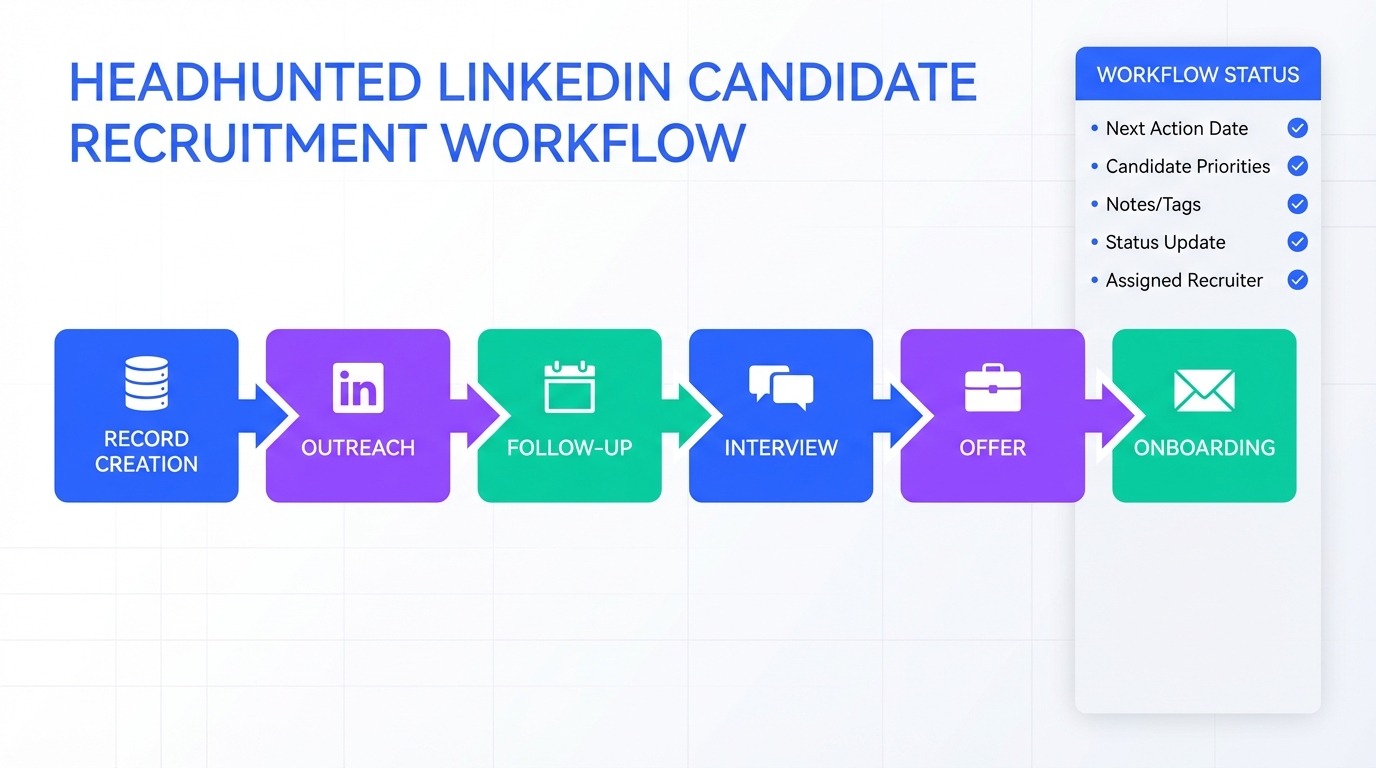
If you want your recruitment database to actually produce hires from headhunted candidates, the winning approach is simple: treat every record as a relationship in progress, not as an applicant in a queue. That means you track why you reached out, what the candidate cares about, what you promised to send, and exactly when you will follow up. In our day to day recruiting operations, we have found that a clean United States recruitment database paired with consistent outreach and fast response times prevents the two biggest failures with passive talent: slow scheduling and silent drop off. This article turns practical do’s and don’ts into a database workflow, and shows where StrategyBrain AI Recruiter can take over repetitive LinkedIn connecting, messaging, Q and A, and resume collection so recruiters can focus on interviews and closing.
Table of Contents
- What changes when the candidate is headhunted
- Set up your recruitment database for passive candidates
- Do’s and don’ts you can operationalize
- A practical outreach and interview workflow
- How StrategyBrain AI Recruiter fits into the workflow
- Quick comparison: manual vs AI assisted outreach
- FAQ
- Conclusion
What changes when the candidate is headhunted
When a candidate applies, they have already opted into your process. When you headhunt, you are the one interrupting their day. That single difference changes the tone, the pacing, and what your recruitment database needs to capture.
In the source article, the core reminder is that you reached out first, so your communication should reflect that. Practically, this means your notes and tags should focus on the candidate’s motivations and constraints, not just their resume keywords.
Definition: A recruitment database is a structured system of candidate records and interaction history used to source, engage, and progress talent through a hiring funnel. A US recruitment database or United States recruitment database is the same concept, scoped to candidates located in the United States or roles hiring in the US.
Set up your recruitment database for passive candidates
Before you change scripts or interview panels, fix the data model. Passive candidates move fast, and you cannot rely on memory or scattered inbox threads.
Minimum fields we recommend tracking
- Source and channel: LinkedIn outreach, referral, recruiter network, event list
- Role family and level: for example accounting and finance, operations, information technology, executive and senior management
- Location and work model: United States, Canada, remote, hybrid, on site
- Conversation stage: contacted, replied, interested, interview requested, offer, accepted, declined
- Candidate priorities: compensation, flexibility, growth, values alignment, work life balance
- Next action with date: the single most important field for preventing ghosting
Two tags that reduce confusion immediately
- Headhunted: you initiated contact
- Inbound: they applied or requested information
This separation matters because the do’s and don’ts are different. If you mix these populations, your team will default to applicant style messaging and lose passive candidates.
Do’s and don’ts you can operationalize
The original piece is a list of practical do’s and don’ts for hiring headhunted candidates. Below, we keep the same intent and guidance, but translate each point into something you can execute and measure inside a recruitment database.
1) Do not treat them like they applied
Don’t: Open with a screening tone that assumes they are trying to impress you.
Do: Acknowledge you reached out and explain why. In your recruitment database, store the specific reason you targeted them, such as domain experience, leadership scope, or niche tooling.
2) Do not run a one way interview
Don’t: Make the conversation only about the candidate proving fit.
Do: Prepare to sell the company and role. Add an “employer story” note template to each record so every interviewer can reinforce the same value proposition.
3) Do not leave everything to HR
Don’t: Keep the direct manager out of early conversations.
Do: Involve the hiring manager early. In the database, assign an owner for “role realism” questions so candidates get credible answers about day to day work.
4) Do not talk only about the job description
Don’t: Assume a title change or salary increase is enough.
Do: Discuss culture, flexibility, and work environment. Track which themes resonate per candidate so follow ups stay personal rather than generic.
5) Do not be rigid with scheduling
Don’t: Offer only standard business hours.
Do: Offer lunch hour or after hours options. In your United States recruitment database, store time zone and preferred windows so coordinators stop guessing.
6) Do not lowball the offer
Don’t: Start with a weak offer and hope negotiation fixes it.
Do: Come with your best offer and plan for counteroffers. Record the candidate’s stated must haves and likely counteroffer risk so leadership can approve quickly.
7) Do not rush or ghost
Don’t: Move too fast or disappear between steps.
Do: Keep momentum with clear next steps and consistent updates. The database should enforce a next action date for every active headhunted candidate.
8) Do not focus only on salary
Don’t: Treat compensation as base pay only.
Do: Present the full package, including bonuses, equity, benefits, retirement plans, vacation, and flexibility. Add a structured “total rewards” field so your team can compare offers consistently.
9) Do not stop after acceptance
Don’t: Assume the hire is safe once they say yes.
Do: Maintain excitement through onboarding. Track pre start touchpoints in the recruitment database, such as welcome email sent, team intro scheduled, and first day plan confirmed.
Additional guidance when working with a recruiter
- Don’t bypass the recruiter and present an offer directly without alignment.
- Do respect the recruiter’s relationship and let them manage the offer stage or at least review it.
- Don’t backburner recruiter messages when resumes or interviews are waiting.
- Do respond quickly because headhunted candidates can be hired elsewhere if you delay.
A practical outreach and interview workflow
Here is a reproducible workflow you can implement in a recruitment database without changing your entire tech stack. The goal is to reduce drop off and keep the process candidate friendly.
Step by step
- Create the record before outreach
Add role family, location, and the reason you are targeting them. This prevents vague outreach and improves handoffs. - Send an outreach message that sells and qualifies
Include why them, what the role is, and a simple question about interest. Log the exact message version in the record. - Run a two way discovery call
Prepare answers on culture, flexibility, and growth. Capture objections and priorities as structured fields. - Schedule with flexibility
Offer at least 2 time windows that respect their current job. Store time zone and preferred hours. - Move fast on feedback
Set an internal service level target for feedback turnaround and record the timestamp of each stage change. - Present a complete offer package
Document base, variable, benefits, and flexibility. Track counteroffer risk and decision deadline. - Maintain post acceptance engagement
Plan touchpoints until start date and record completion so nothing is forgotten.
Copyable checklist for your team
- Every headhunted candidate record has a next action date
- Every interview stage has an owner and a feedback deadline
- Every candidate has at least 1 culture and work model note
- Every offer includes non salary elements in writing
- Every accepted offer has a pre start touchpoint plan
How StrategyBrain AI Recruiter fits into the workflow
Most teams do not lose headhunted candidates because they lack a recruitment database. They lose them because the database is not kept current, and the outreach workload makes consistency hard. This is where StrategyBrain AI Recruiter fits naturally into the same process.
Where it helps in real recruiting operations
- Automated LinkedIn connecting and introductions: AI Recruiter can connect with candidates that match your search criteria and introduce the opportunity using the details you provide about the role, company, compensation, and benefits.
- Always on follow up: AI Recruiter responds to candidate messages 24 hours a day and keeps the conversation moving so you do not lose momentum across time zones.
- Multilingual communication: AI Recruiter can communicate in the candidate’s native language, which is especially useful when your United States recruitment database includes bilingual or international talent.
- Resume and contact capture: When a candidate is interested, AI Recruiter can request resumes and capture contact details so recruiters can focus on evaluation and interviews.
- Scaling across accounts: AI Recruiter supports managing more than 100 LinkedIn accounts, which can help organizations build an AI powered recruiting team for higher outreach volume.
Important limitation to plan for
AI Recruiter can identify willingness to communicate or interview, but it does not decide whether a resume fully matches job requirements. Your recruiters still need to review resumes and make the final qualification decision.
Compliance and data handling notes
According to the product information provided, AI Recruiter is designed to support privacy compliance in the EU, United States, and Canada, and customer provided data is not used to train AI models. Candidate information is described as encrypted and isolated per customer environment.
Quick comparison: manual vs AI assisted outreach
| Workflow area | Manual recruiting team | With StrategyBrain AI Recruiter |
|---|---|---|
| Initial LinkedIn outreach | Recruiter sends and tracks messages | Automated connecting and role introduction based on your inputs |
| Candidate Q and A | Handled during business hours | 24 hour responses and follow up |
| Language coverage | Depends on recruiter language skills | Multilingual communication in candidate native language |
| Resume collection | Recruiter requests and files resumes | Automated resume request and contact capture for interested candidates |
| Final qualification | Recruiter reviews resume and decides fit | Recruiter still reviews resume and decides fit |
Note: This table reflects the capabilities described in the provided product information. It does not claim performance outcomes for your specific team.
FAQ
What is a recruitment database in recruiting operations?
A recruitment database is a system that stores candidate profiles plus interaction history, stage, and next actions. For headhunted candidates, it is most valuable when it tracks motivations, objections, and follow up dates, not only resumes.
How is a US recruitment database different from a general recruitment database?
A US recruitment database is scoped to candidates in the United States or roles hiring in the US. In practice, it often needs extra fields for time zones, work authorization notes, and location based compensation expectations.
Why do headhunted candidates drop out even when the role is strong?
They often drop out due to slow scheduling, unclear next steps, or inconsistent communication. Passive candidates are usually employed, so delays and rigid processes create friction quickly.
What is the single most important field to add for headhunted candidates?
Add a required next action date for every active record. If your recruitment database enforces this, you reduce ghosting and prevent candidates from being forgotten between stages.
Can StrategyBrain AI Recruiter replace recruiters?
No. Based on the provided product information, it automates outreach, messaging, and resume collection, but recruiters still do final qualification and run interviews and closing.
Does StrategyBrain AI Recruiter work only on LinkedIn?
It is described as an automated AI powered recruitment tool built specifically for LinkedIn hiring. If your sourcing strategy relies heavily on LinkedIn, it can fit naturally into your workflow.
How does AI Recruiter collect resumes and contact details?
When a candidate expresses interest, AI Recruiter requests a resume and captures contact details shared in the conversation. The product information states it supports email submissions and LinkedIn file uploads.
What should we say differently to headhunted candidates?
Start by acknowledging you reached out and explain why you chose them. Then treat the conversation as two way, where you also sell the company, culture, and work model, not just the job tasks.
Conclusion
A recruitment database becomes a competitive advantage with headhunted candidates when it drives consistent, respectful communication and fast next steps. Use the do’s and don’ts as operating rules, then enforce them with structured fields like conversation stage, candidate priorities, and a next action date. If your team is doing high volume LinkedIn sourcing, StrategyBrain AI Recruiter can take on connecting, messaging, multilingual follow up, and resume collection so recruiters spend their time on interviews and decision making. Next step: audit 25 recent headhunted records, add missing fields, and implement the checklist for every new outreach starting this week.














