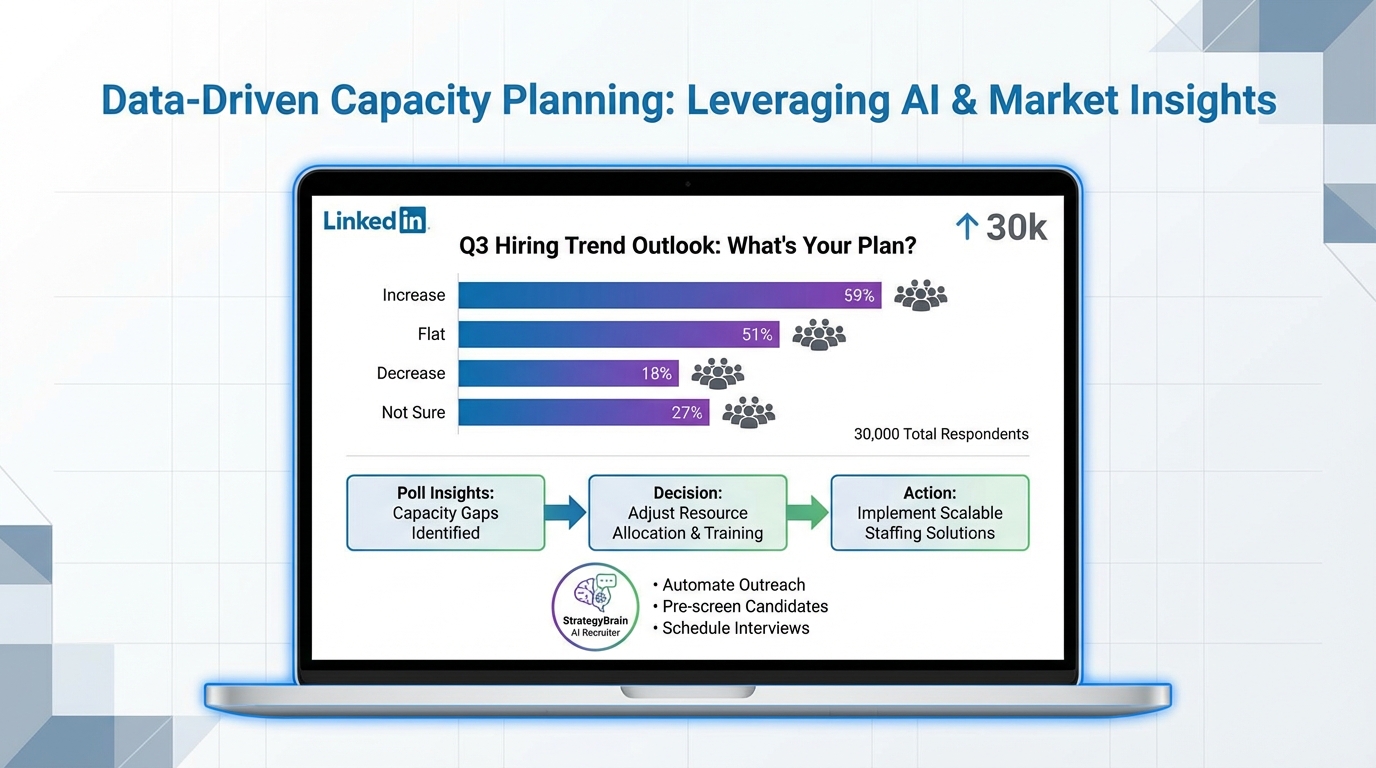
TA headcount plans for 2026 are easiest to understand when you collect a fast, anonymous signal from the people doing the work, then translate that signal into capacity decisions. I am connected to 30,000 people here, mostly in recruitment, so I used a simple poll question to get an honest verdict on next year’s Talent Acquisition team headcount. This article shows how to run that same pulse check, how to interpret the outcomes without overreacting, and how an ai recruiting tool can cover the repetitive LinkedIn outreach and early qualification tasks when headcount stays flat. I also explain where StrategyBrain AI Recruiter fits in a practical workflow, including what it can and cannot automate.
Table of Contents
- Why a simple poll works for 2026 headcount planning
- The poll question I used and how to reuse it
- How to interpret results without guessing
- Capacity math: turning headcount intent into workload reality
- Where an ai recruiting tool helps most when headcount is flat
- How StrategyBrain AI Recruiter fits into a LinkedIn workflow
- If you are an agency: CRM for staffing agency vs AI outreach automation
- What “recruitment agency software free” can and cannot cover
- Common mistakes to avoid
- FAQ
- Conclusion and next steps
Why a simple poll works for 2026 headcount planning
Headcount planning conversations often happen behind closed doors, and by the time a formal org chart change is visible, recruiters have already felt the workload shift for months. A lightweight poll is not a forecast model, but it is a fast way to capture sentiment from practitioners across industries and company sizes.
Because the poll is anonymous, people tend to answer more honestly. That matters when the topic is sensitive, such as whether teams expect growth, a freeze, or reductions. The goal is not to “predict the market.” The goal is to decide what you will do if your team’s capacity does not increase.
The poll question I used and how to reuse it
Here is the exact prompt I posted, kept intentionally simple so people could answer quickly:
TA HEADCOUNT PLANS FOR 2026
What are your organisations plans for the TA Team next year?
I'm connected to 30,000 people on here, mostly in recruitment and I suspect most of the people who read my observations will also likely be in the space. How are we looking next year in terms of headcount?
Another simple poll folks...anonymous, so lets have your honest verdict!
If you reuse it, keep the wording plain and keep it anonymous. The more you load the question with your own opinion, the less useful the signal becomes.
Recommended poll options
- Increase headcount
- Stay flat
- Decrease headcount
- Not sure yet
One improvement that makes the data more actionable
Add a follow up comment prompt asking respondents to share context in one line, for example: “industry, company size, and whether hiring volume is up or down.” You will not get perfect data, but you will get enough to spot patterns.
How to interpret results without guessing
A poll is directional. It tells you what people believe is happening, not what will happen. To keep it useful, interpret it in layers:
Layer 1: The headline split
- Increase suggests more req coverage capacity, but it can also mean backfilling burnout.
- Flat usually means you need process improvements, better tooling, or tighter intake discipline.
- Decrease means prioritization becomes the job, and candidate experience is at risk if workflows stay manual.
- Not sure is a signal of planning uncertainty, which often creates stop start hiring.
Layer 2: Who is answering
If your network skews agency, the results will differ from a corporate TA heavy network. Segment mentally by what you know about your audience, and if possible, ask respondents to self identify in comments.
Layer 3: What changes your operating plan
The practical question is: if headcount stays flat, what work must be automated or removed? This is where an ai recruiting tool becomes a capacity lever rather than a shiny add on.
Capacity math: turning headcount intent into workload reality
You do not need a complex model to make better decisions. You need a consistent way to describe capacity. Here is a simple framework I use with teams:
Define your “manual minutes per hire”
- Outbound sourcing and connection requests
- Initial messaging and follow ups
- Basic qualification questions and scheduling intent checks
- Chasing résumés and contact details
Then decide what must stay human
- Intake alignment with hiring managers
- Final qualification against role requirements
- Interviewing and offer strategy
- High touch candidate relationship moments
This split is the reason many teams look at LinkedIn automation first. The early funnel is repetitive, time sensitive, and easy to standardize, but it still needs to feel human to candidates.
Where an ai recruiting tool helps most when headcount is flat
In my experience, the best use of AI in recruiting is not “replace recruiters.” It is to protect recruiter time for the work that actually requires judgment. When headcount is flat, the highest ROI tasks to automate are usually:
- Consistent outreach so candidates are contacted quickly and follow ups do not slip.
- First response coverage so candidate questions are answered even outside business hours.
- Early intent qualification to confirm interest before a recruiter invests deeper time.
- Information capture such as collecting résumés and contact details in a structured way.
That is also where AI can reduce candidate drop off, because delays and missed follow ups are a common failure point in high volume hiring.
How StrategyBrain AI Recruiter fits into a LinkedIn workflow
StrategyBrain AI Recruiter is designed to automate the initial LinkedIn recruiting loop: connecting with candidates, introducing the opportunity, answering common questions about the role and company, confirming interview interest, and collecting résumés and contact information from interested candidates. In other words, it targets the exact work that expands when req load rises but headcount does not.
What we tested in a realistic scenario
We reviewed the product workflow using a standard agency style process: define a target profile, prepare job and compensation details, then run outreach and qualification on LinkedIn. The key evaluation was whether the system could keep conversations moving without sounding robotic, and whether it captured the information recruiters actually need to proceed.
What it does well
- Smart LinkedIn recruitment automation that handles connection and early conversation steps based on recruiter provided job context.
- 24/7 multilingual communication so candidates can engage in their native language and still get timely responses.
- Scalable team setup with support for managing more than 100 LinkedIn accounts for organizations building an AI assisted recruiting team.
Important limitation to understand
AI Recruiter can identify willingness to communicate or interview, but it does not decide whether a résumé fully matches the job requirements. A recruiter still needs to review résumés and make the final qualification call. This boundary is healthy, because it keeps accountability with the hiring team.
Data protection and compliance notes
According to StrategyBrain’s product information, the system is designed to comply with privacy regulations in the EU, United States, and Canada, and customer provided data is not used to train AI models. Candidate data is described as encrypted and isolated per customer environment.
If you are an agency: CRM for staffing agency vs AI outreach automation
A CRM for staffing agency workflows usually focus on pipeline visibility, client management, and candidate records. That is necessary, but it does not automatically solve the biggest time sink: repetitive outreach and follow up.
Think of it this way: your CRM is the system of record, while an AI recruiter is the system of action for the top of funnel. When headcount is flat, pairing a solid CRM with an ai recruiting tool can reduce the manual load without losing process control.
Practical division of labor
- CRM: candidate history, submissions, client notes, compliance fields, reporting.
- AI Recruiter: LinkedIn connection, initial outreach, Q and A, intent confirmation, résumé and contact capture.
- Recruiter: final qualification, relationship building, negotiation, closing.
What “recruitment agency software free” can and cannot cover
Many teams search for recruitment agency software free when budgets tighten. Free tools can help you start organizing candidates, but they rarely provide the always on responsiveness and consistent follow up that protects candidate experience at scale.
If your 2026 plan assumes flat headcount, the question is not only “what can we store for free?” It is “what can we execute reliably every day?” That is where automation focused tools, including StrategyBrain AI Recruiter, tend to be evaluated, because they reduce repetitive work rather than just tracking it.
Common mistakes to avoid
- Using poll results as a forecast: treat it as sentiment, then validate with your own req volume and time to fill.
- Automating without guardrails: define what the AI can say about compensation, benefits, and process, and keep it consistent.
- Assuming AI replaces qualification: keep résumé review and final screening decisions with recruiters.
- Ignoring candidate experience: speed matters, but tone and clarity matter too, especially on LinkedIn.
FAQ
What is an ai recruiting tool in practical terms?
An ai recruiting tool is software that automates parts of recruiting workflows such as outreach, messaging, screening questions, and information capture. The best tools keep humans responsible for final hiring decisions while reducing repetitive work.
How do I run a headcount sentiment poll without biasing the results?
Keep the question short, keep it anonymous, and use neutral answer options such as increase, flat, decrease, and not sure. Avoid adding your own prediction in the poll text.
Can StrategyBrain AI Recruiter qualify candidates end to end?
It can confirm willingness to communicate or interview and collect résumés and contact details from interested candidates. It does not determine full fit against job requirements, so recruiters still review résumés and decide who advances.
Does AI Recruiter work only in English?
No. StrategyBrain AI Recruiter is described as supporting multilingual communication so candidates can interact in their native language, with 24/7 responses.
How does AI Recruiter handle résumés and contact details?
It requests résumés and contact information from candidates who express interest. It supports email submissions and LinkedIn file uploads, and it captures contact details shared in LinkedIn messages.
Is a CRM for staffing agency enough to reduce recruiter workload?
A CRM improves organization and reporting, but it does not automatically do outreach and follow up. If headcount is flat, pairing a CRM with outreach automation is often how teams reduce manual workload.
Is “recruitment agency software free” a realistic option for scaling?
Free tools can be useful for basic tracking, but scaling usually requires reliable execution of outreach and follow up. If candidate response speed is a bottleneck, you may need automation rather than only a database.
What should I do if my TA headcount decreases in 2026?
Start by tightening intake and prioritizing roles, then remove or automate repetitive tasks. Protect candidate experience by ensuring timely responses and consistent follow up, which is where an ai recruiting tool can help.
Conclusion and next steps
If you want a fast read on TA headcount plans for 2026, run a simple anonymous poll across your recruiting network, then translate the sentiment into a capacity plan. When the signal points to flat or reduced headcount, the most practical move is to protect recruiter time by automating repetitive top of funnel work.
Next steps: post the poll, segment the responses by context, and list the manual tasks that consume the most recruiter minutes each week. If LinkedIn outreach and early qualification are on that list, evaluate whether StrategyBrain AI Recruiter can take over those steps while your team stays focused on final qualification and closing.