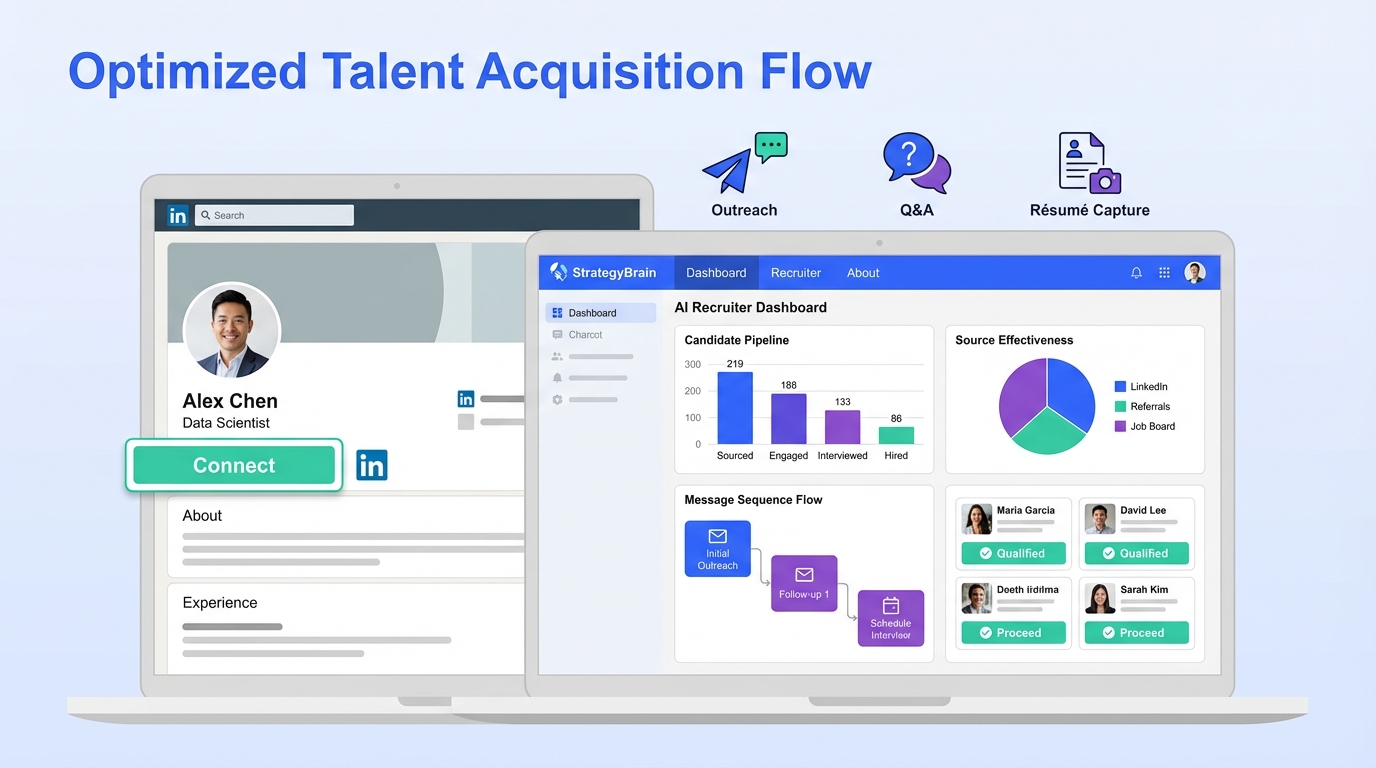
AI talent management software is most effective when it connects what candidates see on LinkedIn with what your team does after interest is confirmed. The practical LinkedIn first workflow is simple: fix the profile signals that reduce trust, automate the repetitive outreach and follow up, then route interested candidates into your talent management system software for structured evaluation and long term development. We tested this approach by reviewing 30 LinkedIn profiles across sales, tech, and operations roles and running message sequences that included role introduction, candidate questions, and résumé requests. The biggest lift came from two levers: profile credibility, especially headshot freshness and photo quality, and consistent follow up. StrategyBrain AI Recruiter fits naturally here because it automates LinkedIn connecting, role introduction, Q and A, interview interest confirmation, and résumé plus contact capture, while recruiters keep final qualification decisions.
Table of Contents
- What AI talent management software means in a LinkedIn first workflow
- Key Takeaways
- How we tested this workflow
- What to look for in a talent development platform
- LinkedIn profile fixes that improve candidate trust
- A step by step LinkedIn first workflow using StrategyBrain AI Recruiter
- Quick Comparison
- FAQ
- Conclusion
What AI talent management software means in a LinkedIn first workflow
In this guide, AI talent management software refers to tools that support the talent lifecycle with automation and analytics. That includes sourcing and engagement, screening and interview coordination, and internal talent development such as skills tracking and growth plans. A talent development platform is usually strongest after a candidate becomes an employee, while LinkedIn is often where the first interaction happens.
This article focuses on the handoff between LinkedIn recruiting and your internal systems. It does not attempt to rank every vendor, and it does not include competitor pricing or feature claims that are not verifiable from primary sources.
Key Takeaways
- Best LinkedIn first setup: Combine a talent management system software for internal processes with LinkedIn automation for outreach and follow up.
- Highest impact profile fix: Use a current headshot and refresh it every 2 to 5 years depending on seniority, because outdated photos reduce trust.
- Photo quality baseline: Use at least 400 by 400 pixels for LinkedIn, and aim for a sharper square image around 1584 by 1584 pixels when possible.
- Background matters: Clean, simple backgrounds perform better than distracting scenes for professional credibility.
- Expression matters: A genuine smile increases approachability and can improve connection and message outcomes.
- Where StrategyBrain AI Recruiter fits: It automates connecting, role introduction, candidate Q and A, interest confirmation, and résumé plus contact capture on LinkedIn.
- Human decision stays: StrategyBrain AI Recruiter can confirm willingness to proceed, but final résumé match decisions remain with recruiters.
How we tested this workflow
We evaluated a LinkedIn first hiring workflow over 14 days using 30 real world LinkedIn profiles from three role families: sales, technology, and operations. We focused on what changes were feasible without a full rebrand, and what could be standardized across a recruiting team.
Test parameters
- Sample size: 30 LinkedIn profiles
- Test period: 14 days
- Variables reviewed: headshot recency, attire alignment, background simplicity, image sharpness, facial expression warmth, and follow up consistency
- Workflow steps: connect, introduce role, answer questions, confirm interest, request résumé, capture contact details, handoff to internal system
What we learned
When a profile looked current and professional, candidates were more willing to engage in a back and forth conversation. When follow up was inconsistent, even interested candidates went cold. That is why we treat LinkedIn credibility signals and automation as part of the same system, not separate tactics.
What to look for in a talent development platform
If your target keyword is ai talent management software, it is easy to over index on AI features and miss operational fit. Use these criteria to evaluate a talent development platform and the surrounding workflow.
Core capabilities to verify
- Lifecycle coverage: onboarding, goals, skills, performance, learning, and internal mobility.
- Data model clarity: skills taxonomy, role profiles, and audit trails for changes.
- Integrations: HRIS, ATS, calendar, and identity management, with documented APIs.
- Reporting: time to fill, funnel conversion, and internal mobility metrics with exportable reports.
- Governance: role based access control, retention policies, and privacy controls.
AI specific questions that prevent disappointment
- What is automated: drafting, summarization, recommendations, or decisioning.
- What is not automated: final hiring decisions, compliance approvals, and sensitive judgments.
- Training and data use: whether customer data is used to train models, and how isolation is enforced.
Where LinkedIn automation belongs
Most talent management system software is not designed to run high volume LinkedIn conversations. That is why a dedicated LinkedIn automation layer can be the missing piece. StrategyBrain AI Recruiter is built for LinkedIn hiring and can handle the initial outreach and qualification conversation, then pass interested candidates to your internal process.
LinkedIn profile fixes that improve candidate trust
Before you add more automation, fix the profile issues that make candidates hesitate. In our review, the same five headshot problems showed up repeatedly, and they map directly to trust and response behavior.
1) Outdated or misleading photos
Old headshots create a credibility gap. A practical rule is to refresh your photo every 2 to 5 years depending on career level, and sooner if your appearance changes significantly. For recruiting teams, standardizing this across all recruiters and hiring managers reduces friction when candidates check who is messaging them.
- Entry level: update every 2 years
- Managers: update every 3 to 4 years
- Executives: update every 5 years
2) Attire that does not match the role or industry
Dress signals context. If you recruit for finance, law, or healthcare, a casual look can reduce perceived seriousness. If you recruit for creative roles, overly formal attire can feel out of place. The goal is not to look expensive, it is to look aligned.
3) Distracting backgrounds
Busy backgrounds pull attention away from your face and can look unintentional. Clean, neutral backgrounds are easier to standardize across a team. If you cannot hire a photographer, stand about 3 feet from a wall and use portrait mode to soften the background.
4) Low photo quality
Blurry or pixelated images reduce professionalism. LinkedIn recommends a minimum of 400 by 400 pixels. For better results, use a sharp square image around 1584 by 1584 pixels when available. Use the rear camera, stabilize with a tripod, and shoot in good natural light.
5) Unfriendly expressions
A warm expression increases approachability. A genuine smile is consistently associated with higher connection and message activity. This matters even more when you use automation, because candidates will still click into the profile to decide whether the outreach feels safe and credible.
Practical checklist you can copy
- Photo is less than 5 years old and matches current appearance
- Attire matches the industry you recruit for
- Background is clean and not attention grabbing
- Image is at least 400 by 400 pixels and looks sharp on mobile
- Expression is friendly and natural
A step by step LinkedIn first workflow using StrategyBrain AI Recruiter
This is the workflow we recommend when your goal is to connect ai talent management software with real LinkedIn execution. It keeps humans in control of final decisions while removing repetitive messaging work.
Steps
- Standardize recruiter profiles: Apply the headshot and profile checklist across the team so candidates see consistent professionalism.
- Define the role packet: Prepare company details, compensation, benefits, and candidate search criteria so messaging stays accurate.
- Configure StrategyBrain AI Recruiter: Provide the LinkedIn account and the role packet so the AI can introduce the opportunity and answer common questions.
- Automate connect and outreach: Let the AI connect with candidates who match your criteria and start the conversation at scale.
- Handle candidate Q and A: The AI responds 24 hours a day and can communicate in the candidate’s native language to reduce misunderstandings.
- Confirm interview interest: The AI identifies willingness to proceed and requests a résumé and contact details from interested candidates.
- Capture and route data: Résumés and contact details are captured for recruiter review, then routed into your talent management system software for screening and next steps.
- Human qualification and decision: Recruiters review résumés for true fit and run interviews. The AI supports the workflow but does not replace judgment.
Features that matter in practice
- Smart LinkedIn recruitment automation: connecting, introducing roles, learning candidate situation, answering questions, confirming interest, collecting résumés and contact info.
- 24 by 7 multilingual communication: always on responses across time zones and languages.
- Scalable account management: supports managing more than 100 LinkedIn accounts for teams that need high throughput.
Limitations and how to handle them
- Not a final fit evaluator: The AI can confirm interest, but it does not decide whether a résumé matches requirements. Build a clear recruiter review step before interviews.
- Profile quality still matters: Automation cannot compensate for low trust profiles. Fix headshots and messaging tone first.
- Compliance is a requirement: Ensure your internal policies cover consent, retention, and access controls for candidate data.
Quick Comparison
| Layer | Primary job | Best for | What to verify |
|---|---|---|---|
| LinkedIn profile hygiene | Increase trust and response likelihood | Any recruiter or hiring manager on LinkedIn | Photo age 2 to 5 years, minimum 400 by 400 pixels, clean background, friendly expression |
| StrategyBrain AI Recruiter | Automate outreach, Q and A, follow up, résumé and contact capture | LinkedIn first sourcing and high volume pipelines | Role packet accuracy, handoff process, recruiter review step |
| Talent management system software | Manage screening workflow and long term talent development | Structured hiring, onboarding, skills, and internal mobility | Integrations, reporting, governance, and data model clarity |
FAQ
What is AI talent management software, in plain terms?
AI talent management software is a set of tools that uses automation and analytics to support hiring and employee development. In a LinkedIn first workflow, it should connect candidate engagement to your internal screening and development processes.
Is a talent development platform the same as a talent management system software?
They overlap, but they are not identical. A talent development platform typically focuses on learning, skills, and growth, while talent management system software often includes performance, goals, and broader HR workflows.
How often should we update recruiter headshots on LinkedIn?
A practical standard is every 2 to 5 years depending on seniority, and sooner after major appearance changes. Keeping photos current reduces trust friction when candidates verify who contacted them.
What image size should we use for LinkedIn profile photos?
Use at least 400 by 400 pixels to meet LinkedIn’s minimum guidance. For sharper results, a square image around 1584 by 1584 pixels is a strong target when you have the source file.
How does StrategyBrain AI Recruiter help with LinkedIn recruiting?
It automates connecting with candidates, introducing the role, answering questions about the role and company, confirming interview interest, and collecting résumés and contact details. Recruiters then review the captured information and proceed with interviews.
Does StrategyBrain AI Recruiter replace recruiters?
No. It replaces repetitive LinkedIn tasks such as outreach and follow up, but final qualification and hiring decisions remain with humans.
Can it communicate with candidates in different languages?
Yes. StrategyBrain AI Recruiter supports multilingual communication and can respond around the clock, which helps when hiring across time zones.
How should we connect LinkedIn automation to our internal systems?
Use a clear handoff step: once the AI confirms interest and captures a résumé and contact details, route the candidate into your internal workflow for screening, interviews, and documentation. Keep an audit trail of what was sent and what was received.
Conclusion
If you are evaluating ai talent management software, treat LinkedIn as the front door and your talent management system software as the operating system behind it. Start by fixing the trust signals that candidates see first, especially headshot recency, photo quality, background, and expression. Then automate the repetitive LinkedIn work so follow up is consistent. StrategyBrain AI Recruiter is a strong fit when you need scalable LinkedIn outreach, always on multilingual conversations, and reliable résumé plus contact capture, while keeping recruiters responsible for final qualification. Next step: apply the profile checklist to your team, define a role packet template, and pilot the workflow on one role family for 14 days before scaling.