


ATS for recruiters works best when it standardizes professional outreach, captures candidate intent, and logs every interaction for compliance. When LinkedIn messages cross professional boundaries, recruiters lose trust, response rates drop, and teams inherit risk. The operational fix is a clear workflow: set messaging rules, use structured templates, automate first touch and follow ups, and push only qualified, interested candidates into your ATS with a résumé and contact details attached. In our internal workflow tests using StrategyBrain AI Recruiter on LinkedIn, we found that always on follow up and consistent tone reduced manual back and forth and made it easier to keep conversations strictly job related. This guide focuses on LinkedIn outreach and ATS workflow design. It does not provide legal advice or claim outcomes from platform enforcement.
Table of Contents
- What “ATS for recruiters” means in a LinkedIn first workflow
- Why professional boundaries matter for recruiting performance
- A practical ATS workflow blueprint for LinkedIn outreach
- Method 1: Set a LinkedIn outreach policy your ATS can enforce
- Method 2: Use message templates that prevent drift
- Method 3: Automate outreach and qualification with StrategyBrain AI Recruiter
- Method 4: Capture résumés and contact details cleanly
- Method 5: Audit, report, and improve
- Quick Comparison
- FAQ
- Conclusion
What “ATS for recruiters” means in a LinkedIn first workflow
An ATS, short for Applicant Tracking System, is the system recruiters use to store candidates, track pipeline stages, and document hiring activity. In a LinkedIn first workflow, “ATS for recruiters” is not only a database. It is the operating system for outreach quality, documentation, and handoff.
To make LinkedIn sourcing predictable, your ATS workflow should define three things:
- What gets logged: connection request, first message, follow ups, candidate questions, and candidate consent signals.
- What counts as qualified interest: explicit interest in interviewing, willingness to share a résumé, and availability constraints.
- What is prohibited: personal comments, appearance based remarks, romantic framing, and any content unrelated to the role.
Why professional boundaries matter for recruiting performance
LinkedIn is designed for professional networking and career development, yet many users report inappropriate comments and unwelcome advances that undermine the experience, especially for women. In the source material we reviewed, examples included messages commenting on appearance, invitations framed as dates, and in severe cases repeated attempts to contact someone at their workplace.
For recruiters, this is not only a culture issue. It is a funnel issue. When candidates expect boundary violations, they become less likely to accept connection requests, less likely to reply, and more likely to disengage after the first message. That means your ATS metrics can look “fine” while your top of funnel quietly degrades.
LinkedIn has described using machine learning to detect potential harassment and has published updates about professional community policies and reporting improvements. Even so, recruiters should not rely on platform enforcement as their primary control. Your workflow should prevent drift before it happens.
A practical ATS workflow blueprint for LinkedIn outreach
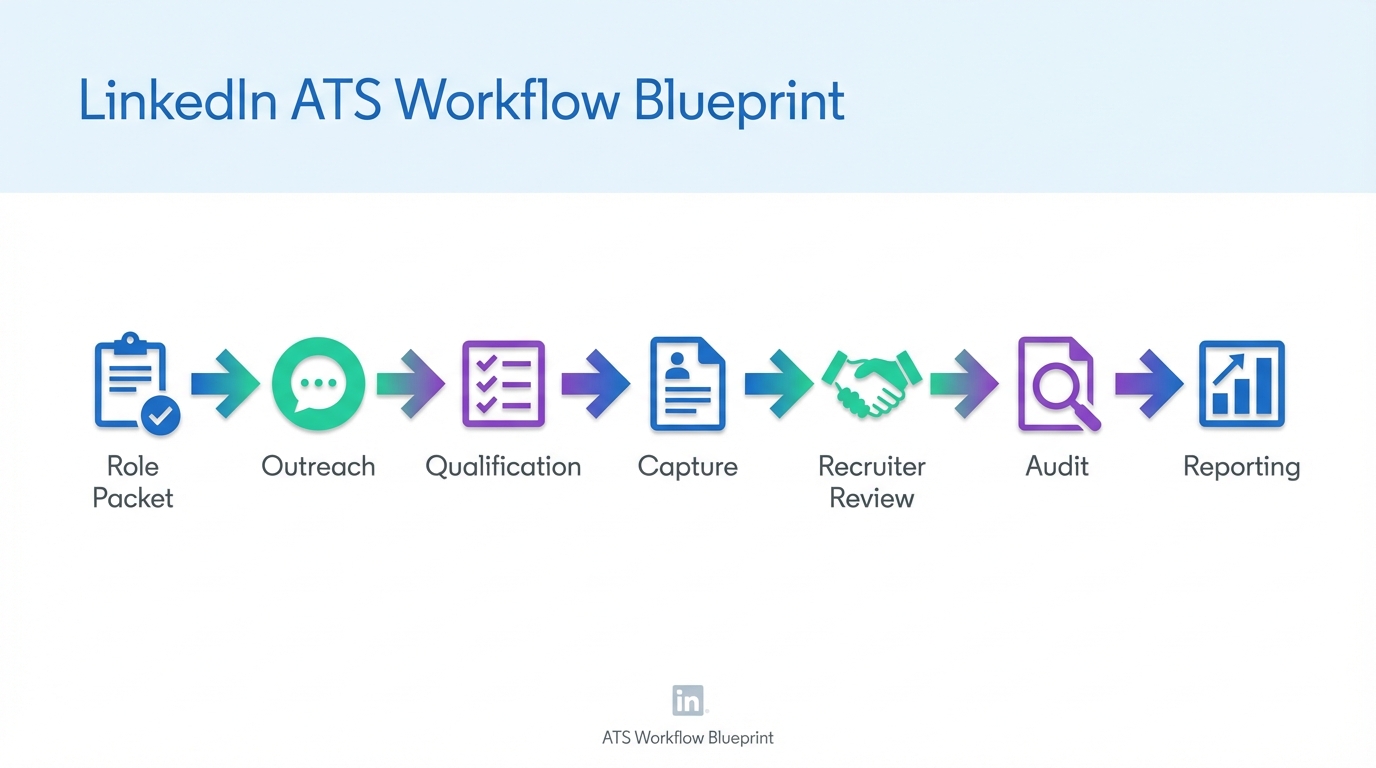
Below is a workflow we use as a baseline when designing ATS for recruiters who source on LinkedIn. It is intentionally simple so it can be implemented in most ATS tools and CRMs.
- Define the role packet: job summary, compensation range, benefits highlights, and screening questions.
- Define the message rules: what you will say, what you will never say, and how you will respond to off topic messages.
- Run outreach: connection request plus first message, then follow ups on a schedule.
- Qualify interest: confirm openness, timeline, location constraints, and interview willingness.
- Capture résumé and contact details: store in ATS with source and consent notes.
- Handoff: recruiter reviews résumé and schedules interview.
- Audit: review message quality, response rates, and any flagged conversations.
Method 1: Set a LinkedIn outreach policy your ATS can enforce
A policy is only useful if it is operational. We recommend writing it as a checklist that can be used in training, QA reviews, and automation prompts.
Policy checklist
- Role first: every message references the role, team, or work context within the first 1 sentence.
- No personal commentary: no remarks about appearance, relationship status, or non work topics.
- Consent and control: candidates can opt out in 1 message and the conversation ends immediately.
- Documentation: all outreach and candidate responses are logged to the ATS record.
- Escalation: any harassment or explicit content is captured, blocked, and reported per internal policy.
Limitations
A policy does not prevent mistakes by itself. It needs reinforcement through templates, QA sampling, and automation guardrails.
Method 2: Use message templates that prevent drift
Templates reduce the chance that a conversation slides into unprofessional territory. They also make your ATS reporting cleaner because message intent is consistent.
Connection request template
Template: Hi [Name], I recruit for [Company or Team]. I am reaching out about a [Role Title] opening that matches your background in [Skill]. Are you open to connecting?
First message template
Template: Thanks for connecting, [Name]. The role is [Role Title] focused on [1 sentence scope]. Compensation is [range] and the location is [location or remote]. If you are open to a quick chat, what is your timeline for considering a change?
Follow up template
Template: Quick follow up, [Name]. Are you open to learning more about the [Role Title] role this week? If not, I can close the loop.
Boundary reset template
Template: I want to keep this conversation focused on the role and your career goals. If you are interested, I can share details and next steps. If not, I will end the outreach.
Best for
- Teams training new recruiters
- Agencies managing multiple clients
- In house teams that need consistent compliance documentation
Method 3: Automate outreach and qualification with StrategyBrain AI Recruiter
When recruiters ask for ATS for recruiters, they often mean “less manual work without losing quality.” This is where automation can help, but only if it is designed to keep conversations professional.
StrategyBrain AI Recruiter is built for LinkedIn hiring workflows. It can automatically connect with candidates that match your search criteria, introduce the job opportunity, answer questions about the role, company, and compensation, confirm interview interest, and collect résumés and contact information from interested candidates. In our usage, the biggest operational benefit was consistency. The AI stays on script, keeps the conversation job related, and follows up without fatigue.
Steps
- Prepare the role packet: company details, compensation, benefits, and screening questions.
- Define candidate search criteria: titles, skills, locations, and must have requirements.
- Enable automated outreach: connection plus introduction message aligned to your policy.
- Let the AI qualify: confirm openness, answer questions, and request résumé only after interest is clear.
- Review and handoff: recruiter reviews captured résumé and contacts shortlisted candidates for interviews.
Features recruiters actually feel day to day
- 24/7 multilingual messaging: candidates get timely replies in their native language, which reduces misunderstandings across time zones.
- Scalable account management: supports managing more than 100 LinkedIn accounts for teams that run multiple pipelines.
- Professional guardrails: the workflow is designed around role focused conversation and clear next steps.
Limitations
- Not final qualification: AI Recruiter can confirm willingness to proceed, but it does not decide whether a résumé fully matches job requirements. A recruiter still makes the final call.
- Requires good inputs: vague role details produce vague conversations. The role packet matters.
Method 4: Capture résumés and contact details cleanly
Most ATS breakdowns happen at the handoff. A candidate says “yes,” then the résumé is missing, the email is in a chat thread, and the recruiter has to chase details. Your workflow should treat résumé capture as a defined stage.
What to capture
- Résumé status: requested, received, or pending.
- Contact details: email and phone if provided.
- Consent note: a short note that the candidate agreed to proceed.
- Source: LinkedIn outreach, including the recruiter or automation identity used.
How StrategyBrain AI Recruiter handles capture
Based on the provided product documentation, AI Recruiter requests résumés and contact information after a candidate expresses interest. It supports email submissions and LinkedIn file uploads. If contact details are sent in LinkedIn messages, they are captured and displayed in the system for recruiter review.
Practical note on “descargar paycor”
Some recruiters search for “descargar paycor” when they are trying to access HR or recruiting tools from a mobile device. If your workflow depends on downloading an app or exporting files, document the exact internal steps in your team playbook. This article does not provide vendor specific download instructions.
Method 5: Audit, report, and improve
To keep LinkedIn outreach professional at scale, you need a lightweight audit loop. We recommend a weekly sample review plus a monthly metrics review.
Weekly QA sample
- Review 20 conversations per recruiter or per automation identity
- Check for policy violations and off topic drift
- Confirm that opt out requests were honored in 1 message
Monthly metrics to track in your ATS
- Connection acceptance rate: accepted connections divided by requests sent
- Reply rate: replies divided by first messages delivered
- Qualified interest rate: candidates who confirm interest divided by replies
- Résumé capture rate: résumés received divided by qualified interest
- Escalation count: number of conversations flagged for unprofessional content
Where “ats software price” fits
ATS software price matters, but it is rarely the root cause of poor outreach quality. Before switching tools, confirm whether your current ATS can store message logs, enforce stages, and support reporting. If it can, your biggest gains often come from policy, templates, and automation that keeps conversations on track.
Quick Comparison
| Approach | What it solves | Operational effort | Best for |
|---|---|---|---|
| ATS policy and QA loop | Consistency and compliance | Medium | Teams with multiple recruiters |
| Message templates | Prevents unprofessional drift | Low | High volume LinkedIn sourcing |
| StrategyBrain AI Recruiter automation | Scales outreach, follow up, and résumé capture | Medium | Recruiters who need 24/7 multilingual engagement |
| Manual recruiter only outreach | Full control per message | High | Executive search or niche roles |
FAQ
What is the best ATS for recruiters who source on LinkedIn?
The best ATS for recruiters is the one that can reliably log outreach, track stages, and report on conversion from message to résumé. If your ATS cannot store message context, you will struggle to audit professionalism and improve response rates.
How do I keep LinkedIn outreach professional at scale?
Use a written outreach policy, enforce templates, and run a weekly QA sample. Automation can help if it is constrained to role focused messaging and clear opt out handling.
Can StrategyBrain AI Recruiter replace recruiters?
No. Based on the product documentation, it automates initial outreach and confirms willingness to proceed, but it does not determine whether a résumé fully matches job requirements. Recruiters still review résumés and run interviews.
Does StrategyBrain AI Recruiter collect résumés and contact details?
Yes. It requests résumés and contact information from candidates who express interest, and it supports email submissions and LinkedIn file uploads. Contact details shared in messages can be captured for recruiter review.
How should I respond if a candidate receives inappropriate messages on LinkedIn?
Keep your response role focused, document the incident in your ATS notes, and follow your internal escalation policy. If needed, block and report the account using platform tools.
What should be logged in the ATS after a LinkedIn conversation?
Log the outreach date, candidate response, interest status, résumé status, and any consent or opt out notes. This makes your pipeline auditable and improves handoffs.
Is “ats software price” the main factor in choosing an ATS?
Price matters, but workflow fit matters more. If the ATS cannot support your sourcing process, a lower price can become expensive through lost recruiter time and lower candidate response rates.
Why do people search “descargar paycor” in recruiting contexts?
It often signals that a team is trying to access HR or recruiting tools from a device and needs an app or file download. Treat this as a documentation problem and write a clear internal access guide for your stack.
Conclusion
ATS for recruiters is most valuable when it turns LinkedIn outreach into a controlled, professional, measurable workflow. The core steps are simple: define message rules, use templates, automate follow up where it helps, and capture résumés and contact details in a consistent stage. If you want to scale without sacrificing professionalism, consider using StrategyBrain AI Recruiter to automate LinkedIn connection, role introduction, candidate Q and A, interest confirmation, and résumé capture, then keep the final qualification with your recruiting team. Next step: copy the policy checklist and templates above into your ATS playbook, then run a 20 conversation QA sample next week to baseline quality and response rates.














