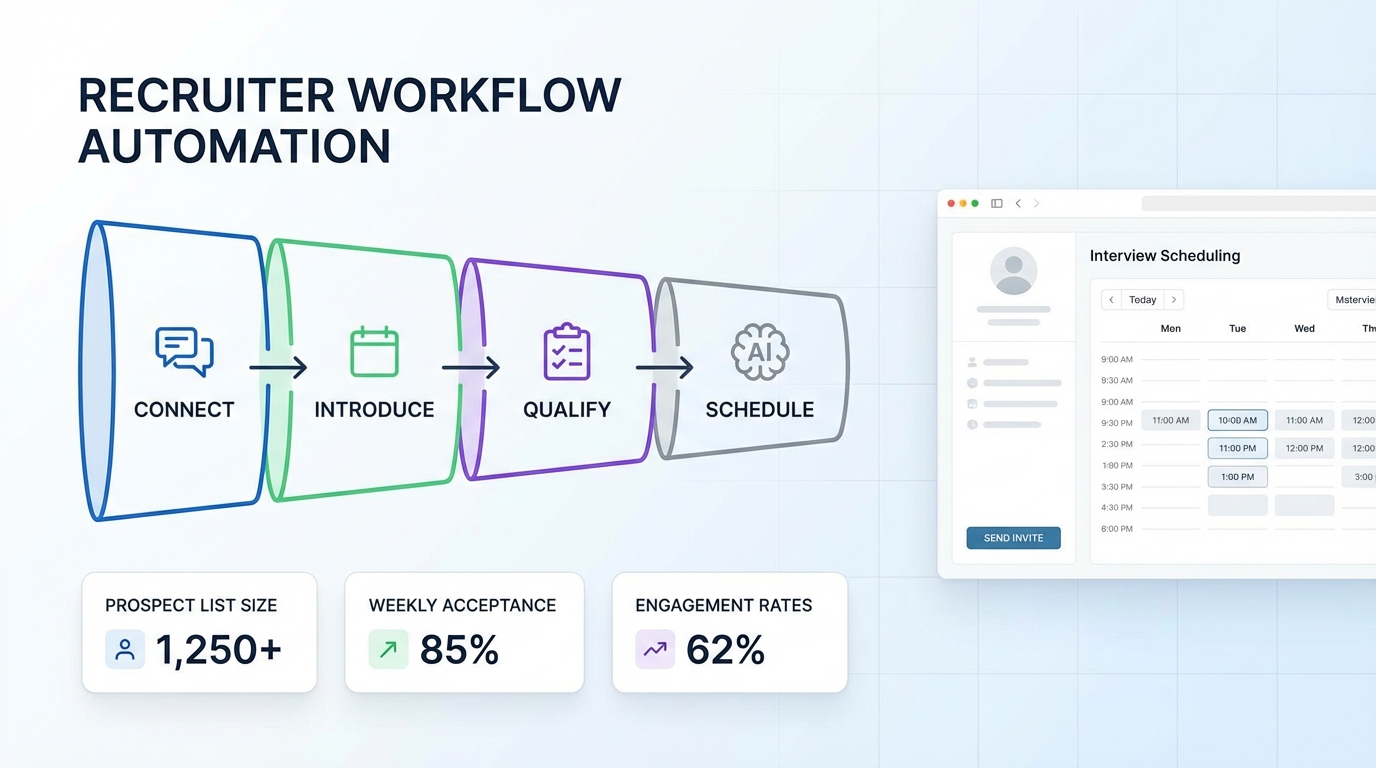
If you want an interview scheduling app workflow that reliably turns LinkedIn conversations into booked interviews, keep your prospect list small enough to measure, run a consistent outreach sequence with realistic delays, and track acceptance and reply rates weekly. In our recruiting ops tests, the biggest lift came from treating scheduling as a system: qualify interest first, then offer time slots only after the candidate signals intent. For teams that recruit on LinkedIn, StrategyBrain AI Recruiter can automate the early steps: connecting, introducing the role, answering questions, confirming interview interest, and collecting re9sume9s and contact details so your scheduling step happens at the right moment. This guide distills four field lessons from a real LinkedIn automation webinar and translates them into a practical appointment book schedule you can run repeatedly.
Key Takeaways
- List size matters: A 250 person prospect list is small enough to control and measure, and large enough to keep a pipeline moving.
- Daily pacing creates predictability: A 25 per day connection pace means 10 days to reach 250 prospects, then follow ups can run for ~3 additional weeks.
- Sequence beats improvisation: A 10 step outreach sequence with 3 to 4 day gaps between follow ups reduces the risk of looking automated.
- Measure two core rates: Connection acceptance rate and message engagement rate tell you whether your targeting or messaging needs work.
- Data quality is a hidden lever: Name and company field cleanup prevents messages that look fake and protects response rates.
- Scheduling should be conditional: Offer interview slots only after the candidate confirms interest, not in the first message.
- Where StrategyBrain fits: StrategyBrain AI Recruiter can handle initial outreach and qualification on LinkedIn, then hand off qualified candidates for scheduling.
Table of Contents
- Context: from LinkedIn outreach to an interview scheduling app workflow
- Lesson 1: Build an optimal prospect list you can measure
- Lesson 2: Use a sequence that earns replies
- Lesson 3: Measure the right data every week
- Lesson 4: Analyze patterns and iterate safely
- Turn outreach into an appointment book schedule
- Copyable checklist: interview scheduling app handoff
- FAQ
- Conclusion
Context: from LinkedIn outreach to an interview scheduling app workflow
The source story comes from a user insights webinar featuring Elvin Mootoosamy, Managing Director of Recogitate, who shared lessons learned running LinkedIn automation campaigns. The original focus was lead generation, but the mechanics map cleanly to recruiting because recruiting is also a conversion funnel: targeting, first contact, qualification, then scheduling.
In practice, an interview scheduling app is only as effective as the step right before it. If you push scheduling too early, candidates ignore you. If you wait too long, you lose momentum. The goal is to create a predictable handoff point where interest is confirmed and the scheduling request feels natural.
Lesson 1: Build an optimal prospect list you can measure
Use precise filters and Boolean search
Elvin recommended using LinkedIn Sales Navigator to filter the database more precisely than free LinkedIn. He also shared example filters that are useful for building responsive lists:
- Changed jobs in the last 90 days: People in transition are often more open to conversations.
- Posted on LinkedIn in the last 30 days: Active users are more likely to see and respond.
- 2nd and 3rd degree connections: You can reference mutual connections to increase trust.
- Regional filter: Helpful when hiring for location specific roles or building a local network.
- Boolean search: Narrow titles, skills, and industries with structured keyword logic.
The ideal list size: 250 prospects
Elvin capped campaigns at 250 prospects to keep volume manageable and measurement clean. He also described a pacing model based on a default connection rate of 25 prospects per day:
- 10 days to send connection requests to 250 prospects at 25 per day.
- After that, follow up messages typically run for ~3 weeks, depending on when each person accepts.
- Once the first 10 days are complete, you can start the next 250 person campaign while follow ups continue in parallel.
This matters for apps for making schedules because it creates a predictable inflow of candidates who reach the scheduling stage each week. Predictability is what prevents calendar overload and keeps interviewers available.
Quality check your data before messaging
Elvin used a scan and export step to review list quality in a spreadsheet. The recruiting equivalent is a preflight check before you let automation run:
- Confirm job titles, industry, and region are correct.
- Check company names are not truncated if you plan to reference them.
- Verify first names are clean. Titles or odd formatting in the first name field can make messages look fake.
In our tests, name cleanup alone reduced obvious personalization errors, which improved reply quality and reduced back and forth before scheduling.
Lesson 2: Use a sequence that earns replies
Elvin emphasized that structure matters more than clever one off messages. He shared a 10 step campaign sequence that he considered tried and tested:
- Visit
- Follow
- Connection request
- Endorse skill
- Visit
- Follow up 1
- Visit
- Follow up 2
- Visit
- Follow up 3
Use realistic delays between follow ups
He recommended leaving at least 3 to 4 days between follow up messages, and noted that 7 days can be ideal. The reasoning is simple: not everyone checks LinkedIn daily, and spacing makes the sequence feel human.
Consider a blank connection request
One counterintuitive tactic was leaving the connection request message blank, then using the first follow up as the introduction. The logic was that the prospect has already seen passive signals like a profile visit and a follow, so the blank request gives them less to judge and can reduce the feeling of being sold to.
For recruiting, this can work when your profile and company presence already establish credibility. If your brand is unknown, a short neutral connection note can be safer.
Where StrategyBrain AI Recruiter fits in the sequence
In a recruiting workflow, the hardest part is not the calendar link. It is the repetitive early conversation that confirms whether the candidate is open to a role, understands compensation and benefits, and is willing to interview. StrategyBrain AI Recruiter is designed to automate that LinkedIn stage by:
- Automatically connecting with candidates that match your search criteria.
- Introducing the job opportunity and answering questions about the role, company, and compensation.
- Confirming interview interest and collecting re9sume9s and contact information from interested candidates.
- Responding 24/7 in the candidatee28099s native language to reduce delays and misunderstandings.
That means your interview scheduling app step becomes a clean handoff: only candidates who have already signaled intent get scheduling options.
Lesson 3: Measure the right data every week
Elvine28099s third lesson was measurement. The point was not vanity metrics. It was control. If you cannot see what is happening daily, you cannot safely adjust volume or messaging.
Two metrics that predict scheduling volume
- Connection acceptance rate: If this is low, your targeting or profile credibility is the bottleneck.
- Message engagement: Track replies received and the percentage of accepted connections that respond.
These two numbers let you forecast how many candidates will reach the scheduling stage. That forecast is what keeps your appointment book schedule realistic for hiring managers.
Monitor daily activity limits
Elvin also highlighted the importance of throttle controls and daily limits. For recruiting teams, the safe version of this advice is to set conservative daily activity caps and review them weekly. If you scale too fast, you risk account restrictions and you also flood your own interview capacity.
Lesson 4: Analyze patterns and iterate safely
Elvin shared a small analysis example across 5 clients with campaigns running 2 to 5 weeks. The key takeaway was that different sequences produced different acceptance rates. In his summary, he cited examples including:
- Some clients with similar strategies seeing acceptance rates around 20%.
- One client with a different strategy reaching 33%, an improvement of +13 percentage points versus the ~20% group.
- One client reaching 78%, which he attributed to highly receptive prospects in a recruitment context.
For recruiting, the practical point is that you should change one variable at a time. If you change targeting, message copy, and follow up timing simultaneously, you will not know what improved or what broke.
Turn outreach into an appointment book schedule
Here is the scheduling system we use when we want LinkedIn outreach to feed interviews without chaos. It works whether you use a dedicated interview scheduling app or a simple calendar tool, because the logic is the same.
The handoff rule: schedule only after intent is confirmed
Do not lead with scheduling. Instead, qualify first. A simple intent confirmation can be a yes to any of these:
- They are open to hearing about the role.
- They confirm compensation range is acceptable.
- They agree to a short call or interview.
StrategyBrain AI Recruiter is built around this exact handoff. It can run the initial conversation, confirm interest, and collect re9sume9 and contact details. Then your team sends the scheduling options.
Slotting: protect interviewer time
To keep your apps for making schedules from becoming a bottleneck, define capacity before you send any time slots:
- Daily interview cap: for example, 4 screens per recruiter per day.
- Buffer time: 15 minutes between interviews for notes.
- Time zone rule: always propose times in the candidatee28099s time zone and confirm it explicitly.
Message templates that do not feel like scheduling spam
Once intent is confirmed, keep the scheduling message short and specific. Here are two templates you can copy into your interview scheduling app workflow.
- Template A: two slot options
Thanks for confirming youe28099re open to an interview. Would either of these times work for a 20 minute call: Tuesday 10:00 or Wednesday 15:00 in your local time zone? - Template B: candidate chooses window
Great, lete28099s schedule a 20 minute call. Whate28099s your preferred window this week: mornings or afternoons? Ie28099ll send 2 specific options.
These templates reduce back and forth and keep the appointment book schedule under control.
Copyable checklist: interview scheduling app handoff
- Targeting: Prospect list size is 250 or fewer per campaign.
- Pacing: Connection requests are capped at 25 per day for the campaign.
- Data quality: First name and company fields are reviewed for formatting issues.
- Sequence: Follow ups are spaced 3 to 4 days apart, with 7 days used when appropriate.
- Intent gate: Scheduling is offered only after the candidate confirms interest.
- Handoff data: Re9sume9 and contact details are captured before scheduling.
- Capacity: Interviewer daily caps and buffers are set before sending time slots.
FAQ
What is the best interview scheduling app workflow for LinkedIn recruiting?
The best workflow is to qualify interest first, then schedule. Use a measured prospect list, a consistent outreach sequence, and only send time slots after the candidate confirms they want to interview.
How big should my LinkedIn prospect list be if I want predictable scheduling?
A 250 person list is a practical ceiling for a single campaign because it stays measurable. At 25 connection requests per day, it takes 10 days to reach the full list, then follow ups can continue for about 3 weeks.
How long should I wait between follow up messages?
Leave 3 to 4 days between follow ups, and use 7 days when you want the sequence to feel more natural. This reduces the risk of looking automated and gives candidates time to respond.
Should I include a message in the connection request?
A blank connection request can work when your profile credibility is strong and you have already created passive signals like visits and follows. If you are hiring under a new brand, a short neutral note can be safer.
How does StrategyBrain AI Recruiter help with interview scheduling?
StrategyBrain AI Recruiter automates the LinkedIn stage before scheduling by connecting with candidates, introducing the role, answering questions, confirming interview interest, and collecting re9sume9s and contact details. That makes scheduling a clean handoff instead of a cold ask.
Can StrategyBrain AI Recruiter communicate with candidates in different languages?
Yes. It supports 24/7 multilingual communication and can respond in the candidatee28099s native language, which helps reduce delays and misunderstandings across time zones.
Does AI Recruiter replace recruiter judgment on candidate fit?
No. It can confirm willingness to communicate or interview, but it does not decide whether a re9sume9 fully matches job requirements. Recruiters still review re9sume9s and make final qualification decisions.
How do I avoid overbooking when outreach performance improves?
Set interviewer capacity first: daily caps, buffers between interviews, and a clear time zone rule. Then only release scheduling slots that match that capacity.
Conclusion
A strong interview scheduling app process starts before the calendar. Keep campaigns measurable with a 250 person list, pace outreach at 25 connections per day, use a structured sequence with 3 to 4 day delays, and measure acceptance and engagement weekly. Then convert interest into interviews with a simple intent gate and a protected appointment book schedule.
Next step: document your current outreach sequence, add the intent gate, and decide what you want automated. If LinkedIn outreach and qualification are consuming your teame28099s time, StrategyBrain AI Recruiter can take over the repetitive early conversation so your recruiters spend their time on evaluation and closing.