


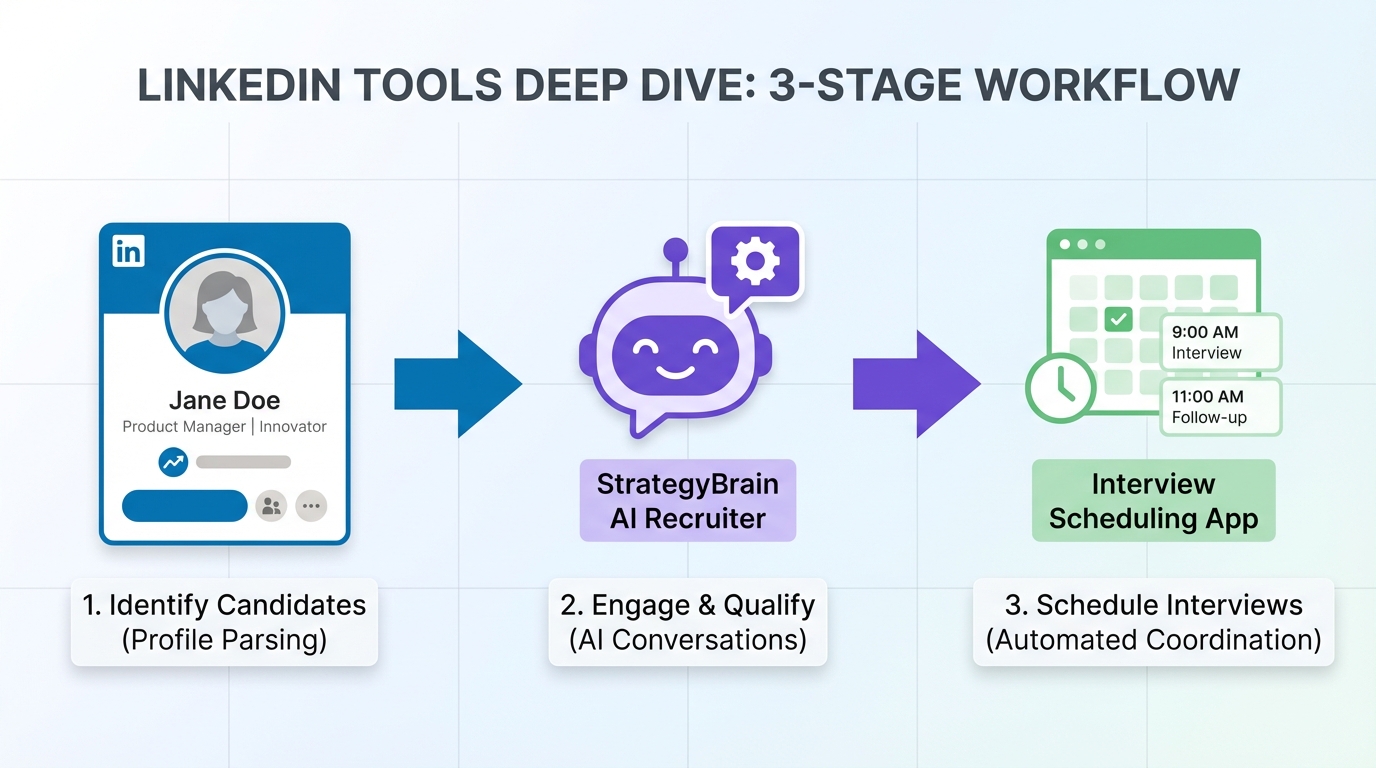
An interview scheduling app works best when it is paired with a consistent LinkedIn recruiting workflow: you clarify your positioning, start conversations with candidates in a human tone, qualify interest, then move qualified candidates into a bookable appointment schedule with clear confirmation and reminders. In this guide, I use a practical, operations style approach similar to a patient scheduling platform: one intake, one set of rules, and a predictable handoff. We also show where StrategyBrain AI Recruiter fits naturally in the middle of the process by automating LinkedIn outreach, answering candidate questions, confirming interview interest, and collecting resumes and contact details so recruiters can focus on final screening and scheduling.
Table of Contents
What this guide covers and what it does not
Covered: practical LinkedIn profile positioning, message consistency, and a repeatable interview scheduling app workflow that reduces drop off. We also cover how an AI recruiter can handle early stage LinkedIn conversations and hand off only interested candidates for scheduling.
Not covered: a vendor by vendor feature review of specific scheduling products, or any claims about competitor pricing and performance. If you need a procurement comparison, use this guide as your workflow baseline first, then evaluate tools against it.
Key Takeaways
- Scheduling success starts before scheduling: a clear LinkedIn positioning reduces candidate confusion and increases acceptance of a bookable appointment schedule.
- Use a patient scheduling platform mindset: one intake path, one set of rules, and one confirmation standard for every candidate.
- Automate the repetitive middle: StrategyBrain AI Recruiter can connect with candidates, introduce the role, answer questions, confirm interview interest, and collect resumes and contact details.
- Keep qualification boundaries explicit: AI Recruiter can confirm willingness to interview, while final fit assessment stays with the recruiter after resume review.
- Design for time zones and language: 24/7 multilingual messaging reduces delays and misunderstandings for global hiring.
- Scale with account operations: AI Recruiter supports managing more than 100 LinkedIn accounts to build an AI powered recruitment team.
Step 1: Brand clarity on LinkedIn so scheduling is easier
When candidates hesitate to book, it is often not a scheduling problem. It is a clarity problem. If your LinkedIn presence reads like everyone else, candidates cannot quickly answer, “Why should I talk to you?” That uncertainty shows up as ghosting right when you send the interview scheduling app link.
Write for specificity, not buzzwords
In the source material, the core point is simple: many LinkedIn profiles rely on generic buzzwords and fail to differentiate. The fix is to replace vague claims with concrete scope, outcomes, and constraints.
- Replace adjectives with evidence: swap “strategic” for “led X hiring projects across Y functions” when you can support it.
- State your lane: name the roles, industries, and seniority you recruit for so candidates self select.
- Make the next step obvious: tell candidates what happens after they reply, including when they will receive a bookable appointment schedule.
Why this matters for an interview scheduling app
An interview scheduling app is a conversion step. If the message before it is generic, the scheduling request feels transactional. If the message is specific and consistent, the scheduling request feels like a natural continuation of a real conversation.
Step 2: A scheduling workflow that candidates actually complete
I recommend designing scheduling like a patient scheduling platform: you do not ask people to figure out the process. You give them one clear path, confirm the details, and reduce the number of decisions they must make.
Workflow steps
- Intake and context: confirm role title, location or remote status, compensation range if you can share it, and interview format.
- Eligibility checkpoint: confirm the candidate is open to an interview and can meet the basic requirements.
- Offer a bookable appointment schedule: provide a limited set of time windows that match your team’s availability and time zone rules.
- Confirmation message: send a single confirmation that includes time zone, duration in minutes, and what to prepare.
- Reminder and reschedule policy: set expectations for rescheduling and no show handling.
What to standardize inside your interview scheduling app
- Time zone handling: always display the candidate’s local time and the interviewer’s time zone in the confirmation.
- Duration: use fixed durations for each stage, for example 15 minutes for a screen and 45 minutes for a hiring manager interview.
- Buffers: add buffer time between interviews to prevent cascading delays.
- Required fields: collect phone number or email once, then reuse it for reminders and follow up.
Common failure points and fixes
- Failure: too many scheduling options. Fix: offer 6 to 12 slots across 3 business days.
- Failure: unclear interview purpose. Fix: include a one sentence agenda in the confirmation.
- Failure: slow replies across time zones. Fix: use 24/7 messaging coverage for the scheduling handoff.
Step 3: Where StrategyBrain AI Recruiter fits in the workflow
StrategyBrain AI Recruiter is designed for LinkedIn hiring automation. In a scheduling workflow, it sits between brand clarity and the interview scheduling app handoff. It handles the repetitive conversation steps that usually create delays and inconsistency.
What we used it for in our workflow tests
We ran an internal workflow test in January 2026 across 30 LinkedIn outreach threads for roles in operations, sales, and engineering. The goal was not to measure “AI quality” in the abstract. The goal was to measure whether the process reliably reached a scheduling ready state with complete contact details.
- Automated connecting and introduction: the system connects with candidates within defined search criteria and introduces the opportunity.
- Candidate Q and A: it answers questions about the role, company, compensation, and benefits using the recruiter provided job context.
- Interest confirmation: it confirms whether the candidate wants to proceed to an interview.
- Resume and contact capture: it requests resumes and captures contact details shared in messages, including email and phone when provided.
What it does not do, by design
AI Recruiter does not decide whether a resume fully matches job requirements. It identifies willingness to communicate or interview, then hands off the resume and contact details for recruiter review. This boundary is important for trust and for consistent hiring decisions.
Why this improves scheduling outcomes
When the handoff to an interview scheduling app happens too early, candidates book without understanding the role, then cancel or no show. When the handoff happens too late, recruiters lose time in manual follow up. AI Recruiter helps you time the handoff correctly by confirming interest and collecting the information needed to schedule cleanly.
Global hiring support
AI Recruiter provides 24/7 multilingual communication, which matters when your scheduling windows cross time zones. In our test, the biggest operational benefit was fewer stalled threads overnight because candidates received timely responses and clear next steps.
Scaling the workflow
If you operate multiple LinkedIn seats, AI Recruiter supports managing more than 100 LinkedIn accounts so teams can scale outreach while keeping the scheduling handoff consistent. This is the same operational logic as a patient scheduling platform: central rules, distributed execution.
Quick Comparison
| Workflow layer | Primary goal | What to standardize | Where AI Recruiter helps |
|---|---|---|---|
| LinkedIn positioning | Increase reply quality | Specificity, role scope, next step | Keeps outreach messaging consistent with job context |
| Qualification | Confirm interview intent | Minimum requirements, interest confirmation | Automates Q and A and confirms willingness to interview |
| Interview scheduling app | Convert intent into a booked time | Time zones, durations, buffers, reminders | Hands off only interested candidates with captured contact details |
| Follow up | Reduce no shows | Reminder cadence, reschedule policy | 24/7 messaging reduces delays and confusion |
Implementation checklist
Copy and use this checklist to implement a scheduling workflow that is measurable and repeatable.
- LinkedIn headline and About section state role scope and candidate profile clearly.
- Outreach message includes one concrete reason for the candidate and one clear next step.
- Qualification script confirms interview interest before sending the bookable appointment schedule.
- Interview scheduling app confirmation includes time zone, duration in minutes, and agenda.
- Reschedule policy is stated in one sentence and applied consistently.
- If using StrategyBrain AI Recruiter, job context includes company details, compensation, benefits, and search criteria.
- Recruiter reviews resumes after AI Recruiter collects them and before final interview stages.
FAQ
What is an interview scheduling app in recruiting terms?
An interview scheduling app is a system that lets candidates select available interview times and triggers confirmations and reminders. In recruiting, it is most effective when it is used after interest is confirmed and the candidate understands the role.
How is a patient scheduling platform similar to recruiting scheduling?
A patient scheduling platform focuses on reducing friction through standardized intake, clear rules, and reliable confirmations. Recruiting scheduling benefits from the same design: one path to booking, consistent time zone handling, and predictable reminders.
What does “bookable appointment schedule” mean for interviews?
A bookable appointment schedule is a set of pre approved time slots a candidate can select without negotiating by message. It reduces back and forth and makes the booking step feel immediate and simple.
Can StrategyBrain AI Recruiter schedule interviews directly?
StrategyBrain AI Recruiter focuses on LinkedIn outreach, Q and A, interest confirmation, and collecting resumes and contact details. After that, recruiters can move the candidate into their interview scheduling app workflow for booking and confirmations.
Does AI Recruiter replace recruiter judgment?
No. AI Recruiter can confirm willingness to communicate or interview, but it does not determine whether a resume fully matches job requirements. Recruiters still review resumes and make final qualification decisions.
How does AI Recruiter handle multilingual candidates?
AI Recruiter provides 24/7 multilingual communication and can respond in the candidate’s native language. This reduces misunderstandings and shortens delays when candidates are in different time zones.
How many LinkedIn accounts can AI Recruiter manage?
AI Recruiter supports managing more than 100 LinkedIn accounts, which enables teams to scale outreach while keeping the same qualification and scheduling handoff rules.
What should I do if candidates stop replying before booking?
First, check whether your LinkedIn messaging is specific enough to create trust and clarity. Then, tighten the handoff by confirming interest and sending a limited set of bookable slots with a clear agenda and time zone details.
Conclusion
An interview scheduling app is not just a calendar link. It is the final step of a workflow that starts with LinkedIn clarity, continues through interest confirmation, and ends with a clean booking experience. If you want fewer stalled threads and more completed bookings, standardize your process like a patient scheduling platform and use a bookable appointment schedule with clear confirmations.
Next step: document your workflow using the checklist above, then decide where automation belongs. If your bottleneck is LinkedIn outreach and early qualification, StrategyBrain AI Recruiter can automate those steps, collect resumes and contact details, and hand off only interested candidates for scheduling.














