


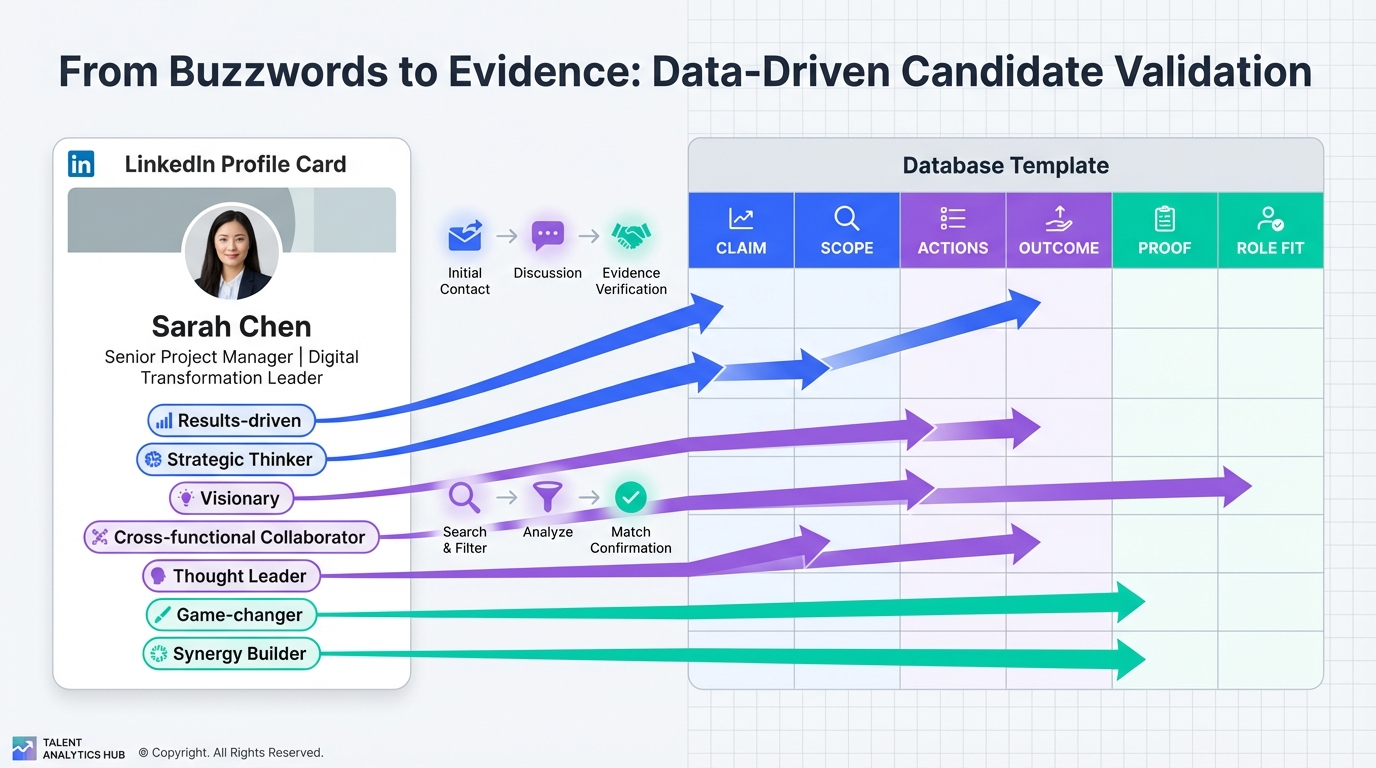
A recruitment database is your system of record for candidate evidence, not a storage bin for vague adjectives. If your LinkedIn sourcing and outreach rely on profile buzzwords, you will capture low quality data, misclassify candidates, and burn time on follow ups that never convert. The fix is simple and repeatable: translate buzzwords into database fields you can verify, then use an automation layer to keep LinkedIn conversations moving so your United States recruitment database or US recruitment and information database fills with candidates who have confirmed interest, shared resumes, and provided contact details.
Table of Contents
- What LinkedIn buzzwords mean for a recruitment database
- The 2013 LinkedIn buzzwords list (and why it still matters)
- Method 1: Convert buzzwords into evidence fields (template)
- Method 2: Standardize fields for a United States recruitment database
- Method 3: Automate outreach and capture with StrategyBrain AI Recruiter
- Quick Comparison
- FAQ
- Conclusion
What LinkedIn buzzwords mean for a recruitment database
Buzzwords are not “wrong” because they are popular. They are harmful because they are non diagnostic. In database terms, they create noisy labels that cannot be used for reliable search, ranking, or matching.
When a recruiter copies a profile summary into a recruitment database, buzzwords typically cause three operational problems:
- Low precision search: searching “strategic” returns too many unrelated profiles.
- Weak qualification notes: “responsible” does not tell you what the person owned, at what scale, or with what outcome.
- Inconsistent scoring: different recruiters interpret the same adjective differently, so your pipeline metrics drift.
The 2013 LinkedIn buzzwords list (and why it still matters)
LinkedIn published an annual buzzword study in 2013 based on English language profiles from its member base at the time. The study highlighted the most overused terms, with “Responsible” at the top and “Analytical” at number 10. Even though the list is from 2013, the underlying lesson still applies in 2026: generic descriptors spread faster than verifiable evidence, especially when candidates optimize for broad appeal.
Top 10 overused LinkedIn profile buzzwords (2013)
- Responsible
- Strategic
- Creative
- Effective
- Patient
- Expert
- Organizational
- Driven
- Innovative
- Analytical
Other highlights from the same 2013 study
- “Responsible” was used more than twice as often as “Strategic.”
- Only four buzzwords from 2012 remained in the 2013 top 10: “Creative,” “Responsible,” “Effective,” and “Analytical.”
- Several 2012 terms did not make the 2013 list, including “Experimental,” “Motivated,” “Multinational,” and “Specialized.”
- Most English language countries sampled shared the same top three: “Responsible,” “Strategic,” and “Effective.”
- “Sustainable” appeared in the top 10 only in the Netherlands, and “Enthusiastic” only in Great Britain.
- Australia and New Zealand were the only countries to include “Passionate” in their top 10 lists.
Method 1: Convert buzzwords into evidence fields (template)
The fastest way to improve a recruitment database is to stop storing adjectives and start storing evidence. Evidence is any detail that can be checked, compared, or used to make a decision. Below is the conversion template we use when cleaning LinkedIn sourced records.
Buzzword to evidence conversion template
Copy this into your ATS notes, CRM, or spreadsheet as a consistent structure:
- Claim: the buzzword or self description (example: “Strategic”).
- Scope: what they owned (team size, budget, region, product line).
- Actions: what they did (designed, negotiated, automated, rebuilt).
- Outcome: measurable result with units (%, $, time, volume).
- Proof: portfolio, project name, certification, or referenceable artifact.
- Role fit: why it maps to your job requirements.
Worked examples using the 2013 list
- Responsible becomes “Owned X process” plus “reduced errors by Y%” or “managed Z stakeholders.”
- Analytical becomes “Built KPI dashboard” plus “used SQL, Excel, Python” plus “improved forecast accuracy by X%.”
- Innovative becomes “Shipped new workflow” plus “cut cycle time by X days” plus “adoption rate Y%.”
Limitations
This method depends on what the candidate has publicly shared. If the profile is thin, you will need a short outreach message to request specifics. That is where automation helps, because manual follow up is usually the bottleneck.
Method 2: Standardize fields for a United States recruitment database
If you are building a United States recruitment database or a US recruitment and information database across multiple recruiters, standardization matters more than perfection. The goal is that two recruiters can read the same record and reach the same conclusion about next steps.
Recommended minimum fields (practical and searchable)
- Location: city, state, and work authorization status if the candidate provides it.
- Seniority: IC, lead, manager, director, VP, C level.
- Function: sales, finance, HR, IT, engineering, operations, marketing, legal.
- Industry: candidate’s primary domain experience.
- Evidence notes: the buzzword to evidence template output.
- Engagement status: not contacted, contacted, replied, interested, interview requested, not interested.
- Resume received: yes or no, plus date received.
- Contact details captured: email and phone if provided by the candidate.
Data hygiene checklist (copyable)
- [ ] Every record has a function and seniority value.
- [ ] Every record has at least 1 evidence note with an outcome and units.
- [ ] Engagement status is updated within 24 hours of a candidate reply.
- [ ] Resume received is marked within 1 business day of receipt.
- [ ] Duplicate profiles are merged using a consistent rule (email first, then LinkedIn URL stored internally).
Method 3: Automate outreach and capture with StrategyBrain AI Recruiter
After you standardize what goes into your recruitment database, the next constraint is throughput. In our experience, the slowest step is not searching LinkedIn. It is the repetitive cycle of connect requests, initial messages, answering basic questions, confirming interest, and collecting resumes and contact details.
StrategyBrain AI Recruiter is designed to automate that LinkedIn front end so your database fills with higher intent candidates. It can automatically connect with candidates that match your search criteria, introduce the role, ask about the candidate’s situation, answer questions about the role, company, compensation, and benefits, then confirm interview interest and collect resumes and contact information from interested candidates. It also supports 24/7 multilingual communication, which is useful when you are building a US recruitment and information database that includes candidates across time zones and languages.
Steps
- Define your capture fields: decide what evidence you want stored in the recruitment database, including engagement status, resume received, and contact details captured.
- Provide role context: give AI Recruiter the job details you want it to communicate, including company information, compensation, and benefits.
- Set candidate search criteria: align your LinkedIn search filters with the roles you are hiring for.
- Run automated outreach: AI Recruiter handles initial messaging and follow up, then flags candidates who confirm interest.
- Review and advance: recruiters review collected resumes and contact details, then schedule interviews for shortlisted candidates.
Features (relevant to database quality)
- Automated resume and contact capture: resumes can be received via email submission or LinkedIn file upload, and contact details shared in messages are captured.
- Always on follow up: 24/7 responses reduce drop off when candidates reply outside business hours.
- Scale with multiple accounts: supports managing more than 100 LinkedIn accounts for teams that need higher outreach volume.
Limitations (important for trust)
- AI Recruiter does not replace final qualification: it identifies willingness to proceed and collects information, but recruiters still evaluate whether the resume matches job requirements.
- Profile evidence can be incomplete: if a candidate does not share measurable outcomes, your database record may still need a recruiter review call to fill gaps.
Quick Comparison
| Method | Speed to improve data quality | Cost | Best for |
|---|---|---|---|
| Buzzword to evidence template | Same day | $0 | Cleaning existing recruitment database notes |
| Standardized fields and hygiene checklist | 1 to 2 weeks rollout | $0 to implement | Teams building a United States recruitment database |
| StrategyBrain AI Recruiter automation | Immediate throughput gain after setup | Varies by plan | Scaling LinkedIn outreach and capturing resumes and contact details |
FAQ
What is a recruitment database in practical terms?
A recruitment database is a structured system that stores candidate identity, evidence of fit, and engagement status so recruiters can search, segment, and move candidates through a hiring process. The key is storing verifiable details, not just descriptive words.
Why do LinkedIn buzzwords reduce database quality?
Buzzwords are ambiguous and hard to compare across candidates. When you store them as notes, you create noisy labels that make search and scoring unreliable.
How do I turn “Responsible” into something searchable?
Capture what the person owned, at what scale, and with what outcome. For example, store ownership scope, actions taken, and a measurable result with units such as % or time saved.
Do I need a separate United States recruitment database for US hiring?
Not always. Many teams use one system but enforce US specific fields such as location, work authorization status when provided, and time zone. The important part is consistent field definitions across recruiters.
What is a US recruitment and information database?
It is typically a recruitment database that includes both candidate profile information and process information such as outreach status, replies, interest confirmation, resume receipt, and contact details captured.
How does StrategyBrain AI Recruiter help fill the database faster?
It automates LinkedIn connecting, initial outreach, follow up, and basic Q and A about the role, then confirms interest and collects resumes and contact details from candidates who want to proceed. Recruiters then review and schedule interviews.
Does AI Recruiter decide if a candidate is qualified?
No. It identifies willingness to proceed and gathers information, but the recruiter still evaluates resume fit against job requirements.
Can AI Recruiter communicate with candidates in different languages?
Yes. It supports multilingual communication and can respond around the clock, which helps when candidates reply outside your local business hours.
How should I store AI Recruiter outcomes in my recruitment database?
Store the engagement status, whether a resume was received, the contact details the candidate shared, and a short evidence note summarizing role fit signals. Keep the fields consistent so reporting stays accurate.
Conclusion
If you want a recruitment database that actually improves hiring speed and quality, treat LinkedIn buzzwords as a signal to ask for evidence, not as evidence itself. Start by converting common adjectives into scope, actions, outcomes, and proof, then standardize fields so your United States recruitment database or US recruitment and information database stays searchable and consistent. When outreach volume becomes the bottleneck, use StrategyBrain AI Recruiter to automate LinkedIn connecting, messaging, follow up, and resume and contact capture so your database fills with candidates who have confirmed interest and are ready for recruiter review.
Next step: pick 20 recent LinkedIn sourced records, rewrite their notes using the buzzword to evidence template, then decide which fields you will enforce across your team for the next 30 days.














