


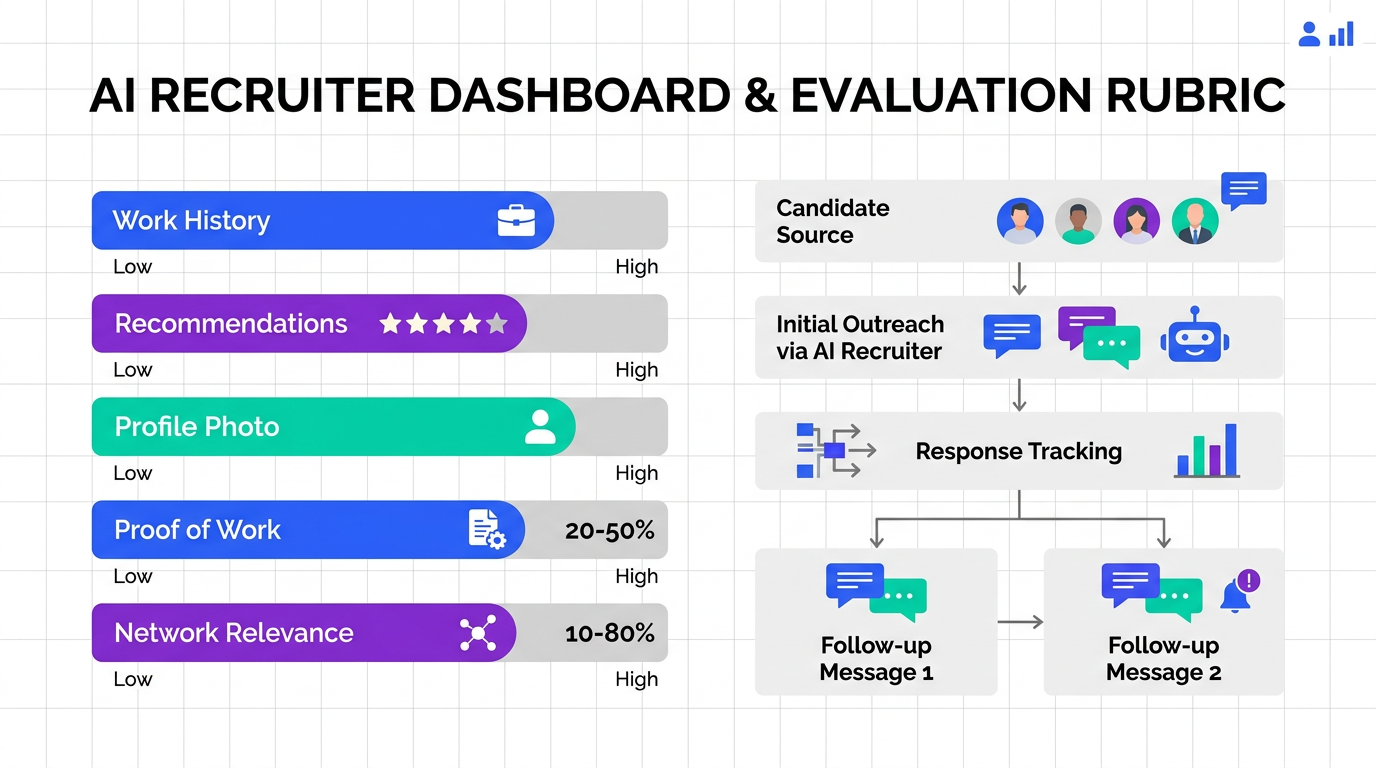
For recruitment online for recruiters, the highest leverage move is to evaluate LinkedIn profiles with a consistent, evidence based rubric and then run a disciplined outreach and follow up cadence. In practice, we look for five signals that predict whether a profile will convert from “interesting” to “interviewable”: accurate work experience, credible recommendations, a professional photo, proof of work, and a relevant network. This article shows exactly what to check, what to ignore, and how to scale the first touch and follow up using StrategyBrain AI Recruiter so a recruiting company for remote jobs and contract recruiters can keep pipelines full without spending all day in manual messaging.
Key Takeaways
- Use a 5 signal rubric: work history, recommendations, photo, proof of work, and network relevance are the fastest profile quality indicators.
- Verify dates and titles first: inaccurate employment dates and vague titles are common reasons recruiters deprioritize a profile.
- Recommendations act like pre references: at least 1 recommendation per role improves credibility, with manager recommendations preferred.
- Proof of work beats buzzwords: attach presentations, documents, or project artifacts to reduce screening uncertainty.
- Scale outreach safely: StrategyBrain AI Recruiter can automate initial LinkedIn connection, role intro, Q&A, and follow up 24/7 in any language.
- Know the boundary: AI Recruiter confirms interest and collects resumes and contact details, but final qualification still requires recruiter review.
Why LinkedIn signals matter in online recruiting
LinkedIn is a daily sourcing and research surface for many recruiters, especially when you are hiring across geographies or building a pipeline for hard to fill roles. One widely cited survey found that 93% of respondent companies used LinkedIn for recruiting. (Source: Jobvite, “Social Recruiting Survey”) When profiles are incomplete or outdated, recruiters lose time validating basics, and candidates lose opportunities because they do not pass the first screen.
In other words, the goal is not to “judge” a profile. The goal is to reduce uncertainty quickly so you can spend human time where it matters: role fit, motivation, and closing.
The 5 LinkedIn profile signals recruiters check first
1) Accurate work experience information
We start with the basics because they are the easiest to verify and the easiest to get wrong. Check for correct employment dates, a clear job title, and a short description of scope and outcomes. A LinkedIn profile does not need to replicate a resume line for line, but it must cover the main details that support the candidate’s story.
- What to look for: consistent dates, role progression, measurable achievements, and clear responsibilities.
- Common red flags: missing months and years, overlapping full time roles without explanation, and titles that do not match the described work.
2) Recommendations that function as pre references
Recommendations are a credibility shortcut. They help you see how others describe the candidate’s impact and working style. We prefer recommendations from managers, but peers, board members, and business partners can also be meaningful depending on the role.
- Minimum standard: 1 recommendation per job listed is a strong signal for roles where trust and collaboration matter.
- Quality check: specific examples beat generic praise.
3) A professional photo
A profile photo is not a hiring criterion, but it is a professionalism signal in a professional network context. A simple headshot with conservative work attire and a neutral background reduces friction and helps the profile feel current and intentional.
- What to look for: clear face, good lighting, solo photo, professional presentation.
- What to avoid: party photos, costumes, or group photos that create ambiguity.
4) Portfolio samples and proof of work
Proof of work reduces screening risk. LinkedIn supports adding media such as images, video, presentations, and documents. This is not only for creative roles. A sales leader can attach a talk, a case study, or a playbook excerpt. An engineer can attach a technical presentation. A researcher can attach slides from a published project.
LinkedIn’s own help documentation describes how members can add and manage “work samples” on their profile. (Source: LinkedIn Help Center)
- What to look for: artifacts that match the role’s core outputs.
- Recruiter benefit: fewer back and forth messages to validate competence.
5) Connections and network relevance
Sometimes who a candidate knows is as important as what they know, especially in sales and business development. A relevant network can indicate industry embeddedness and access to the right circles. We do not treat connection count as a score. We treat it as context.
- What to look for: relevant industry peers, customers, partners, and communities.
- Practical tip: encourage candidates to refresh their network periodically and reconnect with past colleagues.
Professionalism checks that influence recruiter confidence
After the five signals, we do a quick professionalism scan. Grammar and spelling matter because they affect perceived attention to detail. We also watch for overused buzzwords that inflate claims without evidence. The goal is not to police tone. The goal is to ensure the profile communicates clearly.
A 10 minute LinkedIn profile audit workflow
This is the repeatable workflow we use when we need speed without sacrificing consistency. It works for internal talent teams and for agency recruiters running multiple searches.
Steps
- Confirm role alignment: match headline and current role to your target profile in 60 seconds.
- Validate work history: check dates, titles, and scope for the last 2 roles.
- Scan for proof of work: look for attached media, publications, or project artifacts.
- Check recommendations: confirm at least 1 strong recommendation that includes specifics.
- Assess professionalism: photo, writing clarity, and buzzword density.
- Decide next action: outreach now, save for later, or disqualify with a reason code.
Copyable scorecard template
Use this as a lightweight internal standard. It is designed to be filled in quickly and to support handoffs between recruiters.
| Signal | Pass criteria | Notes |
|---|---|---|
| Work experience accuracy | Dates and titles consistent, outcomes described | Record any gaps or inconsistencies to clarify |
| Recommendations | At least 1 specific recommendation for relevant role | Prefer manager or direct stakeholder |
| Professional photo | Clear, solo, professional context | Do not over weight this, use as friction reducer |
| Proof of work | Artifacts that match role outputs | List what you reviewed |
| Network relevance | Relevant industry connections visible | Context only, not a numeric score |
Adjustments for remote roles and contract recruiters
If you are a recruiting company for remote jobs or you work as one of many contract recruiters on a fast moving requisition, you need two extra checks: clarity and responsiveness.
Remote hiring specific checks
- Location and time zone clarity: confirm the candidate’s location and whether they can overlap with required hours.
- Remote collaboration evidence: look for distributed team experience, async communication, and cross functional work.
- Work authorization signals: if relevant, note whether the profile indicates eligibility, but verify later through your compliant process.
Contract recruiting specific checks
- Availability window: contract candidates often have shorter start timelines. Capture availability early.
- Scope and outcomes: contract work should show deliverables, not only responsibilities.
- Portfolio emphasis: proof of work is often the fastest credibility builder for contract placements.
Where StrategyBrain AI Recruiter fits in the workflow
Once your profile rubric is consistent, the bottleneck becomes messaging time. This is where StrategyBrain AI Recruiter can reduce manual workload while keeping the conversation professional and responsive.
What we automate vs what we keep human
- Automate: initial connection requests, role introductions, candidate Q&A about the role and company, follow up, and collecting resumes and contact details from interested candidates.
- Keep human: final qualification against job requirements, interview evaluation, offer strategy, and sensitive conversations.
In our experience, this division of labor is practical because AI Recruiter can confirm whether a candidate is open to new opportunities and can keep the thread warm with timely follow up. At the same time, it does not claim to replace recruiter judgment on fit. That boundary is important for quality and trust.
Operational advantages for online recruiting teams
- 24/7 multilingual communication: candidates receive timely responses in their native language, which reduces misunderstandings across regions.
- Scalable account management: teams can manage more than 100 LinkedIn accounts to build an AI powered recruiting team for high volume sourcing.
- Cost and time efficiency: StrategyBrain states results such as replacing up to 90% of manual LinkedIn recruiting work and lowering costs to USD 2.40 per resume, which should be validated in your environment and use case.
Limitations we plan for
- Fit is not fully automated: AI Recruiter identifies willingness to communicate or interview, but it does not determine whether the resume matches requirements.
- Process design still matters: you need clear job information, compensation details, and candidate criteria to avoid inconsistent outreach.
Quick comparison: manual vs AI assisted outreach
| Workflow element | Manual recruiter only | With StrategyBrain AI Recruiter |
|---|---|---|
| Initial connection and intro | High time cost per candidate | Automated connection and role introduction based on your criteria |
| Candidate Q&A | Delayed responses outside working hours | 24/7 responses in any global language |
| Follow up | Often inconsistent across recruiters | Consistent follow up workflow to confirm interest |
| Resume and contact capture | Manual requests and tracking | Automated collection and marking of received resumes and contact details |
| Final qualification | Recruiter review | Recruiter review remains required |
FAQ
What is the fastest LinkedIn profile check for recruitment online for recruiters?
The fastest check is a 5 signal scan: accurate work history, recommendations, professional photo, proof of work, and network relevance. If 2 or more signals are missing, we usually move the candidate to “needs clarification” before investing more time.
Do recommendations really matter for remote hiring?
Yes. Recommendations add third party context that is especially useful when you cannot rely on local reputation or shared networks. We prioritize recommendations that include specific examples of outcomes and collaboration.
How should contract recruiters evaluate proof of work?
Contract recruiters should look for deliverables that match the contract scope, such as presentations, documents, case studies, or project artifacts. Proof of work reduces risk when timelines are short and interviews are compressed.
Can StrategyBrain AI Recruiter replace a recruiter?
No. StrategyBrain AI Recruiter automates initial outreach, conversation, follow up, and collecting resumes and contact details from interested candidates. Final qualification and hiring decisions remain the recruiter’s responsibility.
Does StrategyBrain AI Recruiter work across languages and time zones?
Yes. It is designed for 24/7 multilingual candidate communication, which helps global sourcing and improves response speed for remote pipelines.
How many LinkedIn accounts can a team manage with AI Recruiter?
StrategyBrain states that organizations can manage more than 100 LinkedIn accounts to build AI powered recruitment teams. Your operational limit should be set by your internal governance and process design.
What should I avoid when reviewing LinkedIn profiles?
Avoid over weighting superficial signals like connection count or trendy keywords. Focus on verifiable evidence: dates, outcomes, recommendations, and work artifacts.
What is one simple way to improve candidate response rates?
Respond quickly and follow up consistently. If your team cannot do that manually, an automated workflow that handles first touch and follow up can keep conversations warm until a recruiter steps in.
Conclusion
Recruitment online for recruiters works best when you combine a consistent LinkedIn profile rubric with a reliable outreach and follow up system. Start by standardizing the five signals we covered, then implement the 10 minute audit so every recruiter evaluates profiles the same way. If messaging volume is your bottleneck, use StrategyBrain AI Recruiter to automate connection, introduction, Q&A, and follow up, then keep final qualification and interview decisions human. Next step: copy the scorecard into your ATS notes template and run it on 20 profiles this week to calibrate your team’s pass criteria.














