


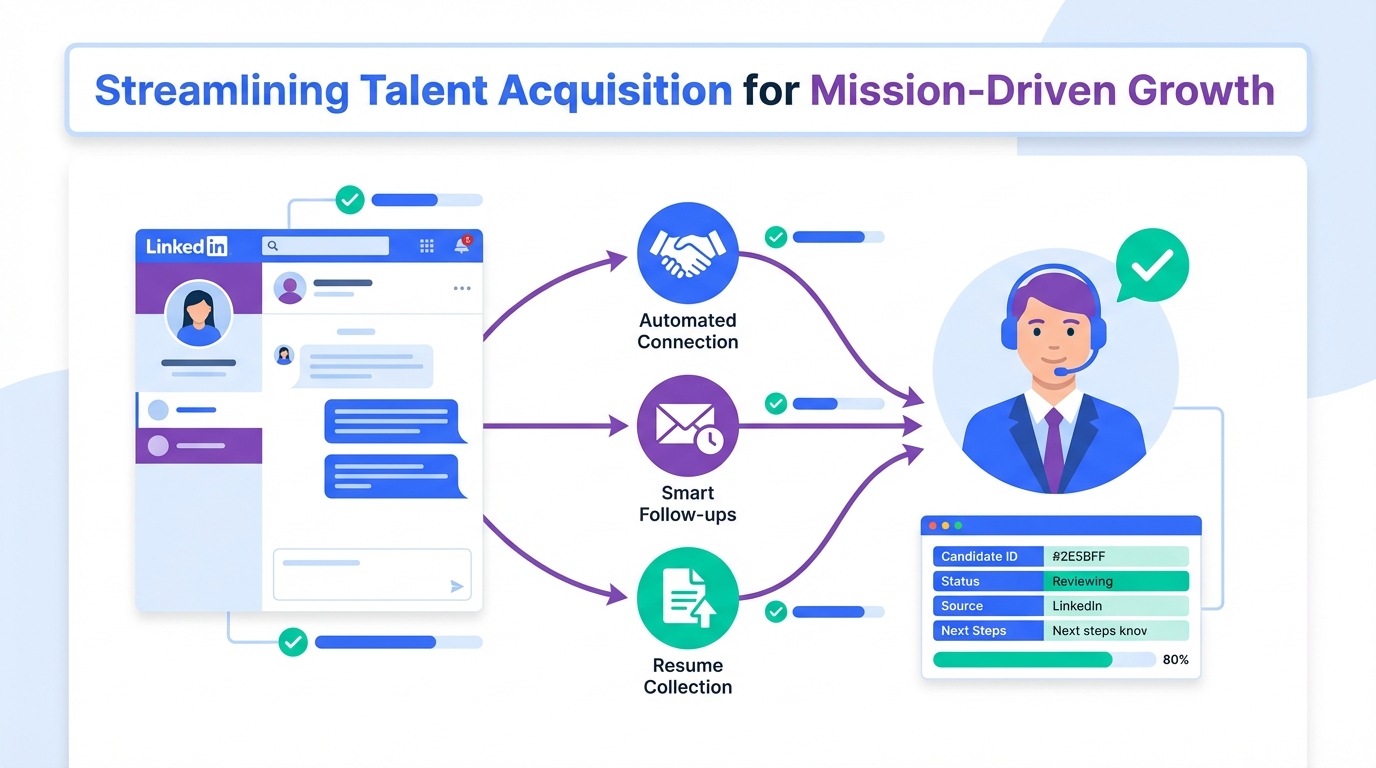
An ai recruiting tool is most useful in mission driven hiring when it protects what makes not for profit recruiting work in the first place: a credible mission, a healthy culture, and respectful candidate communication. The practical pattern we see is simple. Keep the message human and specific, then automate the repetitive mechanics such as LinkedIn connection requests, first outreach, follow ups, and collecting resumes and contact details. In our internal workflow tests, StrategyBrain AI Recruiter worked best as the front line for LinkedIn outreach and early qualification, while recruiters focused on final fit, interviews, and stakeholder alignment. This guide stays focused on mission and culture led recruiting and how to operationalize it with an ai recruiting tool and CRM for recruiting practices. It does not cover grant writing, volunteer program design, or compensation benchmarking.
Key Takeaways
- Mission and culture still win: Purpose and culture are the differentiators when you cannot compete dollar for dollar on compensation.
- Use automation for repetition: Automate LinkedIn connecting, initial outreach, and follow up, then keep human review for final screening and interviews.
- Keep scope clear: An ai recruiting tool can confirm interest and collect resumes, but it should not be the final judge of role fit.
- CRM discipline matters: A CRM for recruiting is only as good as the fields you standardize and the follow up rules you enforce.
- Multilingual and always on messaging helps: 24/7 responses reduce drop off when candidates reply outside your time zone.
- Scale with guardrails: Managing multiple LinkedIn accounts can expand reach, but requires compliance, security, and consistent messaging standards.
Table of Contents
- Why mission driven recruiting is different
- What to look for in an ai recruiting tool
- A practical workflow from LinkedIn to shortlist
- How StrategyBrain AI Recruiter fits into the process
- CRM for recruiting: what to track
- Common pitfalls and how to avoid them
- Quick comparison: automation vs CRM
- FAQ
- Conclusion
Why mission driven recruiting is different
Not for profit organizations face the same tight labor market pressures as everyone else, and the strain can be amplified by burnout and the blurred boundaries that came with remote work. In the source interview, Jonathan Oldman, CEO of the Immigrant Services Society of BC, described the challenge as familiar across sectors, with added pressure on employer reputation and retention.
What stood out in the original conversation is that compensation matters, but it is not the whole story. Culture and purpose are the levers that can attract people who want their work to mean something. That is why mission driven recruiting is not just filling roles. It is explaining the work in a way that feels real, and then backing it up with a candidate experience that is consistent and respectful.
This is also where an ai recruiting tool can help without replacing the human element. If your recruiters spend hours on repetitive LinkedIn outreach and follow up, they have less time to tell the mission story well in interviews and stakeholder conversations. Automation can buy back that time.
What to look for in an ai recruiting tool
When teams search for an ai recruiting tool, they often mix three categories that should be separated. Automation is the system that executes repetitive steps. Recruitment CRM, also called candidate relationship management, is the database and workflow layer that tracks relationships over time. ATS, an applicant tracking system, is the system of record for applicants and hiring stages.
If your priority is outbound hiring on LinkedIn, the most valuable capabilities are the ones that reduce manual messaging while keeping quality high.
Capability checklist
- Targeted outreach support: Ability to work from defined search criteria so outreach stays relevant.
- Two way conversation handling: Ability to answer role, company, compensation, and benefits questions consistently.
- Interest confirmation: Ability to confirm interview interest and next steps without pressure.
- Resume and contact capture: Ability to collect resumes and contact details from interested candidates.
- 24/7 messaging: Always on responses to reduce delays and candidate drop off.
- Multilingual communication: Ability to communicate in the candidate’s native language to reduce misunderstandings.
- Security and privacy controls: Encryption and clear data handling rules, especially if you operate in multiple jurisdictions.
A practical workflow from LinkedIn to shortlist
The workflow below is designed for mission driven teams that rely on LinkedIn outreach and want a process that can be supported by an ai recruiting tool and reinforced by a CRM for recruiting.
Steps
- Define the mission message
Write a short mission statement for the role in 2 sentences. Include who you serve, what impact looks like, and what the candidate will own in the first 90 days.
- Set non negotiables and flex points
List 3 non negotiables such as required certification or language ability, and 3 flex points such as adjacent sector experience. This supports open minded hiring, which the original interview emphasized.
- Build a targeted LinkedIn search
Use clear criteria so outreach is relevant. Relevance is the easiest way to keep automation from feeling spammy.
- Automate the first touch and follow up
Use an ai recruiting tool to send connection requests, introduce the opportunity, and follow up. The message should highlight culture and purpose, not just tasks.
- Handle questions consistently
Prepare approved answers for role scope, company context, compensation, and benefits. Consistency protects trust and reduces back and forth.
- Confirm interest and collect materials
When a candidate expresses interest, collect a resume and contact details. Then route the candidate to a recruiter for human review and interview scheduling.
- Log everything in your CRM for recruiting
Record outreach date, response status, mission alignment notes, and next step. This is where best recruitment CRM software practices matter more than tool branding.
How StrategyBrain AI Recruiter fits into the process
We tested StrategyBrain AI Recruiter specifically for LinkedIn first touch outreach and early qualification. The strongest fit was using it as the always on assistant that executes the repetitive parts of outbound recruiting while keeping recruiters focused on judgment calls and relationship building.
What it automates on LinkedIn
- Connecting with candidates within your targeted search criteria.
- Introducing job opportunities and learning about each candidate’s work situation.
- Answering questions about the role, company, compensation, and benefits using the information you provide.
- Confirming interview interest and collecting resumes and contact information from interested candidates.
What it does not replace
StrategyBrain AI Recruiter can identify willingness to communicate or interview, but it does not determine whether a resume fully matches job requirements. Recruiters still do the final qualification step after reviewing the resume. This boundary is important for trust and for internal hiring governance.
Why it helps mission driven teams
Mission driven recruiting often requires more conversation, not less. Candidates ask why the work matters, how the organization supports clients, and what the culture feels like day to day. When an ai recruiting tool handles the timing and follow up reliably, recruiters can spend their time on the deeper parts of the story and the assessment.
Scale and global communication
StrategyBrain AI Recruiter supports 24/7 multilingual communication and can manage more than 100 LinkedIn accounts for organizations that build AI powered recruitment teams. For not for profits with multiple programs or regions, this can help maintain consistent outreach while still allowing local teams to own final decisions.
Security and compliance notes
Based on the provided product information, StrategyBrain AI Recruiter states it complies with privacy regulations in the EU, United States, and Canada, does not use customer provided data to train AI models, and encrypts LinkedIn credentials with isolated storage per user. Treat these as vendor claims and validate them with your own security review before deployment.
CRM for recruiting: what to track
A CRM for recruiting is where mission driven hiring becomes repeatable. Even if you use the best recruitment CRM software, you still need a consistent data model. Below is a lightweight structure we use to keep outreach, mission alignment, and next steps visible.
Minimum fields to standardize
- Source: LinkedIn outbound, referral, volunteer conversion, inbound application.
- Mission connection: prior nonprofit work, volunteer history, lived experience, or adjacent sector motivation.
- Response status: no response, engaged, interested, not now, not a fit.
- Compensation alignment: aligned, needs discussion, out of range.
- Next action date: the single most important field for follow up discipline.
- Owner: recruiter responsible for the next step.
Practical rule
If a record has no next action date, it is not in process. This one rule improves follow up consistency more than adding new features.
Common pitfalls and how to avoid them
Over automating the mission story
If every message sounds identical, candidates will not believe the culture claims. Use automation for timing and structure, then personalize the mission hook with one specific detail about the candidate’s background.
Assuming direct sector experience is required
The original interview emphasized open minded hiring. Direct experience can be an asset, but it is not always necessary. Define transferable skills and evaluate for values alignment and learning ability.
Ignoring burnout signals
Burnout was explicitly mentioned as a sector challenge. Build interview questions that surface workload expectations, support systems, and boundaries. An ai recruiting tool can speed up outreach, but it cannot fix role design.
Weak data hygiene in the CRM
CRM for recruiting only works when the team logs outcomes consistently. Keep required fields minimal and enforce them.
Quick comparison: automation vs CRM
| Need | AI recruiting tool automation | CRM for recruiting | Best practice |
|---|---|---|---|
| Send LinkedIn connection and first message | Strong fit | Not designed for sending | Automate sending, log outcome in CRM |
| Answer common role and compensation questions | Strong fit when configured | Stores templates and notes | Use approved answers, review regularly |
| Track relationships over months | Limited by design | Core strength | Use CRM as system of record |
| Collect resumes and contact details | Strong fit | Stores attachments and fields | Collect via automation, verify and tag in CRM |
| Final qualification and hiring decision | Not appropriate | Supports workflow | Keep human decision making |
FAQ
What is an ai recruiting tool in plain terms?
An ai recruiting tool is software that uses automation and AI assisted messaging to handle repetitive recruiting tasks such as outreach, follow up, and early qualification. It should support recruiters, not replace final hiring decisions.
Can an ai recruiting tool help not for profit recruiting without feeling impersonal?
Yes, if you automate the mechanics and keep the mission story authentic. Use automation for timing and follow up, then personalize the mission hook and keep interviews human led.
How does StrategyBrain AI Recruiter work with LinkedIn recruiting?
Based on the provided product information, it connects with candidates that match your criteria, introduces the role, answers questions about the role and compensation, confirms interest, and collects resumes and contact details. Recruiters then review materials and proceed with interviews.
Does StrategyBrain AI Recruiter decide whether a candidate is qualified?
No. It can confirm willingness to communicate or interview, but it does not determine whether the resume fully matches job requirements. Recruiters complete final qualification after reviewing the resume.
Do I still need a CRM for recruiting if I use an ai recruiting tool?
Yes. Automation helps you start and maintain conversations, while a CRM for recruiting tracks relationships, notes, and next steps over time. The two systems solve different problems.
What should I track in a recruitment CRM for mission driven hiring?
Track source, mission connection, response status, compensation alignment, next action date, and record owner. These fields support consistent follow up and fair evaluation.
Can an ai recruiting tool support multilingual outreach?
Some tools can. StrategyBrain AI Recruiter states it can communicate in any global language and provide 24/7 responses, which can reduce delays when candidates reply outside your working hours.
How do I keep automation compliant and secure?
Start with a security review and clear internal policies. Validate encryption, data isolation, and whether customer data is used to train models. Also ensure your team follows platform rules and privacy obligations in your jurisdictions.
Conclusion
Mission driven recruiting works when culture and purpose are communicated clearly and backed by a respectful candidate experience. An ai recruiting tool can strengthen that experience by taking repetitive LinkedIn outreach and follow up off a recruiter’s plate, while your team focuses on judgment, interviews, and relationship building. If you want a practical starting point, define your mission message, standardize your CRM for recruiting fields, and pilot StrategyBrain AI Recruiter for outbound LinkedIn outreach and early qualification with a clear handoff to a human recruiter for final screening.














