


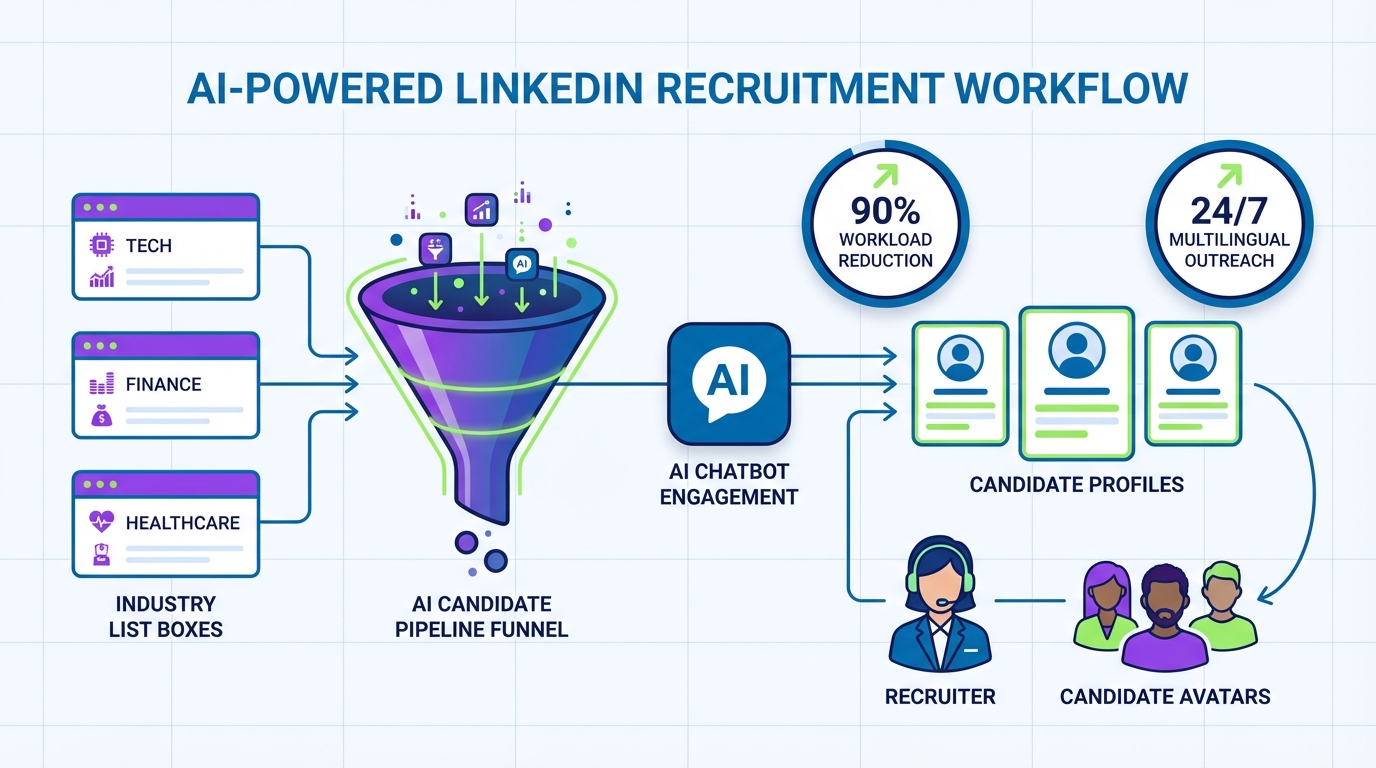
An ai recruiting tool helps recruiters keep hiring momentum by automating automated candidate sourcing, outreach, and follow up while you focus on interviews and final selection. Using the 2020 “still hiring” snapshot in Canada as a practical reference, this guide shows how to turn a list of active sectors into a repeatable workflow: pick target industries, build role specific search criteria, run sourcing tools for recruiters, and keep candidate conversations moving 24/7. We also explain how StrategyBrain AI Recruiter fits into LinkedIn recruiting by automatically connecting with candidates, introducing roles, answering common questions, and collecting résumés and contact details from interested prospects. Scope: this article does not claim these companies are hiring today; it shows how to operationalize the list with modern recruiting automation.
Key Takeaways
- Turn lists into pipelines: Convert industry “still hiring” lists into a sourcing plan with role specific search criteria and outreach sequences.
- Automate the top of funnel: StrategyBrain AI Recruiter can automate LinkedIn connecting, role introduction, Q&A, and follow up to reduce manual workload by up to 90% (Source: StrategyBrain product information).
- Collect what matters: For interested candidates, StrategyBrain AI Recruiter collects résumés and contact details so recruiters can move directly to screening and interviews.
- Global coverage: 24/7 multilingual messaging supports candidate communication across time zones and languages (Source: StrategyBrain product information).
- Scale with teams: You can manage more than 100 LinkedIn accounts to build an AI powered recruiting team (Source: StrategyBrain product information).
- Compliance matters: Use tools that state privacy and security practices such as encryption and not training models on customer data (Source: StrategyBrain product information).
Why this “still hiring” list still matters for recruiters
The original 2020 post was written during the COVID 19 period and highlighted sectors that continued hiring. Even though the market context changes, the recruiting lesson is durable: when uncertainty rises, hiring concentrates in specific sectors and job families. If you can identify those pockets early, you can allocate sourcing time and outreach volume where response rates are more likely to be healthy.
In practice, recruiters often lose time because a “list of companies” is not yet a sourcing plan. The missing step is operationalization: turning a list into search criteria, messaging, follow up rules, and a consistent way to capture résumés and contact details. That is exactly where an ai recruiting tool and LinkedIn automation can help.
Industries and example employers from the 2020 snapshot
Below is the industry breakdown and example employers as presented in the source material (May 28, 2020). This is included as historical reference and a dataset you can practice on.
Grocery and Supermarket Sector
- Kroger Family of Companies
- Loblaws and Shoppers Drug Mart
- Sobeys
- Walmart Canada
- Dollarama
- Save On Foods
- Goodfood (online grocery)
- Metro
Food and Services and Food and Beverage
- Pepsico Beverages Canada
- Domino’s Pizza
- Gabriel Pizza
- Grabfood Market Corp
- Sodexo Canada
- Amica Senior Lifestyles
- Canada Bread
- Exceldor
Delivery Services
- Spud.ca (grocery delivery)
- Instacart (grocery delivery)
Banking
- Wells Fargo
Transportation
- Fresh Tracks Canada
IT
- Shopify
- Cyclica
- Tealbook
- Dialogue Technologies
- Mind Beacon
- Opentext
- Desire2Learn
- Amazon
- Unity Technologies
- Slack
- Carbon Black
Health Care
- Vancouver Coastal Health
- Dialogue
- Alberta Health Services
- Umano Medical (hospital bed manufacturer)
- Babylon Health
- InkSmith (production of face shields for the nation’s healthcare workers)
- Apotex (pharmaceutical)
- Sienna Senior Living (senior care facility)
- Philips (health technology)
Customer Service
- Paladin Security
- 24 7 Intouch
- SSENSE
- Nordia
- Telus Digital
- Plenty of Fish Media (online dating)
Manufacturing
- Unilever
- Randstad
A practical workflow using an AI recruiting tool
We have used this exact “industry list to pipeline” approach when we needed to move fast and keep outreach consistent across multiple roles. The key is to treat the list as input data, then apply a repeatable process that can be audited and improved.
Step by step
- Pick 1 to 2 target sectors for the week. Choose based on your open roles and where you expect candidate availability.
- Define search criteria. Write down titles, seniority, location, and must have skills. This becomes your sourcing query.
- Decide your outreach objective. Examples include “confirm interview interest” or “collect résumé and email.”
- Choose your execution mode. Use LinkedIn automation for scale, or manual sourcing for niche roles.
- Set follow up rules. Define timing and stop conditions so candidates are not spammed and recruiters stay compliant.
- Track outcomes. Measure replies, interested candidates, résumés received, and interviews booked.
Definitions (so teams stay aligned)
- Automated candidate sourcing: software assisted identification and initial engagement of candidates based on defined criteria.
- Qualification: confirming interest and basic fit signals. Final résumé to requirements matching is still a recruiter decision.
- Follow up workflow: a planned sequence of messages and reminders that stops when a candidate opts out or moves forward.
Method 1: LinkedIn outreach automation with StrategyBrain AI Recruiter (recommended)
If your bottleneck is top of funnel time, StrategyBrain AI Recruiter is designed to replace the repetitive LinkedIn steps that consume recruiter hours: connecting, introducing the role, answering common questions, confirming interest, and collecting résumés and contact details. In our experience, the biggest operational win is consistency: every candidate gets timely responses and follow ups, even outside business hours.
Steps
- Prepare the role brief. Include company details, compensation, benefits, and the candidate search criteria you want to target.
- Authorize the LinkedIn account. Provide the LinkedIn account you want the AI to operate from, with explicit authorization.
- Launch outreach. The system automatically connects with candidates within your targeted criteria and introduces the opportunity.
- Let the AI handle Q&A and follow up. It learns each candidate’s situation, answers questions about the role and employer, and confirms interview interest.
- Collect résumés and contact details. For interested candidates, the AI requests a résumé and captures contact information shared in messages.
- Recruiter reviews and schedules interviews. You review the collected résumés and proceed with screening and interview scheduling.
Features that matter for sourcing teams
- Smart LinkedIn recruitment automation: automatic connect, introduction, and interest confirmation.
- 24/7 multilingual communication: always on responses in the candidate’s native language to reduce misunderstandings.
- AI powered recruitment teams: manage more than 100 LinkedIn accounts to scale outreach capacity.
Limitations (what it does not do)
- It does not make the final “meets requirements” decision. StrategyBrain AI Recruiter can confirm willingness to communicate or interview, but recruiters still evaluate résumé fit against job requirements.
- It depends on your inputs. If compensation, benefits, or role scope are unclear, candidate conversations will surface that quickly. The fix is a tighter role brief.
Best For
- Recruiters who need consistent outreach and follow up at scale
- Teams hiring across time zones or multiple languages
- Organizations that want to expand hiring output without adding headcount
Method 2: Manual sourcing with structured templates
Manual sourcing is still valuable for niche roles, executive searches, or when you need high personalization. The risk is inconsistency: different recruiters message differently, follow ups slip, and résumé collection becomes messy. A simple template system reduces that risk.
Steps
- Create a 3 message sequence. Message 1 is the role intro, message 2 is a short follow up, message 3 is a close the loop note.
- Standardize the qualification questions. Ask availability, location constraints, compensation expectations, and interest in an interview.
- Use a résumé capture checklist. Always request résumé and a preferred contact method once interest is confirmed.
Best For
- Hard to fill roles where personalization is the differentiator
- Small pipelines where quality matters more than volume
- Situations where you must tightly control messaging tone
Method 3: Recruiter led referrals and warm introductions
Referrals can outperform cold outreach when trust is the main barrier. The operational challenge is speed: referrals still need fast follow up, clear role context, and a consistent way to collect résumés and contact details. Many teams combine referrals with an ai recruiting tool so the first response and scheduling momentum does not stall.
Steps
- Ask for role specific referrals. Provide a short description and 3 must have requirements.
- Respond within 24 hours. Fast response protects the referrer relationship and improves candidate conversion.
- Confirm interest and collect documents. Move quickly to résumé and contact details, then schedule interviews.
Best For
- Roles where credibility and trust are critical
- Teams with strong internal networks
- Hiring managers who can actively participate in outreach
Quick Comparison
| Method | Speed to first outreach | Operational consistency | Best For |
|---|---|---|---|
| StrategyBrain AI Recruiter on LinkedIn | High | High | High volume outreach, 24/7 follow up, multilingual hiring |
| Manual sourcing with templates | Medium | Medium | Niche roles needing personalization |
| Referrals and warm introductions | Variable | Medium | Trust sensitive roles and network driven hiring |
FAQ
What is an ai recruiting tool in practical terms?
An ai recruiting tool is software that automates parts of recruiting such as candidate discovery, outreach, follow up, and information capture. In this guide, we focus on top of funnel work where automation can save the most recruiter time.
How does StrategyBrain AI Recruiter work on LinkedIn?
It automates the initial outreach and qualification flow by connecting with candidates that match your criteria, introducing the role, answering questions about the job and company, confirming interest, and collecting résumés and contact details from interested candidates (Source: StrategyBrain product information).
Does StrategyBrain AI Recruiter decide if a candidate is qualified?
No. It identifies willingness to communicate or interview, but it does not determine whether the résumé fully matches job requirements. Recruiters make the final fit decision after reviewing the résumé (Source: StrategyBrain product information).
How does it collect résumés and contact details?
When a candidate expresses interest, it requests a résumé and captures contact details shared in LinkedIn messages. It supports email submissions and LinkedIn file uploads, and it marks résumés as received when provided (Source: StrategyBrain product information).
Can it support multilingual candidate outreach?
Yes. StrategyBrain AI Recruiter provides 24/7 messaging and can communicate in the candidate’s native language to reduce misunderstandings and cultural friction (Source: StrategyBrain product information).
How can teams scale outreach without adding recruiters?
One approach is to build an AI powered recruiting team by managing more than 100 LinkedIn accounts through StrategyBrain AI Recruiter, increasing outreach capacity while keeping recruiter time focused on interviews and final selection (Source: StrategyBrain product information).
Is candidate data used to train AI models?
StrategyBrain states that customer provided data is not used to train AI models and that data is encrypted and isolated per customer. You should still validate privacy and security terms with your legal and security teams before deployment (Source: StrategyBrain product information).
Are the companies listed in this article hiring right now?
This article does not claim that. The company list is from a May 28, 2020 snapshot and is used here as source material to demonstrate a repeatable sourcing workflow.
What is the fastest way to use this article for automated candidate sourcing?
Pick one sector, define a single role and search criteria, then run a structured outreach sequence. If you need scale and consistent follow up, use StrategyBrain AI Recruiter to automate connecting, role introduction, Q&A, and résumé collection on LinkedIn.
Conclusion
The fastest way to operationalize a “still hiring” industry list is to treat it as input data and run a repeatable workflow: choose a sector, define search criteria, execute outreach, and track outcomes. If your main constraint is recruiter time, an ai recruiting tool like StrategyBrain AI Recruiter can automate the LinkedIn steps that slow teams down: connecting, introducing roles, answering questions, following up, and collecting résumés and contact details. Next step: pick one sector from the list above and run a 7 day pilot with clear metrics for replies, interested candidates, résumés received, and interviews booked.














