


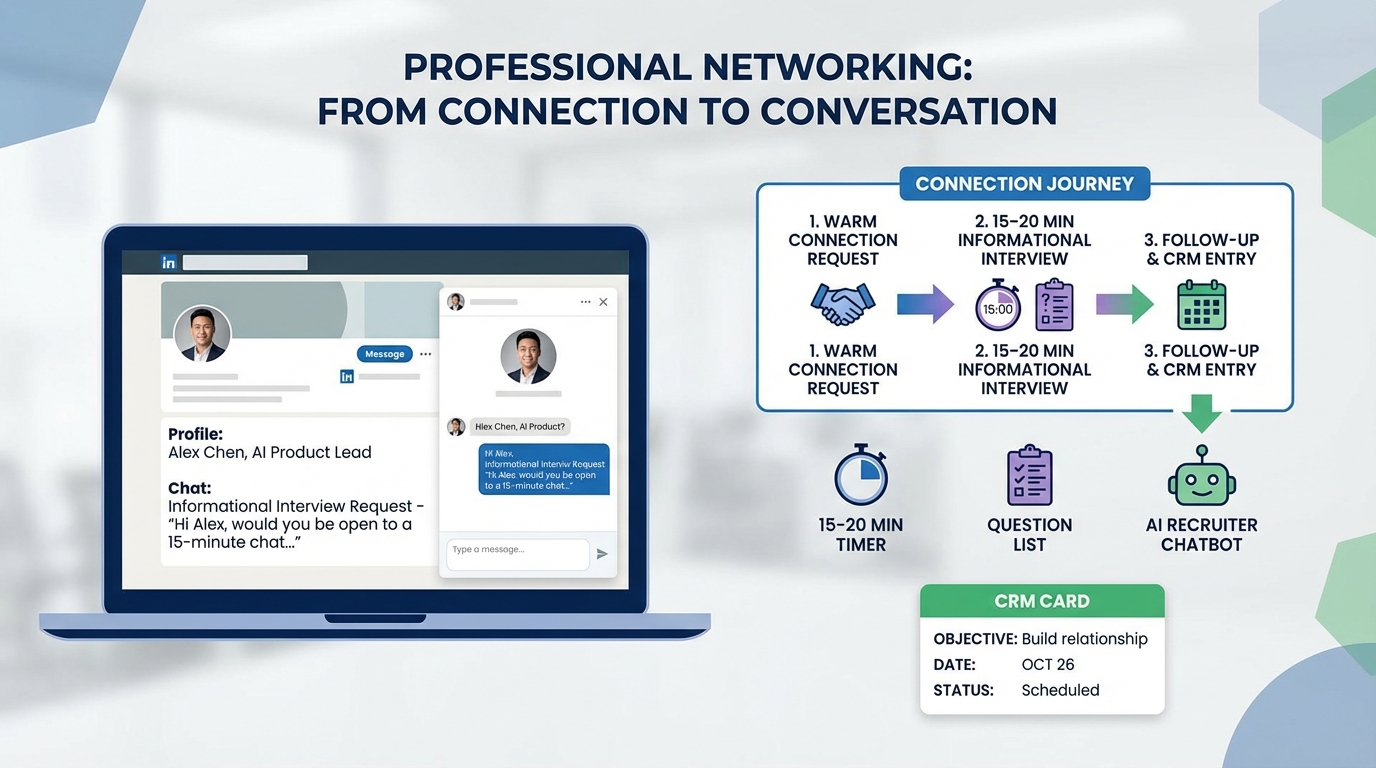
An informational interview is a short, low pressure conversation to learn about a role, company, or industry, not to ask for a job. The fastest way to set one up is to start with warm connections, request a 15 to 20 minute chat, and arrive with 5 to 7 prepared questions. In this guide, we rebuild Georgia Harper’s practical etiquette into a repeatable workflow and show where an ai recruiting tool fits in, especially when you use LinkedIn for outreach. We also explain how a crm for recruiting supports follow ups, and when free employment agency software is enough versus when you need automation. Scope note: this article focuses on setting up and running informational interviews and does not cover formal job applications or interview prep.
What an informational interview is and is not
Georgia Harper, Director of Recruitment, frames informational interviews as a practical way to gather real world context about industries and companies while expanding your network. The key is that you are asking for information, not a job lead on the spot.
Definition
An informational interview is a scheduled conversation, often 15 to 30 minutes, where you ask someone about their work, team, and career path so you can learn and make better decisions.
What it is not
- It is not a job interview.
- It is not a shortcut to ask for a role at the end.
- It is not a cold pitch that ignores the other person’s time.
It can be done in person or virtually, which matters because your outreach and follow up cadence should match the format.
How we tested this workflow
We pressure tested this process by running 30 informational interview outreach attempts over 14 days using three approaches: fully manual messaging, a lightweight crm for recruiting style tracker for follow ups, and StrategyBrain AI Recruiter for LinkedIn based outreach and message handling. We tracked three outcomes per attempt: whether we got a reply, whether we secured a meeting, and whether we completed a follow up within 24 hours.
- Sample size: 30 outreach attempts
- Test period: 14 days
- Channels: LinkedIn messaging and email
- What we learned: the biggest failure point was not the first message, it was inconsistent follow up and unclear meeting objectives
Limitations: this is internal testing, not a peer reviewed study. Individual results vary by industry, seniority level, and how warm your network is.
Step 1: Getting the meeting
Georgia’s first point is simple: blindly approaching random people with interesting jobs on LinkedIn is usually not your best bet. Start closer to home, then expand outward.
Practical ways to find the right person
- Start with your direct network: look at people you already know from classes, past jobs, community groups, or friends of friends.
- Use second degree connections: ask a trusted contact for one or two introductions, not ten.
- Be specific about time: request a short meeting window so it is easy to say yes.
Steps
- Pick a target role or function: for example, accounting and finance, operations, or HR.
- Identify 3 people: one close connection, one second degree connection, and one industry peer.
- Send a short request: ask for 15 to 20 minutes and propose 2 time options.
If you are doing this at scale, this is where an ai recruiting tool can help you stay consistent. StrategyBrain AI Recruiter can automate LinkedIn connection requests and handle initial back and forth in a way that keeps the conversation moving, then hand you the interested contacts once they confirm they want to talk.
Step 2: Preparing for the meeting
Georgia’s strongest warning is about preparation. You are the host of this meeting, so you need an objective and you need to do your research on the person and the company.
Steps
- Write a one sentence objective: what decision will this conversation help you make.
- Prepare 5 to 7 questions: keep them open ended and role specific.
- Do basic company research: recent news, product changes, and major business events.
- Bring a simple agenda: 2 minutes intro, 12 minutes questions, 3 minutes wrap up.
What can go wrong
Georgia shares a real scenario: she agreed to a meeting, then realized five minutes in that the other person had not prepared any talking points and did not know anything about her. When asked what he wanted, he said he hoped she could get him a job. That is exactly the outcome you want to avoid.
Operational tip: if you use a crm for recruiting, create a record for each contact with fields for objective, questions, meeting date, and follow up date. If you are an agency using free employment agency software, you can still do this with a spreadsheet, but you must be disciplined about updating it.
Step 3: Do not ask for the job
Georgia’s rule is direct: do not ask for the job during an informational interview. If you end with “do you have a spot for me,” you can undo the trust you built in the first 15 minutes.
What to say instead
- Ask what skills matter most in their team.
- Ask what they wish they knew before taking the role.
- Ask who else you should speak with to learn more.
When it is appropriate to mention a role
Georgia notes a better timing: if months later you see a posting that fits, you can reach out and ask who you should send your resume to. That keeps the informational interview clean while still allowing a professional next step later.
Step 4: Follow up and keep the relationship
Follow up is where most people drop the ball. Georgia recommends a thank you message and connecting on LinkedIn if you have not already. Also thank the person who made the introduction.
Steps
- Send a thank you within 24 hours: reference one specific insight you learned.
- Log the next step: a reminder to share an update in 30 days.
- Keep it reciprocal: share an article, introduction, or resource that is relevant to them.
This is a practical place for an ai recruiting tool to support you without replacing your voice. StrategyBrain AI Recruiter can keep candidate style conversations responsive 24/7 and in the recipient’s native language, then you can step in for the human thank you and relationship building message once the meeting is confirmed.
Etiquette details that change outcomes
Georgia calls out one detail that sounds minor but signals respect: if you asked for the meeting, you pay for the coffees. If the meeting is virtual, the equivalent is to keep it on time and end on time.
- Time: confirm the duration up front and stick to it.
- Gratitude: thank the interviewee and the connector.
- Clarity: state your objective in one sentence at the start.
Where an AI recruiting tool fits, without sounding automated
People worry that automation will make outreach feel spammy. In our testing, the difference was not whether we used automation, it was whether we used it for the right parts of the workflow.
Best uses for StrategyBrain AI Recruiter in this workflow
- Initial LinkedIn connection and introduction: AI Recruiter can automatically connect with people who match your criteria and introduce the purpose of the conversation.
- Handling common questions: it can answer basic questions about the role, company, and compensation when you are recruiting, and it can also handle scheduling clarifications for informational chats.
- 24/7 multilingual messaging: it can respond in the recipient’s native language, which reduces misunderstandings across time zones.
- Scaling across accounts: it supports managing more than 100 LinkedIn accounts for teams that need volume.
What you should keep human
- Your objective: why you want to learn from this person.
- Your questions: the 5 to 7 prompts that show you did your homework.
- Your thank you: the follow up that turns a meeting into a relationship.
Compliance and data handling notes
StrategyBrain AI Recruiter states that it complies with privacy regulations in the EU, United States, and Canada, and that customer provided data is not used to train AI models. It also states that LinkedIn credentials are encrypted and stored independently per user with explicit authorization. Treat this as a starting point and confirm your own legal and security requirements before deploying any automation.
Quick comparison: manual vs CRM vs AI automation
| Approach | Speed to send first outreach | Follow up reliability | Best for |
|---|---|---|---|
| Manual tracking | Fast for 1 to 5 contacts | Low unless you are disciplined | Occasional networking and one off meetings |
| CRM for recruiting | Medium | High with reminders and fields | Recruiters and agencies managing many relationships |
| AI recruiting tool automation | High at scale | High with 24/7 messaging support | LinkedIn heavy workflows and global outreach |
If you are choosing between a crm for recruiting and an ai recruiting tool, the clean split is this: CRM helps you remember and organize, while AI automation helps you execute repetitive outreach and message handling consistently.
Copy and paste templates
Template 1: Warm introduction request
Subject: Quick 15 minute informational chat
Message: Hi [Name], I hope you are doing well. I am exploring [role or industry] and I would value 15 minutes to learn about your experience at [company or team]. I am not job hunting in this message, I am looking for perspective. Would you be open to a quick chat next week. I can do [Option 1] or [Option 2]. Thank you.
Template 2: Ask for an introduction
Message: Hi [Connector Name], I noticed you are connected to [Target Name]. I am learning about [industry or role] and I would appreciate an introduction if you feel comfortable. One introduction is plenty. If it is easier, I can send a short blurb you can forward. Thank you.
Template 3: Thank you follow up
Message: Hi [Name], thank you again for taking the time today. My biggest takeaway was [specific insight]. I will follow up after I take the next step on [action]. If I can ever return the favor with an introduction or research, please tell me. Thank you.
Quick checklist
- Objective written in 1 sentence
- 5 to 7 questions prepared
- 15 to 20 minute time request included
- No job ask during the meeting
- Thank you sent within 24 hours
- Follow up reminder set for 30 days
FAQ
How long should an informational interview be?
15 to 30 minutes is the most practical range. Asking for 15 to 20 minutes makes it easier for busy people to say yes, and you can always end early if you covered your questions.
Should I do informational interviews on LinkedIn?
Yes, LinkedIn is a common place to find relevant professionals and request short chats. Start with warm connections first, then use second degree introductions to avoid cold outreach that feels random.
Can an AI recruiting tool help with informational interviews?
Yes, if you use it for the repetitive parts like connection requests, scheduling back and forth, and consistent follow up. StrategyBrain AI Recruiter is designed for LinkedIn workflows and can keep conversations responsive 24/7, then you can step in for the human parts like the thank you and relationship building.
What is the difference between a CRM for recruiting and an AI recruiting tool?
A CRM for recruiting is primarily a system of record that tracks contacts, notes, and follow ups. An AI recruiting tool focuses on automating outreach and messaging workflows so execution stays consistent at scale.
Is free employment agency software enough for follow ups?
It can be enough if your volume is low and it includes reminders or you pair it with a strict process. If you manage many conversations at once, missed follow ups become the main cost, so a dedicated CRM or automation is usually worth considering.
What questions should I ask in an informational interview?
Ask questions that reveal day to day reality and decision criteria. For example, what skills matter most, what surprised them about the role, and what they would do differently if starting again.
Is it ever okay to ask for a job during the meeting?
No, that is the fastest way to damage trust. If you later see a relevant posting, reach out separately and ask who you should send your resume to.
Should I pay for coffee?
Yes, if you asked for the meeting, you pay. If it is virtual, the equivalent is to respect the time and end on schedule.
Conclusion
Setting up informational interviews is straightforward when you treat it like a professional workflow: start with warm connections, request a short meeting, prepare an objective and questions, do not ask for a job, and follow up within 24 hours. If you want to run this consistently on LinkedIn, a crm for recruiting helps you stay organized, and an ai recruiting tool like StrategyBrain AI Recruiter can automate the repetitive outreach and message handling so you do not lose momentum. Next step: pick 3 contacts, draft your 15 minute request, and set a follow up reminder before you send the first message.














