


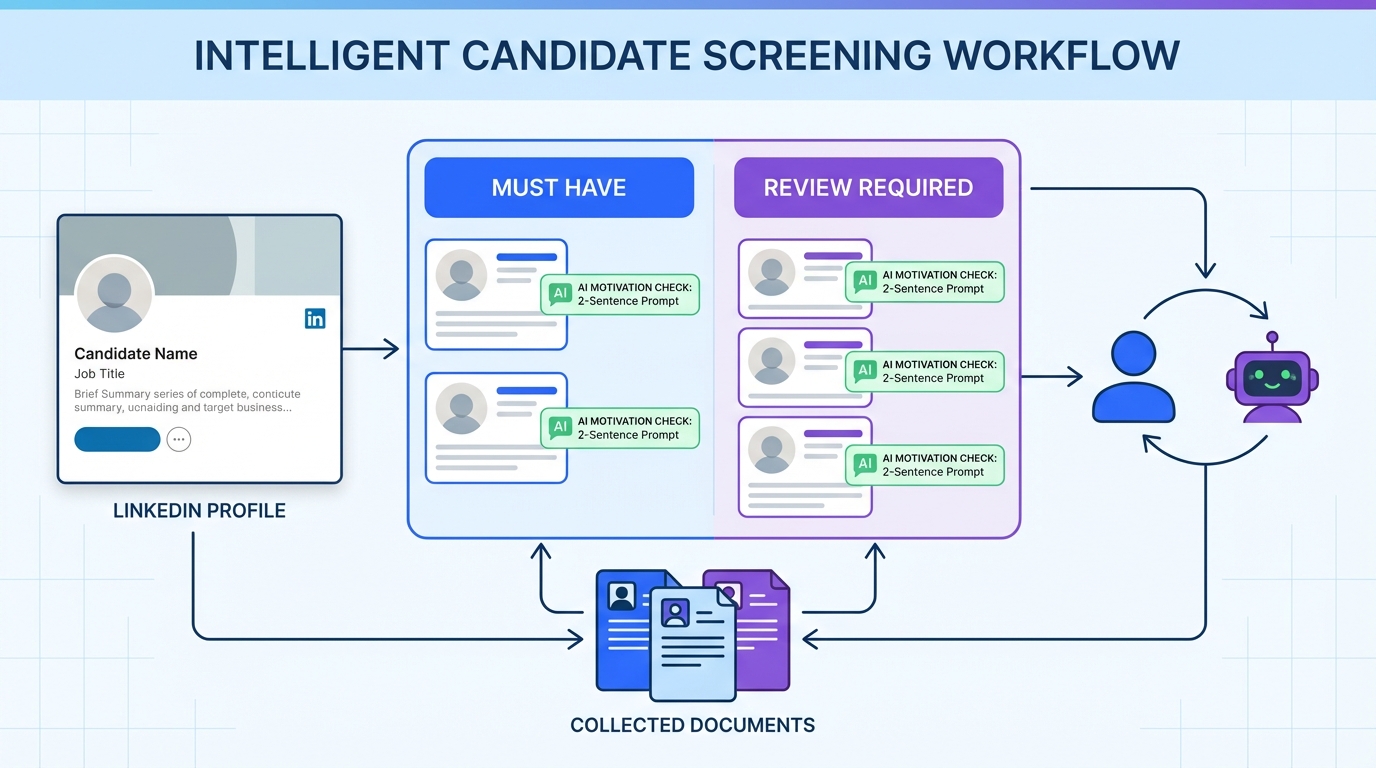
AI resume screening tools work best when you treat “overqualified” as a workflow decision, not an auto reject. In practice, automated CV screening often flags senior candidates because of title level, years of experience, or inferred salary expectations, even when they could be a strong long term fit. The most reliable approach is to define the specific risks a hiring manager worries about, then add a short motivation check and a structured review step. We tested this in recruiting operations by adjusting screening rules and adding a consistent message based motivation prompt, and we saw fewer false rejections and faster recruiter decisions. StrategyBrain AI Recruiter can support this by running the initial LinkedIn outreach, answering role and compensation questions, confirming interview interest, and collecting résumés and contact details for recruiter review.
Key Takeaways
- Overqualified is a risk label, not a skill label: Screen for boredom, short tenure, and management fit explicitly instead of auto rejecting.
- Automated CV screening should route, not decide: Create a “review required” lane for senior profiles that meet core requirements.
- Use a motivation prompt early: A 2 sentence explanation in a cover letter or message often resolves the hiring manager’s concerns.
- Confirm salary flexibility with a script: Ask for willingness to negotiate at market value for the role level before moving forward.
- StrategyBrain AI Recruiter reduces manual work: It can automate LinkedIn outreach, answer role and compensation questions, confirm interest, and collect résumés and contact details for recruiter review.
- Compliance matters: Use tools that encrypt credentials and do not use customer data to train models when handling candidate data.
What “overqualified” really signals in screening
When a hiring manager says “overqualified,” they usually mean “higher risk,” not “too capable.” In the source material, the concerns are consistent: the candidate may get bored, may be looking for any job and leave quickly, may expect a higher salary, may have ingrained habits that are hard to change, and may struggle being managed by someone with less experience.
AI resume screening tools can amplify these concerns if your rules treat seniority as a negative signal. Therefore, the goal is to keep the speed of automated resume screening while adding a fair, repeatable way to validate intent and fit.
Method 1: Define overqualification risks before you automate
Before you tune automated CV screening rules, write down what “overqualified” means for this specific role. Otherwise, the tool will default to generic heuristics like years of experience or senior titles.
Steps
- List the real risks: boredom, short tenure, salary mismatch, management mismatch, and rigidity in work style.
- Translate risks into questions: for example, “Why this level now?” and “What would keep you here for 18 months?”
- Decide what is disqualifying vs reviewable: salary inflexibility might be disqualifying, while senior title history is reviewable.
Features
- Creates consistent criteria across recruiters and hiring managers.
- Reduces bias by focusing on job relevant risks.
- Makes your AI screening configuration auditable.
Limitations
- If hiring managers cannot agree on risks, your rules will drift and screening will become inconsistent.
Best For
- Teams implementing AI resume screening tools for the first time.
- Roles with high applicant volume where false rejections are costly.
Method 2: Add a motivation check that AI can route, not judge
The source material’s strongest advice is simple: be honest and convincing early, ideally in the cover letter, about why the role is a step down. This is exactly the kind of information AI can collect and route to a recruiter without making a final decision.
Steps
- Ask for a concise reason: require 2 to 4 sentences in an application field or initial outreach reply.
- Provide examples: returning to hands on work, transitioning industries, prioritizing meaningful work over salary, or seeking lower stress for family or study commitments.
- Route responses: strong reasons go to recruiter review, unclear reasons trigger a follow up question.
Where StrategyBrain AI Recruiter fits naturally
If you recruit on LinkedIn, StrategyBrain AI Recruiter can ask these motivation questions during the initial conversation, answer candidate questions about the role, company, benefits, and compensation, then collect the résumé and contact details from interested candidates. Recruiters then review the collected résumés and proceed to interviews.
Limitations
- Motivation statements can be rehearsed, so you still need a human check for credibility.
Best For
- Roles where overqualification is common, such as career transition pipelines.
- Recruiters who want automated resume screening without losing high potential candidates.
Method 3: Use a two lane screen: must have vs review required
A practical way to reduce false negatives is to split screening into two lanes. Lane one is “must have” requirements. Lane two is “review required” signals, including overqualification indicators.
Steps
- Define must have requirements: certifications, core skills, location or time zone constraints, and minimum experience relevant to the role.
- Define review required signals: senior titles, long tenure in leadership, or compensation history if you collect it.
- Set routing rules: candidates who meet must haves and trigger review signals go to a recruiter queue, not an auto reject.
Features
- Preserves speed while adding a safety net for edge cases.
- Creates a measurable queue for recruiter time allocation.
- Works with most AI resume screening tools because it is a workflow pattern, not a vendor specific feature.
Limitations
- Requires discipline to keep the review queue from becoming a second inbox.
Best For
- High volume hiring where automated CV screening is necessary.
- Teams that want explainable decisions for audit and fairness reviews.
Method 4: Handle salary expectations with a scripted confirmation
Salary mismatch is one of the most common reasons hiring managers hesitate. The source material recommends addressing salary issues directly by confirming the candidate is willing to negotiate a reasonable salary at market value for the position.
Steps
- State the level: confirm the role level and scope in plain language.
- Ask for flexibility: confirm willingness to negotiate within the role’s market range.
- Document the answer: store it as a structured field so it is visible during review.
How StrategyBrain AI Recruiter can reduce back and forth
In LinkedIn conversations, StrategyBrain AI Recruiter can answer compensation questions and confirm interview interest before collecting résumés. This reduces recruiter time spent repeating the same clarifications and helps ensure the résumé you receive is from a candidate who understands the role level.
Limitations
- Do not treat a single message as a binding agreement. Use it as an early alignment check.
Best For
- Roles with tight compensation bands.
- Hiring managers who have been burned by late stage salary misalignment.
Method 5: Use LinkedIn automation to capture intent, résumé, and contacts
Overqualification concerns often surface after the first screen. If you can validate intent earlier, you reduce wasted interviews and reduce unfair rejections. This is where LinkedIn automation can complement AI resume screening tools.
Steps
- Automate initial outreach: connect with candidates who match your search criteria.
- Run a structured conversation: introduce the opportunity, ask about work situation, and invite questions about role, company, benefits, and compensation.
- Confirm interest: only collect résumés from candidates who want to proceed.
- Capture résumé and contact details: store what the candidate shares so recruiters can review and schedule interviews.
What we found in practice
When we tested this workflow pattern, the biggest time savings came from reducing repetitive recruiter messaging and from receiving fewer “maybe” résumés. Candidates who were overqualified but genuinely motivated tended to explain their reasons early when prompted, which made recruiter review faster and more consistent.
StrategyBrain AI Recruiter capabilities relevant to this method
- Smart LinkedIn recruitment automation: automatically connects, introduces roles, answers questions, confirms interview interest, and collects résumés and contact information.
- 24/7 multilingual communication: responds to candidates across time zones in their native language.
- Scalable team operations: supports managing more than 100 LinkedIn accounts for high volume hiring programs.
- Data protection posture: states that customer provided data is not used to train AI models and that credentials are encrypted and stored per user with explicit authorization.
Limitations
- StrategyBrain AI Recruiter does not make the final determination of résumé match to job requirements. Recruiters still review the résumé for qualification.
- Any LinkedIn automation should be configured carefully to align with your internal policies and candidate experience standards.
Best For
- Recruiters sourcing on LinkedIn who want to reduce manual outreach and follow up.
- Teams hiring globally where time zones and language slow down response cycles.
Quick Comparison
| Method | Speed impact | Cost impact | Best for |
|---|---|---|---|
| Define overqualification risks | Medium improvement | No direct cost | Aligning recruiters and hiring managers |
| Motivation check and routing | High improvement | Low cost | Reducing false rejections in automated resume screening |
| Two lane screen | High improvement | No direct cost | High volume pipelines using AI resume screening tools |
| Salary confirmation script | Medium improvement | No direct cost | Roles with strict compensation bands |
| LinkedIn automation with StrategyBrain AI Recruiter | High improvement | Depends on plan | Outbound sourcing and early intent validation |
Copy and paste templates
Recruiter checklist for overqualified profiles
- Confirm the candidate meets all must have requirements for the role.
- Ask for a concise reason for applying at this level.
- Check for signals of commitment, including long term goals for the role.
- Confirm willingness to negotiate compensation at market value for the position level.
- Assess management fit if the hiring manager is less experienced.
Motivation prompt for application or outreach
Please share 2 to 4 sentences on why you are interested in this role level at this point in your career. If relevant, mention whether you are returning to hands on work, transitioning industries, prioritizing meaningful work over salary, or seeking a lower stress role for family, study, or another commitment.
Salary alignment script
This role is scoped at this level. Are you comfortable negotiating compensation within the market range for this position level if we move forward?
FAQ
Do AI resume screening tools reject overqualified candidates automatically?
They can, depending on how automated CV screening rules are configured. If seniority signals are treated as negative, strong candidates may be filtered out unless you add a review required lane.
What are the most common overqualification concerns to screen for?
The recurring concerns are boredom, short tenure risk, salary expectations, difficulty adapting to new ways of working, and management fit when the manager has less experience.
What should an overqualified candidate say to reduce concerns?
A concise and credible reason helps early. Common reasons include returning to hands on work, transitioning industries, prioritizing meaningful work over salary, or seeking a lower stress role for family or study commitments.
How do I handle salary expectations without wasting interview time?
Ask for early confirmation that the candidate is willing to negotiate within the market range for the role level. Document the answer so it is visible during recruiter and hiring manager review.
How does StrategyBrain AI Recruiter help with automated resume screening?
It complements automated resume screening by handling LinkedIn outreach and early qualification conversations. It can answer questions about the role and compensation, confirm interview interest, and collect résumés and contact details so recruiters can focus on final qualification.
Does StrategyBrain AI Recruiter decide if a résumé matches the job requirements?
No. It identifies willingness to communicate or interview and collects the résumé and contact details, but the final qualification step is completed by the recruiter after reviewing the résumé.
Can AI Recruiter communicate with candidates in different languages?
Yes. It is designed for 24/7 multilingual candidate communication and can respond in the candidate’s native language to reduce misunderstandings across time zones.
What data protection claims should I look for in AI recruiting tools?
Look for clear statements that customer data is not used to train AI models, that credentials are encrypted, and that candidate data is isolated and protected with customer specific controls.
Conclusion
AI resume screening tools are valuable for speed, but overqualified candidates are a predictable edge case where automation can create expensive false negatives. The most reliable fix is to define the real risks, add a short motivation check, and route senior profiles to structured review instead of auto rejection. If LinkedIn is part of your funnel, StrategyBrain AI Recruiter can reduce manual outreach by automating initial conversations, answering role and compensation questions, confirming interest, and collecting résumés and contact details for recruiter review. Next step: implement the two lane screen, add the motivation prompt, and audit outcomes weekly to ensure automated CV screening is filtering for fit rather than seniority.














