


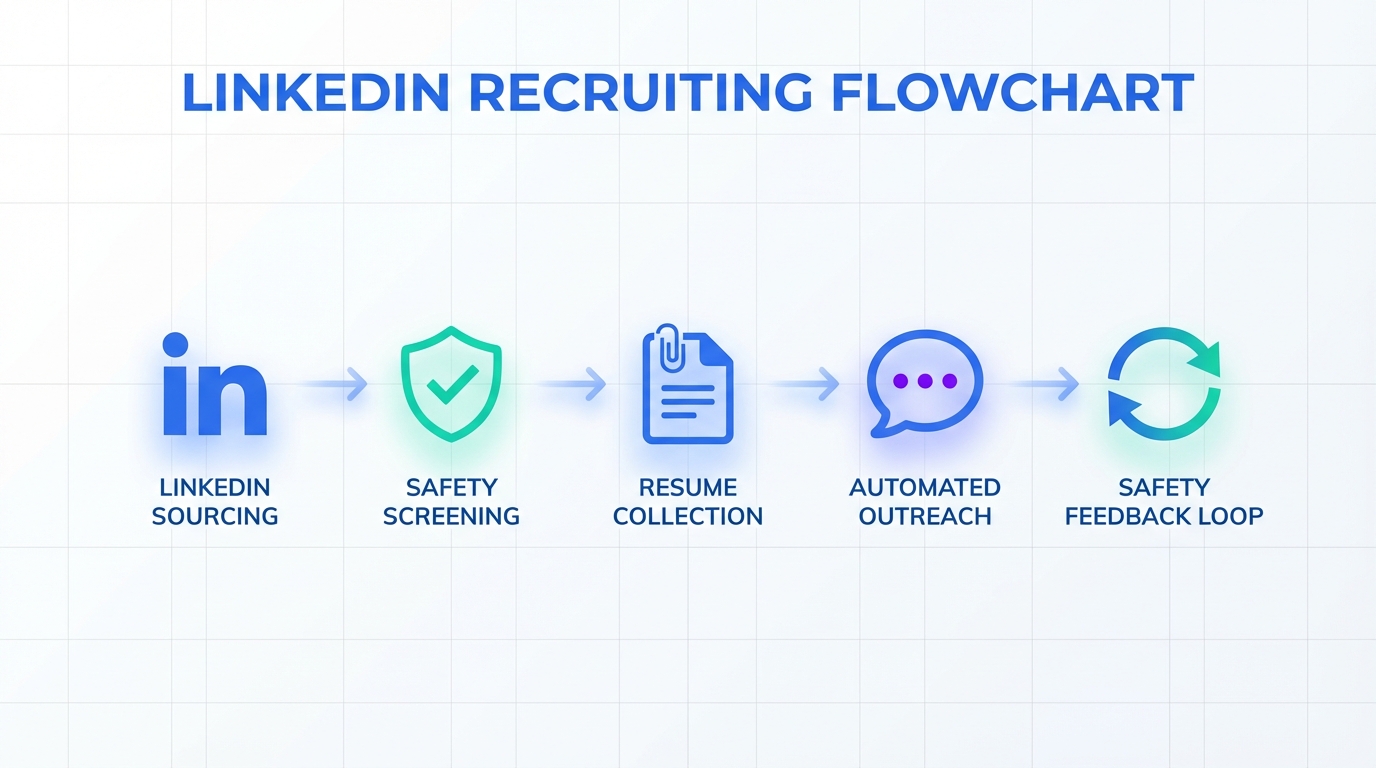
AI resume screening tools work best when you treat safety as a first-class hiring requirement, not an afterthought. The practical approach is simple: define safety-critical competencies in the role profile, screen resumes for verifiable safety training and prevention behaviors, then validate those signals with structured behavioral interview questions. In our own recruiting workflows for industrial and field roles, we found the fastest way to move from screening to real evaluation was to combine resume screening with LinkedIn outreach automation using StrategyBrain AI Recruiter, which can automatically connect with candidates, introduce the role, answer common questions, and collect resumes and contact details from interested candidates so recruiters can focus on safety-focused assessment.
Key Takeaways
- Safety-first screening reduces preventable risk: Make safety a required competency and screen for evidence, not slogans.
- AI screening is only as good as your criteria: Define must-have safety signals and disqualifiers before you run resume screening.
- Use behavioral questions in every interview: Ask for specific actions the candidate took to prevent incidents and stop unsafe work.
- Speed comes from automating outreach: StrategyBrain AI Recruiter can automate LinkedIn connecting, role intro, Q&A, and resume collection.
- Be honest about limitations: AI can surface patterns, but it cannot guarantee safety performance without human validation.
- Operationalize learning: Track post-hire safety outcomes and update your screening rubric quarterly.
Why safety must lead your screening
I still remember getting a call about a placement who was injured on the job after being crushed by heavy equipment. That kind of moment changes how you think about hiring. In industrial settings, most people can name near misses and severe injuries they have seen or heard about. The uncomfortable question is why safety is not one of the first topics in interviews and why it is not treated as a core hiring requirement.
Accidents can be prevented. Some organizations reach a point where serious incidents become rare because safety expectations are built into daily work and reinforced through training, supervision, and accountability. Hiring is part of that system. If you do not screen for safety behaviors and safety mindset, you are leaving a critical control point to chance.
What AI resume screening tools can and cannot do
AI resume screening tools are software systems that use rules, machine learning, or large language models to rank, filter, or summarize resumes against a job profile. They can help you process volume, standardize initial review, and reduce time spent on repetitive sorting.
However, they do not magically “know” who will work safely. They can only detect what is written, what is structured, and what you tell them to prioritize. If your screening criteria ignore safety, the tool will ignore safety too. That is why the most important work happens before you run resume screening.
Scope boundaries
- This guide covers: building a safety-first screening rubric, what to look for on resumes, interview validation, and how to speed up resume collection with LinkedIn automation.
- This guide does not cover: legal advice, jurisdiction-specific safety regulations, or medical/fitness-for-duty assessments.
Method 1: Build a safety-first screening profile (recommended)
If you want AI resume screening tools to help, you need a profile that is explicit about safety. I recommend writing a one-page “Safety-First Role Profile” before you screen a single resume.
Steps
- Define safety-critical tasks: List 5 to 10 tasks where a mistake could injure someone or damage equipment.
- Convert tasks into competencies: For each task, define the competency in observable terms, such as lockout-tagout discipline, hazard identification, or stop-work authority.
- Set must-have evidence: Decide what counts as proof on a resume, such as named certifications, documented training, or specific incident-prevention actions.
- Set disqualifiers: Define clear red flags, such as repeated short tenures in safety-critical roles without explanation, or vague claims with no supporting detail.
- Write your screening prompts: If you use an AI tool that accepts prompts, include your must-haves and disqualifiers in plain language.
Features
- Consistency: Every resume is evaluated against the same safety signals.
- Auditability: You can explain why someone advanced or was rejected.
- Better interviews: Your interview questions map directly to the safety profile.
Limitations
- Garbage in, garbage out: If the profile is vague, the screening output will be vague.
- Resume bias risk: Candidates with strong safety behaviors may not describe them well in writing, so you still need validation steps.
Best For
- Industrial, construction, utilities, mining, and field service roles
- Any role where a near miss can become a serious incident
Method 2: Screen for proof, not claims
Most resumes contain safety buzzwords. Your job is to find evidence. This is also the easiest way to explain how to get your resume noticed by AI to candidates: write what you did, what you used, and what changed, using concrete nouns and verbs.
What to look for during resume screening
- Named training and certifications: The exact course or credential name, plus the year completed when available.
- Safety actions: Examples like leading toolbox talks, performing hazard assessments, writing JSAs, or stopping unsafe work.
- Equipment and environments: Specific equipment types and site conditions that imply safety exposure and discipline.
- Incident prevention language: Phrases that describe prevention steps, not just compliance, such as “identified,” “reported,” “corrected,” “verified.”
Practical template candidates can copy
Resume bullet formula: Action + safety context + tool/process + outcome.
- Example: “Performed pre-task hazard assessments for rotating equipment maintenance, documented controls, and verified lockout steps before work began.”
- Example: “Stopped work when a lift plan changed, escalated to supervisor, and re-briefed crew before resuming.”
Limitations
- Not every employer allows employees to quantify safety outcomes, so avoid requiring metrics that candidates cannot ethically provide.
Method 3: Validate with behavioral safety interview questions
In the original recruiting context that inspired this guide, the point was blunt and correct: every interview should include detailed behavioral questions about safety experience. I agree. If you do not ask, you will not learn how the person behaves when pressure, fatigue, or ambiguity shows up.
Steps
- Pick 3 to 5 safety questions that match the role’s highest-risk tasks.
- Require a specific example: Ask for the last time, not a hypothetical.
- Probe for actions: What did they do, who did they involve, what did they document, what changed.
- Score consistently: Use a simple rubric so interviewers grade the same way.
Behavioral questions you can use
- Prevention: “What steps did you take in a past job to protect other people on site?”
- Stop-work: “Tell me about the last time you saw a coworker doing something unsafe. What did you do next?”
- Near miss: “Describe a near miss you were involved in or witnessed. What changed afterward?”
- Pressure: “When production pressure conflicts with safety steps, how do you handle it? Give a real example.”
- Learning: “What safety practice did you do incorrectly earlier in your career that you would never do now?”
Limitations
- Great talkers can still be risky hires, so pair interviews with reference checks and job-relevant assessments where appropriate.
Method 4: Use LinkedIn automation to collect resumes faster
Resume screening is only one bottleneck. Another is the time it takes to connect with candidates, explain the role, answer repetitive questions, and actually get the resume and contact details into your workflow. This is where StrategyBrain AI Recruiter fits naturally, because it automates the front end of LinkedIn recruiting while keeping the recruiter in control of final qualification.
What we used StrategyBrain AI Recruiter for
- Automated connecting with candidates who match targeted search criteria.
- Automated role introduction and early conversation to confirm interest.
- Q&A handling about role, company, compensation, and benefits based on recruiter-provided details.
- Resume and contact collection from interested candidates, including email submissions and LinkedIn file uploads.
Steps
- Prepare the role packet: Provide company details, compensation, benefits, and candidate search criteria.
- Define the safety-first message: Include 2 to 3 lines that signal safety expectations early, such as stop-work authority and required safety discipline.
- Launch outreach: Let the system connect and start conversations while you monitor responses.
- Collect resumes: For candidates who express interest, the AI requests resumes and captures contact details.
- Human screening and interview: Recruiters review resumes and run the behavioral safety interview questions.
Limitations
- It does not replace final qualification: StrategyBrain AI Recruiter can identify willingness to proceed and collect resumes, but the recruiter still decides fit after reviewing the resume.
- Process discipline required: Automation amplifies whatever message and criteria you provide, so your safety-first role packet must be clear.
Best For
- Teams that need faster candidate response and follow-up across time zones
- Recruiters who want to spend more time on evaluation and less on repetitive messaging
- Organizations scaling outreach across many LinkedIn accounts
Method 5: Close the loop with a safety feedback system
The most overlooked part of using AI resume screening tools is feedback. If you never measure outcomes, your screening criteria never improves. You do not need a complex analytics stack to start. You need a consistent way to learn from hires that went well and hires that created risk.
Steps
- Track 3 post-hire signals: safety incidents, near-miss reporting behavior, and supervisor safety feedback during the first 90 days.
- Map outcomes back to resume signals: Identify which resume patterns correlated with strong safety behavior.
- Update your rubric quarterly: Add or remove screening signals based on evidence.
Unique framework: the Safety-First Screening Loop
- Define: safety-critical tasks and competencies
- Detect: evidence on resumes and in outreach responses
- Validate: behavioral interview questions and references
- Learn: post-hire outcomes update the rubric
Quick Comparison
| Method | Speed Impact | Cost | Best For |
|---|---|---|---|
| Safety-first screening profile | Medium | $0 | Making AI screening outputs consistent and defensible |
| Proof-based resume screening | Medium | $0 | Reducing buzzword-driven shortlists |
| Behavioral safety interviews | Low | $0 | Validating real safety behavior under pressure |
| LinkedIn outreach automation with StrategyBrain AI Recruiter | High | Varies by plan | Faster resume collection and follow-up at scale |
| Safety feedback loop | Medium | $0 | Improving screening accuracy over time |
FAQ
Do AI resume screening tools reject good candidates automatically?
They can, if the criteria are poorly defined or overly rigid. The safest approach is to use AI screening to prioritize review, then validate with structured interviews and consistent rubrics.
How do I get my resume noticed by AI screening?
Use specific, job-relevant nouns and verbs and describe safety actions you actually took. Replace generic claims like “safety focused” with concrete examples such as hazard assessments, stop-work decisions, and documented procedures.
What should I screen for if the role is safety-critical?
Screen for evidence of safety training, prevention behaviors, and experience in similar environments. Then confirm those signals with behavioral questions that require real examples.
Can StrategyBrain AI Recruiter replace resume screening?
No. StrategyBrain AI Recruiter automates LinkedIn outreach, early conversation, and collection of resumes and contact details from interested candidates, but recruiters still perform final qualification by reviewing resumes and interviewing.
Does StrategyBrain AI Recruiter support multilingual candidate communication?
Yes. It is designed for 24/7 multilingual communication so candidates can interact in their native language, which helps reduce misunderstandings across time zones and regions.
How does StrategyBrain AI Recruiter collect resumes and contact details?
When a candidate expresses interest, it requests a resume and captures contact details shared in the conversation. It supports email submissions and LinkedIn file uploads, and it records when a resume is received.
Is candidate data used to train AI models in StrategyBrain AI Recruiter?
No. The product documentation states that customer-provided data is not used to train AI models and is used only to personalize communication for the customer’s AI instance.
What is the minimum number of safety questions to ask in an interview?
Use at least 3 behavioral safety questions for every safety-critical role, and increase to 5 when the job includes high-risk tasks. The key is that each question requires a specific past example, not a hypothetical.
Conclusion
AI resume screening tools can help you hire faster, but only if you tell them what matters. For safety-critical roles, that means building a safety-first screening profile, screening for proof rather than buzzwords, and validating with behavioral interview questions in every interview. If you also want to remove the outreach bottleneck, StrategyBrain AI Recruiter can automate LinkedIn connecting, role introduction, follow-up, and resume collection so your team can spend human time where it counts: evaluating safety behavior and making better hiring decisions.
Next step: Create your one-page Safety-First Role Profile today, then update your outreach message to set safety expectations before you request a resume.














