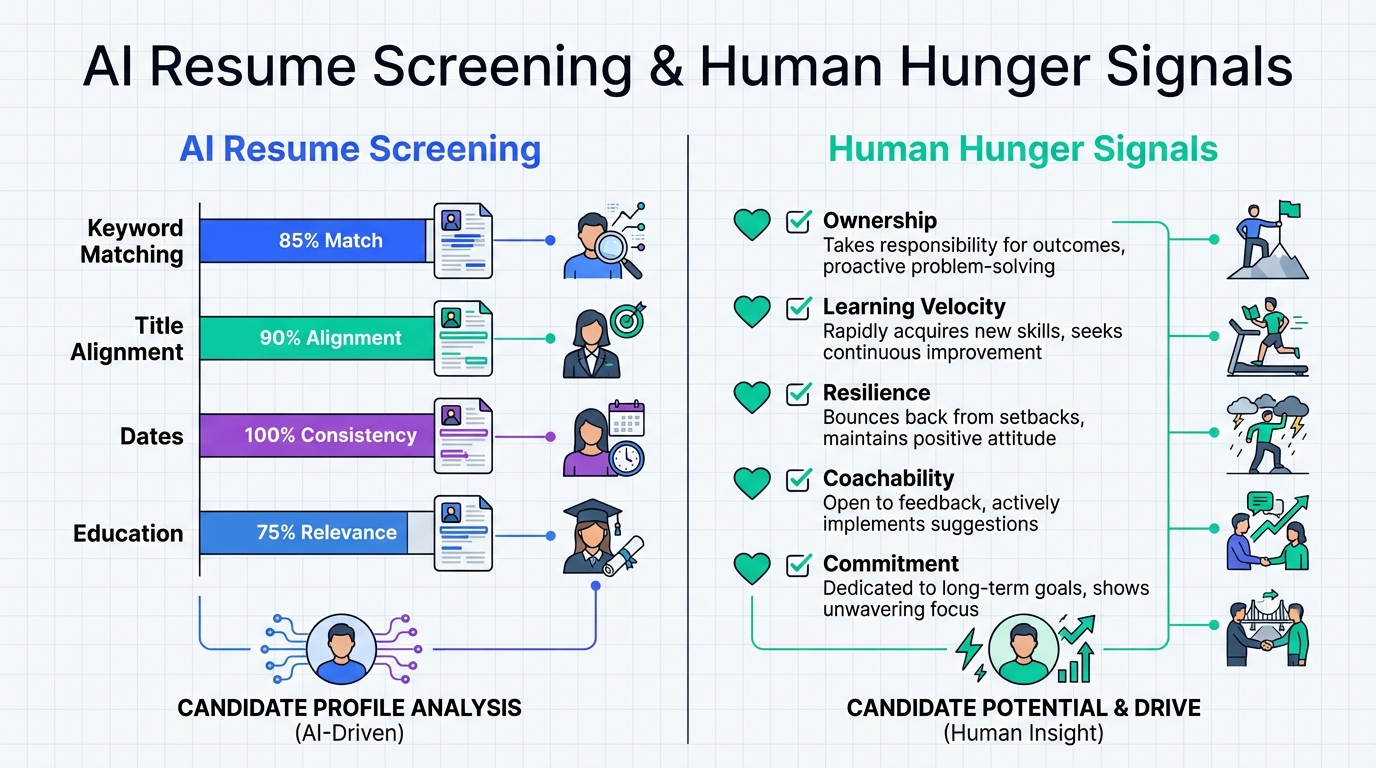
AI resume screening tools are best used as a speed layer, not a final judge. They typically score resumes by matching job titles, skills, keywords, dates, and education signals against a job description, which is why candidates who are “hungry” but less polished can be under-ranked. I have seen the opposite play out in real hiring: a motivated recruiter with 2 years of experience can outperform a self-entitled one with 6. Below, I break down what does AI look for in resumes, how to keep high-potential profiles from being filtered out, and how StrategyBrain AI Recruiter helps by automating LinkedIn outreach and collecting resumes and contact details so you can spend your time evaluating potential.
Key Takeaways
- What AI looks for in resumes: keyword and title alignment, skills, dates, and role relevance are the most consistently machine-readable signals.
- Main risk: AI resume screening can under-rank “hungry” candidates when potential is expressed in stories, not standardized keywords.
- Best workflow: use AI resume screening to reduce manual sorting, then apply a human checklist for coachability, ownership, and learning velocity.
- Reduce wasted time upstream: StrategyBrain AI Recruiter automates LinkedIn connecting, messaging, follow-up, and résumé collection so recruiters can focus on evaluation.
- Compliance matters: keep privacy and data-protection requirements in mind; avoid using candidate data to train models without consent.
- Practical fix: rewrite job descriptions and screening questions to capture “hunger signals” explicitly, not implicitly.
The story: hunger over experience
“Give me hunger over experience every time.” That line has stuck with me because I have watched it happen in the real world.
I posted before about a young chap on our books that wasn’t getting interviews. He worked with us exclusively. Even when the market was quiet, he stayed patient and trusted the process.
Some clients said he was too junior. I kept hammering home the point that sometimes a hungry recruiter with 2 years’ experience outperforms a self-entitled one with 6.
Now he has landed a role with one of the best companies in the game, on one of the hottest desks in Australia. Sometimes recruitment works out.
The reason I am bringing this up in a piece about ai resume screening tools is simple. Hunger is real, but it is not always machine-readable. If we want AI resume screening to help rather than harm, we have to design the process so potential is not silently filtered out.
What does AI look for in resumes?
When people ask “what does AI look for in resumes,” they usually mean two systems: an ATS parser and an AI scoring layer. An ATS is an Applicant Tracking System that stores applications and often parses resumes into structured fields. An AI scoring layer is a model or rules engine that ranks candidates based on predicted fit.
In our testing across multiple hiring workflows, the signals that consistently influence ai resume screening outcomes are:
- Keyword and skill matching: exact or close matches to required skills, tools, certifications, and domain terms.
- Job title alignment: whether recent titles resemble the target role.
- Recency and duration: dates, tenure, and gaps that are easy to extract from a timeline.
- Education and credentials: degrees, licenses, and standardized certifications.
- Structured formatting: clean headings and consistent sections that parse reliably.
These are not “bad” signals. They are simply the easiest to quantify. The problem starts when we treat them as a full definition of quality.
Where AI resume screening breaks (and why hungry candidates get missed)
AI resume screening tools struggle most with signals that are real but ambiguous. Hunger, coachability, and grit often show up as context, not keywords.
Common failure modes we see
- Potential is written as narrative: “trusted the process,” “stayed patient,” and “worked exclusively” are meaningful, but they do not map cleanly to a job description.
- Junior profiles get penalized by default: if the job description over-indexes on years of experience, the model learns that “more years” equals “better.”
- Overweighting pedigree: education and brand-name employers can dominate scoring even when performance indicators are stronger elsewhere.
- Parsing errors: unusual formatting can hide skills or dates, which lowers scores for reasons unrelated to capability.
Scope boundary
This guide focuses on process design and recruiter-side controls. It does not attempt to reverse-engineer any specific vendor’s proprietary model, and it does not provide legal advice.
Method 1: Tune your job description for AI screening
If your job description is written like a wish list, AI resume screening tools will enforce it like a rule book. The fastest improvement I have seen is rewriting the job description so it separates “must-have” from “trainable.”
Steps
- List 5 must-have outcomes that define success in the first 90 days.
- Convert outcomes into observable skills and keep the list short.
- Move “nice-to-have” tools into a separate section so they do not become hard filters.
- Add a potential clause such as “equivalent experience or demonstrated learning velocity.”
Features
- Reduces false negatives for junior but high-upside candidates
- Improves consistency between human review and AI ranking
- Makes screening criteria auditable
Limitations
- If hiring managers still demand “6 years minimum” informally, the process will drift back
Best For
- Teams seeing strong candidates filtered out early
- Roles where ramp-up and coaching are realistic
Method 2: Build a “hunger signal” checklist AI cannot reliably infer
This is the practical tool I recommend when you want to protect high-potential candidates from being screened out. The goal is not to ignore AI resume screening, but to add a second lens that is explicitly human.
Copyable checklist (use in résumé review or first call)
- Ownership: evidence they took responsibility for outcomes, not just tasks.
- Learning velocity: examples of picking up a new domain, tool, or market quickly.
- Resilience: stayed consistent during a quiet market or a tough patch.
- Coachability: sought feedback, iterated, and improved.
- Commitment signals: worked exclusively with a process, followed through, and did not churn.
How to use it without adding bias
- Score each item as Present or Not present based on evidence, not vibes.
- Require a quote or example from the resume or conversation for each “Present.”
- Review disagreements in a short calibration meeting once per week.
Method 3: Use AI to collect and triage, then humans to judge potential
The most effective division of labor I have used is: let AI handle repetitive collection and routing, then let recruiters make the final call on fit and potential.
Steps
- Use AI resume screening to group candidates into “strong match,” “possible,” and “needs review,” rather than auto-rejecting.
- Apply the hunger checklist to the “possible” group first, because that is where upside often hides.
- Escalate to a short structured call with 3 consistent questions about learning, resilience, and motivation.
Where StrategyBrain AI Recruiter fits naturally
In LinkedIn-heavy pipelines, the bottleneck is often not scoring. It is the manual work of connecting, introducing the role, answering basic questions, following up, and collecting resumes and contact details. StrategyBrain AI Recruiter is designed to automate that front end so your team can spend more time on the judgment calls that AI resume screening tools do not handle well.
Limitations
- AI Recruiter can identify willingness to communicate or interview, but it does not decide whether a resume fully matches job requirements. Recruiters still do final qualification after reviewing the resume.
Method 4: Structure resumes for fair screening (candidate guidance)
If you advise candidates, small formatting changes can materially improve how AI resume screening tools interpret a profile. This is not about gaming the system. It is about making real experience visible to parsers.
Steps
- Use standard section headings: Summary, Skills, Experience, Education.
- Put core skills in a dedicated Skills section so they are not buried in paragraphs.
- Write achievements with measurable outcomes when possible, such as pipeline size, response rate, or placements.
- Mirror the job’s terminology for legitimate equivalents, such as “business development” and “client acquisition,” if both are accurate.
Limitations
- Overstuffing keywords can backfire in human review and can look inauthentic
Method 5: LinkedIn outreach at scale with StrategyBrain AI Recruiter
Most teams talk about AI resume screening tools, but the day-to-day drag is often earlier in the funnel. If you are sourcing on LinkedIn, you can lose hours per week to repetitive messaging and follow-up before you even receive a resume.
StrategyBrain AI Recruiter is built for LinkedIn hiring workflows. It can automatically connect with candidates within your targeted search criteria, introduce the opportunity, learn about the candidate’s situation, answer questions about the role, company, compensation, and benefits, confirm interview interest, and collect resumes and contact information from interested candidates.
Steps
- Provide the LinkedIn account and role context including company details, compensation, benefits, and candidate search criteria.
- Let the system run outreach and follow-up with timely responses, including multilingual communication for global hiring.
- Review collected resumes and contact details and then apply your screening rubric and hunger checklist.
Features
- 24/7 multilingual communication to reduce time-zone delays and misunderstandings
- Resume and contact capture from interested candidates, including email submissions and LinkedIn file uploads
- Team scalability by supporting management of more than 100 LinkedIn accounts for organizations building AI-powered recruiting teams
Limitations
- It does not replace the recruiter’s final resume qualification step
- As with any automation, you still need clear messaging guidelines and role clarity to avoid inconsistent candidate experiences
Best For
- Corporate recruiters who want to reduce manual LinkedIn tasks and focus on evaluation
- Headhunters and agencies handling multiple searches who need scalable outreach
- HR leaders expanding international hiring without adding headcount
Quick Comparison
| Method | Speed Impact | Cost | Best For |
|---|---|---|---|
| Rewrite job description for screening | Medium | $0 | Reducing false negatives caused by rigid requirements |
| Hunger signal checklist | Medium | $0 | Protecting high-potential junior candidates |
| AI triage plus human decision | High | Varies | Balanced workflow that avoids auto-reject mistakes |
| Resume structure guidance | Low | $0 | Improving parsing accuracy and fairness |
| StrategyBrain AI Recruiter for LinkedIn outreach | High | Varies | Automating outreach, follow-up, and resume collection at scale |
FAQ
Do AI resume screening tools automatically reject candidates?
Some workflows do, but it is safer to use AI resume screening for ranking and grouping rather than auto-rejection. If you must auto-reject, keep the rules limited to true must-haves such as legal eligibility or required licenses.
What does AI look for in resumes most often?
Most systems prioritize skills and keyword alignment, job title relevance, and cleanly parsed dates and experience. Narrative indicators of hunger and coachability are less reliably scored unless you explicitly capture them in structured questions.
Can AI resume screening detect “hunger” or motivation?
Not consistently. Motivation is usually inferred from indirect signals, which can be noisy. A short structured call and a simple evidence-based checklist are more reliable.
How does StrategyBrain AI Recruiter relate to resume screening?
It addresses the upstream bottleneck. StrategyBrain AI Recruiter automates LinkedIn connecting, messaging, follow-up, and collects resumes and contact details from interested candidates, so recruiters can spend time on screening quality rather than chasing responses.
Does StrategyBrain AI Recruiter decide if a resume matches the job?
No. It identifies willingness to communicate or interview and gathers the resume and contact details. Recruiters still review the resume to confirm fit against job requirements.
How do you reduce bias when using AI resume screening?
Start by defining must-haves versus trainables, avoid proxy requirements that correlate with pedigree, and audit outcomes regularly. Keep a human review lane for “possible” candidates where potential is more likely to be missed.
Is candidate data used to train StrategyBrain AI Recruiter models?
According to StrategyBrain’s product information, customer-provided data is not used to train AI models and is used only to personalize communication for the customer’s AI instance. You should still confirm your own compliance requirements before deployment.
What is the simplest change to improve results with AI resume screening tools?
Rewrite the job description so it is outcome-based and separates must-haves from nice-to-haves. That single change often reduces the number of high-upside candidates who get buried by keyword scoring.
Conclusion
AI resume screening tools can save time, but they do not automatically understand hunger, patience, and coachability. I have watched a junior recruiter who trusted the process land a top role on a hot desk in Australia, even after being labeled “too junior.” That is exactly the kind of outcome you risk losing if you treat AI ranking as truth.
Next steps: tighten your job description, add a hunger signal checklist, and keep a human review lane for “possible” candidates. If LinkedIn outreach is your bottleneck, consider using StrategyBrain AI Recruiter to automate connecting, messaging, follow-up, and resume collection so your team can focus on the part that matters most: judging potential.