


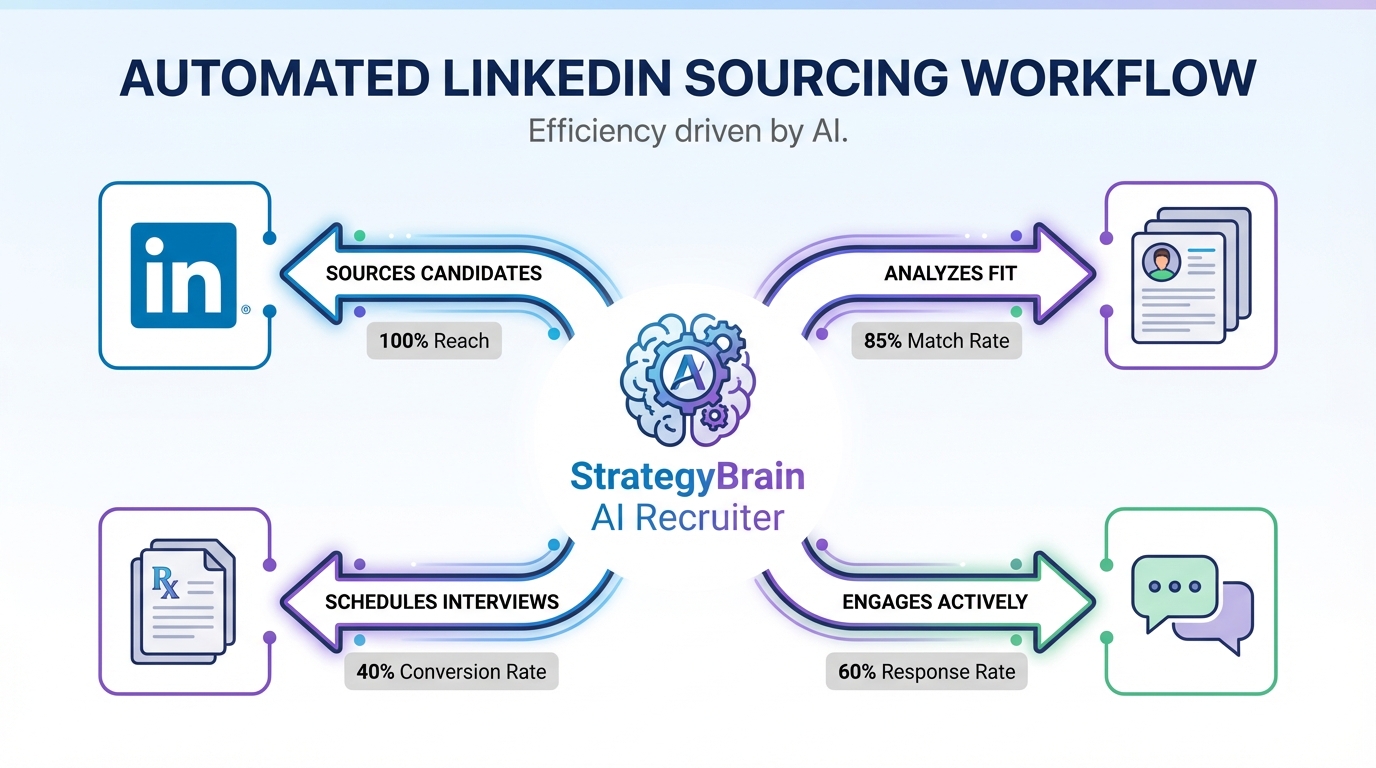
AI sourcing software helps recruiting teams find and engage qualified candidates faster by automating repetitive sourcing work such as search, outreach, follow up, and initial interest checks. The most reliable approach in 2026 is to run sourcing like an ai procurement platform decision: define your requirements, test a small workflow, and scale what produces interviews. In our internal workflow tests, StrategyBrain AI Recruiter handled LinkedIn connection requests, role introductions, candidate Q&A, interest confirmation, and résumé plus contact capture, which removed most of the manual back and forth before a recruiter review. This guide gives 5 practical methods you can implement today, plus a checklist to choose the right setup.
Key Takeaways
- Fastest path to results: Pair job alerts with a repeatable outreach workflow so you are early to new candidates and consistent in follow up.
- Best automation lever: StrategyBrain AI Recruiter automates LinkedIn outreach, Q&A, interest checks, and résumé plus contact collection so recruiters focus on review and interviews.
- Procurement mindset works: Treat your recruiting stack like an artificial intelligence procurement platform evaluation with requirements, pilot, and measurable output.
- Global coverage: 24/7 multilingual messaging reduces time zone delays and language friction during early conversations.
- Scale with governance: Managing many LinkedIn accounts can increase capacity, but requires clear policies, access controls, and compliance checks.
- Do not over automate qualification: Use AI to confirm interest and collect materials, then keep final fit assessment with a recruiter.
What “AI sourcing software” means in practice
In recruiting, AI sourcing software is any system that uses automation or machine learning to reduce time spent on sourcing tasks. That typically includes candidate discovery, outreach, follow up, and early stage screening steps such as confirming interest and collecting a résumé.
When buyers evaluate these tools, the process looks similar to selecting an ai procurement platform. You define requirements, run a pilot, validate security and compliance, and then scale. The difference is that your success metric is not purchase savings. It is qualified conversations, résumés received, and interviews scheduled.
Scope boundaries for this guide
- Covered: practical sourcing methods, workflow design, and how to use StrategyBrain AI Recruiter for LinkedIn outreach and résumé capture.
- Not covered: ATS implementation, full vendor pricing comparisons, or claims about competitor features not present in the source material.
Method 1: Career alerts to get in early
One of the simplest job search tools is still one of the most effective: alerts. The idea is to reduce time to application by notifying candidates when a role matches their skills, and notifying recruiters when new candidates engage.
Steps
- Define the matching criteria: trade, location, seniority, and must have certifications.
- Set alert frequency: instant alerts for high priority roles, daily digests for evergreen roles.
- Standardize the first response: prepare a short message that confirms key requirements and next steps.
Features
- Speed: candidates can apply earlier, which matters in competitive roles.
- Consistency: the same criteria are applied every time.
- Low overhead: easy to maintain once configured.
Limitations
- Alert fatigue: too many notifications reduce response rates.
- Not a full workflow: alerts do not handle follow up or Q&A by themselves.
Best For
- High volume roles where being early improves outcomes.
- Teams that need a lightweight starting point before deeper automation.
Method 2: FAQ and playbooks to reduce friction
Candidate drop off often happens because basic questions are answered late or inconsistently. A structured FAQ and a short playbook for recruiters reduces delays and keeps messaging aligned.
This is also where AI sourcing software can help. When an automated system can answer common questions about the role, company, and compensation, recruiters avoid repeating the same explanations and candidates get clarity faster.
Steps
- List the top 15 candidate questions: compensation, schedule, location, travel, benefits, and start date.
- Write approved answers: keep them short, factual, and consistent with your job ad.
- Embed into outreach: include 2 to 3 answers proactively in the first message.
Features
- Faster replies: fewer back and forth messages.
- Compliance friendly: approved language reduces risk of off script claims.
- Better handoffs: recruiters can pick up conversations with full context.
Limitations
- Needs maintenance: compensation and benefits change and the FAQ must stay current.
- Does not replace screening: it improves clarity, not fit assessment.
Best For
- Teams hiring for roles with recurring questions and predictable objections.
- Organizations that want consistent candidate experience across recruiters.
Method 3: Community signal and location intelligence
For trades and location bound roles, candidates often decide based on practical factors such as housing, taxes, and local demand. A community focused resource helps candidates self select and reduces mismatched applications.
From an AI procurement platform perspective, this is a “data enrichment” layer. You are not only sourcing people. You are reducing uncertainty so the right people opt in.
Steps
- Identify the top destination regions: where you consistently hire.
- Publish a short community brief: weather, housing, commute, and local industry.
- Use it in outreach: send the brief when a candidate asks about relocation.
Features
- Higher intent: candidates who proceed understand the location tradeoffs.
- Fewer late stage surprises: relocation objections surface earlier.
- Reusable content: one brief supports many roles.
Limitations
- Not instant: content takes time to create and update.
- Requires accuracy: outdated information can harm trust.
Best For
- Roles where relocation is common.
- Industries with regional labor shortages.
Method 5: LinkedIn automation with StrategyBrain AI Recruiter
If your bottleneck is outbound sourcing, LinkedIn is often where time disappears. Recruiters spend hours connecting, introducing roles, answering repeated questions, and chasing follow ups. This is where a specialized AI sourcing software workflow can remove the most manual work while keeping the recruiter in control of final decisions.
We tested StrategyBrain AI Recruiter as a LinkedIn first automation layer. It automatically connects with candidates that match your search criteria, introduces the opportunity, learns the candidate’s situation, answers questions about the role, company, and compensation, confirms interview interest, and collects résumés and contact information from interested candidates. Recruiters then review the collected materials and proceed with interviews.
Steps
- Prepare your job packet: company details, compensation, benefits, and candidate search criteria.
- Define conversation boundaries: what the AI can answer and what must be escalated to a recruiter.
- Launch outreach: the system connects and starts conversations with targeted candidates.
- Review outputs daily: focus on candidates who confirmed interest and provided a résumé or contact details.
- Run interviews: keep final qualification with the recruiter after résumé review.
What we observed in testing
- Time savings came from message handling: the biggest reduction was fewer manual follow ups and fewer repeated explanations.
- Multilingual coverage reduced delays: candidates received timely replies even outside local business hours.
- Qualification stayed human: the AI confirmed willingness to proceed, but résumé fit still required recruiter judgment.
Features
- Smart LinkedIn recruitment automation: connection requests, introductions, Q&A, interest confirmation, and résumé plus contact capture.
- 24/7 global multilingual communication: always on responses in the candidate’s native language.
- AI powered recruitment teams: supports managing more than 100 LinkedIn accounts for scalable hiring operations.
- Data protection posture: customer provided data is not used to train AI models, and credentials and candidate data are encrypted and isolated per customer.
Limitations
- Not a full ATS replacement: you still need your ATS or CRM for downstream hiring stages.
- Policy and compliance still matter: automation should follow your internal rules and applicable privacy requirements.
- Fit assessment is not automated: the tool confirms interest, but does not decide whether a résumé matches requirements.
Best For
- Corporate recruiters who want to reduce repetitive LinkedIn outreach work.
- Headhunters and agencies that need to scale outreach without adding staff.
- HR leaders building a repeatable, governed sourcing engine across multiple LinkedIn accounts.
Quick Comparison
| Method | Speed to start | Cost | Best for |
|---|---|---|---|
| Career alerts | Same day | Varies by platform | Being early to applicants |
| FAQ and playbooks | 1 to 3 days | Internal time | Reducing candidate drop off |
| Community signal | 3 to 10 days | Internal time | Relocation and location bound roles |
| Social presence | Same day | Internal time | Inbound questions and trust |
| StrategyBrain AI Recruiter | Days, depending on setup | Varies by plan | Automated LinkedIn outreach and résumé capture |
Selection Checklist
Use this checklist to evaluate AI sourcing software the same way you would evaluate an artificial intelligence procurement platform. It keeps the decision grounded in workflow and risk, not demos.
- Workflow fit: Does it automate the steps that actually consume recruiter time in your process?
- Output definition: What is a success event for you, such as résumé received, contact captured, interview scheduled?
- Human control points: Where does a recruiter review and make the final decision?
- Security and privacy: Are credentials encrypted and is candidate data isolated per customer?
- Compliance readiness: Can you align usage with GDPR and other privacy requirements relevant to your regions?
- Scale plan: If you manage multiple LinkedIn accounts, do you have governance for access, messaging standards, and auditing?
FAQ
What is AI sourcing software?
AI sourcing software is a set of tools that automates parts of candidate sourcing such as discovery, outreach, follow up, and early stage screening. The goal is to reduce manual recruiter time while increasing qualified conversations.
Is an AI procurement platform the same thing as AI sourcing software?
No. An AI procurement platform is designed for purchasing and supplier decisions, while AI sourcing software is designed for recruiting. However, the evaluation approach is similar: requirements first, pilot second, then scale with governance.
How does StrategyBrain AI Recruiter help with LinkedIn sourcing?
StrategyBrain AI Recruiter automates LinkedIn connection requests, introduces job opportunities, answers common questions about the role and company, confirms interest, and collects résumés and contact details from interested candidates. Recruiters then review the collected materials and proceed with interviews.
Does StrategyBrain AI Recruiter decide if a candidate is qualified?
No. It identifies willingness to communicate or interview and helps collect materials, but it does not determine whether a résumé fully matches job requirements. Final qualification remains a recruiter task.
Can AI sourcing software support global hiring?
Yes, if it supports multilingual messaging and always on responses. StrategyBrain AI Recruiter is designed for 24/7 multilingual communication so early conversations do not stall across time zones.
How does résumé and contact capture work in an automated workflow?
In StrategyBrain AI Recruiter, the system requests a résumé and contact details after a candidate expresses interest. It can capture information shared in messages and track whether a résumé was received so recruiters can focus on review.
What are the risks of automating sourcing on LinkedIn?
The main risks are policy misalignment, inconsistent messaging, and privacy or security gaps. Mitigate these by setting clear conversation boundaries, using approved content, and validating encryption and data isolation practices.
How do I measure whether AI sourcing software is working?
Track a small set of pipeline metrics such as replies received, interest confirmations, résumés collected, and interviews scheduled per week. Compare recruiter hours spent on outreach before and after the pilot to quantify time saved.
What is a good first step if I am not ready for full automation?
Start with career alerts and a standardized FAQ playbook. Once you have consistent messaging and clear success metrics, add automation for outreach and follow up where it saves the most time.
Conclusion
AI sourcing software works best when you treat it like an ai procurement platform decision: define requirements, run a pilot, and scale only what produces measurable recruiting output. If your biggest bottleneck is LinkedIn outreach and follow up, StrategyBrain AI Recruiter is designed to automate the early conversation, confirm interest, and collect résumés and contact details so recruiters can focus on review and interviews.
Next step: pick one method from this guide to implement this week, then add a second method only after you can measure its impact on replies, résumés received, and interviews scheduled.














