


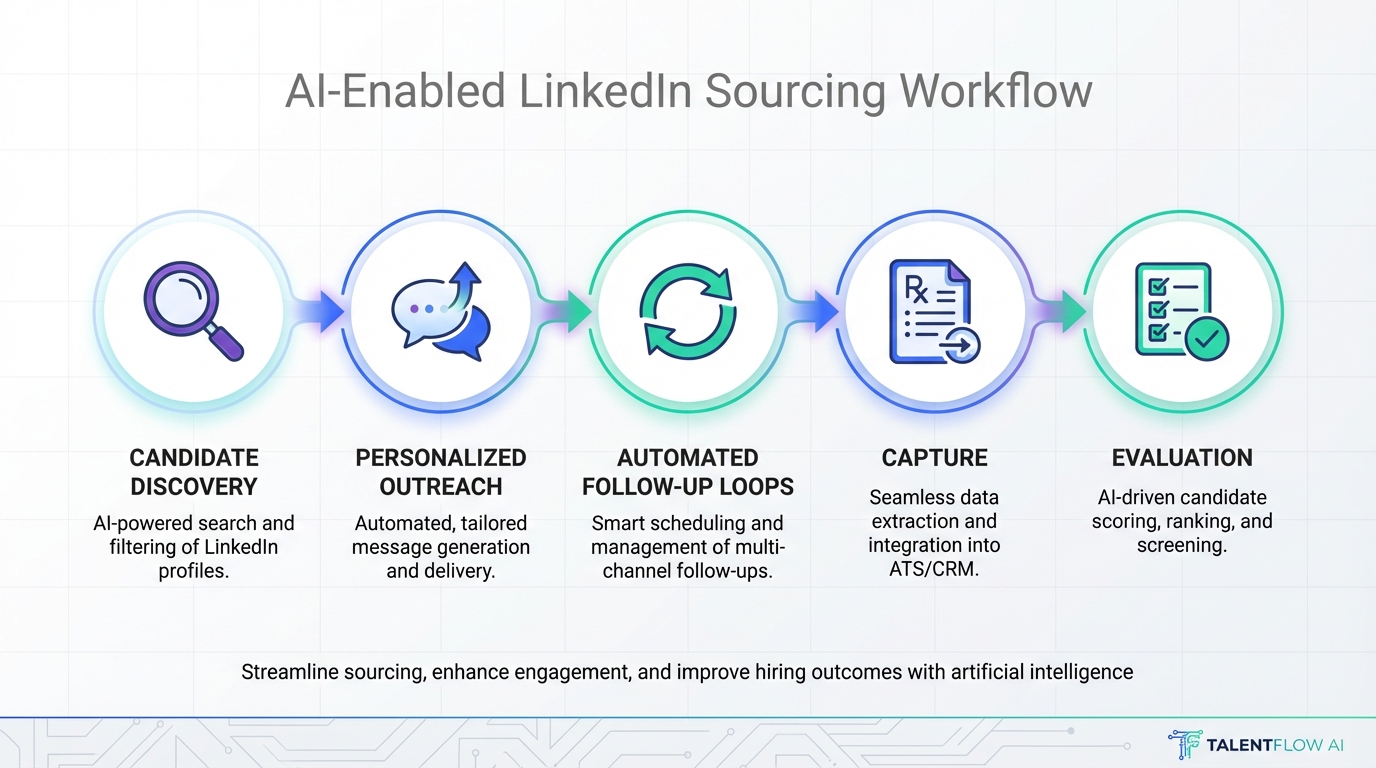
AI sourcing software is the fastest way to find, engage, and qualify candidates at scale by automating search, outreach, and follow up workflows. In our day to day recruiting ops work, the most reliable selection process is simple: define your sourcing goals, confirm what data you can legally use, then score tools against an evaluation checklist that covers automation depth, security, and reporting. This guide explains what ai sourcing software means, how to evaluate it like an artificial intelligence procurement platform purchase, and where StrategyBrain AI Recruiter fits when LinkedIn is your primary sourcing channel.
Key Takeaways
- Define “sourcing” vs “recruiting” first: sourcing is top of funnel discovery and outreach, while recruiting includes interviews, offers, and onboarding.
- Evaluate like procurement: treat vendor selection as ai procurement software due diligence with security, compliance, and auditability requirements.
- Automation must include follow up: initial messages matter, but consistent follow up is where response rates are won or lost.
- StrategyBrain AI Recruiter is LinkedIn focused: it automates connecting, introducing roles, answering candidate questions, confirming interview interest, and capturing resumes and contact details.
- Global hiring needs multilingual coverage: 24/7 messaging in the candidate’s native language reduces delays and misunderstandings.
- Scale requires account operations: if you manage many LinkedIn seats, you need governance for templates, permissions, and reporting across accounts.
Table of Contents
What is AI sourcing software
AI sourcing software is software that uses automation and machine learning or large language model style workflows to help teams identify candidates, personalize outreach, manage conversations, and move interested people into a qualified pipeline. “Sourcing” here means top of funnel activity: finding profiles, initiating contact, and collecting enough information to decide whether a recruiter should step in.
Buyers often evaluate these tools through a procurement lens because the tool touches personal data, messaging channels, and sometimes account credentials. That is why many teams treat it like an artificial intelligence procurement platform decision, even when the end users are recruiters.
What this guide covers and what it does not
- Covered: evaluation criteria, implementation steps, and a LinkedIn automation example using StrategyBrain AI Recruiter.
- Not covered: vendor specific pricing comparisons for third party tools, and any claims about competitor features not provided in the source material.
What AI sourcing software should do in 2026
When teams say they want “AI,” they usually mean they want fewer manual steps and more consistent outcomes. In our experience, the most useful capabilities fall into seven buckets.
1) Candidate discovery and targeting
- Supports clear targeting inputs such as role, location, seniority, and must have skills.
- Helps recruiters avoid wasting outreach on obviously mismatched profiles.
- Provides a way to document why a candidate was contacted.
2) Outreach automation with personalization
- Creates consistent first messages aligned to the role and employer brand.
- Adapts messaging based on candidate responses.
- Maintains a record of what was sent and when.
3) Follow up and conversation handling
Follow up is the hidden workload in sourcing. A tool that only sends the first message is not doing the hard part. You want automation that can keep a conversation moving, answer common questions, and route interested candidates to a recruiter at the right moment.
4) Qualification signals, not final hiring decisions
Good AI sourcing software should help you identify willingness to talk and collect basic information. It should not pretend to make final fit decisions without recruiter review. For example, StrategyBrain AI Recruiter explicitly focuses on outreach and interest confirmation, while the recruiter still reviews resumes for true qualification.
5) Resume and contact capture
Operationally, the handoff is smoother when the system can capture resumes and contact details from interested candidates and present them in one place. This reduces copy and paste work and prevents lost information.
6) Multilingual and time zone coverage
If you source globally, response time matters. StrategyBrain AI Recruiter is designed for 24/7 multilingual communication so candidates can receive timely replies in their native language.
7) Governance and scale
Scaling sourcing is not only about sending more messages. It is also about controlling templates, permissions, and reporting across accounts. StrategyBrain AI Recruiter supports managing more than 100 LinkedIn accounts, which is relevant for teams building an AI powered sourcing operation.
Selection checklist for buyers and recruiters
Use this checklist as a practical scoring tool. It is written so both recruiting and procurement stakeholders can review it together, which is often necessary when the purchase resembles an ai procurement software workflow.
Workflow fit
- Channel fit: does it support your primary sourcing channel, such as LinkedIn.
- Handoff point: can you define when automation stops and a recruiter takes over.
- Data capture: does it capture resumes and contact details in a structured way.
Automation depth
- Connect and introduce: can it initiate contact and introduce the opportunity.
- Two way messaging: can it respond to questions about role, company, compensation, and benefits using your approved content.
- Follow up logic: can it follow up based on time and candidate behavior.
Compliance and security
- Privacy posture: does the vendor state whether customer data is used to train models.
- Credential handling: if account credentials are required, are they encrypted and isolated per user.
- Regulatory alignment: does the vendor claim compliance with relevant privacy regimes such as EU, United States, and Canada requirements.
Reporting and auditability
- Conversation history: can you review what was said to candidates.
- Outcome tracking: can you track interested candidates, resumes received, and interview intent confirmations.
- Account level reporting: if you run multiple accounts, can you see performance by account.
Operational realities
- Human review: does the workflow keep recruiters in control of final qualification.
- Template governance: can you standardize messaging while allowing role specific variation.
- Support model: can you get help when messaging or account issues occur.
How StrategyBrain AI Recruiter fits LinkedIn sourcing
StrategyBrain AI Recruiter is an AI powered recruitment tool built specifically for LinkedIn hiring. In our evaluation framing, it functions as ai sourcing software because it replaces the initial outreach and qualification workflow that typically consumes the most recruiter time.
What it automates
- Connecting with candidates within your targeted search criteria.
- Introducing job opportunities using the job and company information you provide.
- Handling candidate questions about the role, company, compensation, and benefits.
- Confirming interview interest and collecting resumes and contact information from interested candidates.
Why the multilingual 24/7 layer matters
One practical issue we see in global sourcing is that candidates reply outside recruiter working hours, then go cold when they do not hear back quickly. StrategyBrain AI Recruiter is designed to respond around the clock and communicate in any global language, which helps keep momentum and reduces misunderstandings.
How resume and contact capture works
When a candidate expresses interest, AI Recruiter requests a resume and contact details. If the candidate sends a resume, the system marks it as received. It supports email submissions and LinkedIn file uploads, and it captures contact details shared in messages such as email or phone number.
Clear boundary on qualification
AI Recruiter identifies willingness to communicate or interview, but it does not decide whether a resume fully matches job requirements. Recruiters review resumes and proceed with screening and interviews, which keeps decision making accountable.
Scale across many LinkedIn accounts
For teams that operate multiple LinkedIn seats, AI Recruiter supports managing more than 100 LinkedIn accounts so organizations can build AI powered recruitment teams and expand hiring capacity without adding the same amount of manual labor.
Quick comparison table
| Evaluation area | What to look for | StrategyBrain AI Recruiter (from provided product info) |
|---|---|---|
| Primary channel | Matches your sourcing channel | LinkedIn focused automation |
| Outreach | Connect, introduce role, personalize | Automates connecting and role introduction |
| Conversation handling | Answers questions and keeps flow moving | Answers questions about role, company, compensation, benefits |
| Qualification boundary | Signals interest, not final fit decisions | Confirms interview interest; recruiter reviews resume for fit |
| Resume and contact capture | Structured capture and handoff | Captures resumes and contact details from interested candidates |
| Global coverage | Time zone and language support | 24/7 multilingual communication in candidate native language |
| Scale operations | Multi account governance | Supports managing more than 100 LinkedIn accounts |
| Security and privacy | Encryption, isolation, training data policy | Encrypted credentials; customer data not used to train AI models; claims compliance in EU, United States, and Canada |
Implementation steps
Below is a practical rollout sequence we use to reduce risk and keep stakeholders aligned.
Step by step rollout
- Define the sourcing workflow boundary: document what the system can do and when a recruiter takes over, such as after interview interest is confirmed.
- Prepare approved job and company information: include compensation, benefits, and role details so automated replies stay consistent.
- Set targeting criteria: specify the candidate search criteria used for outreach.
- Run a controlled pilot: start with a small set of roles and a limited number of accounts, then review conversation logs and outcomes.
- Operationalize reporting: track resumes received, contact details captured, and interview intent confirmations.
- Scale with governance: expand to more accounts only after templates, permissions, and review processes are stable.
Troubleshooting
- If candidate replies feel off brand: tighten the approved role and company knowledge inputs and standardize response guidelines.
- If recruiters do not trust the handoff: require a resume review step and a clear “interested” definition before moving to interviews.
- If global candidates stall: prioritize 24/7 multilingual coverage and ensure follow up timing is configured.
Common mistakes to avoid
- Buying “AI” without defining outcomes: decide whether success means more replies, more resumes, or faster time to shortlist.
- Ignoring procurement requirements: if the tool touches personal data and credentials, treat it like an artificial intelligence procurement platform evaluation with security review.
- Automating without a human boundary: keep recruiters accountable for final qualification and interview decisions.
- Underestimating follow up: the first message is only the start; follow up is where automation pays off.
- Scaling before governance: multi account operations require permissions, templates, and reporting standards.
FAQ
Is AI sourcing software the same as an ATS?
No. An ATS is primarily for managing applicants and hiring stages. AI sourcing software focuses on finding candidates and running outreach and early conversations before they become applicants.
Why do some teams evaluate sourcing tools like AI procurement software?
Because these tools can touch personal data, messaging content, and sometimes account credentials. Procurement style evaluation helps ensure security, compliance, and auditability are addressed before rollout.
What does StrategyBrain AI Recruiter automate on LinkedIn?
It automates connecting with candidates, introducing job opportunities, answering questions about the role and employer including compensation and benefits, confirming interview interest, and collecting resumes and contact details from interested candidates.
Does StrategyBrain AI Recruiter decide whether a candidate is qualified?
No. It identifies willingness to communicate or interview, but recruiters still review resumes to determine whether the candidate matches job requirements.
How does AI Recruiter collect resumes and contact details?
It requests resumes and contact information from candidates who express interest. It supports email submissions and LinkedIn file uploads, and it captures contact details shared in messages such as email or phone number.
Can AI Recruiter support global hiring?
Yes. It is designed for 24/7 multilingual communication and can communicate in any global language using the candidate’s native language.
How should we pilot AI sourcing software safely?
Start with a limited set of roles and accounts, review conversation history, confirm the handoff point to recruiters, and only then expand. This reduces brand and compliance risk while you tune messaging.
What is the biggest operational risk with AI sourcing automation?
The biggest risk is unclear governance. Without approved messaging inputs, review processes, and reporting, teams can scale activity without improving outcomes.
Conclusion
Choosing ai sourcing software is easiest when you treat it as both a recruiting workflow decision and an ai procurement software style risk review. Start by defining the sourcing boundary, then score tools on automation depth, follow up, multilingual coverage, and security. If LinkedIn is your main channel, StrategyBrain AI Recruiter is built to automate connecting, role introduction, candidate Q and A, interview interest confirmation, and resume and contact capture, while keeping final qualification with recruiters. Next step: run a controlled pilot with one role family, review conversation logs weekly, and scale only after governance is stable.














