


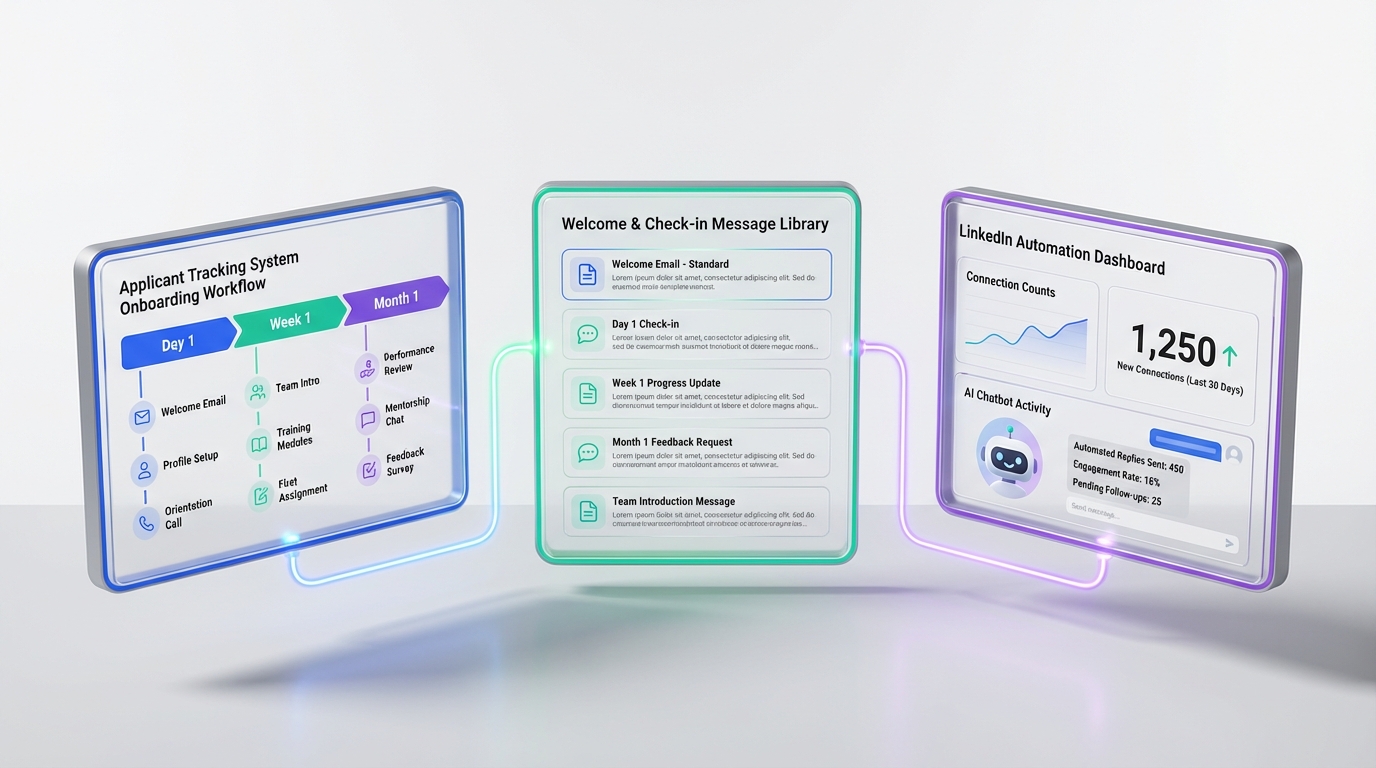
An applicant tracking system for recruiters is most valuable when it turns good intentions into repeatable execution: clear ownership, consistent communication, and a measurable onboarding plan. If you are hiring in January or any high volume period, the fastest improvement is to convert your onboarding playbook into ATS stages, tasks, and templates so every new hire receives the same essentials on day 1, week 1, and month 1. This article focuses on onboarding and retention workflows inside an ATS, plus how StrategyBrain AI Recruiter can reduce manual LinkedIn outreach and pre qualification work so recruiters have more time to run a high quality onboarding process. It does not cover payroll setup, benefits administration, or HRIS configuration.
Key Takeaways
- Best ATS use for onboarding: Convert onboarding into stages, tasks, owners, and due dates so execution is consistent across teams.
- Manager ownership matters: The direct manager should be the visible owner of onboarding, with HR and others supporting specific tasks.
- Communication is a retention tool: Use ATS templates for welcome messages, week 1 check ins, and 30 day reviews to reduce missed touchpoints.
- StrategyBrain AI Recruiter frees recruiter time: It automates LinkedIn connecting, initial role introduction, Q and A, follow ups, and résumé collection so recruiters can focus on interviews and onboarding quality.
- Qualification boundary: AI Recruiter can confirm interest and collect résumés, but final fit assessment still belongs to the recruiter and hiring manager.
- Compliance and trust: AI Recruiter states customer provided data is not used to train AI models and uses encrypted, isolated storage per customer.
Why onboarding belongs in your ATS
Recruiters often think of an ATS as a pre hire system, but the applicant tracking system benefits become clearer when you extend it into the first 30 to 90 days. Onboarding is a workflow problem: multiple stakeholders, time sensitive tasks, and a new employee who is forming a lasting impression.
When onboarding lives in scattered documents and inbox threads, the process depends on memory and goodwill. When onboarding is tracked in an ATS, you can assign owners, set deadlines, and audit completion. That is one of the most practical ATS benefits for recruiters who want predictable outcomes.
From our experience building recruiting workflows, the biggest onboarding failures are not caused by a lack of caring. They happen because responsibilities are unclear, messages are inconsistent, and follow ups are not scheduled. An ATS is the simplest place to make those items visible and repeatable.
Method 1: Own onboarding with clear ATS ownership
If the new hire reports to you, treat onboarding as a leadership responsibility, not an administrative handoff. HR, coordinators, and training teams can help, but the manager sets the tone. In an ATS, that means the manager is the named owner for the onboarding stage, with supporting tasks delegated to others.
Steps
- Create an onboarding stage in your ATS with a start date and a 30 day target end date.
- Assign a primary owner who is accountable for completion, typically the hiring manager.
- Break onboarding into tasks such as access setup, first week plan, role expectations, and introductions.
- Set due dates for day 1, day 3, day 7, and day 30 tasks.
Features to use
- Task assignments with owners and due dates.
- Templates for welcome messages and check in notes.
- Audit trail so you can confirm what was completed and when.
Limitations
- If managers do not adopt the workflow, the ATS becomes a reporting tool instead of an execution tool.
- Overly complex task lists reduce completion rates. Start with 10 to 15 tasks for the first 30 days.
Best For
- Teams hiring multiple roles per quarter.
- Organizations with distributed stakeholders across HR, IT, and hiring managers.
Method 2: Be the tour guide with structured ATS communication
A strong onboarding experience feels like guided orientation, not a flood of information. Think like a tour guide: introduce what is essential, connect the new hire with key people, and watch for signs of overload. In an ATS, you can operationalize this with scheduled messages and meeting prompts.
This is also where StrategyBrain AI Recruiter indirectly improves onboarding outcomes. When recruiters spend less time on repetitive LinkedIn outreach and follow ups, they can invest more time in handoffs, manager alignment, and onboarding readiness. AI Recruiter is designed to automate the initial LinkedIn connection, introduce the opportunity, answer candidate questions about the role, company, and compensation, confirm interview interest, and collect résumés and contact details for interested candidates.
Steps
- Build a first week communication sequence with day 1 welcome, day 3 check in, and day 7 expectations review.
- Standardize introductions by adding a task for key stakeholder meetings.
- Capture concerns in structured notes so issues are not lost between HR and the manager.
Features to use
- Email templates for consistent tone and content.
- Internal notes for non verbal cues and risk flags.
- Reminders for scheduled check ins.
Limitations
- Templates can feel robotic if you do not personalize the first paragraph for the individual.
- Some ATS platforms do not support post hire messaging well, so you may need a shared inbox process.
Best For
- Recruiters supporting hiring managers who need structure.
- High growth teams where onboarding consistency is a retention lever.
Method 3: Empower new hires with goals and early wins
New hires need clarity on what success looks like and how their work connects to team goals. In practice, empowerment means defining projects, targets, and short term milestones. An ATS can support this by storing role expectations and tracking the first set of deliverables as onboarding tasks.
We have seen onboarding improve when recruiters and managers agree on a simple 30 day plan before the start date. That plan becomes a checklist in the ATS, and the manager reviews it in the first week. This reduces confusion and prevents the new hire from waiting for direction.
Steps
- Document role expectations in a structured onboarding note that is visible to the manager and HR.
- Set 2 to 3 short term targets for the first 14 days, then confirm them in a meeting.
- Assign a mentor task with a named person and a scheduled first meeting date.
Features to use
- Custom fields for first 30 day goals.
- Task dependencies so access setup happens before project work.
- Shared visibility across recruiter, HR, and manager.
Limitations
- Not every ATS is designed for performance tracking, so keep goals lightweight and onboarding focused.
Best For
- Roles where early productivity is critical, such as sales, customer support, and operations.
Method 4: Review progress with scheduled check ins
Onboarding is not complete after day 1. Schedule structured check ins as the weeks progress, then document outcomes. A friendly, informative review builds trust and surfaces issues early. In an ATS, you can create recurring tasks for day 7, day 14, day 30, and day 60 reviews.
If you use AI assisted sourcing, be explicit about the handoff. For example, when StrategyBrain AI Recruiter collects résumés and contact details from interested candidates, recruiters can move faster to interviews. That speed is helpful, but it also increases the need for a disciplined onboarding workflow so the organization is ready when offers are accepted.
Steps
- Create check in tasks at fixed intervals with a required note field.
- Discuss career goals and document what support the company will provide.
- Escalate blockers by assigning follow up tasks to HR, IT, or training.
Features to use
- Required fields for check in notes to prevent empty updates.
- Tags for common issues such as access, training, workload, and manager alignment.
Limitations
- If check ins become a formality, you will collect data but not improve outcomes. Keep the conversation real and specific.
Best For
- Organizations with turnover risk or rapid team changes.
Method 5: Turn your onboarding guide into ATS templates
A written onboarding guide is useful, but it becomes operational when it is converted into templates and checklists inside your ATS. The source article that inspired this piece referenced an employer onboarding guide that included an onboarding checklist, welcome letter templates, performance review templates, and employee questionnaires. You can achieve the same outcome without relying on a single document by storing each template as an ATS artifact.
This is where the applicant tracking system benefits become measurable. Templates reduce variance, and variance is what makes onboarding feel unfair or chaotic across teams.
Steps
- Create a welcome letter template with placeholders for role, start date, and first week schedule.
- Create a performance review template for the 30 day check in, focused on expectations and support needs.
- Create an employee questionnaire for week 2 to capture friction points early.
- Attach templates to onboarding tasks so they appear at the right time.
Features to use
- Document templates stored in the ATS or linked internally in your knowledge base.
- Reusable onboarding workflows by role family.
- Reporting on task completion rates by team.
Limitations
- Templates need quarterly review. Outdated onboarding content reduces trust quickly.
Best For
- Recruiting teams that support multiple departments and want consistent onboarding quality.
Quick Comparison
| Approach | What it improves | Where it lives | Best for |
|---|---|---|---|
| ATS onboarding stage with owners | Accountability and consistency | ATS workflow | Teams with multiple stakeholders |
| ATS communication templates | Candidate and new hire experience | ATS templates and reminders | Managers who need structure |
| Goal based onboarding tasks | Early productivity | ATS tasks and custom fields | Roles with fast ramp expectations |
| Scheduled progress reviews | Retention risk detection | ATS recurring tasks | High turnover risk environments |
| StrategyBrain AI Recruiter for LinkedIn outreach | Recruiter time and follow up speed | LinkedIn automation workflow | Recruiters who need more time for interviews and onboarding |
ATS ready onboarding checklist template
Copy this checklist into your ATS as tasks. Keep the wording short so it fits in task titles, then add details in the task description field.
Day 1
- Send welcome message from manager
- Confirm access and equipment ready
- Review role responsibilities and team context
- Introduce key people and communication norms
Day 3
- Check workload and information overload signals
- Confirm training plan and first week schedule
- Assign mentor and schedule first meeting
Day 7
- Agree on 2 to 3 short term targets
- Review questions about role, company, and expectations
- Document blockers and assign follow ups
Day 30
- Run 30 day check in using a review template
- Discuss career goals and support plan
- Confirm next 30 day priorities
FAQ
What is an applicant tracking system for recruiters?
An applicant tracking system for recruiters is software that organizes candidates, job requisitions, and hiring workflows in one place. It typically supports stages, notes, tasks, and reporting so recruiters can manage hiring consistently.
What are the biggest applicant tracking system benefits for onboarding?
The biggest applicant tracking system benefits for onboarding are accountability and consistency. When onboarding tasks have owners and due dates, fewer steps are missed and managers have a clear plan for the first 30 days.
How do ATS benefits show up for hiring managers?
ATS benefits for hiring managers show up as clarity and reduced coordination work. Managers can see what is expected, what is completed, and what needs follow up without chasing multiple people across email threads.
How does StrategyBrain AI Recruiter fit into an ATS workflow?
StrategyBrain AI Recruiter supports the top of funnel by automating LinkedIn connecting, initial outreach, candidate Q and A, follow ups, and résumé and contact collection for interested candidates. Recruiters can then move qualified, interested candidates into the ATS for interviews, offers, and onboarding tracking.
Does AI Recruiter replace recruiter judgment?
No. AI Recruiter can confirm interest and collect résumés, but it does not decide whether a résumé matches job requirements. Recruiters and hiring managers still perform final qualification and selection.
Can AI Recruiter communicate with candidates in different languages?
Yes. StrategyBrain AI Recruiter is designed for 24/7 multilingual candidate communication, using the candidate’s native language to reduce misunderstandings and improve responsiveness across time zones.
How many LinkedIn accounts can an AI Recruiter team manage?
StrategyBrain AI Recruiter supports managing more than 100 LinkedIn accounts so organizations can build scalable AI powered recruiting teams. This is useful when hiring volume requires parallel outreach and follow up.
How should recruiters measure onboarding quality inside an ATS?
Start with completion rate and timeliness for day 1, day 7, and day 30 tasks. Then add a short new hire questionnaire at week 2 and track recurring issues such as access delays, unclear expectations, or missing training.
What should not be stored in an ATS onboarding record?
Avoid storing sensitive personal data that is not required for employment or onboarding execution. Follow your organization’s privacy policy and applicable regulations, and keep notes factual and job related.
Conclusion
If you want the most practical value from an applicant tracking system for recruiters, treat onboarding as a tracked workflow, not a document. Assign a clear owner, use templates for consistent communication, set early goals, and schedule progress reviews so the new hire feels guided and supported.
Next, protect recruiter time so onboarding does not get squeezed by sourcing and follow ups. If LinkedIn outreach is consuming your day, StrategyBrain AI Recruiter can automate the initial connection, role introduction, candidate questions, follow ups, and résumé collection so you can focus on interviews, manager alignment, and a stronger onboarding experience.














