


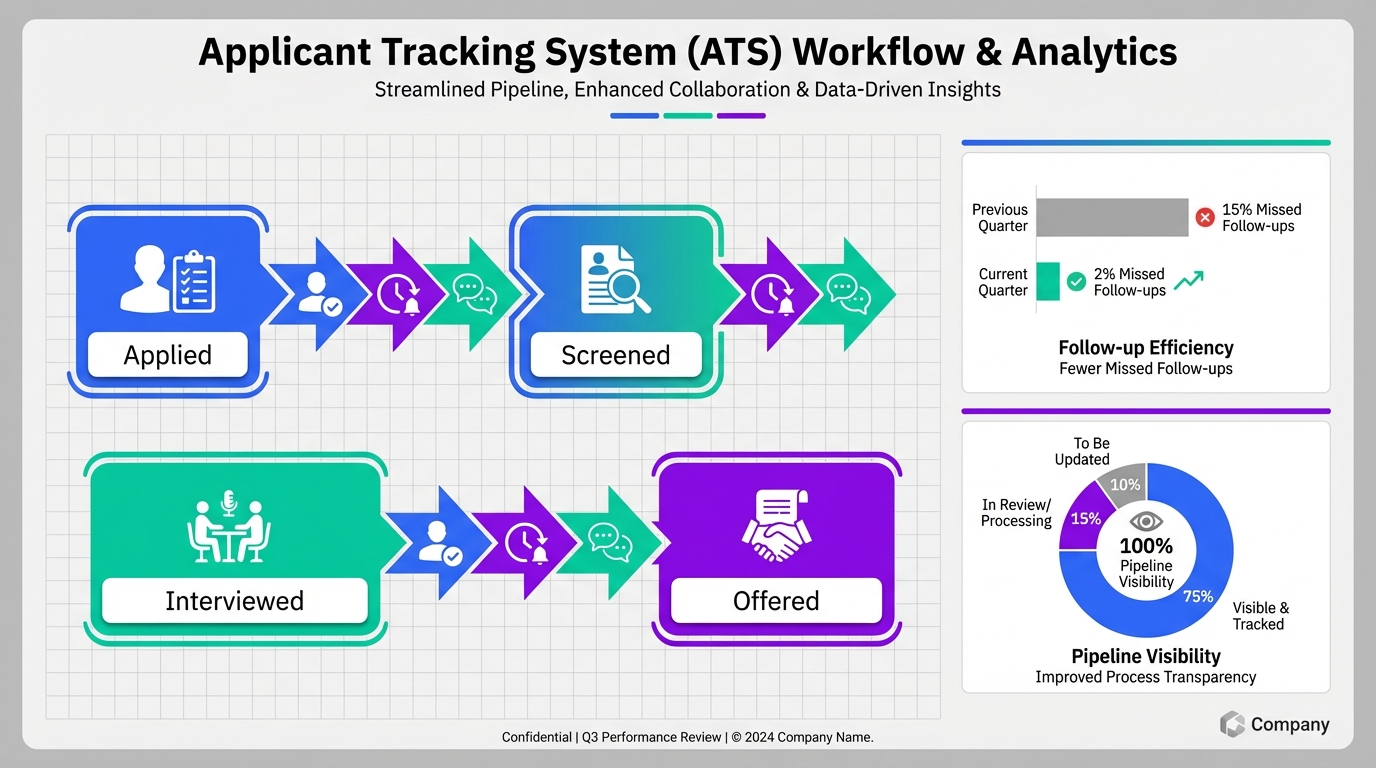
An applicant tracking system for recruiters is the fastest way to centralize candidates, standardize screening, and keep every stakeholder aligned from first touch to offer. In our day to day recruiting operations, the most reliable ATS benefits show up in three places: fewer missed follow ups, clearer pipeline visibility, and faster handoffs between sourcers, recruiters, and hiring managers. This guide breaks down those applicant tracking system benefits into practical recruiter actions, then shows how modern LinkedIn workflows can feed your ATS with cleaner conversations and better documented intent. Scope note: this article focuses on recruiter workflow and candidate experience, not a deep technical ATS implementation or vendor by vendor pricing.
What an ATS means for recruiters
An ATS, short for Applicant Tracking System, is software that stores candidate records and tracks each person through defined hiring stages such as applied, screened, interviewed, and offered. For recruiters, the ATS is less about “a database” and more about a shared operating system: it is where notes, decisions, and next steps live so the team can move quickly without losing context.
When recruiters say an ATS “is not working,” the root cause is usually process, not the tool. The system can only deliver ATS benefits if the team agrees on stage definitions, required fields, and what gets logged after every interaction.
Core ATS benefits recruiters can measure
Below are the applicant tracking system benefits we see most consistently when recruiters use the ATS as the system of record and keep it updated daily.
1) Pipeline visibility that reduces “status chasing”
Recruiters spend less time answering “where are we with this candidate” because the ATS shows stage, owner, and next action. The benefit is not just reporting. It is fewer interruptions and fewer handoff errors.
2) Fewer missed follow ups and fewer dropped candidates
Follow up tasks, reminders, and stage based SLAs reduce the risk of losing candidates to silence. This is one of the most practical ATS benefits because it directly affects candidate experience and offer acceptance momentum.
3) Cleaner collaboration with hiring managers
When feedback is captured in one place, recruiters can compare interviewer notes, spot misalignment early, and move the process forward with less back and forth. The ATS becomes the single source of truth for decisions.
4) Better compliance documentation and audit readiness
Even if you are not in a heavily regulated environment, documenting why candidates advanced or were rejected protects the business and the recruiter. A well used ATS creates a time stamped record of decisions and communications.
5) More consistent screening and fairer evaluation
Structured scorecards and standardized questions reduce “vibes based” decisions. This is an applicant tracking system benefit that improves quality of hire over time because it makes patterns visible.
6) Faster onboarding of new recruiters
When stages, templates, and required fields are consistent, new recruiters ramp faster. They do not need to reverse engineer how the team works from scattered spreadsheets and inbox threads.
7) Stronger candidate experience through consistent communication
Templates, tracked touchpoints, and clear ownership reduce delays and mixed messages. Candidates feel the process is organized, which improves trust even when the answer is “not this time.”
A recruiter workflow blueprint that actually uses the ATS
This is a practical workflow we have used to make an applicant tracking system for recruiters feel like a daily tool, not an end of week reporting chore.
Steps
- Define stages in plain language
Write stage definitions that a new recruiter can understand in 60 seconds. Example: “Screened” means a live conversation happened and minimum requirements were confirmed. - Set non negotiable fields
Pick 5 to 8 fields that must be completed before a candidate can move forward, such as location, compensation expectations, work authorization, and interview availability. - Standardize screening notes
Use a short template so every recruiter captures the same decision inputs. This is where ATS benefits become real because notes become comparable. - Log every meaningful touchpoint
If it changes the decision, it goes in the ATS. If it is just small talk, it does not. The goal is signal, not noise. - Run a daily pipeline sweep
Spend 10 minutes per requisition to check for stalled candidates and missing feedback. This prevents “silent drop off” and keeps the process moving.
Quick checklist you can copy into your ATS playbook
- Every candidate has an owner and a next action.
- Every stage has a definition and an exit criteria.
- Every interview has a scorecard and a due time for feedback.
- Every rejection has a documented reason category.
- Every offer has a recorded decision timeline and key stakeholders.
Where LinkedIn outreach and AI fit without breaking your ATS
Many recruiters source and start conversations on LinkedIn, then later try to reconstruct the story inside the ATS. That gap is where candidates get lost and where reporting becomes unreliable. A practical approach is to keep the ATS as the system of record while using automation to improve the quality and consistency of early conversations.
How StrategyBrain AI Recruiter complements an ATS
StrategyBrain AI Recruiter is designed to automate the repetitive front end of LinkedIn recruiting while your ATS remains the place where candidate records and hiring decisions are tracked. In our experience, this pairing works best when you treat AI Recruiter as the outreach and qualification layer and the ATS as the documentation and workflow layer.
What AI Recruiter can handle before the ATS stage changes
- Automated candidate connection and first message based on your search criteria and role context.
- Role introduction and Q and A so candidates can ask about the role, company, compensation, and benefits in real time.
- Interest confirmation by asking whether the candidate is open to interviewing.
- Resume and contact detail collection for candidates who want to proceed.
- 24/7 multilingual messaging so candidates get timely responses across time zones and languages.
Operational guardrails we recommend
- Do not let outreach live only in inboxes. Summarize key intent signals and store them in the ATS record.
- Keep final qualification with the recruiter. AI Recruiter can confirm willingness to proceed, but resume fit decisions should remain with the recruiter after review.
- Use consistent tags such as “Interested,” “Not interested,” and “Needs follow up” so the ATS pipeline stays clean.
Limitations to be honest about
Automation does not remove the need for recruiter judgment. It reduces manual outreach and follow up work, but it does not replace the recruiter’s responsibility to evaluate resume fit, manage stakeholder alignment, and close candidates through the offer process.
Interview reminder: body language still matters
Even with a strong applicant tracking system for recruiters and better early stage messaging, interviews are still human. One reminder we keep in our internal coaching notes comes from award winning author James Borg, who argues that body language is one of the most accurate ways to gauge feelings, attitudes, and emotions. The practical takeaway for recruiters is simple: coach candidates to align their nonverbal signals with their verbal answers, and train interviewers to notice incongruence without over interpreting it.
Four interview body language tips recruiters can share
- Pause and self check
Candidates often avoid eye contact, cross arms, or fidget when nervous. Awareness helps them choose calmer behaviors. - Match the interviewer’s pace
Speaking at a normal speed signals confidence. Extremely fast or slow speech can read as anxiety or insecurity. - Use an open posture
Facing the interviewer, leaning slightly forward, and nodding at appropriate moments can signal engagement and interest. - Smile naturally
A genuine social smile supports rapport and can reinforce the candidate’s claims about teamwork and communication.
From a process standpoint, the ATS benefit here is documentation. If interview feedback includes observable behaviors and job related evidence, not vague impressions, your hiring decisions become easier to defend and easier to improve.
Quick comparison: ATS only vs ATS plus AI outreach
| Workflow area | ATS only | ATS plus StrategyBrain AI Recruiter |
|---|---|---|
| Candidate record and stages | Centralized tracking inside the ATS | Centralized tracking inside the ATS |
| LinkedIn first touch outreach | Manual messaging by recruiter | Automated connection and outreach based on recruiter inputs |
| Candidate Q and A | Handled manually in messages and calls | AI answers questions about role, company, compensation, and benefits |
| Follow up coverage | Depends on recruiter capacity | 24/7 multilingual responses and follow up support |
| Resume and contact capture | Manual request and manual logging | AI requests resumes and captures contact details for interested candidates |
| Final qualification | Recruiter reviews and decides | Recruiter reviews and decides after AI collects intent and documents basics |
FAQ
What is the biggest benefit of an applicant tracking system for recruiters?
The biggest benefit is consistent pipeline visibility with documented next steps. When every candidate has an owner, a stage, and a next action, recruiters lose fewer candidates to missed follow ups and hiring managers get clearer status updates.
Do ATS benefits depend on company size?
Yes. Smaller teams often feel the benefit as fewer dropped tasks and faster coordination, while larger teams feel it as standardized process and cleaner reporting across many requisitions. The core applicant tracking system benefits still come from consistent usage.
Can an ATS replace LinkedIn recruiting?
No. An ATS is built to track applicants and hiring stages, while LinkedIn is a sourcing and messaging channel. Most recruiters use both, then connect them through disciplined logging and consistent stage updates.
How does StrategyBrain AI Recruiter relate to an ATS?
StrategyBrain AI Recruiter automates early LinkedIn outreach, candidate messaging, and resume collection, while the ATS remains the system of record for candidate stages, interview feedback, and hiring decisions. Used together, recruiters can reduce manual outreach work without losing process control.
Does AI Recruiter decide if a candidate is qualified?
No. AI Recruiter can confirm willingness to proceed and collect resumes and contact details, but it does not determine whether a resume matches the job requirements. Recruiters should make the final qualification decision after review.
How do you keep candidate communication consistent across recruiters?
Use ATS templates for key messages and require a short structured note after each meaningful interaction. If you use AI assisted outreach, keep the same role facts and compensation details consistent so candidates receive accurate information.
What should recruiters document in the ATS after an interview?
Document job related evidence, scorecard ratings, and clear next steps. Avoid vague statements and focus on observable behaviors and role requirements, which also supports fairer decisions.
Is body language feedback appropriate to include in ATS notes?
It can be, if it is tied to job relevant communication and is described objectively. For example, note whether the candidate maintained eye contact while explaining a complex project, rather than making broad personality judgments.
What is a simple way to start getting ATS benefits in the first week?
Define stage exit criteria, require an owner and next action for every candidate, and run a daily 10 minute pipeline sweep per requisition. Those three habits create immediate improvements in follow up reliability and visibility.
Conclusion
An applicant tracking system for recruiters delivers the most valuable ATS benefits when it is treated as the system of record for stages, decisions, and next steps. The practical applicant tracking system benefits are fewer missed follow ups, clearer collaboration, and more consistent evaluation. If your team also relies on LinkedIn for sourcing, pair disciplined ATS usage with an automation layer like StrategyBrain AI Recruiter to handle repetitive outreach, candidate Q and A, and resume collection, then log the outcomes back into the ATS.
Next step: pick one requisition, apply the workflow blueprint in this article for 5 business days, and compare how many candidates stalled or went uncontacted before and after. If you want to scale outreach without adding recruiter hours, pilot AI Recruiter on a single LinkedIn account first, then expand once your ATS logging habits are stable.














