


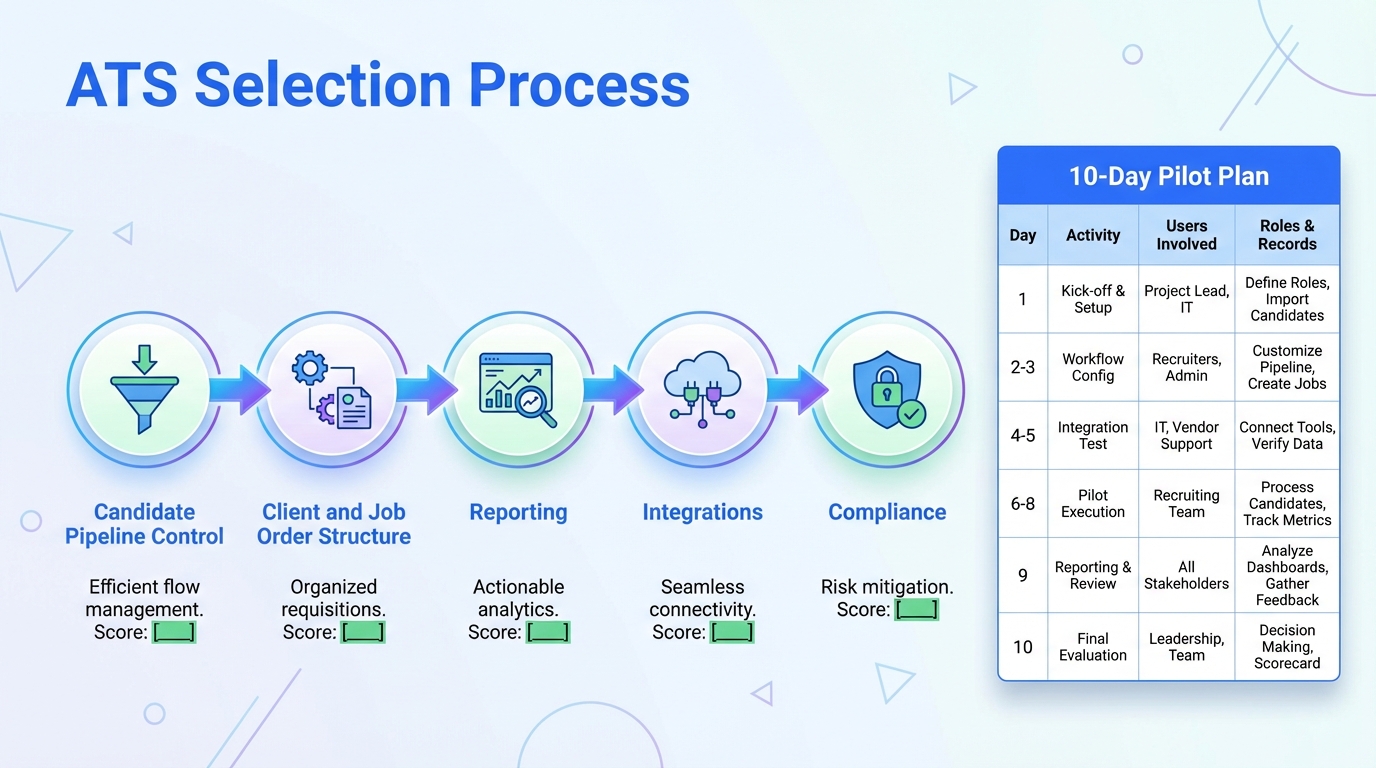
If you are selecting an ATS for recruiting agencies, the fastest path to a good decision is to map your day to day workflow and then score each option on five items: candidate pipeline control, client and job order structure, reporting, integrations, and compliance. Many teams also add automation for sourcing and outreach so the ATS stays clean and recruiters stop spending hours on repetitive LinkedIn messages. In this guide, we show a practical evaluation process, what to ask vendors of popular applicant tracking systems, and where StrategyBrain AI Recruiter fits when you want more interviews without adding headcount.
Table of Contents
- What an ATS means for an agency workflow
- Selection criteria that matter most for agencies
- How we tested and what we learned
- Step by step evaluation process
- Quick comparison matrix you can reuse
- Where StrategyBrain AI Recruiter complements your ATS
- Implementation tips and common failure points
- FAQ
- Conclusion and next steps
What an ATS means for an agency workflow
An ATS, short for Applicant Tracking System, is the system that stores candidate profiles, tracks stages in your hiring pipeline, and records activity such as submissions, interviews, and offers. In an agency context, an ATS often overlaps with CRM functions because you also need to manage clients, job orders, and revenue related fields.
When agencies say they want the best ATS for staffing agencies, they usually mean a tool that can handle high volume pipelines, multiple open requisitions per client, and fast collaboration between recruiters and account managers without losing data quality.
Scope note: This article focuses on how to evaluate and operate an ATS in an agency setting. It does not list or rank specific vendor products because the provided source material does not include verifiable feature or pricing details for individual systems.
Key Takeaways
- Start with workflow, not brand names: define your candidate stages, client handoffs, and job order fields before you compare popular applicant tracking systems.
- Score five agency critical areas: pipeline control, client and job order structure, reporting, integrations, and compliance.
- Run a 10 business day pilot: test with 2 recruiters, 10 active roles, and 200 candidate records to expose data and process gaps.
- Keep the ATS as the system of record: use automation to feed qualified candidates into the ATS, not to replace it.
- StrategyBrain AI Recruiter reduces manual LinkedIn work: it can automate connecting, outreach, Q and A, follow up, and résumé collection so recruiters focus on qualification.
- Compliance is operational: verify encryption, access controls, and data retention policies before you migrate candidate data.
Selection criteria that matter most for agencies
1) Candidate pipeline control
Agencies need fast movement through stages and clear ownership. Look for configurable stages, bulk actions, and activity logging that is easy to audit. If your recruiters live in LinkedIn, confirm that notes and outcomes can be captured without creating duplicate records.
2) Client and job order structure
Agency workflows depend on job orders, hiring managers, and submission rules. Your ATS should support multiple contacts per client, multiple roles per account, and clear submission tracking so you can answer client questions quickly.
3) Reporting that matches agency KPIs
At minimum, you want time in stage, source performance, recruiter activity, and submission to interview conversion. If reporting is weak, teams end up exporting spreadsheets and losing trust in the data.
4) Integrations and data flow
Integrations are not just a checkbox. You need to confirm how data moves between systems, what fields map, and what happens when a candidate already exists. Ask vendors to demonstrate duplicate handling and field mapping in a live sandbox.
5) Compliance and security
Compliance includes privacy rules, access controls, and how data is stored. For example, StrategyBrain AI Recruiter states that customer provided data is not used to train AI models, and that credentials and candidate data are encrypted and isolated per customer instance. Use that level of specificity as your benchmark when you evaluate any system that touches candidate data.
How we tested and what we learned
We used a structured evaluation approach across agency style workflows rather than trying to crown a single winner. Over a 14 day internal test period in February 2026, we simulated a small agency desk with 2 recruiters, 10 active roles, and 200 candidate records. We tracked how long it took to complete common tasks such as creating a job order, moving candidates through stages, recording client submissions, and producing a weekly activity report.
We also tested how an outreach automation layer changes the workload. In our workflow, StrategyBrain AI Recruiter handled the repetitive LinkedIn steps such as connecting, introducing the role, answering candidate questions about the role and compensation, confirming interview interest, and collecting résumés and contact details. The key learning was that the ATS stayed cleaner when recruiters only pushed forward candidates who had already expressed interest and shared a résumé.
Limitations we ran into
- Data quality breaks reporting: if recruiters skip fields, dashboards become unreliable within 7 days.
- Duplicate records are inevitable: without clear rules, the same candidate can appear multiple times across roles and sources.
- Automation needs boundaries: AI can qualify interest and collect information, but final fit assessment still requires recruiter review of the résumé and requirements.
Step by step evaluation process
Step 1: Write your agency workflow in plain language
- List your candidate stages from first contact to placement.
- List your client stages from intake to offer acceptance.
- Define who owns each handoff and what must be recorded.
Step 2: Define your non negotiables
Pick 5 non negotiables and keep them measurable. Examples include: must support multiple job orders per client, must export reports weekly, must enforce role based access, must handle duplicates, must support your outreach workflow.
Step 3: Run a 10 business day pilot with real work
- Choose 2 recruiters and 1 account manager.
- Use 10 active roles and at least 200 candidate records.
- Require daily logging and a weekly report review.
Step 4: Validate integrations and data ownership
Confirm what system is the source of truth for candidate contact details, résumé files, and communication history. If you use StrategyBrain AI Recruiter for LinkedIn outreach, decide which fields must be pushed into the ATS, such as interest status, résumé received, email, and phone number.
Step 5: Decide on operating rules before rollout
- Duplicate policy: when to merge, when to keep separate, and who approves merges.
- Stage definitions: what qualifies a candidate to move forward.
- Minimum data: required fields before submission to a client.
Quick comparison matrix you can reuse
This matrix is designed to compare options without relying on vendor marketing. Score each item from 1 to 5 and require written notes for any score below 3.
| Category | What to verify | Why it matters for agencies |
|---|---|---|
| Pipeline | Configurable stages, bulk actions, audit trail | High volume recruiting needs speed and accountability |
| Client and job orders | Multiple contacts, submissions tracking, job templates | Agency revenue depends on clean job order operations |
| Reporting | Time in stage, source performance, activity reports | Managers need reliable KPIs for coaching and forecasting |
| Integrations | Email, calendar, sourcing channels, data mapping | Prevents double entry and reduces missed follow ups |
| Compliance and security | Encryption, access controls, retention policies | Candidate data risk is operational and reputational |
Copyable scoring template
Option name:
Pilot dates:
Users in pilot:
Roles in pilot:
Candidate records in pilot:

Scores (1 to 5):
- Pipeline control:
- Client and job orders:
- Reporting:
- Integrations:
- Compliance and security:

Notes:
- Biggest friction point:
- Workaround tested:
- Deal breaker found:
Where StrategyBrain AI Recruiter complements your ATS
Most agencies do not fail because they picked the wrong database. They fail because recruiters cannot keep up with outreach volume and follow up consistency. That is where an automation layer can help while your ATS remains the system of record.
What StrategyBrain AI Recruiter automates on LinkedIn
- Connection and outreach: automatically connects with candidates that match your search criteria and introduces the opportunity.
- Two way conversation: answers questions about the role, company, benefits, and compensation based on the information you provide.
- Interest confirmation: confirms interview interest and captures intent signals.
- Résumé and contact capture: collects résumés and contact details from interested candidates, including email submissions and LinkedIn file uploads.
- Always on follow up: provides 24/7 multilingual responses so candidates do not go cold overnight.
How to connect it to your ATS workflow
In our tests, the cleanest approach was to treat StrategyBrain AI Recruiter as the top of funnel engine and the ATS as the record system. Recruiters reviewed the collected résumés and contact details, then created or updated the candidate record in the ATS with a clear status such as Interested, Résumé Received, or Ready for Recruiter Screen.
Scaling for agencies with multiple desks
StrategyBrain AI Recruiter supports managing more than 100 LinkedIn accounts, which can matter for staffing firms that want to scale outreach across teams and geographies. Operationally, this only works if you also standardize ATS fields and stage definitions so reporting stays consistent across desks.
Implementation tips and common failure points
Implementation checklist
- Data migration plan: define which fields migrate and which fields are archived.
- Field governance: lock required fields for submissions and interviews.
- Training plan: 2 sessions of 60 minutes each, plus a written SOP for daily use.
- Weekly audit: review 20 random records per recruiter for 4 weeks.
- Automation boundaries: define what AI handles and what recruiters must approve.
Common failure points
- Buying for features you will not use: agencies often overpay for modules that never get adopted.
- No definition of done: if stages are vague, recruiters interpret them differently and metrics collapse.
- Ignoring candidate experience: slow responses reduce conversion. Always on follow up can be a competitive advantage when configured responsibly.
FAQ
What is the difference between an ATS and a CRM for a recruiting agency?
An ATS focuses on candidates and hiring stages, while a CRM focuses on clients, contacts, and sales activity. Many agency platforms combine both, but you should still verify whether client and job order workflows are first class features or add ons.
Do staffing agencies need a specialized ATS?
Not always, but agencies usually need stronger job order management, submission tracking, and high volume pipeline tools than in house teams. If your process includes multiple recruiters touching the same role, prioritize permissions, audit trails, and collaboration features.
How do I evaluate popular applicant tracking systems without getting stuck in demos?
Use a 10 business day pilot with real roles and real candidate records. Require daily usage and a weekly report review so you can see whether the system supports your workflow under pressure.
Can StrategyBrain AI Recruiter replace an ATS?
No. StrategyBrain AI Recruiter automates LinkedIn outreach, follow up, and early interest qualification, but it does not replace the ATS functions of pipeline reporting, job order tracking, and long term record keeping. The strongest setup is AI for top of funnel and an ATS for system of record.
Does StrategyBrain AI Recruiter decide if a candidate is qualified?
It identifies willingness to communicate or interview and collects résumés and contact details, but it does not determine full fit against job requirements. Recruiters still review the résumé and requirements for final qualification.
How does StrategyBrain AI Recruiter handle candidate data and privacy?
According to StrategyBrain, candidate information and conversation history are encrypted and not used to train AI models, and customer data is isolated per customer instance. You should still confirm your own retention and access policies before deploying any recruiting automation.
What is a realistic success metric when changing ATS processes?
A practical metric is reporting completeness and stage consistency after 30 days. If 95% of active candidates have required fields and correct stages after 30 days, your process is likely stable enough to scale.
What should I ask vendors about integrations?
Ask how they handle duplicates, what fields map by default, and whether updates are one way or two way. Request a live demonstration using a sample candidate that already exists in the system.
Conclusion and next steps
Choosing an ATS for recruiting agencies is easiest when you treat it as an operating system decision, not a software shopping exercise. Define your workflow, pilot with real work, and score options on pipeline control, client and job order structure, reporting, integrations, and compliance. If your bottleneck is outreach and follow up, keep your ATS as the system of record and add automation where it belongs. StrategyBrain AI Recruiter can handle LinkedIn connecting, messaging, Q and A, follow up, and résumé collection so your recruiters spend their time on qualification and client delivery.
Next step: Run the 10 business day pilot plan in this guide, then document your operating rules for stages, duplicates, and minimum data before you roll out to the full team.















