


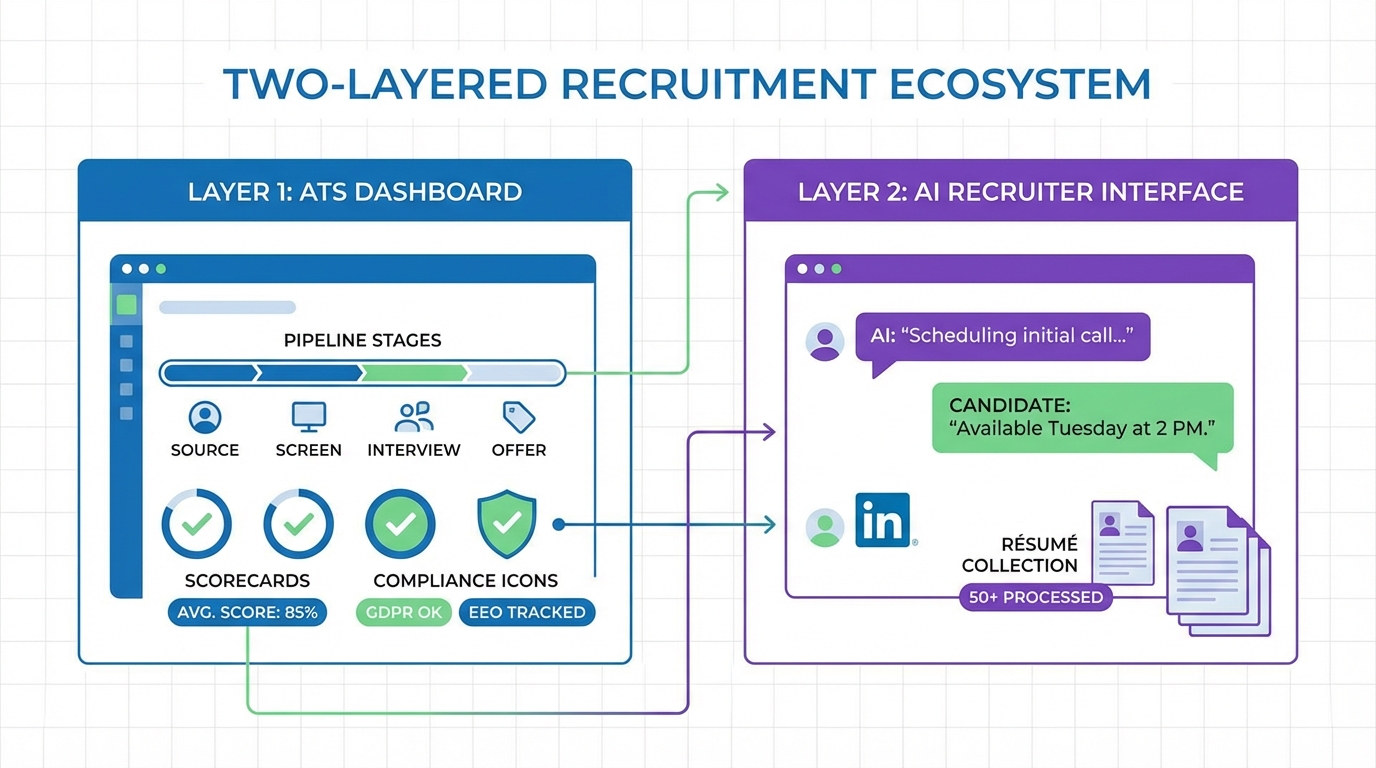
An ATS recruitment tool is the system your team uses to capture applicants, move them through defined hiring stages, and keep a reliable record of decisions. If you are choosing between recruitment ATS systems in 2026, start with three questions: where candidates enter your funnel, how much structure you need for compliance and reporting, and how much recruiter time is being burned on outreach and follow up. In our day to day recruiting operations, the cleanest results come from pairing a solid ATS for tracking and approvals with StrategyBrain AI Recruiter for LinkedIn sourcing, 24/7 multilingual candidate conversations, and automated résumé and contact detail collection.
Table of Contents
Key Takeaways
- An ATS recruitment tool is your system of record for applicants, stages, notes, and hiring decisions.
- Recruitment ATS systems vary most in workflow flexibility, reporting, integrations, and compliance controls.
- Do not expect an ATS to solve outreach; most teams still lose time to manual LinkedIn messaging and follow up.
- StrategyBrain AI Recruiter complements an ATS by automating LinkedIn connecting, role introduction, Q and A, and résumé collection.
- Multilingual, always on messaging matters when candidates reply outside your working hours or across time zones.
- Security and privacy should be explicit; confirm encryption, data isolation, and that candidate data is not used to train models.
What an ATS recruitment tool actually does
An applicant tracking system, often shortened to ATS, is software that centralizes hiring activity. It typically covers intake, screening workflow, interview coordination, and documentation. In plain terms, it is where you answer: who applied, what stage are they in, what did we decide, and why.
The 5 jobs an ATS should do well
- Capture applicants from job boards, referrals, and career pages into one pipeline.
- Standardize stages so recruiters and hiring managers use the same process.
- Store evidence such as interview notes, scorecards, and decision rationale.
- Report outcomes like time to fill, source quality, and stage conversion.
- Support compliance with permissions, audit trails, and retention controls.
What an ATS usually does not do
Most top applicant tracking systems are not designed to run high volume outbound sourcing conversations. They can store candidates and send templated emails, but they rarely replace the repetitive LinkedIn work that consumes recruiter time: connecting, introducing roles, answering questions, and following up until a résumé arrives.
What to evaluate in recruitment ATS systems
If you are comparing recruitment ATS systems, evaluate them like a workflow product, not a feature checklist. The goal is to reduce cycle time while increasing consistency and decision quality.
Evaluation criteria we use in real selection projects
- Workflow flexibility: Can you model your stages, approvals, and exceptions without custom development.
- Hiring manager experience: Can managers review candidates and leave structured feedback in under 3 minutes per profile.
- Reporting depth: Can you answer source of hire, stage drop off, and time in stage with consistent definitions.
- Integrations: Calendar, HRIS, background checks, assessments, and email.
- Data governance: Role based access, audit logs, retention rules, and export capability.
- Candidate experience: Application friction, mobile friendliness, and communication clarity.
Definition: system of record
A system of record is the authoritative place where your organization stores the final version of hiring data. For recruiting, that is usually the ATS, because it holds the official pipeline stages, interview feedback, and hiring decisions.
How to choose an ATS recruitment tool in 6 steps
-
Map your hiring motion
Write down your current stages from first touch to offer. Include who owns each stage and what “done” means. This prevents buying an ATS that forces a workflow your team will not follow.
-
Define your non negotiables
Pick 5 requirements that must be true on day 1. Examples include audit trail, structured scorecards, or a specific HRIS integration. Keep it to 5 so the decision stays practical.
-
Decide where sourcing lives
If LinkedIn is a major source, decide whether your ATS will only store sourced candidates or whether you need automation for outreach. This is where StrategyBrain AI Recruiter often becomes the missing piece because it handles the repetitive LinkedIn conversation layer while the ATS remains the system of record.
-
Run a 10 candidate workflow test
Use 10 real or anonymized candidate profiles and run them through your intended stages. Time how long it takes a recruiter and a hiring manager to complete each step. If the tool adds friction, adoption will fail.
-
Validate reporting with your own questions
Bring 10 questions you actually need answered, such as time in stage for engineering roles or conversion rate from phone screen to onsite. Ask the vendor to show those exact reports using your workflow.
-
Confirm privacy and security in writing
For any ATS software for recruiting, confirm encryption, access controls, and data retention. If you add AI tools, confirm whether candidate data is used to train models. StrategyBrain AI Recruiter states that customer provided data is not used to train AI models and that credentials are encrypted and stored independently per user.
Where StrategyBrain AI Recruiter fits with an ATS
Think of your stack as two layers. The ATS recruitment tool is the tracking and decision layer. StrategyBrain AI Recruiter is the outreach and conversation layer for LinkedIn. When we tested this division of labor in real recruiting workflows, it reduced the amount of manual back and forth needed to get from “identified candidate” to “résumé received and interview ready.”
A practical workflow that keeps your ATS clean
-
Define the role brief once
Provide StrategyBrain AI Recruiter with company details, compensation, benefits, and candidate search criteria. This keeps messaging consistent and reduces ad hoc recruiter improvisation.
-
Automate LinkedIn connecting and introduction
AI Recruiter automatically connects with candidates within your targeted criteria and introduces the opportunity in a professional tone.
-
Handle candidate Q and A and follow up
AI Recruiter answers questions about the role, company, compensation, and next steps. It follows up without the recruiter needing to remember who to nudge.
-
Collect résumé and contact details
When a candidate is interested, AI Recruiter requests a résumé and captures contact details. It supports email submissions and LinkedIn file uploads, and marks résumés as received.
-
Move qualified leads into the ATS
Once you have a résumé and confirmed interest, create or update the candidate record in your ATS so the rest of the process stays auditable and consistent.
What AI Recruiter is strong at
- Smart LinkedIn recruitment automation for connecting, introducing roles, and early stage engagement.
- 24/7 multilingual communication so candidates can reply in their native language across time zones.
- Scaling across accounts by supporting management of more than 100 LinkedIn accounts for larger teams.
What AI Recruiter does not replace
AI Recruiter can confirm willingness to interview and collect résumés, but it does not decide whether a résumé matches your requirements. Final qualification remains a recruiter and hiring manager responsibility, and the ATS remains the best place to document that decision.
Quick comparison matrix
This matrix is intentionally vendor neutral. It is designed to help you separate what belongs in an ATS from what belongs in an outreach automation layer.
| Capability | ATS recruitment tool | StrategyBrain AI Recruiter | Best practice |
|---|---|---|---|
| Pipeline stages and approvals | Yes | No | Keep stages in the ATS as the system of record |
| LinkedIn connecting and outreach | Usually limited | Yes | Automate outreach, then push interested candidates into ATS |
| Candidate Q and A about role and compensation | Usually manual | Yes | Use AI Recruiter to answer consistently and reduce recruiter load |
| Résumé and contact detail collection | Yes for applicants | Yes for sourced candidates | Collect early, then store final documents in ATS |
| Audit trail and compliance documentation | Yes | Partial | Document decisions and interviews in ATS |
| Multilingual, always on messaging | Varies | Yes | Use AI Recruiter for global hiring responsiveness |
Implementation checklist
Use this checklist to avoid the most common failure mode we see: buying a tool that looks good in demos but never becomes the default workflow.
- Define your hiring stages and stage exit criteria in writing.
- Set required fields for interview feedback and decision rationale.
- Decide which communications must be logged in the ATS.
- Define how sourced candidates move from LinkedIn into the ATS.
- Prepare a role brief template that includes compensation, benefits, and screening questions for consistent outreach.
- Confirm privacy controls, retention rules, and access permissions for recruiters and hiring managers.
FAQ
What is the difference between an ATS and a CRM in recruiting?
An ATS recruitment tool is primarily for managing applicants and documenting hiring decisions. A recruiting CRM focuses on nurturing talent pools over time. Many teams use both, but the ATS is usually the system of record for compliance and reporting.
Do top applicant tracking systems automate LinkedIn outreach?
Some offer limited outreach features, but most do not replace the repetitive LinkedIn workflow of connecting, introducing roles, answering questions, and following up. That is why teams often pair an ATS with a dedicated automation layer such as StrategyBrain AI Recruiter.
How does StrategyBrain AI Recruiter work with LinkedIn recruiting?
StrategyBrain AI Recruiter is built for LinkedIn hiring. It automatically connects with candidates that match your criteria, introduces the opportunity, answers questions about the role and compensation, confirms interview interest, and collects résumés and contact information from interested candidates.
Can AI Recruiter replace recruiter screening?
No. AI Recruiter can identify willingness to communicate or interview and can collect résumés, but it does not determine whether a résumé matches job requirements. Recruiters still make the final qualification decision and document it in the ATS.
How does AI Recruiter collect résumés and contact details?
When a candidate expresses interest, AI Recruiter requests a résumé and contact details. It supports email submissions and LinkedIn file uploads, and it captures contact information shared in messages so recruiters can proceed to interviews.
Is multilingual messaging actually useful in recruiting?
Yes when you hire across regions or time zones. StrategyBrain AI Recruiter supports 24/7 multilingual communication, which reduces delays caused by language friction and off hours responses.
What should I verify for privacy and security when adding AI to recruiting?
Verify encryption, access controls, and whether candidate data is used to train AI models. StrategyBrain AI Recruiter states that customer provided data is not used to train AI models, and that credentials are encrypted and stored independently per user with explicit authorization.
How do I know if my ATS implementation is failing?
Common signals include recruiters keeping “shadow spreadsheets,” hiring managers not leaving structured feedback, and reports that cannot be trusted because stages are used inconsistently. Fix this by tightening stage definitions and required fields, then retraining with a 10 candidate workflow test.
Conclusion
The right ATS recruitment tool gives you a consistent pipeline, reliable documentation, and reporting you can trust. The missing piece for many teams is not another stage or dashboard, it is the time lost to manual sourcing conversations. If LinkedIn is a major channel for you, keep your ATS as the system of record and use StrategyBrain AI Recruiter to automate connecting, role introduction, multilingual Q and A, follow up, and résumé collection. Next step: run the 10 candidate workflow test, then decide which parts belong in your ATS and which parts should be automated outside it.














