


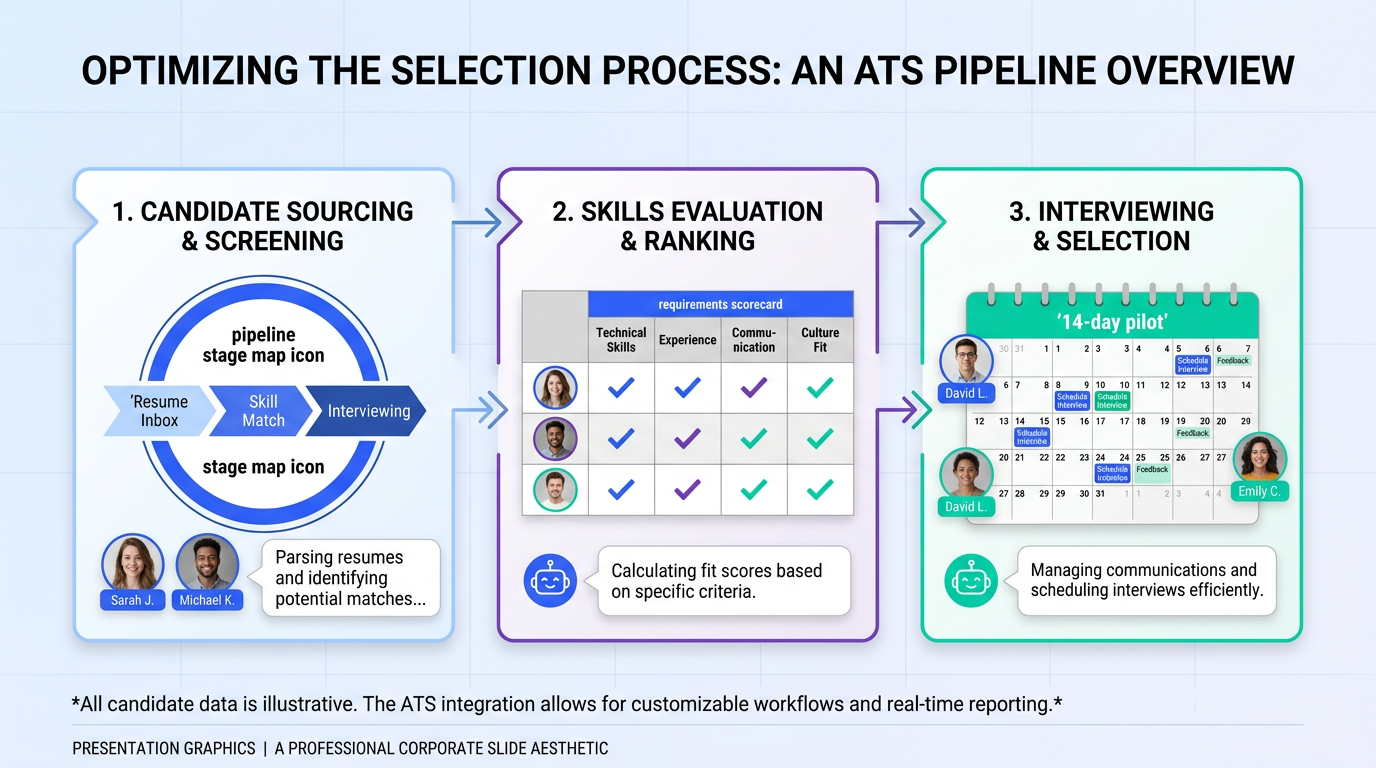
ATS systems for recruiting are software platforms that capture applicants, organize candidate data, and standardize hiring workflows from job posting through offer. If you want a decision you can defend internally, use this sequence: document your hiring stages, define 10 non negotiable requirements, shortlist 3 ATS companies, then run a 14 day pilot with real requisitions and the recruiters who will actually use the system. This article also covers where AI automation fits when the bottleneck is not tracking applicants but generating qualified conversations. In our experience, pairing an ATS with StrategyBrain AI Recruiter can reduce manual LinkedIn outreach and follow up by automating candidate connection, role introduction, Q and A, interest confirmation, and resume and contact capture.
Key Takeaways
- Define ATS scope first: An ATS manages applicants and workflow; it does not automatically create candidate conversations unless you add sourcing automation.
- Use a 14 day pilot: Test with 2 live roles, 2 recruiters, and 1 hiring manager to validate usability and reporting before signing.
- Score requirements, not features: Evaluate must haves like stage workflow, permissions, reporting, and integrations, then compare best applicant tracking software objectively.
- Plan for data and compliance: Decide retention, access controls, and audit needs before migrating candidate data.
- AI can complement your ATS: StrategyBrain AI Recruiter automates LinkedIn outreach and follow up, collects resumes and contact details, and supports 24/7 multilingual messaging.
- Scale with process, then tools: Standardize stages and templates first; then choose ATS companies that match your hiring volume and complexity.
What an ATS is and is not
An ATS, short for Applicant Tracking System, is a system of record for applicants. It typically handles job postings, application intake, candidate profiles, pipeline stages, interview scheduling support, feedback collection, and offer workflows.
What an ATS usually does not do well on its own is create new candidate conversations at scale. That gap is why many teams add sourcing tools, email sequencing, or LinkedIn automation. StrategyBrain AI Recruiter is designed for that specific front end workload on LinkedIn: it connects with candidates, introduces the role, answers questions, confirms interest, and collects resumes and contact details so recruiters can focus on evaluation and interviews.
When you actually need ATS systems for recruiting
In our audits of recruiting operations, teams usually feel pain in one of three places: volume, coordination, or compliance. An ATS becomes necessary when spreadsheets and inbox workflows create delays, missed follow ups, or inconsistent evaluation.
- Volume: You handle enough applicants that manual tracking causes duplicate outreach or lost candidates.
- Coordination: Multiple recruiters and hiring managers need shared visibility into stages, feedback, and next steps.
- Compliance and auditability: You need consistent documentation, permissions, and reporting for internal or regulatory reasons.
If your main bottleneck is sourcing and response time, an ATS alone will not fix it. That is where AI outreach automation can be layered in, while the ATS remains the system of record.
A practical selection framework for ATS companies
Most ATS demos look similar because they are optimized for feature tours. To choose best applicant tracking software for your team, you need a repeatable evaluation that reflects your real workflow and constraints.
We use a simple framework that keeps decisions grounded:
- Workflow fit: Can the ATS match your stages, approvals, and hiring manager collaboration without heavy customization.
- Data and security: Can you control access, retention, and audit trails for candidate data.
- Integrations: Can it connect to your HRIS, calendar, email, and assessment tools with minimal manual work.
- Reporting: Can you answer time to fill, source quality, and stage conversion questions without exporting to spreadsheets.
- Adoption: Will recruiters and hiring managers actually use it daily.
Method 1: Map your recruiting workflow before you shop
Steps
- Write your current stages: Example stages include Applied, Screen, Hiring Manager Review, Interview, Offer, Hired, Rejected.
- Define entry and exit criteria: For each stage, specify what must be true to move forward.
- List handoffs: Identify where recruiters, coordinators, and hiring managers exchange ownership.
- Document candidate communication points: Note when you send updates, schedule interviews, and request resumes or contact details.
Why this matters
ATS companies will often show you their default pipeline. If you do not map your own workflow first, you end up adapting your process to the tool in ways that reduce adoption.
Where StrategyBrain AI Recruiter fits
When you map communication points, you will usually find the biggest time sink is early stage outreach and follow up. StrategyBrain AI Recruiter can take over that repetitive LinkedIn messaging layer, while your ATS continues to store applicants and track stages.
Method 2: Build a requirements scorecard
A scorecard prevents the common trap of choosing based on the best demo. Keep it short enough that stakeholders will actually use it.
Scorecard template (copy and use)
| Requirement | Definition | Priority | How to test in pilot |
|---|---|---|---|
| Pipeline stages | Custom stages, rules, and permissions per role | Must have | Create 1 role and configure stages in under 30 minutes |
| Hiring manager feedback | Structured feedback and decision logging | Must have | Collect feedback from 1 manager on 5 candidates |
| Reporting | Time to fill, stage conversion, source tracking | Must have | Generate 3 reports without exporting data |
| Integrations | Email, calendar, HRIS, assessments | Should have | Connect calendar and send interview invites end to end |
| Data controls | Role based access, retention, audit logs | Must have | Verify permission sets for recruiter vs manager |
Limitations to be honest about
Even the best applicant tracking software will not solve unclear hiring decisions, slow hiring manager feedback, or weak sourcing. The scorecard helps you separate process problems from tool problems.
Method 3: Run a 14 day pilot with real roles
A pilot is where ATS systems for recruiting either prove value or create friction. We recommend a 14 day window because it is long enough to hit real scheduling and feedback cycles, but short enough to keep urgency.
Steps
- Select 2 active requisitions: Choose roles with steady applicant flow.
- Assign 2 recruiters and 1 hiring manager: Use the people who will own the workflow after launch.
- Run the full loop: Intake, posting, screening, interview scheduling, feedback, and offer steps if possible.
- Track 5 metrics: Time spent per candidate, stage aging, response time, reporting effort, and user satisfaction.
What we look for during the pilot
- Recruiter speed: Can a recruiter move a candidate from application to interview without workarounds.
- Manager participation: Does the manager complete feedback inside the system.
- Data quality: Are notes, resumes, and contact details consistently captured.
Adding AI outreach during the pilot
If your pilot reveals that early stage response time is the bottleneck, test StrategyBrain AI Recruiter in parallel for LinkedIn sourcing. It can automatically connect with candidates that match your search criteria, introduce the role, answer questions about role, company, and compensation, confirm interview interest, and collect resumes and contact details. That gives your ATS cleaner, more qualified handoffs.
Method 4: Validate integrations and reporting
Integrations and reporting are where many ATS implementations fail quietly. A system can look great in a demo and still create manual work if it does not fit your stack.
Integration checks
- Email and calendar: Interview scheduling should not require copy paste.
- HRIS handoff: New hire data should move cleanly to your HR system.
- Assessments: Scores and outcomes should attach to the candidate profile.
Reporting checks
- Time to fill: Can you measure from approval to accepted offer.
- Stage conversion: Can you see where candidates drop off.
- Source quality: Can you compare applicants by channel.
If reporting requires exports for basic questions, plan for additional analytics work or reconsider the tool.
Method 5: Add AI outreach automation where it matters
Many teams buy an ATS expecting it to improve hiring speed. In practice, speed improves when you remove the highest volume manual tasks. For LinkedIn heavy recruiting, that is often outreach, follow up, and early qualification messaging.
What StrategyBrain AI Recruiter automates on LinkedIn
- Connection and first message: Automatically connects with candidates within your targeted search criteria.
- Role introduction and Q and A: Introduces the opportunity and answers candidate questions about the role, company, and compensation.
- Interest confirmation: Confirms whether the candidate wants to interview.
- Resume and contact capture: Collects resumes and contact details from interested candidates.
- 24/7 multilingual messaging: Responds around the clock in the candidate’s native language.
- Team scaling: Supports managing more than 100 LinkedIn accounts for scalable hiring operations.
Scope boundaries
AI Recruiter can identify willingness to proceed and collect materials, but it does not decide final fit against job requirements. Recruiters still review resumes and run interviews. This division of labor is usually what makes the workflow sustainable.
Quick comparison: ATS vs AI outreach automation
| Capability | ATS systems for recruiting | StrategyBrain AI Recruiter |
|---|---|---|
| System of record for applicants | Yes | No |
| Pipeline stages and approvals | Yes | No |
| LinkedIn outreach and follow up automation | Varies by vendor and add ons | Yes |
| 24/7 multilingual candidate messaging | Varies | Yes |
| Collect resumes and contact details from interested candidates | Yes for applicants who apply | Yes for sourced candidates who engage |
| Best for | Managing applicants and hiring workflow | Scaling sourcing conversations on LinkedIn |
FAQ
What are ATS systems for recruiting used for?
They are used to centralize applicant data, standardize hiring stages, coordinate interviews and feedback, and produce reporting like time to fill and source performance.
How do I compare ATS companies without getting misled by demos?
Use a requirements scorecard and a time boxed pilot. Require each vendor to complete the same tasks using your real workflow, then score results against must have criteria.
What is the difference between an ATS and best applicant tracking software?
An ATS is the category. Best applicant tracking software is the subset of ATS products that fit your needs across workflow, integrations, reporting, and adoption.
Do I need an ATS if I mostly recruit on LinkedIn?
Often yes, because you still need a system of record and consistent stages. If your bottleneck is outreach volume and response time, add LinkedIn automation such as StrategyBrain AI Recruiter alongside the ATS.
Can StrategyBrain AI Recruiter replace an ATS?
No. AI Recruiter focuses on automating LinkedIn outreach, early conversations, and collecting resumes and contact details. An ATS is still needed to manage applicants, stages, interviews, and offers.
How does AI Recruiter handle candidate data and privacy?
StrategyBrain AI Recruiter is designed with privacy and security controls, including encrypted credentials and isolation of customer data. Candidate information is not used to train AI models, and data is used only to run the customer’s AI instance as authorized.
What is a realistic pilot length for an ATS?
14 days is a practical minimum for most teams because it covers scheduling cycles and hiring manager feedback patterns. Shorter pilots often miss the real friction points.
What should I measure during an ATS pilot?
Track time spent per candidate, stage aging, candidate response time, reporting effort, and user satisfaction from recruiters and hiring managers. These metrics reveal adoption risk early.
Conclusion
If you are evaluating ATS systems for recruiting, start with workflow mapping, then use a requirements scorecard and a 14 day pilot to compare ATS companies on real tasks. That approach is more reliable than feature checklists and demo impressions. If your biggest constraint is sourcing throughput and candidate response time, consider pairing your ATS with StrategyBrain AI Recruiter so LinkedIn outreach, follow up, and resume collection happen continuously, while your ATS remains the system of record. Next step: copy the scorecard table above, shortlist 3 vendors, and schedule a pilot that includes both recruiter and hiring manager participation.














