


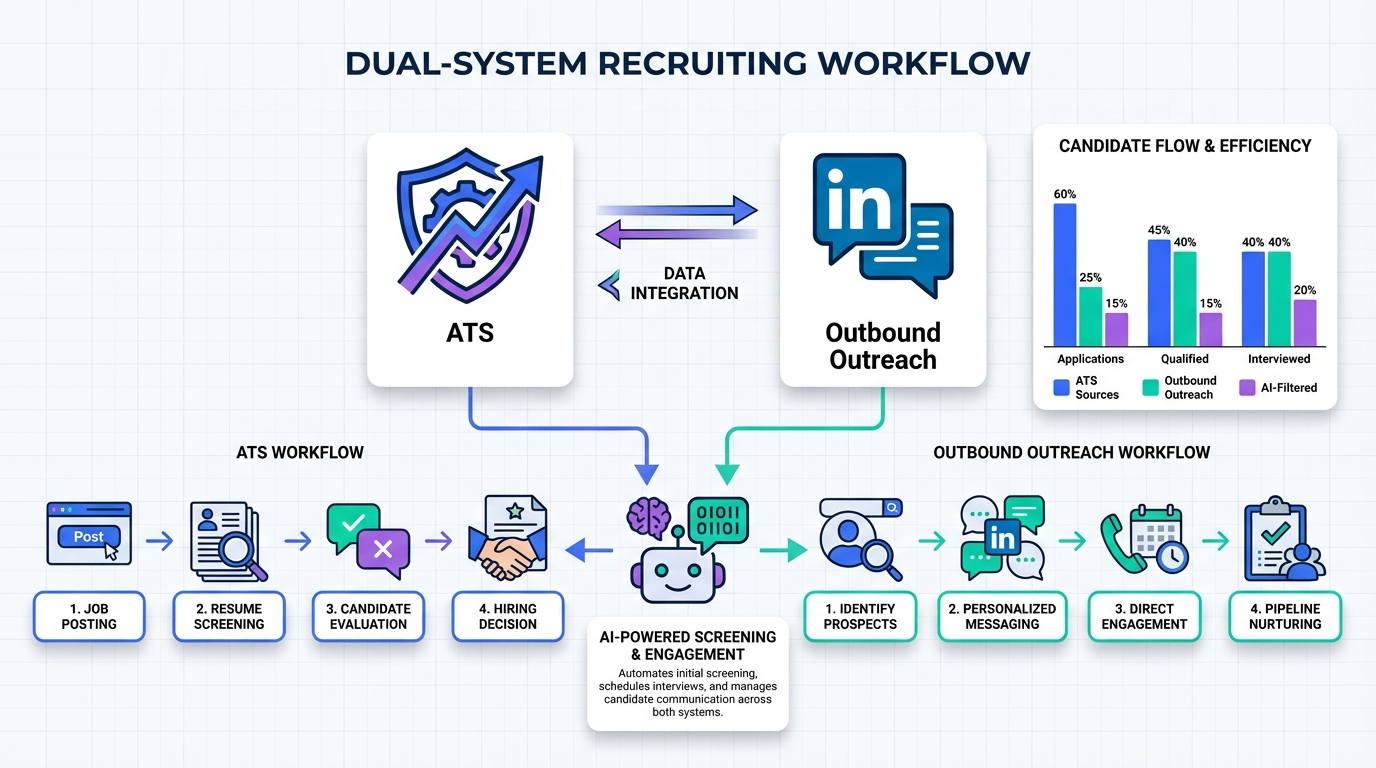
If you are evaluating ATS systems for recruiting, the practical answer is this: an ATS is necessary for intake, tracking, and compliance, but it will not create candidate supply. When relocation is limited and unemployment is low for credentialed workers, your pipeline can stay empty even with the best applicant tracking software. One Canada focused example cited 375,000 job vacancies and only 313,188 people moving between provinces from March 2016 to March 2017, which is less than 1% of the population. In that environment, the winning setup is an ATS for process control plus an outbound engine that starts conversations. In our recruiting operations, we use the ATS to manage stages and reporting, then use StrategyBrain AI Recruiter on LinkedIn to automate initial outreach, answer candidate questions, and collect resumes and contact details for recruiter review.
Table of Contents
- Why an ATS alone does not fix hiring
- What ATS systems for recruiting actually do
- How to choose the best applicant tracking software
- A practical workflow: ATS plus LinkedIn outreach
- How StrategyBrain AI Recruiter fits with your ATS
- Quick comparison: what to expect from each system
- Implementation checklist
- FAQ
- Conclusion
Key Takeaways
- An ATS optimizes process, not supply: it tracks applicants and stages, but it does not make qualified people relocate or respond.
- Labor mobility can be the bottleneck: 313,188 Canadians moved between provinces from March 2016 to March 2017, which is less than 1%.
- Define “best” by workflow: the best applicant tracking software is the one that matches your hiring volume, approvals, and reporting needs.
- Pair ATS with outbound sourcing: use LinkedIn outreach to create conversations, then push interested candidates into the ATS.
- StrategyBrain AI Recruiter automates the front end: it connects, introduces roles, answers questions, and collects resumes and contact details for recruiter review.
- Be honest about limits: AI can confirm interest, but final qualification still requires a recruiter reviewing the resume against requirements.
Why an ATS alone does not fix hiring
Many teams buy an ATS during a hiring crunch, expecting the tool to “fix recruiting.” The reality is that an ATS mostly improves what happens after a candidate is already in your funnel. If your funnel is thin, the ATS will simply show you the same shortage with cleaner dashboards.
A useful way to think about it is constraints. In the Canada example referenced above, employers faced a combination of job vacancies, low unemployment for credentialed talent, and limited relocation. If people do not move, and most qualified people are already employed, your ATS cannot manufacture applicants. It can only help you handle the applicants you do get.
This is why many recruiting leaders end up with two systems: one for process control, and one for pipeline creation. The second system can be a sourcing team, an agency, or an automation layer that increases outbound reach and follow up consistency.
What ATS systems for recruiting actually do
An applicant tracking system is software that centralizes candidate records and moves them through defined hiring stages. In practice, most ATS companies focus on four core jobs.
1) Intake and data capture
The ATS collects applications from job boards, career pages, referrals, and email. It stores resumes, contact details, and screening responses in a structured profile so recruiters do not have to rebuild context every time they open a candidate.
2) Workflow and approvals
The ATS enforces your hiring process. That includes stage definitions, interview plans, scorecards, offer approvals, and audit trails. This is where the “best applicant tracking software” often differs by company size and compliance needs.
3) Collaboration and communication logging
Recruiting is a team sport. ATS systems typically log emails, notes, and interview feedback so hiring managers and recruiters can make decisions with the same information.
4) Reporting
Time to fill, source of hire, stage conversion rates, and recruiter workload are common ATS reports. These metrics are only as good as your data hygiene, which is why consistent stage usage matters.
What an ATS usually does not do well
- Create candidate conversations: it is not designed to initiate outreach at scale.
- Follow up 24/7: most ATS messaging is not built for real time back and forth across time zones.
- Handle multilingual candidate chat: some platforms support templates, but true multilingual conversation is often limited.
How to choose the best applicant tracking software
Instead of starting with a feature checklist, start with your operating model. The “best” ATS systems for recruiting are the ones that reduce friction in your specific workflow and produce reliable reporting.
Selection criteria that actually matter
- Hiring volume: 10 hires per year and 1,000 hires per year require different permissioning, automation, and reporting depth.
- Process complexity: if you have multi step approvals, union rules, or regulated roles, you need stronger audit trails and structured scorecards.
- Source mix: if LinkedIn sourcing is a major channel, prioritize clean candidate import, deduplication, and stage mapping.
- Data hygiene controls: required fields, stage definitions, and consistent disposition reasons improve reporting accuracy.
- Integration surface: calendar, email, HRIS, and background checks matter, but only if you will implement them.
Questions to ask ATS companies during evaluation
- What does a complete candidate record look like? Ask to see resume, contact details, conversation history, and interview feedback in one view.
- How does deduplication work? Confirm how the system handles the same person applying twice or being sourced and applying later.
- How do we measure stage conversion? Ask for a live report showing conversion rates by role and by recruiter.
- What is the minimum setup to go live? Get a concrete list: stages, scorecards, templates, permissions, and reporting.
Scope boundary
This guide does not rank specific ATS vendors or publish pricing. Without verified vendor documentation provided in the source material, listing prices would be speculative. The goal here is to help you choose and implement an ATS plus an outbound workflow that reliably produces candidates.
A practical workflow: ATS plus LinkedIn outreach
When the market is tight, the workflow that consistently performs is simple: use the ATS as the system of record, and use outbound outreach to create qualified conversations that become ATS entries.
Step by step workflow
- Define the target profile: write a short spec with must have skills, location constraints, and compensation range.
- Source on LinkedIn: build a search that matches your spec and excludes obvious mismatches.
- Start conversations at scale: outreach should introduce the role, confirm interest, and handle common questions.
- Collect resumes and contact details: only move interested candidates forward to recruiter review.
- Create or update the ATS record: log source, conversation summary, and attach the resume.
- Run structured interviews: use scorecards and consistent stages so your reporting stays clean.
In our experience, the failure point is usually step 3 and step 4. Recruiters get busy, follow ups slip, and candidates go cold. That is exactly where an AI layer can help, as long as you keep the recruiter responsible for final qualification and decision making.
How StrategyBrain AI Recruiter fits with your ATS
StrategyBrain AI Recruiter is designed for the front end of recruiting on LinkedIn. It automates the repetitive work that typically happens before a candidate ever becomes a clean ATS record.
What it automates on LinkedIn
- Candidate connection requests based on your targeted search criteria.
- Role introduction that explains the opportunity and checks whether the candidate is open to a conversation.
- Two way Q and A about the role, company, compensation, and benefits using the information you provide.
- Interest confirmation to identify who wants to proceed to an interview.
- Resume and contact collection from interested candidates, including email submissions and LinkedIn file uploads.
24/7 multilingual communication
AI Recruiter can respond around the clock and communicate in the candidate’s native language. This matters when you are sourcing across time zones or hiring internationally, because response speed and clarity often determine whether a candidate stays engaged.
Scaling with multiple LinkedIn accounts
For teams that need volume, AI Recruiter supports managing more than 100 LinkedIn accounts so you can run an AI powered recruiting team. The operational benefit is that you can expand outreach capacity without adding the same amount of recruiter headcount.
Limitations and how we handle them
AI Recruiter can confirm willingness to talk and gather documents, but it does not decide whether a resume fully matches job requirements. We treat it as a qualification gateway for interest and logistics, then a recruiter reviews the resume and moves the candidate into the ATS stage flow.
Data protection and compliance notes
According to the provided product information, AI Recruiter is designed to comply with privacy regulations in the EU, United States, and Canada. It also states that customer provided data is not used to train AI models, and that LinkedIn credentials are encrypted and stored independently per user with explicit authorization.
Quick comparison: what to expect from each system
| Capability | ATS systems for recruiting | StrategyBrain AI Recruiter (LinkedIn) |
|---|---|---|
| Primary job | Track applicants, stages, approvals, and reporting | Create and manage outbound conversations, then collect resumes and contact details |
| Best for | Process control and compliance | Pipeline creation and follow up consistency |
| Candidate engagement | Usually limited to application and templated messaging | Two way messaging that answers questions and confirms interest |
| Coverage hours | Business hours, recruiter dependent | 24/7 responses (per product description) |
| Multilingual support | Varies by vendor and configuration | Any global language (per product description) |
| Final qualification | Recruiter and hiring manager decision | Recruiter reviews resume after AI collects it |
Implementation checklist
Use this checklist to make your ATS and outbound workflow measurable within 14 days.
- Define ATS stages and disposition reasons for every role family.
- Create a single source taxonomy: inbound, referral, agency, LinkedIn outbound, other.
- Set a service level target for first response time, measured in minutes or hours.
- Configure a resume review step that happens before interviews are scheduled.
- Prepare a role brief for AI Recruiter: company details, compensation, benefits, and screening questions.
- Decide the handoff rule: when a candidate confirms interest, create or update the ATS record within 1 business day.
- Track weekly metrics: outreach sent, replies, interested candidates, resumes received, interviews booked.
FAQ
Do ATS systems for recruiting include sourcing?
Some ATS platforms include basic sourcing features, but most are strongest after a candidate is already in your funnel. If your main issue is low response rates, you usually need a dedicated outbound workflow in addition to the ATS.
What is the difference between an ATS and a CRM?
An ATS is built for applicants and hiring stages, while a recruiting CRM is built for long term talent pools and outreach. In practice, teams often use an ATS as the system of record and add an outreach layer when they need more pipeline.
Why do we have lots of applicants but still cannot hire?
Volume does not equal fit. If relocation is unlikely and qualified talent is already employed, you can see many applications that do not meet requirements. Tightening the job spec and improving outbound targeting usually helps more than adding ATS features.
How does StrategyBrain AI Recruiter help if we already have an ATS?
It focuses on the front end: connecting with candidates on LinkedIn, introducing the role, answering questions, confirming interest, and collecting resumes and contact details. Then your recruiters can move only interested candidates into the ATS workflow.
Can AI Recruiter decide whether a candidate is qualified?
It can identify willingness to communicate or interview, but it does not determine whether the resume fully matches job requirements. A recruiter should still review the resume and make the final qualification decision.
How many LinkedIn accounts can we manage with AI Recruiter?
The provided product information states it supports managing more than 100 LinkedIn accounts, which enables building an AI powered recruiting team for scalable outreach.
Does AI Recruiter support multilingual candidate messaging?
Yes. The product description states it can communicate in any global language and respond 24/7, which is useful for international hiring and time zone coverage.
What data protection claims are made for AI Recruiter?
The provided product information states that customer provided data is not used to train AI models, and that credentials and candidate data are encrypted and isolated with customer specific keys. For regulated environments, confirm these controls with your internal security review.
Conclusion
ATS systems for recruiting are essential, but they are not a magic fix for a tight labor market. When relocation is limited and unemployment is low for credentialed talent, you need a process system and a pipeline system. Use your ATS to standardize stages, approvals, and reporting, then add consistent outbound outreach to create conversations.
If LinkedIn is a core channel for you, the most direct next step is to keep your ATS as the system of record and use StrategyBrain AI Recruiter to automate initial outreach, handle candidate questions, and collect resumes and contact details for recruiter review. That combination is how you turn “we cannot hire” into a measurable weekly flow of interested candidates and scheduled interviews.














