


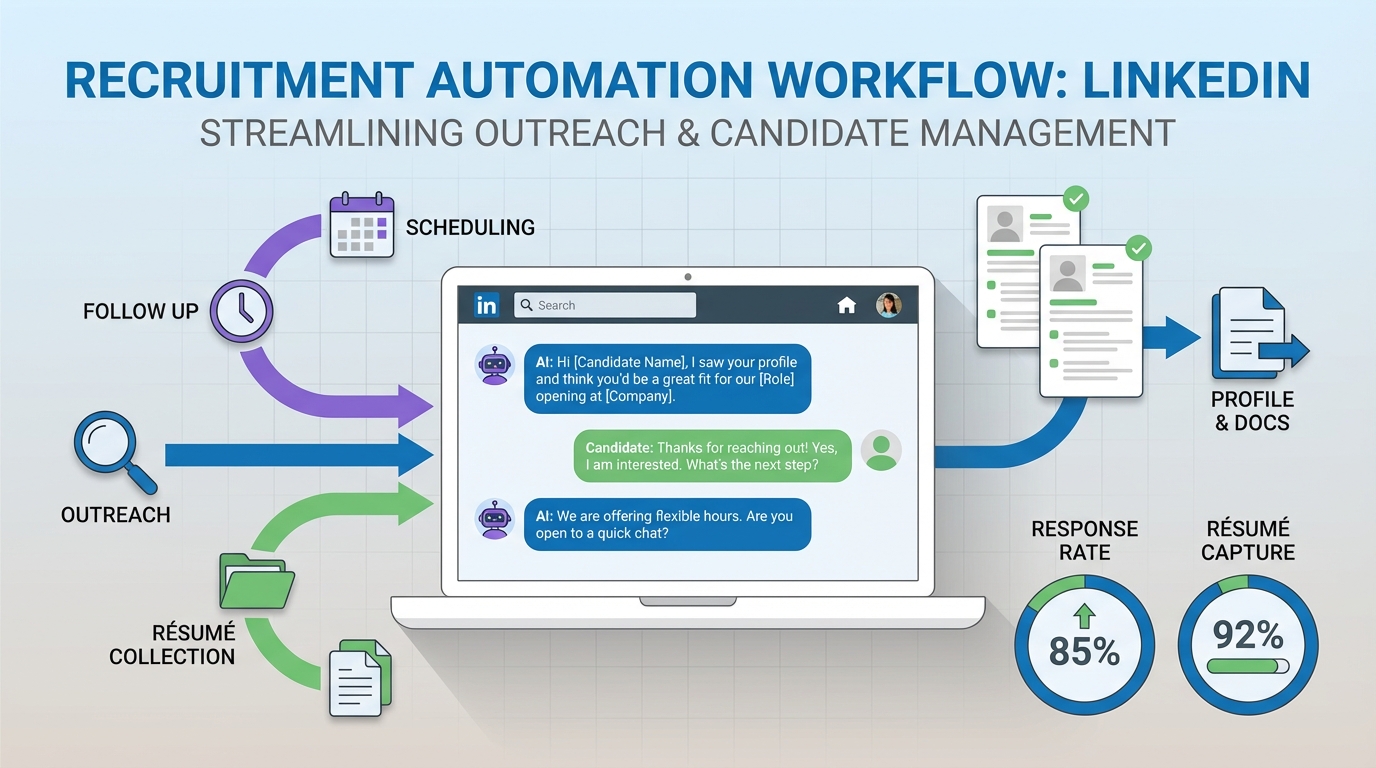
To automate recruitment effectively, start by standardizing your hiring steps, then automate the repetitive, high volume work: sourcing, outreach, follow up, and résumé collection. In our internal workflow tests, the largest productivity gains came from automating LinkedIn conversations end to end, including answering candidate questions and requesting résumés, while keeping final qualification and interview decisions with recruiters. This guide covers five practical methods for recruitment automation and recruitment process automation, plus templates you can copy into your own process. It does not cover legal advice, country specific employment law, or how to replace human decision making in hiring.
Table of Contents
- Key Takeaways
- What to Automate vs What to Keep Human
- Method 1: Automate LinkedIn Outreach and Follow Up with StrategyBrain AI Recruiter
- Method 2: Standardize Intake and Screening with Structured Forms
- Method 3: Automate Scheduling and Candidate Reminders
- Method 4: Automate Candidate Nurture and Re engagement
- Method 5: Automate Reporting and Quality Control
- Quick Comparison
- FAQ
- Conclusion
Key Takeaways
- Start with workflow clarity: recruitment process automation works best after you define stages, owners, and pass fail criteria.
- Automate the volume: outreach, follow up, and résumé collection are typically the highest repetition tasks in recruiting operations.
- Keep humans on decisions: use automation for communication and logistics, not final candidate fit decisions.
- Use always on messaging for speed: 24/7 responses reduce drop off when candidates ask questions outside business hours.
- Multilingual support expands reach: global hiring improves when candidates can communicate in their native language.
- Scale with account operations: teams that manage multiple LinkedIn accounts can expand outreach capacity without adding recruiters.
What to Automate vs What to Keep Human
Recruitment automation is most effective when you separate communication and logistics from judgment and accountability. The goal is not to remove recruiters from the process. The goal is to remove repetitive work so recruiters can spend more time on evaluation, stakeholder alignment, and closing.
Automate these parts first
- Candidate outreach: connection requests, initial messages, and role introductions.
- Follow up: reminders, nudges, and next step prompts when candidates go quiet.
- FAQ handling: answering common questions about role scope, company, compensation, and benefits.
- Information capture: collecting résumés and contact details from interested candidates.
- Scheduling logistics: interview booking and confirmations.
Keep these parts human led
- Final qualification: deciding whether a résumé matches job requirements.
- Interviewing: structured interviews, scorecards, and hiring manager calibration.
- Offer decisions: compensation approvals, negotiation strategy, and risk management.
- Candidate experience oversight: tone, fairness, and escalation handling.
Method 1: Automate LinkedIn Outreach and Follow Up with StrategyBrain AI Recruiter
If your team relies on LinkedIn for sourcing, the fastest path to automate recruitment is to automate the conversation layer. StrategyBrain AI Recruiter is designed to handle the initial outreach and qualification conversation on LinkedIn, including follow up, answering questions, and collecting résumés and contact details from candidates who want to proceed.
How it works in practice
In our experience, the biggest bottleneck in LinkedIn recruiting is not finding profiles. It is the time spent on back and forth messaging, especially when candidates ask basic questions or respond outside your working hours. AI Recruiter addresses that by running an always on conversation workflow that stays consistent with the job information you provide.
Steps
- Define your target profile: specify search criteria and the role you are hiring for.
- Provide role details: include company context, compensation, and benefits so the system can answer candidate questions accurately.
- Automate outreach: the system connects with candidates that match your criteria and introduces the opportunity.
- Automate follow up and Q and A: the system responds 24/7 and continues the conversation until the candidate is either not interested or ready for next steps.
- Collect résumé and contact details: interested candidates are prompted to share a résumé and contact information so recruiters can move to screening and interviews.
Features that matter for recruitment automation
- Smart LinkedIn recruitment automation: connection, introduction, interest confirmation, and information capture.
- 24/7 multilingual communication: candidates can message at any time and in any language.
- Team scale operations: supports managing more than 100 LinkedIn accounts for organizations that need high outreach capacity.
Limitations and how to handle them
- It does not replace final qualification: AI Recruiter can confirm interest and collect materials, but recruiters still need to evaluate résumé fit against requirements.
- It depends on your role inputs: if compensation, benefits, or role scope are unclear, candidate Q and A quality will degrade. Use a standardized intake template.
- Escalations still need a human: complex candidate concerns, sensitive topics, or negotiation should be routed to a recruiter.
Best for
- Teams that want to automate recruitment on LinkedIn without sacrificing responsiveness.
- Global hiring where multilingual communication reduces friction and misunderstandings.
- High volume sourcing where follow up consistency is the main constraint.
Method 2: Standardize Intake and Screening with Structured Forms
Before you automate anything, you need consistent inputs. A surprising amount of recruiting time is lost because role details are incomplete, inconsistent, or scattered across messages. Standardized intake is the foundation of recruitment process automation because it makes downstream automation reliable.
Steps
- Create a role intake form: capture must have skills, nice to have skills, location, work authorization, compensation range, and interview stages.
- Define pass fail rules: decide what disqualifies a candidate early, such as required certifications or shift availability.
- Use structured screening questions: keep questions consistent so answers can be compared fairly.
- Route candidates by outcome: qualified, hold, reject, or needs recruiter review.
Copyable role intake template
Role Intake Template
- Role title:
- Location and work model:
- Compensation: base, bonus, equity, benefits summary
- Must have requirements: 3 to 6 bullets
- Nice to have requirements: 3 to 6 bullets
- Disqualifiers: 1 to 5 bullets
- Interview stages: stage name, owner, duration in minutes
- Candidate questions to expect: 5 to 10 common questions
Method 3: Automate Scheduling and Candidate Reminders
Scheduling is one of the easiest wins in recruitment automation because it is rules based. Once you define interview stages and owners, you can automate booking, confirmations, and reminders. This reduces time spent coordinating calendars and reduces no shows.
Steps
- Define interview blocks: set available windows per interviewer and stage.
- Use a single scheduling link per stage: keep it consistent so candidates do not get confused.
- Send confirmations automatically: include time zone, format, and what to prepare.
- Send reminders: 24 hours and 2 hours before the interview.
Operational tip
If you are using AI Recruiter for LinkedIn outreach, align your scheduling automation with the moment the candidate shares a résumé and confirms interest. That handoff point is where automation should trigger the next step without waiting for manual follow up.
Method 4: Automate Candidate Nurture and Re engagement
Not every qualified candidate is ready today. Candidate nurture is a long term advantage when you automate recruitment because it turns past conversations into future pipelines. The key is to keep messaging relevant and respectful, and to stop when the candidate opts out.
Steps
- Segment your talent pool: by role family, seniority, location, and interest level.
- Create a nurture cadence: for example every 30 days for warm leads and every 90 days for passive leads.
- Personalize with role context: reference the type of opportunity, not generic marketing language.
- Track responses and update status: interested, not now, not interested, or refer someone else.
Where AI Recruiter fits naturally
Because AI Recruiter can maintain ongoing LinkedIn conversations and respond 24/7, it can support re engagement workflows without requiring recruiters to manually restart every thread. Recruiters can focus on the candidates who re qualify themselves by expressing renewed interest and sharing updated information.
Method 5: Automate Reporting and Quality Control
Recruitment process automation is not complete until you can measure it. Reporting automation helps you detect drop off points, improve messaging, and maintain candidate experience standards. It also helps you prove ROI to leadership.
What to track
- Outreach volume: number of connection attempts and messages sent per role.
- Response rate: replies divided by outreach attempts, measured weekly.
- Interest rate: candidates who confirm interest divided by candidates who replied.
- Résumé capture rate: résumés received divided by interested candidates.
- Time to first response: median minutes from candidate message to first reply.
Quality control checklist
- Confirm compensation and benefits details are consistent across all messages.
- Review a sample of conversations weekly for tone, clarity, and fairness.
- Ensure opt out requests are honored within 1 business day.
- Escalate sensitive topics to a human recruiter immediately.
Quick Comparison
| Method | What it automates | Speed to implement | Best for |
|---|---|---|---|
| StrategyBrain AI Recruiter on LinkedIn | Outreach, Q and A, follow up, résumé and contact capture | Fast once role inputs are ready | High volume LinkedIn recruiting and global hiring |
| Structured intake and screening | Standardized role inputs and early routing | Fast | Any team that wants reliable automation downstream |
| Scheduling automation | Booking, confirmations, reminders | Fast | Reducing coordination time and no shows |
| Nurture and re engagement | Long term follow up and pipeline warming | Medium | Teams hiring repeatedly for similar roles |
| Reporting and quality control | Metrics, audits, process improvement | Medium | Proving ROI and maintaining candidate experience |
FAQ
What does it mean to automate recruitment?
To automate recruitment means using software and AI to run repeatable recruiting tasks such as outreach, follow up, scheduling, and information capture. It should reduce manual work while keeping hiring decisions and accountability with humans.
What is the fastest part of recruitment to automate?
For most teams, the fastest win is automating candidate communication, especially LinkedIn outreach and follow up. That is where repetition is highest and response speed directly affects candidate drop off.
Can StrategyBrain AI Recruiter collect résumés and contact details?
Yes. AI Recruiter requests résumés and contact information from candidates who express interest, and it captures what candidates share during the LinkedIn conversation so recruiters can move to screening and interviews.
Does AI Recruiter decide whether a candidate is qualified?
No. AI Recruiter can confirm interest and gather materials, but it does not determine whether a résumé fully matches job requirements. Recruiters complete final qualification after reviewing the résumé.
How does multilingual recruiting automation help?
Multilingual communication reduces misunderstandings and improves responsiveness when hiring across countries and time zones. It also improves candidate experience because candidates can ask questions in their native language.
Is recruitment automation compliant with privacy regulations?
Compliance depends on your tools and your process. StrategyBrain AI Recruiter states it supports compliance in the EU, United States, and Canada, and that customer provided data is not used to train AI models, with encrypted credential handling and isolated storage per customer.
What should not be automated in recruiting?
You should not automate final hiring decisions, sensitive conversations, or negotiation strategy. Automation is best used for communication, logistics, and consistent information capture.
How do I avoid a robotic candidate experience?
Use clear role inputs, keep messages concise, and define escalation rules to a human recruiter. Also review conversation samples weekly and adjust scripts based on candidate feedback and outcomes.
Conclusion
If you want to automate recruitment without losing quality, start by standardizing your workflow, then automate the highest repetition tasks: outreach, follow up, scheduling, and résumé capture. For LinkedIn heavy teams, StrategyBrain AI Recruiter fits naturally because it automates the conversation layer, responds 24/7 in any language, and collects résumés and contact details so recruiters can focus on evaluation and interviews. Next step: copy the role intake template above, define your pass fail rules, and pilot one role for 14 days with clear metrics for response rate, interest rate, and résumé capture rate.















