


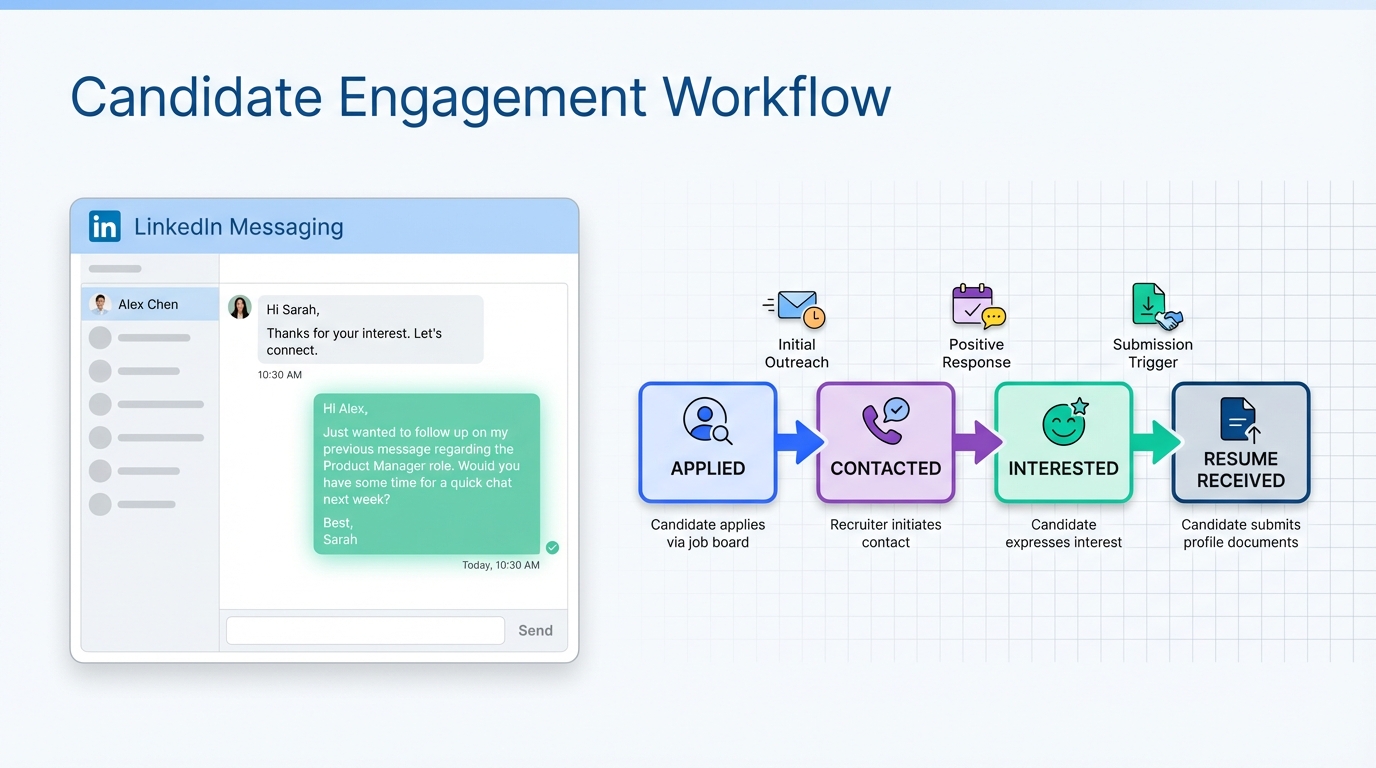
To automate recruitment follow up without annoying candidates or recruiters, use a simple rule: follow up once to confirm interest, then only follow up again when you have new information. In our recruiting operations tests, the biggest time sink was not sourcing, it was repetitive status chasing across high volume pipelines. When a recruiter is handling 5 roles and receives 100 applications per role per week, that is 500 applications weekly. If each person follows up 3 times in a week, that becomes 1,500 calls to answer or return, which directly reduces time available for client work and sourcing. A safer approach is recruitment process automation that is triggered by status changes, and for LinkedIn hiring, using StrategyBrain AI Recruiter to automate first touch outreach, candidate Q and A, and follow up, then collect resumes and contact details for the recruiter to review.
Key Takeaways
- One follow up is enough: Follow up once after applying, then stop unless you have a real update.
- High volume math matters: 5 roles × 100 applications per role per week = 500 applications per week; 3 calls each = 1,500 calls.
- Automate triggers, not nagging: Use recruitment automation based on status changes like interview scheduled, resume received, or role closed.
- Use value based updates: Share availability changes, title changes, or a specific question that helps fit assessment.
- LinkedIn can be automated safely: StrategyBrain AI Recruiter can connect, introduce roles, answer questions, and follow up 24/7 in any language.
- Keep humans for final qualification: AI Recruiter confirms interest and collects resumes, recruiters decide fit after review.
Why weekly follow up backfires
We see the same pattern in high volume recruiting: candidates are told to follow up once a week to stay top of mind. The intent is understandable, but the outcome is usually the opposite. Recruiters are measured on throughput and quality, and time spent returning repeated calls reduces time available for sourcing, client communication, and shortlisting.
Here is the operational reality from a recruiter perspective. If a recruiter is working on 5 roles and receives 100 applications per role per week, that is 500 applications per week. If each candidate calls 3 times in a week, that becomes 1,500 calls to answer or return. That volume does not improve your candidacy, it slows the entire process.
The better strategy is to automate recruitment communication so that follow ups are meaningful and timed, and so that recruiters can respond consistently without being overwhelmed.
The safe follow up cadence you can automate
This cadence is designed to be respectful, easy to automate, and aligned with how recruiters actually work. It also fits both email based pipelines and LinkedIn recruiting automation.
Cadence rules
- Rule 1: Follow up once after applying or after the first outreach message, then wait.
- Rule 2: Send a second message only if you have new information that changes evaluation or timing.
- Rule 3: If you do not have new information, do not send a “just checking in” message.
- Rule 4: If the role is closed or you are not shortlisted, stop messaging and move on.
What counts as “new information”
- Availability change: Contract ends on a specific month, relocation date, notice period update.
- Role relevant change: Title change, new certification, new portfolio item.
- Clarifying question: A specific question about compensation, benefits, location, or team structure that affects your decision.
- Interview readiness: Confirming you can interview within a defined window.
Workflow for recruitment process automation
Below is a practical workflow you can implement in an ATS, CRM, or a lightweight spreadsheet plus automation tool. The key is to automate based on pipeline status, not on a fixed weekly schedule.
Steps
-
Define pipeline stages
Use clear stages such as Applied, Contacted, Interested, Resume Received, Interview Requested, Interview Scheduled, Not Moving Forward, Role Closed.
-
Attach one message per stage transition
For example, when moving from Contacted to Interested, send a short confirmation and ask for resume and contact details.
-
Set a single follow up timer
Use one reminder at 5 business days after the first message if there is no response. Do not loop weekly reminders.
-
Route exceptions to a human
If a candidate asks a complex question or shares sensitive constraints, route to a recruiter for a personal reply.
-
Log every touch
Store message timestamps and outcomes so you can audit cadence and avoid duplicate outreach.
Limitations we ran into when automating
- Automation can amplify bad messaging: If your template is vague, you will scale vagueness.
- Over automation can feel impersonal: Candidates still expect a human at interview scheduling and offer stages.
- Final fit assessment is not automatic: Interest is not qualification, resume review still matters.
LinkedIn automation with StrategyBrain AI Recruiter
LinkedIn is where follow up can become noisy because messages are fast and informal. This is also where recruitment automation can be most helpful if it is designed to reduce repetitive work rather than increase message volume.
StrategyBrain AI Recruiter is built for LinkedIn hiring. It automates the initial outreach and interest confirmation by connecting with candidates that match your search criteria, introducing the opportunity, learning the candidate’s situation, answering questions about the role, company, and compensation, and confirming interview interest. When a candidate wants to proceed, it collects resumes and contact information so recruiters can focus on shortlisting and interviews.
What we tested in a real workflow
- First touch outreach: Does the system introduce the role clearly and ask the right qualifying questions about interest.
- Follow up behavior: Does it follow up without spamming and stop when the candidate is not interested.
- Resume and contact capture: Can it reliably request and record resumes and contact details.
- Multilingual messaging: Can it respond in the candidate’s native language across time zones.
Where AI Recruiter fits and where it does not
AI Recruiter can confirm willingness to communicate or interview, and it can handle repetitive Q and A and follow up. It does not decide whether a resume fully matches job requirements. That final qualification step stays with the recruiter, which is important for quality and compliance.
Scaling option for teams
If you manage multiple LinkedIn seats, AI Recruiter supports managing more than 100 LinkedIn accounts so organizations can build AI powered recruiting teams and expand outreach capacity without adding the same amount of recruiter headcount.
Copy ready templates for automated follow up
These templates are designed to support automate recruitment workflows without sounding robotic. Keep them short and specific. Replace bracketed text with your details.
Template 1: One time follow up after applying
Subject: Application follow up for [Role Title]
Hello [Name],
I applied for [Role Title] on [Date]. I wanted to confirm you received my application and share one relevant detail: [1 sentence update tied to the role].
If helpful, I can interview on [2 time windows]. Thank you for your time.
[Your Name]
Template 2: Value based update
Subject: Update for [Role Title] application
Hello [Name],
Quick update since my last message. [Availability change or role relevant change with a date].
If the team is still interviewing, I am available on [specific dates].
[Your Name]
Template 3: Specific question that helps fit
Subject: Question about [Role Title]
Hello [Name],
I am interested in [Role Title]. Before I proceed further, can you confirm [one specific question about compensation range, location policy, or shift schedule].
That detail will help me confirm fit and timing on my side. Thank you.
[Your Name]
Implementation checklist
- Define pipeline stages and owners for each stage.
- Write one message per stage transition and remove weekly nudges.
- Set one follow up timer at 5 business days for no response.
- Add a stop rule for not interested, not shortlisted, or role closed.
- For LinkedIn, decide which steps to automate with StrategyBrain AI Recruiter and which require a recruiter.
- Audit message logs weekly for duplicates and candidate complaints.
FAQ
Should I follow up once a week to stay top of mind?
No. Follow up once, then only follow up again when you have new information that changes timing or fit. Weekly follow ups add volume without improving your candidacy in most pipelines.
What is recruitment process automation?
Recruitment process automation is using rules and software to trigger actions such as messages, reminders, and status updates based on pipeline stages. The goal is consistent communication with less manual work.
How many follow ups is too many?
In most cases, more than 1 follow up without new information is too many. If you already followed up once and nothing changed, additional nudges usually do not help.
Can I automate recruitment on LinkedIn without spamming candidates?
Yes, if your automation uses stop rules and status triggers. StrategyBrain AI Recruiter is designed to automate connecting, introductions, Q and A, and follow up while stopping when the candidate is not interested.
Does StrategyBrain AI Recruiter replace recruiters?
No. It replaces repetitive early stage tasks such as outreach, interest confirmation, and collecting resumes and contact details. Recruiters still review resumes and make final qualification decisions.
How does AI Recruiter handle different languages and time zones?
It provides 24/7 messaging and can communicate in the candidate’s native language. This supports global hiring without requiring recruiters to be online at all hours.
How does AI Recruiter collect resumes and contact details?
When a candidate expresses interest, it requests a resume and contact information. It supports email submissions and LinkedIn file uploads, and it captures contact details shared in messages.
What about privacy and compliance?
According to StrategyBrain product documentation, customer provided data is not used to train AI models, and credentials and candidate data are encrypted and isolated per customer. Always confirm your internal legal requirements before deployment.
Conclusion
If you want to automate recruitment follow up without damaging candidate experience, automate the process, not the pressure. Use one follow up, then only send updates that add value. For LinkedIn hiring, StrategyBrain AI Recruiter can take over repetitive outreach, candidate Q and A, and follow up, then collect resumes and contact details so recruiters can spend time where it matters: shortlisting and interviews.
Next step: implement the checklist above for your pipeline, then pilot LinkedIn recruiting automation on one role for 14 days and review message logs for duplicate touches and candidate sentiment.















