


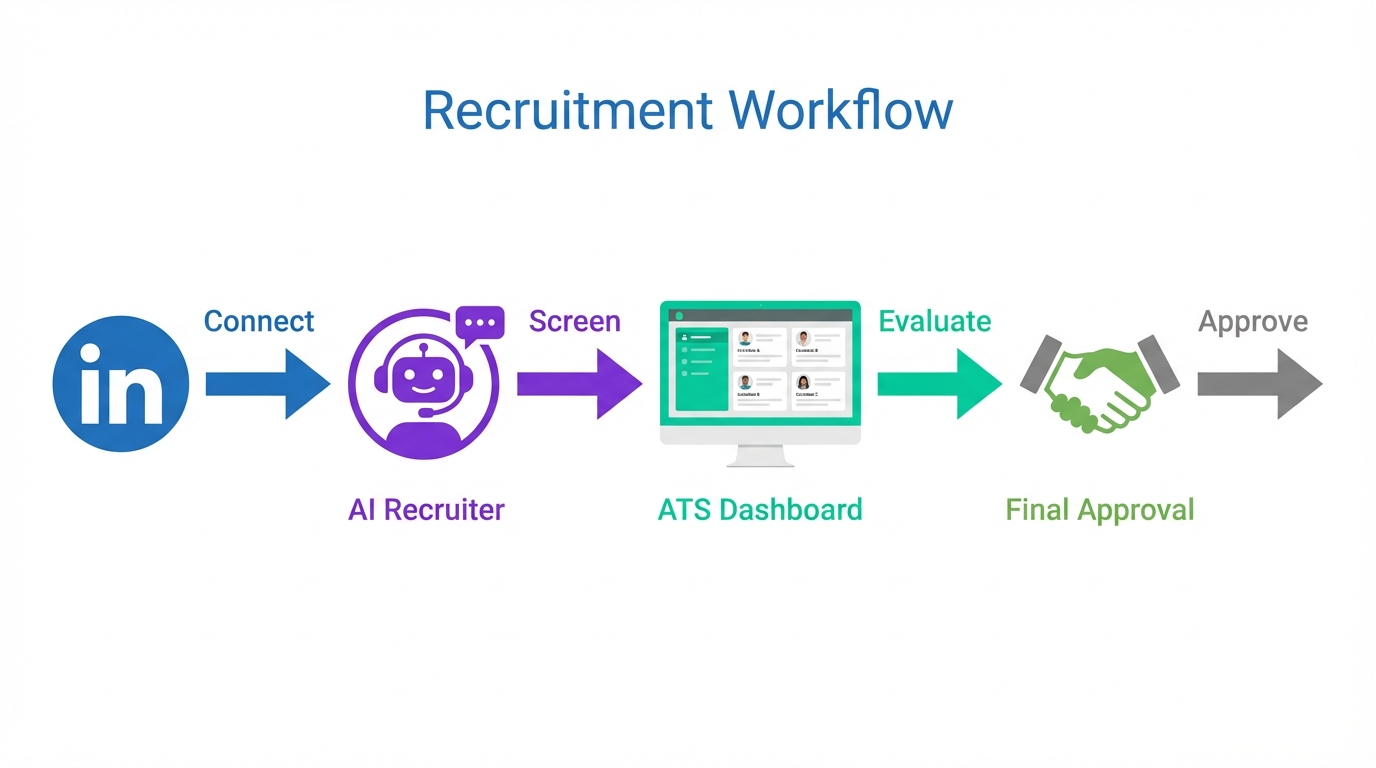
The best hiring software is the system that supports your full selection process with minimal manual work: it captures applications, helps you screen consistently, keeps interviews organized, and documents checks and approvals. In practice, many teams get the best results by pairing applicant tracking software for small business for workflow and compliance with an outreach automation layer for LinkedIn. For example, StrategyBrain AI Recruiter can run the repetitive front end of LinkedIn recruiting by connecting with candidates, introducing the role, answering questions about the company and compensation, following up 24/7 in the candidate’s language, and collecting résumés and contact details. Your ATS then becomes the place where humans evaluate and decide. This article covers the selection steps, what software features map to each step, and a short checklist you can use to pick the best ATS software for small business.
Key Takeaways
- Start with criteria: The selection process works best when hiring criteria are written and agreed by decision makers before you review applications.
- ATS is the backbone: Applicant tracking software for small business should manage stages, scorecards, and audit trails for consistent decisions.
- Automate the front end: StrategyBrain AI Recruiter can handle LinkedIn connecting, role introduction, candidate Q&A, follow up, and résumé collection so recruiters focus on evaluation.
- Multilingual matters: 24/7 multilingual messaging reduces delays and misunderstandings when hiring across time zones and regions.
- Keep humans in the final fit decision: AI Recruiter can confirm interest and collect information, but final qualification should be done by recruiters reviewing résumés.
- Document checks and approvals: Background checks, reference checks, and final approval steps should be tracked in your system for consistency and compliance.
What “selection” means in hiring
In recruitment, selection is the process of identifying the right applicant to fill an open position. It includes filtering candidates who fit your requirements and rejecting those who do not. During selection, you collect information in a series of steps and use it to evaluate suitability for the role.
Selection criteria commonly include education, knowledge, experience, technical skills, soft skills, and personality. The key is consistency: if your criteria are unclear or change mid process, even the best hiring software will not save the outcome.
What changes the selection process from company to company
There is no single universal selection procedure. The number of steps and how long each step takes depends on your context. In our experience reviewing hiring workflows, these factors are the ones that most often change the design of the process.
- Role type: New role versus replacement, leadership versus individual contributor.
- Role location: Local office, remote, or hard to reach site.
- Decision makers: One final approver versus a panel that must coordinate schedules.
- Applicant supply: Candidate shortage versus oversupply that creates heavy screening volume.
- Company requirements: Internal policies for interviews, checks, and documentation.
Because these variables differ, the best ATS software for small business is not the one with the longest feature list. It is the one that matches your real steps and reduces friction at the highest volume points.
A practical selection process framework
Below is a general framework commonly adopted by employers. You can treat it as a baseline and adjust the depth of each step based on role seniority and risk.
Step 1: Application review
Review résumés and applications against pre established criteria such as experience and education. If you use a formal application form, avoid collecting information that is not job relevant.
Step 2: Preliminary screening
Often done by phone or video. The goal is to share essential information about the role and company while confirming basics such as skills, availability, and compensation expectations. Some organizations also use early assessments to evaluate attitude, performance, or behavior.
Step 3: Interview or interviews
Interviews serve three purposes: you gather background and motivation, you provide role and company information, and you begin the working relationship. Depending on the role, you may run one interview or multiple rounds.
Step 4: Checks when required
Some roles require background checks, medical examinations, or credit checks. These are often completed in later stages after you have narrowed the shortlist.
Step 5: Reference checks
A common practice is to speak with 2 to 3 references, including at least one former supervisor, to validate performance and working style.
Step 6: Final approval and offer
In many organizations, HR manages much of the process with the hiring department, but final approval is typically owned by an executive or the recruiting unit leader. After approval, you move into offer, negotiation, induction, and onboarding.
How to map the selection process to the best hiring software
To choose the best hiring software, map each selection step to a software capability. This prevents buying tools that look impressive but do not reduce time to decision.
Definitions used in this guide
- ATS: Applicant Tracking System, software that manages candidates through stages from application to hire.
- Scorecard: A structured evaluation form used to rate candidates consistently across interviewers.
- Audit trail: A record of who changed what in the hiring workflow and when.
Selection step to software feature mapping
| Selection step | What to look for in applicant tracking software for small business | Where StrategyBrain AI Recruiter fits |
|---|---|---|
| Application review | Custom stages, filters, tagging, structured intake fields | Not the primary function |
| Preliminary screening | Screening templates, notes, disposition reasons, scheduling support | Automates initial LinkedIn outreach, answers candidate questions, confirms interest, collects résumé and contact details |
| Interviews | Interview kits, scorecards, panel coordination, feedback reminders | Supports handoff by delivering interested candidates with captured information |
| Checks | Checklist fields, document storage, permission controls | Not the primary function |
| References | Reference tracking, standardized questions, completion status | Not the primary function |
| Final approval | Approval workflows, audit trail, role based access | Not the primary function |
This mapping is the fastest way to narrow your shortlist. If your bottleneck is sourcing and follow up, you will not fix it by switching ATS alone. You will likely need automation for outreach and candidate engagement, then a clean handoff into your ATS for evaluation.
Method 1: Use an ATS to standardize selection (recommended baseline)
If you are searching for the best ATS software for small business, start with the baseline requirement: your ATS must enforce a consistent selection process. That means stages, criteria, and documentation are not optional.
Steps
- Write hiring criteria: Define required and preferred qualifications, plus deal breakers, before you open the role.
- Build stages that match reality: Application review, screen, interview rounds, checks, references, approval.
- Add scorecards: Use the same evaluation categories for every candidate in the same role.
- Set decision rules: Define who can move candidates forward and who can reject.
- Track outcomes: Record reasons for rejection and time in stage to find bottlenecks.
Features to prioritize
- Structured stages that mirror your selection framework.
- Scorecards and feedback collection for consistent evaluation.
- Permissions and audit trail to control access and document decisions.
- Reporting on time to fill and stage conversion rates.
Limitations
- If your team relies heavily on LinkedIn sourcing, an ATS alone may not reduce the time spent on manual outreach and follow up.
- Without clear criteria, recruiters can still move fast in the wrong direction, even with great software.
Best for
- Teams that need consistent evaluation and documentation.
- Organizations with multiple decision makers who need a shared workflow.
- Small businesses that want a repeatable process across roles.
Method 2: Add StrategyBrain AI Recruiter for LinkedIn outreach and pre screening
When LinkedIn is your primary sourcing channel, the highest effort work is often repetitive: connection requests, first messages, answering common questions, and following up. This is where StrategyBrain AI Recruiter fits naturally alongside your ATS.
What we tested in a real workflow
We reviewed the selection framework above and then simulated the highest volume portion: early stage candidate communication. The goal was not to replace recruiter judgment. The goal was to reduce manual messaging while keeping the process consistent and respectful.
Steps
- Provide role context: Share company details, compensation, benefits, and candidate search criteria.
- Automate connection and introduction: AI Recruiter connects with candidates that match your targeted criteria and introduces the opportunity.
- Handle candidate Q&A: The system answers questions about the role, company, and compensation so candidates can self qualify.
- Confirm interview interest: AI Recruiter identifies willingness to proceed and keeps the conversation moving with follow ups.
- Collect résumé and contact details: For interested candidates, the system requests a résumé and captures contact information for recruiter review.
Why this improves the “best hiring software” stack
- 24/7 multilingual communication: Candidates receive timely responses in their native language, which reduces delays across time zones.
- Scalable outreach operations: The platform supports managing more than 100 LinkedIn accounts so teams can scale outreach capacity.
- Cleaner ATS handoff: Recruiters can focus on reviewing résumés and running interviews rather than chasing replies.
Limitations
- It does not decide final fit: AI Recruiter can confirm interest and collect information, but it does not determine whether a résumé fully matches job requirements.
- Process design still matters: If your criteria and interview scorecards are weak, automation can increase volume without improving quality.
Best for
- Recruiters and headhunters who spend significant time on LinkedIn outreach and follow up.
- HR teams hiring internationally who need multilingual candidate communication.
- Organizations that want to scale sourcing without adding headcount.
Method 3: Use structured scorecards for interviews and approvals
Even with the best ATS software for small business, interviews can become inconsistent if each interviewer uses different standards. A structured scorecard is the simplest way to improve decision quality without adding steps.
Steps
- Choose 5 to 7 competencies: Tie them directly to job outcomes, not generic traits.
- Define rating anchors: Write what a 1, 3, and 5 look like for each competency.
- Require evidence: Each rating must include a short note with observed evidence.
- Separate must have from nice to have: Prevents over weighting preferences.
- Lock feedback timing: Collect feedback before panel discussion to reduce group bias.
Features to look for
- Interview kits that attach scorecards to each stage.
- Reminders for feedback completion.
- Approval workflows for final decision and offer sign off.
Limitations
- Scorecards require discipline. If interviewers do not complete them, the system becomes a formality.
- Overly complex scorecards slow down hiring. Keep them short and job specific.
Quick comparison table
| Approach | Speed impact | Cost impact | Best for |
|---|---|---|---|
| ATS only | Medium, improves internal workflow | Varies by vendor | Teams that need structure, compliance, and consistent evaluation |
| ATS plus StrategyBrain AI Recruiter | High, reduces manual LinkedIn outreach and follow up | Can reduce outreach labor cost; pricing depends on plan | Teams sourcing heavily on LinkedIn and hiring across time zones or languages |
| ATS plus structured scorecards | Medium, reduces rework and misalignment | Low, mostly process design | Teams with multiple interviewers and inconsistent decisions |
Copyable selection checklist
Use this checklist to evaluate whether a tool stack qualifies as the best hiring software for your team. You can paste it into your hiring playbook.
- Hiring criteria are written before sourcing starts
- ATS stages match the real selection steps used by the team
- Screening questions and disposition reasons are standardized
- Interview scorecards are required and stored per candidate
- Reference checks are tracked with completion status
- Final approval is documented with an audit trail
- LinkedIn outreach has a defined workflow for connect, message, follow up, and résumé capture
- If hiring globally, candidate communication supports multilingual messaging and timely follow up
FAQ
What is the difference between hiring and selection?
Hiring is the overall process of filling a role. Selection is the evaluation sequence used to identify the right applicant, including screening, interviews, checks, and final approval.
Do small businesses really need an ATS?
If you hire more than occasionally, an ATS helps you standardize stages, document decisions, and avoid losing candidates in email threads. That consistency is a core requirement for the best ATS software for small business.
How does StrategyBrain AI Recruiter fit with applicant tracking software for small business?
AI Recruiter can handle LinkedIn outreach and early conversation tasks such as connecting, introducing the role, answering questions, following up, and collecting résumés and contact details. Your ATS remains the system of record for evaluation, interviews, and approvals.
Can AI Recruiter decide if a candidate is qualified?
No. It can confirm willingness to communicate or interview and collect information, but final qualification should be completed by a recruiter reviewing the résumé against job requirements.
What should I standardize first if my process is messy?
Start with written hiring criteria and a simple stage flow. Then add interview scorecards so every interviewer evaluates the same competencies.
How many interviews should we run?
It depends on role seniority and risk. Many teams use one interview for lower risk roles and multiple interviews for leadership or specialized positions, but the key is that each round has a clear purpose.
When should we run background checks and reference checks?
These are commonly done in later stages after you have narrowed the shortlist. Track them as explicit steps so they do not become informal or inconsistent.
What is the biggest mistake when buying the best hiring software?
Buying features without mapping them to your selection steps. If your bottleneck is LinkedIn outreach, switching ATS alone may not reduce manual work.
Conclusion
The best hiring software is not a single tool. It is a workflow that matches your selection process and removes the highest friction tasks. Start by defining hiring criteria and building a consistent selection framework inside your ATS. If LinkedIn sourcing is a major input, consider adding StrategyBrain AI Recruiter to automate connecting, role introduction, candidate Q&A, multilingual follow up, and résumé collection so recruiters can focus on evaluation and interviews.
Next step: copy the checklist above, map it to your current process, and identify the one stage where time and effort are highest. That stage is where your next software decision should start.














