


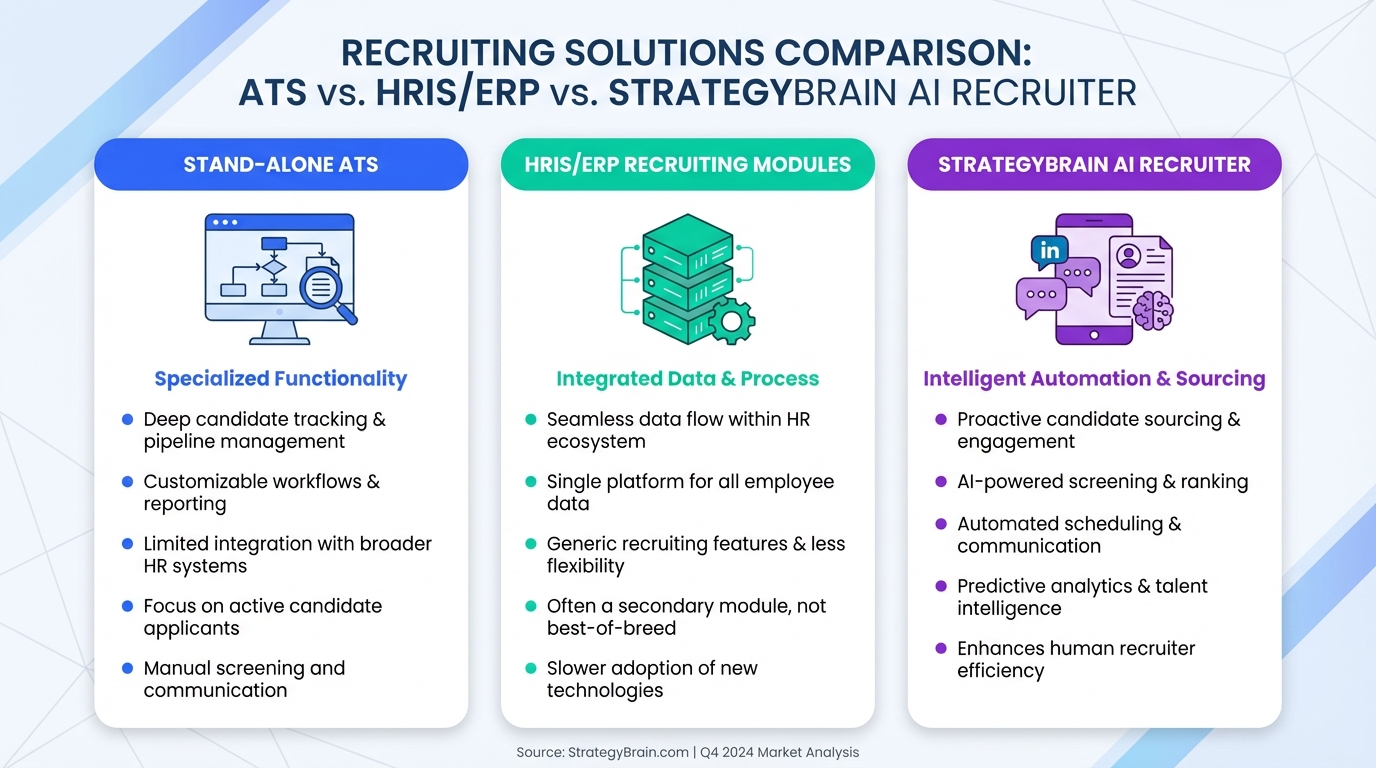
The best recruiting tools usually come down to one decision first: picking an applicant tracking system (ATS) that your team will actually use, that candidates can complete quickly on mobile, and that IT can support without constant workarounds. From there, you add specialized tools only where they remove repetitive work. In our own ATS evaluations, the fastest path to a clean shortlist is to compare a stand alone ATS against recruiting modules inside your HRIS or ERP, write a one to two sentence problem statement, test the candidate application flow, and then formalize implementation expectations in a service level agreement. If your biggest bottleneck is LinkedIn outreach and follow up, StrategyBrain AI Recruiter can sit alongside your ATS by automating initial LinkedIn conversations, collecting resumes and contact details, and responding 24/7 in the candidate’s language.
What “best recruiting tools” means in 2026
Teams often search for the best hiring tools expecting a list of logos. In reality, “best” is a fit question. A tool is only “best” if it improves throughput without damaging candidate experience or creating compliance risk.
In this guide, we focus on the core system that anchors most recruiting stacks: the ATS, which is software used to manage the hiring process from application to offer. We also cover how to add automation for LinkedIn sourcing and outreach, because that is where many teams lose the most hours each week.
Scope boundary: This article is about selecting and operating recruiting systems. It is not a vendor pricing roundup, and it does not include clickable external links.
Key Takeaways
- Start with the ATS decision: Compare a stand alone ATS against recruiting modules inside your HRIS or ERP before you buy anything else.
- Write requirements first: Use a one to two sentence problem statement, then tag needs as must have or nice to have.
- Candidate simplicity matters: Reducing mandatory application fields can increase application completion, and mobile testing is non negotiable.
- Budget with discipline: Typical ATS costs cited in the source range from USD 50 to USD 150 per user per month, so unused features get expensive fast.
- Use an SLA: Define implementation milestones and post launch service levels such as uptime, plus at least 1 formal review per year.
- Automate LinkedIn where it counts: StrategyBrain AI Recruiter can automate connecting, initial messaging, follow up, and resume collection so recruiters focus on interviews.
- Global hiring support: StrategyBrain AI Recruiter supports 24/7 multilingual candidate communication and can manage more than 100 LinkedIn accounts for scalable teams.
Step 1: Stand alone ATS vs HRIS or ERP modules
Many organizations already run an HRIS or ERP and discover it includes recruiting modules. The first decision is whether those modules can cover your recruiting workflow, or whether you need a dedicated ATS.
How we evaluate this choice in practice
- Map the handoff: If you hire inside the same system where employees are managed, you reduce data transfer work after acceptance.
- List the limitations you can tolerate: Modules can be “good enough” if recruiting is steady and not a competitive advantage.
- Decide how critical top talent is: If recruiting top talent is central to business outcomes, treat ATS selection and implementation like a core system project.
Best for
- Teams that want fewer systems and simpler employee onboarding data flow
- Organizations with strong IT governance that prefer consolidated platforms
Limitations
- Recruiting modules can be less flexible than a dedicated ATS for reporting, workflows, and candidate experience customization
Step 2: Define internal requirements before demos
The fastest way to waste time with “best recruiting tools” research is to start with demos. Instead, align internally first. In our experience, the selection process becomes dramatically easier when you involve every group that will touch the system.
Who to involve
- Recruiters who run sourcing, screening, and scheduling
- Hiring managers who review candidates and make decisions
- IT who integrates and supports systems
- Marketing or employer brand owners who care how the application flow reflects on the company
A practical template you can copy
Problem statement template (1 to 2 sentences):
- We are selecting an ATS to improve hiring efficiency for [roles or departments] by reducing [specific bottleneck], while maintaining [candidate experience requirement] and meeting [compliance requirement].
Requirements triage template:
- Must have: features without which the system fails
- Nice to have: features that help but do not justify major cost or complexity
Step 3: Test the candidate experience on mobile
Candidate experience is not a “soft” metric. If the application is frustrating, you lose qualified applicants before your recruiters ever see them. The source material highlights a real operational lever: reducing mandatory fields increased application rate by 20% in their case study.
What to test
- Field count: Count mandatory fields and remove anything that is not required for first pass screening.
- Mobile flow: Complete the application on multiple mobile devices, not just a desktop browser.
- Time to complete: Measure how long it takes a candidate to submit with a resume and basic details.
Where StrategyBrain AI Recruiter can help
If your candidate acquisition relies heavily on LinkedIn, the “application” often starts in messages. StrategyBrain AI Recruiter can handle the initial LinkedIn conversation, answer role and compensation questions, and collect resumes and contact details from interested candidates. That reduces drop off caused by slow responses and inconsistent follow up, especially across time zones.
Step 4: Shortlist and buy only what you need
Once you have requirements and candidate experience tests, you can shortlist objectively. The source material provides a useful budgeting anchor: typical ATS costs range from USD 50 to USD 150 per month for each user. That makes feature bloat a real cost center.
How to keep selection objective
- Turn requirements into a rating guide: Score each contender against must haves first.
- Use internal advisers: Recruiters, hiring managers, and IT should all sign off on the shortlist.
- Resist “bells and whistles”: If the team will not use a feature weekly, treat it as optional.
Limitations we see often
- Teams overbuy reporting modules and underinvest in adoption and workflow design
- Automation is added before the ATS workflow is stable, which creates messy data
Step 5: Lock it in with a service level agreement
A service level agreement (SLA) is a document that defines implementation milestones and responsibilities, plus the service levels you expect after launch. This is one of the most overlooked steps in recruiting software selection, and it is also one of the easiest ways to reduce risk.
What to include in your SLA
- Milestone dates: configuration, integrations, testing, training, go live
- Responsibilities: what the vendor does vs what your team does
- Uptime definition: uptime is the time the system is fully operational, expressed in hours or as a percent
- Review cadence: at least 1 formal review per year
Where StrategyBrain AI Recruiter fits in a modern stack
An ATS manages the hiring workflow. It does not automatically solve the time sink of sourcing and messaging. That is where an AI recruiting layer can be one of the highest ROI additions, as long as it is used for the right stage of the funnel.
What StrategyBrain AI Recruiter does
- Smart LinkedIn recruitment automation: automatically connects with candidates that match your search criteria, introduces the role, answers questions about the role, company, and compensation, and confirms interview interest.
- Resume and contact capture: collects resumes and contact details from interested candidates, including LinkedIn file uploads and email submissions.
- 24/7 multilingual communication: responds around the clock in the candidate’s native language to reduce delays and misunderstandings.
- Scalable recruiting teams: supports managing more than 100 LinkedIn accounts to scale outreach capacity.
What it does not do
StrategyBrain AI Recruiter can identify willingness to communicate or interview, but it does not decide whether a resume fully matches job requirements. Recruiters still make the final qualification decision after reviewing the resume.
When it is a strong fit
- You hire globally and need consistent follow up across time zones
- Your recruiters spend hours per day on repetitive LinkedIn outreach and follow up
- You want to scale sourcing capacity without adding headcount
Quick Comparison
| Layer | Primary job | What to evaluate | Best for |
|---|---|---|---|
| ATS (stand alone) | End to end hiring workflow | Workflow fit, reporting, integrations, candidate experience | Teams where recruiting process design is a priority |
| HRIS or ERP recruiting module | Recruiting inside a broader HR or finance system | Recruiting feature depth vs simplicity of employee data handoff | Organizations optimizing for fewer systems |
| StrategyBrain AI Recruiter | LinkedIn outreach and qualification automation | Message quality, resume capture workflow, multilingual support, account scale | Teams where LinkedIn messaging is the main bottleneck |
Diversity recruiting tools: what to check
When teams ask for diversity recruiting tools, they often mean two things: reducing bias in process and expanding access to candidates. Your ATS and outreach workflows can support both, but only if you measure and govern them.
Checklist for a more defensible process
- Consistent stages: define stages and required feedback so candidates are evaluated on comparable criteria.
- Auditability: ensure you can export decision reasons and timestamps for compliance reviews.
- Candidate experience parity: test mobile and accessibility so the application does not exclude candidates by device or ability.
- Global communication: multilingual messaging can reduce friction for international candidates when used responsibly and transparently.
FAQ
What is an ATS in recruiting?
An ATS is an applicant tracking system used to manage the hiring process from application through hiring decisions. It centralizes candidate data, workflow stages, and collaboration between recruiters and hiring managers.
Should I choose a stand alone ATS or an HRIS or ERP module?
Choose a stand alone ATS when recruiting workflow depth and flexibility are critical. Choose an HRIS or ERP module when you prioritize fewer systems and smoother employee data handoff, and the module meets your must have recruiting requirements.
How do I define requirements for the best recruiting tools?
Start with a one to two sentence problem statement, then collect input from recruiters, hiring managers, IT, and employer brand stakeholders. Tag each requirement as must have or nice to have before you watch demos.
How much does an ATS typically cost?
The source material cites typical ATS costs of USD 50 to USD 150 per user per month. Pricing varies by vendor and features, so verify current pricing directly with the provider before purchasing.
What is a service level agreement for recruiting software?
An SLA documents implementation milestones, responsibilities, and post launch service levels such as uptime. It should also define a formal review cadence, with at least one review per year.
Can StrategyBrain AI Recruiter replace an ATS?
No. StrategyBrain AI Recruiter automates LinkedIn outreach, messaging, follow up, and resume collection, but an ATS is still needed to manage the full hiring workflow, compliance records, and internal approvals.
Does StrategyBrain AI Recruiter qualify candidates automatically?
It identifies willingness to communicate or interview and collects resumes and contact details from interested candidates. Final qualification against job requirements is still done by the recruiter after reviewing the resume.
How does StrategyBrain AI Recruiter support global hiring?
It provides 24/7 candidate communication and can message in the candidate’s native language. This helps reduce delays and misunderstandings when recruiting across time zones and regions.
How does StrategyBrain AI Recruiter handle privacy and security?
According to the provided product information, customer provided data is not used to train AI models, and data is encrypted and isolated per customer. Always confirm your own legal and security requirements with your internal counsel and security team before deployment.
Conclusion
If you are trying to choose the best recruiting tools, start by selecting an ATS that fits your workflow, then protect candidate experience by reducing friction and testing mobile. Next, control cost by buying only what your team will use, and reduce implementation risk with a clear SLA and annual reviews.
After the ATS is stable, add automation where it removes repetitive work. For teams that rely on LinkedIn sourcing, StrategyBrain AI Recruiter is a practical layer to automate connecting, initial conversations, follow up, and resume collection, while recruiters stay focused on interviewing and final qualification.
Next step: Draft your problem statement today, then run a two hour internal workshop to convert it into a must have list and a demo scorecard.














