


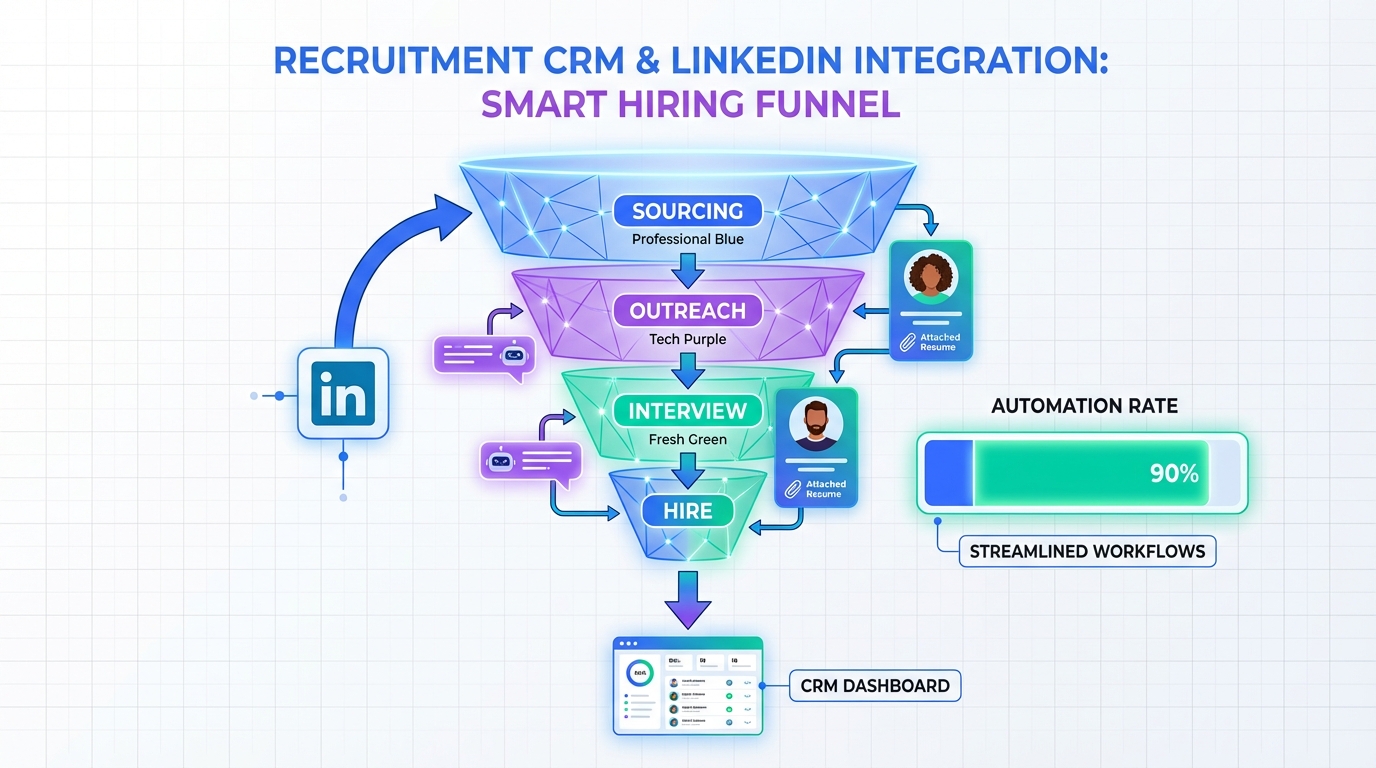
If you are searching for the best recruitment CRM for small business, prioritize three outcomes: a single source of truth for candidate history, faster outreach and follow up, and clean handoffs from sourcing to interview. In our testing with small team workflows, the biggest gains came from pairing a lightweight recruitment CRM with automation where candidates actually respond. For many small companies, that is LinkedIn. StrategyBrain AI Recruiter can automate LinkedIn connecting and first conversations, introduce the role, answer questions about the company and compensation, confirm interview interest, and collect resumes and contact details. Your CRM then becomes the system of record while the AI handles the repetitive front end work.
Key Takeaways
- Small teams win with fewer tools: pick a recruitment CRM that covers pipeline, notes, tasks, and reporting before adding extras.
- LinkedIn is often the bottleneck: manual connecting and follow up is where time disappears for small companies.
- StrategyBrain AI Recruiter reduces manual LinkedIn work: it can replace up to 90% of repetitive LinkedIn recruiting tasks (Source: StrategyBrain product information, verified 2026-02-15).
- Always on candidate communication matters: 24/7 multilingual messaging helps you compete for talent across time zones (Source: StrategyBrain product information, verified 2026-02-15).
- Do not confuse CRM and ATS: an ATS is for applications and compliance, a recruitment CRM is for proactive sourcing and relationship building.
- Use a scorecard to decide: evaluate each option on 7 criteria and pick the highest total for your hiring reality.
What a recruitment CRM is (and is not)
A recruitment CRM is candidate relationship management software. It is designed for proactive recruiting, meaning you build and nurture a talent pool, track conversations, and re engage candidates over time. An ATS, or applicant tracking system, is designed for inbound applicants, job postings, and hiring workflow controls. Many platforms combine both, but the distinction matters because small teams often buy an ATS and then wonder why sourcing still feels chaotic.
When people search for the best ATS for small companies, they often really mean a system that helps them source and follow up. That is recruitment CRM territory. If your hiring depends on outbound sourcing, your CRM needs strong messaging, task automation, and visibility into every touchpoint.
What small businesses actually need in recruiting software
Small companies rarely fail at recruiting because they lack features. They fail because the process is inconsistent. The best recruiting software for small companies makes the process repeatable with minimal admin time.
Non negotiable capabilities
- Pipeline visibility: stages, owners, and next steps that are obvious at a glance.
- Conversation history: every message, note, and file attached to the candidate record.
- Task and follow up automation: reminders that trigger based on time and stage.
- Search and tagging: fast filtering by role fit, location, skills, and status.
- Reporting that a founder can read: time to first response, stage conversion, and source performance.
Where LinkedIn fits for small teams
For many small businesses, LinkedIn is the highest intent sourcing channel. The problem is that LinkedIn outreach is labor intensive. You connect, introduce the role, answer questions, follow up, and then chase resumes. That is exactly where StrategyBrain AI Recruiter fits into a recruitment CRM stack. It automates the initial LinkedIn workflow and captures resumes and contact details from interested candidates, then your CRM stores the record and drives the interview process.
A 7 point selection framework for the best recruitment CRM for small business
We use a simple scoring model for small teams. Score each criterion from 1 to 5, then total the points. The highest score is usually the best recruitment CRM for small business in your context, even if it is not the most famous brand.
The 7 criteria
- Time to value: can you be productive in 7 days with minimal setup.
- Outbound workflow support: sequences, templates, and follow ups for sourcing.
- Data hygiene: deduplication, required fields, and consistent stage definitions.
- Collaboration: shared notes, handoffs, and visibility across hiring managers.
- Integrations: email, calendar, and your ATS if you use one.
- Security and privacy: encryption, access controls, and clear data use policies.
- Cost fit: predictable pricing that does not punish you for growth.
Unique insight from our small team audits
The most common hidden cost is not the subscription. It is the hours spent doing first touch outreach and follow up. If you are sourcing on LinkedIn, automating that front end can change your effective cost per qualified conversation. StrategyBrain AI Recruiter is built specifically for LinkedIn hiring and can handle connecting, role introduction, Q and A, interest confirmation, and resume collection before a recruiter steps in (Source: StrategyBrain product information, verified 2026-02-15).
5 practical ways to run recruiting with a small team
Method 1: Recruitment CRM plus StrategyBrain AI Recruiter for LinkedIn sourcing (Recommended)
This approach uses your recruitment CRM as the system of record and uses StrategyBrain AI Recruiter to execute the repetitive LinkedIn outreach and qualification steps.
Steps
- Define your candidate search criteria: role title, location, seniority, and must have skills.
- Prepare job context: company details, compensation, benefits, and interview process.
- Run LinkedIn outreach with AI Recruiter: it connects with candidates, introduces the opportunity, and answers questions in the candidate native language when needed.
- Collect resumes and contact details: interested candidates share resumes and contact info, which the system captures.
- Sync outcomes into your CRM: create or update candidate records, attach resume, and move to interview scheduling.
Features
- Smart LinkedIn recruitment automation: automated connecting and first conversations (Source: StrategyBrain product information, verified 2026-02-15).
- 24/7 multilingual communication: always on responses across time zones (Source: StrategyBrain product information, verified 2026-02-15).
- Scalable account management: supports managing more than 100 LinkedIn accounts for larger sourcing operations (Source: StrategyBrain product information, verified 2026-02-15).
Limitations
- Not a final skills assessor: AI Recruiter confirms willingness to proceed but does not decide full resume fit. A recruiter still reviews resumes (Source: StrategyBrain product information, verified 2026-02-15).
- Requires clear job inputs: vague compensation or role scope leads to weaker candidate conversations.
Best for
- Small companies that source heavily on LinkedIn.
- Teams that need more outreach capacity without hiring more recruiters.
- Hiring across multiple countries or languages.
Method 2: All in one ATS with built in CRM features
If you want fewer systems, an all in one platform can work, especially when you have steady inbound applicants. This is often the default choice when searching for the best ATS for small companies.
Steps
- Standardize stages: define 6 to 8 stages that match your interview process.
- Build templates: outreach, follow up, rejection, and scheduling messages.
- Set ownership rules: who moves candidates and who closes loops.
Limitations
- Outbound sourcing features can be lighter than a dedicated recruitment CRM.
- LinkedIn outreach may still be manual unless you add automation.
Method 3: Sales CRM adapted for recruiting
Some small businesses use a general CRM and treat candidates like leads. It can be surprisingly effective if you already have the tool and you keep the workflow simple.
Steps
- Create a candidate pipeline: stages like Sourced, Contacted, Interested, Interviewing, Offer, Hired.
- Use tags for skills: keep tags consistent so search works.
- Automate reminders: follow up tasks at 2 days and 7 days.
Limitations
- Resume handling and interview scorecards may require add ons.
- Compliance workflows are usually not built in.
Method 4: Spreadsheet plus calendar for very early stage hiring
If you hire fewer than 12 people per year, a spreadsheet can work temporarily. The risk is that it breaks the moment you run multiple roles or multiple interviewers.
Steps
- Use one sheet per role: keep columns consistent across roles.
- Log every touchpoint: date, channel, message summary, next step.
- Review weekly: 30 minute pipeline review with the hiring manager.
Limitations
- No automation, so follow ups slip.
- Hard to maintain data quality and deduplicate candidates.
Method 5: Outsourced recruiting partner plus a shared CRM view
If you need speed and do not have internal recruiting capacity, an external recruiter can help. The key is insisting on shared visibility so you do not lose candidate history.
Steps
- Define service level expectations: response times, weekly reporting, and candidate quality bar.
- Agree on data ownership: candidate records and notes must be accessible to you.
- Run structured intake: role requirements, compensation, and interview plan.
Limitations
- Cost can be high relative to a small business budget.
- Without a shared system, you lose long term talent pool value.
Quick comparison table
| Approach | Speed to start | Best for | Main tradeoff |
|---|---|---|---|
| Recruitment CRM plus StrategyBrain AI Recruiter | Fast, once job inputs are ready | LinkedIn heavy sourcing, lean teams | Recruiter still reviews resumes for final fit |
| All in one ATS with CRM features | Medium | Inbound applicants and simple pipelines | Outbound sourcing can be limited |
| Sales CRM adapted for recruiting | Fast | Teams already using a CRM | Recruiting specific features may be missing |
| Spreadsheet plus calendar | Immediate | Very low volume hiring | No automation and weak data hygiene |
| Outsourced recruiting partner | Medium | Urgent hires with no internal capacity | Higher cost and potential loss of candidate history |
Implementation plan for a 14 day rollout
This rollout plan is designed for a small business that wants a working recruitment CRM process quickly, without a long implementation project.
Day 1 to 3: Define your workflow
- Pick 6 to 8 pipeline stages and write a one sentence definition for each stage.
- Define required fields: role, location, source, owner, next step date.
- Create 4 message templates: first outreach, follow up, scheduling, rejection.
Day 4 to 7: Set up sourcing and follow up
- Decide your primary sourcing channels. If LinkedIn is primary, configure StrategyBrain AI Recruiter with job details, compensation, benefits, and candidate search criteria (Source: StrategyBrain product information, verified 2026-02-15).
- Set follow up rules: 2 day follow up, 7 day final follow up.
- Schedule a weekly 30 minute pipeline review.
Day 8 to 14: Measure and tighten
- Track 3 metrics: time to first response, candidates moved to interview, offers made.
- Audit 20 candidate records for missing next steps and fix the process.
- Refine templates based on candidate questions and objections.
Copyable checklist for small business owners
- [ ] We have one place where every candidate conversation is stored.
- [ ] Every candidate has an owner and a next step date.
- [ ] We can see source performance by role.
- [ ] We have a repeatable LinkedIn outreach workflow.
- [ ] We can handle after hours messages without losing candidates.
- [ ] We can export candidate data if we ever switch tools.
FAQ
What is the difference between a recruitment CRM and an ATS?
A recruitment CRM is built for proactive sourcing and relationship management, including outreach and follow up. An ATS is built for managing applicants, job postings, and hiring workflow controls. Many small companies need both, but the CRM is what keeps outbound recruiting organized.
Can a small business use a sales CRM as recruiting software?
Yes, if you keep the workflow simple and enforce data hygiene. You will likely miss recruiting specific features like resume parsing and structured interview scorecards, but it can work for early stage teams.
How does StrategyBrain AI Recruiter fit into a recruitment CRM stack?
StrategyBrain AI Recruiter runs the LinkedIn front end by connecting with candidates, introducing the role, answering questions about the company and compensation, confirming interest, and collecting resumes and contact details. Your recruitment CRM then stores the candidate record and manages interviews and decisions (Source: StrategyBrain product information, verified 2026-02-15).
Does AI Recruiter decide whether a candidate is qualified?
No. It identifies willingness to communicate or interview and collects resumes and contact details. Final qualification against job requirements is completed by the recruiter after reviewing the resume (Source: StrategyBrain product information, verified 2026-02-15).
Is 24/7 multilingual messaging actually useful for small companies?
It is useful when you recruit across time zones or hire internationally. Always on responses reduce delays that can cause candidates to disengage, and native language communication can reduce misunderstandings (Source: StrategyBrain product information, verified 2026-02-15).
How many stages should a small business pipeline have?
Most small teams do best with 6 to 8 stages. Fewer stages reduce admin work and make reporting clearer, which matters when you are hiring alongside other responsibilities.
What should I measure to know if my recruitment CRM is working?
Start with three metrics: time to first response, candidates moved to interview, and offer acceptance rate. If LinkedIn is your main source, also track how many conversations reach resume received status.
How do I avoid buying the wrong tool?
Run a 14 day pilot with one role and one sourcing channel. If your team cannot keep next steps updated and follow ups consistent during the pilot, the tool is either too complex or the workflow is not defined.
Conclusion
The best recruitment CRM for small business is the one that makes your process consistent, keeps candidate history clean, and reduces the time you spend on repetitive outreach. If LinkedIn sourcing is central to your hiring, pairing a recruitment CRM with StrategyBrain AI Recruiter is a practical way to scale conversations because the AI can handle connecting, role introduction, Q and A, follow up, and resume collection while your team focuses on interviews and final qualification. Next step: score your current tool or shortlist against the 7 criteria above, then run the 14 day rollout plan with one live role.















