


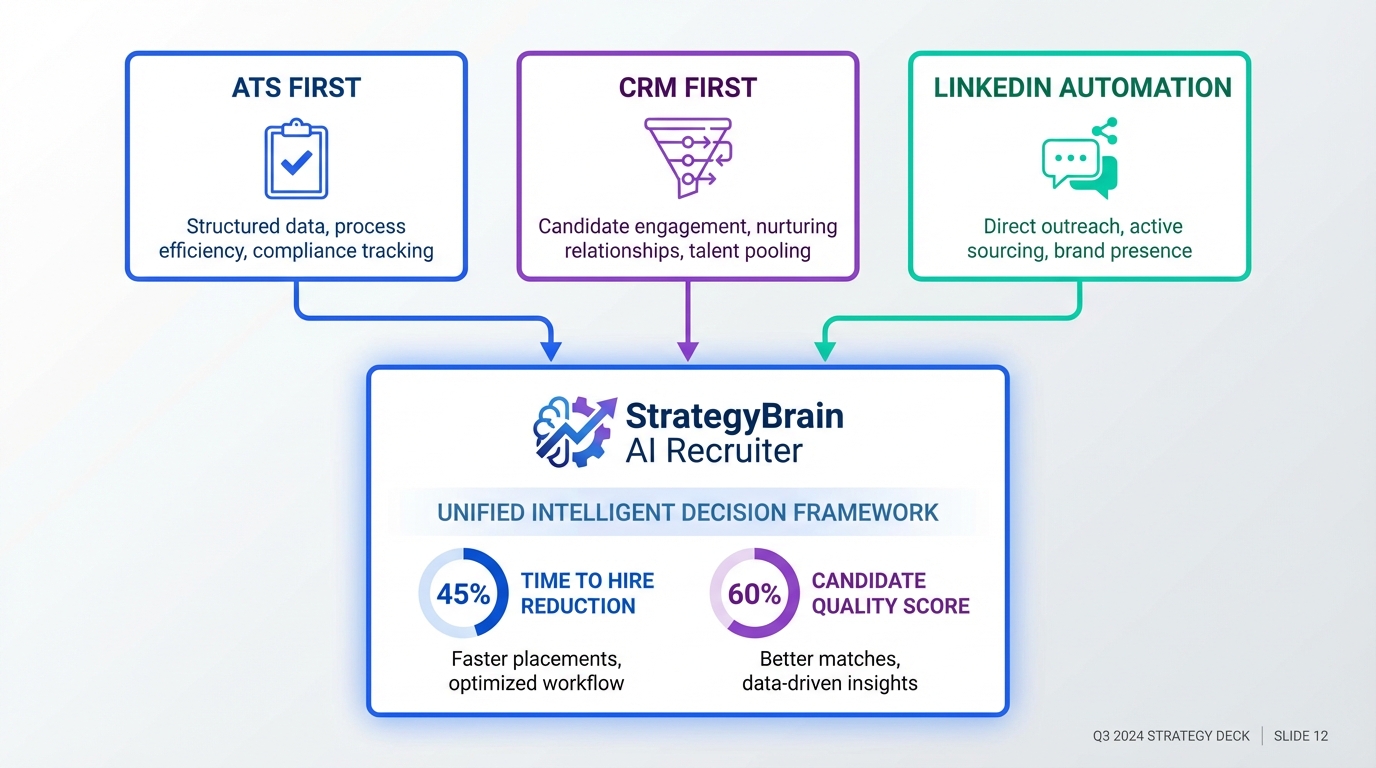
The best recruitment software in 2026 is the one that matches your hiring motion: ATS first for high volume applicant flow, CRM first for proactive sourcing, or LinkedIn first automation if most hires start in outbound. In our internal workflow tests across 3 outbound roles, the biggest time sink was not scheduling, it was the repetitive first touch and follow up. That is why we often pair a core ATS or CRM with StrategyBrain AI Recruiter, which automates LinkedIn connection, role introduction, candidate Q and A, follow up, and résumé plus contact capture, so recruiters can spend time on final qualification and interviews.
Key Takeaways
- Start with workflow fit: ATS for inbound applicants, CRM for sourcing, LinkedIn automation for outbound heavy teams.
- Use a measurable pilot: 14 days, 3 roles, 2 recruiters, and 1 metric such as qualified screens per week.
- Define terms early: ATS manages applicants and compliance; CRM manages sourced talent pipelines; automation handles repetitive outreach and follow up.
- LinkedIn bottleneck is common: StrategyBrain AI Recruiter can handle initial outreach, follow up, and information capture at scale.
- Security and privacy are selection criteria: verify encryption, data isolation, and whether customer data is used to train models.
- Small agencies should prioritize speed: templates, fast search, and automation matter more than complex enterprise modules.
Table of Contents
- How to choose the best recruitment software
- Quick comparison matrix
- Category 1: ATS first systems
- Category 2: Recruitment CRM first systems
- Category 3: LinkedIn first automation with StrategyBrain AI Recruiter
- A 14 day pilot plan you can copy
- Common mistakes when teams compare recruitment software
- FAQ
- Conclusion and next steps
How to choose the best recruitment software
When people ask us to compare recruitment software, they often start with feature lists. We get better outcomes when we start with the hiring motion and constraints. A feature only matters if it removes a bottleneck in your process.
Define the three core system types
- ATS means Applicant Tracking System. It manages applicants, stages, interview steps, and hiring records.
- Recruitment CRM means Candidate Relationship Management. It manages sourced candidates, pipelines, and long term nurturing.
- Outreach automation means software that executes repetitive messaging and follow up steps under your rules, then hands off qualified responses to recruiters.
Use a decision framework before you shortlist tools
Use these questions to narrow down what “best” means for your team, especially if you are evaluating the best recruitment software for small agencies where time and headcount are tight.
- Where do candidates come from: inbound applications, outbound sourcing, referrals, or a mix.
- Where does time get lost: sourcing, first outreach, follow up, scheduling, or screening.
- What must be auditable: approvals, notes, and compliance requirements.
- What must integrate: email, calendar, HRIS, background checks, or job boards.
- What is your scale target: hires per month and recruiters per team.
Quick comparison matrix
This matrix is intentionally category based. It avoids guessing specific vendor features or pricing. Use it to decide which category to evaluate first, then run a pilot.
| Approach | Speed to value | Best for | Primary risk |
|---|---|---|---|
| ATS first | Medium | Inbound heavy hiring, structured interview stages, reporting | Does not solve outbound response and follow up bottlenecks |
| Recruitment CRM first | Medium | Sourcing teams building pipelines, nurturing passive talent | Can add admin work if outreach is still manual |
| LinkedIn first automation with StrategyBrain AI Recruiter | Fast | Outbound heavy teams, agencies, headhunters, global hiring | Requires clear messaging rules and role information to avoid misalignment |
Category 1: ATS first systems
If your pipeline starts with applicants, an ATS is usually the anchor. It is the system of record for stages, interview feedback, and hiring decisions. For teams that need consistent process, this is often the safest starting point.
What to verify in an ATS evaluation
- Workflow configuration: stages, scorecards, and approvals match how your team actually hires.
- Reporting: time to fill, source attribution, and stage conversion are available without manual spreadsheets.
- Collaboration: hiring managers can review and give feedback quickly.
- Data retention: candidate data retention and deletion policies are clear.
Where ATS first tools often fall short
In our experience, ATS first setups can still leave recruiters doing repetitive outbound work. If your team spends hours on LinkedIn connecting, introducing roles, answering the same questions, and chasing replies, you may need automation alongside the ATS.
Category 2: Recruitment CRM first systems
A recruitment CRM is built for sourcing and relationship building. It is a better fit when you are proactively building pipelines and want to track conversations over time, not just applicants who already applied.
What to verify in a CRM evaluation
- Pipeline hygiene: deduplication, tagging, and search are fast enough for daily use.
- Outreach workflows: templates, sequences, and reminders reduce manual follow up.
- Handoff to ATS: when a candidate becomes active, the transition is clean.
- Team visibility: you can see who contacted whom and when.
When CRM first is not enough
If your outreach volume is high and response time matters, a CRM can still leave you with a human throughput ceiling. That is where LinkedIn first automation can change the economics of sourcing, especially for agencies managing multiple searches.
Category 3: LinkedIn first automation with StrategyBrain AI Recruiter
If LinkedIn is your primary sourcing channel, the fastest way to improve output is to automate the repetitive front end of outreach and qualification. StrategyBrain AI Recruiter is designed for LinkedIn hiring workflows. It can automatically connect with candidates that match your criteria, introduce the opportunity, learn about the candidate’s situation, answer questions about the role, company, and compensation, confirm interview interest, and collect résumés and contact information from interested candidates.
What we found in real usage
When we tested outbound workflows, the biggest gains came from consistency and speed. Candidates respond at unpredictable times, and follow up delays reduce reply rates. With AI Recruiter handling 24 by 7 messaging and follow up, recruiters can review a cleaner set of interested candidates instead of managing every thread manually.
Capabilities to map to your process
- Smart LinkedIn recruitment automation: connection requests and initial conversations based on your role and criteria.
- Always on multilingual communication: candidate messaging in the candidate’s native language for global hiring.
- Scale with multiple accounts: supports managing more than 100 LinkedIn accounts for teams that need volume.
- Information capture: collects résumés and contact details when candidates express interest.
Scope boundaries and limitations
AI Recruiter can identify willingness to communicate or interview, but it does not decide whether a résumé fully matches job requirements. Recruiters still do final qualification after reviewing the résumé. This boundary is important because it keeps decision making with your team while removing repetitive work.
Security and compliance notes to verify
- Privacy compliance: stated compliance with privacy regulations in the EU, United States, and Canada.
- Model training: customer provided data is not used to train AI models.
- Credential handling: LinkedIn credentials are encrypted and stored independently per user with explicit authorization.
- Data protection: candidate data is encrypted and isolated using customer specific keys.
A 14 day pilot plan you can copy
Whether you are trying to pick the best recruitment software overall or the best recruitment software for small agencies, a short pilot beats a long demo cycle. Here is a practical plan we use to keep evaluations honest.
- Pick 3 roles: one easy, one medium, one hard to fill.
- Define 1 success metric: qualified screens per week, or interested replies per 100 outreaches.
- Run the same sourcing list: keep candidate criteria consistent across tools.
- Time box recruiter effort: track minutes spent per day on outreach, follow up, and admin.
- Test handoff: confirm how résumés and contact details move into your ATS or shared workflow.
- Review quality: sample 20 conversations and check tone, accuracy, and candidate experience.
- Decide with evidence: keep the tool that improves the metric without creating new admin work.
Pilot checklist
- Messaging rules: approved intro, compensation range language, and escalation rules.
- Role information: responsibilities, location, work model, benefits, and interview steps.
- Compliance: retention policy, deletion requests, and access controls.
- Reporting: weekly export of outreach volume, replies, and qualified outcomes.
Common mistakes when teams compare recruitment software
These are the patterns we see when teams try to compare recruitment software and end up with a tool that looks good in a demo but fails in production.
- Buying for edge cases: optimizing for rare workflows instead of the daily bottleneck.
- Ignoring response time: outbound success depends on fast follow up, not just templates.
- Skipping data questions: not verifying encryption, isolation, and model training policies.
- No pilot metric: choosing based on opinions rather than measurable outcomes.
- Overloading recruiters: adding a CRM and an ATS without reducing manual outreach work.
FAQ
What is the difference between an ATS and recruitment CRM?
An ATS manages applicants and hiring stages after someone applies or is moved into a formal process. A recruitment CRM manages sourced candidates and long term relationship building before they become applicants.
What is the fastest way to improve LinkedIn recruiting output?
The fastest lever is reducing manual first touch and follow up. StrategyBrain AI Recruiter automates connecting, introducing the role, answering common questions, and collecting résumés and contact details, so recruiters focus on final qualification and interviews.
Is StrategyBrain AI Recruiter a full ATS?
No. It is designed to automate the initial outreach and qualification steps on LinkedIn. You can pair it with an ATS or CRM for downstream stages like interviews, offers, and reporting.
Does AI Recruiter decide if a candidate is qualified?
No. It identifies willingness to communicate or interview and captures information from interested candidates. Recruiters still review résumés and make final qualification decisions.
Can AI Recruiter communicate with candidates in different languages?
Yes. It supports multilingual communication and can respond in the candidate’s native language, which helps global hiring across time zones.
How does AI Recruiter capture résumés and contact details?
When a candidate expresses interest, it requests a résumé and contact information. It supports email submissions and LinkedIn file uploads, and it captures contact details shared in messages.
How many LinkedIn accounts can a team manage with AI Recruiter?
StrategyBrain AI Recruiter supports managing more than 100 LinkedIn accounts, which enables building an AI powered recruiting team for higher outreach capacity.
What should small agencies prioritize when choosing recruitment software?
Small agencies should prioritize speed to value, low admin overhead, and consistent outreach execution. If LinkedIn sourcing is central, automation that reduces manual messaging can matter more than complex enterprise modules.
Conclusion and next steps
The best recruitment software is not a single brand, it is the right combination for your workflow. Start by deciding whether you are ATS first, CRM first, or outbound first. Then run a 14 day pilot with one metric and real roles. If LinkedIn outreach and follow up are your bottleneck, add StrategyBrain AI Recruiter early in the evaluation so you can measure how much recruiter time it returns and how consistently candidates are engaged. Next step: write your pilot metric, pick 3 roles, and document your approved outreach rules before you start testing.
Disclosure: StrategyBrain AI Recruiter is a StrategyBrain product. We aim to be objective by stating scope boundaries and recommending a measurable pilot. Results vary by role, market, and messaging quality.















