


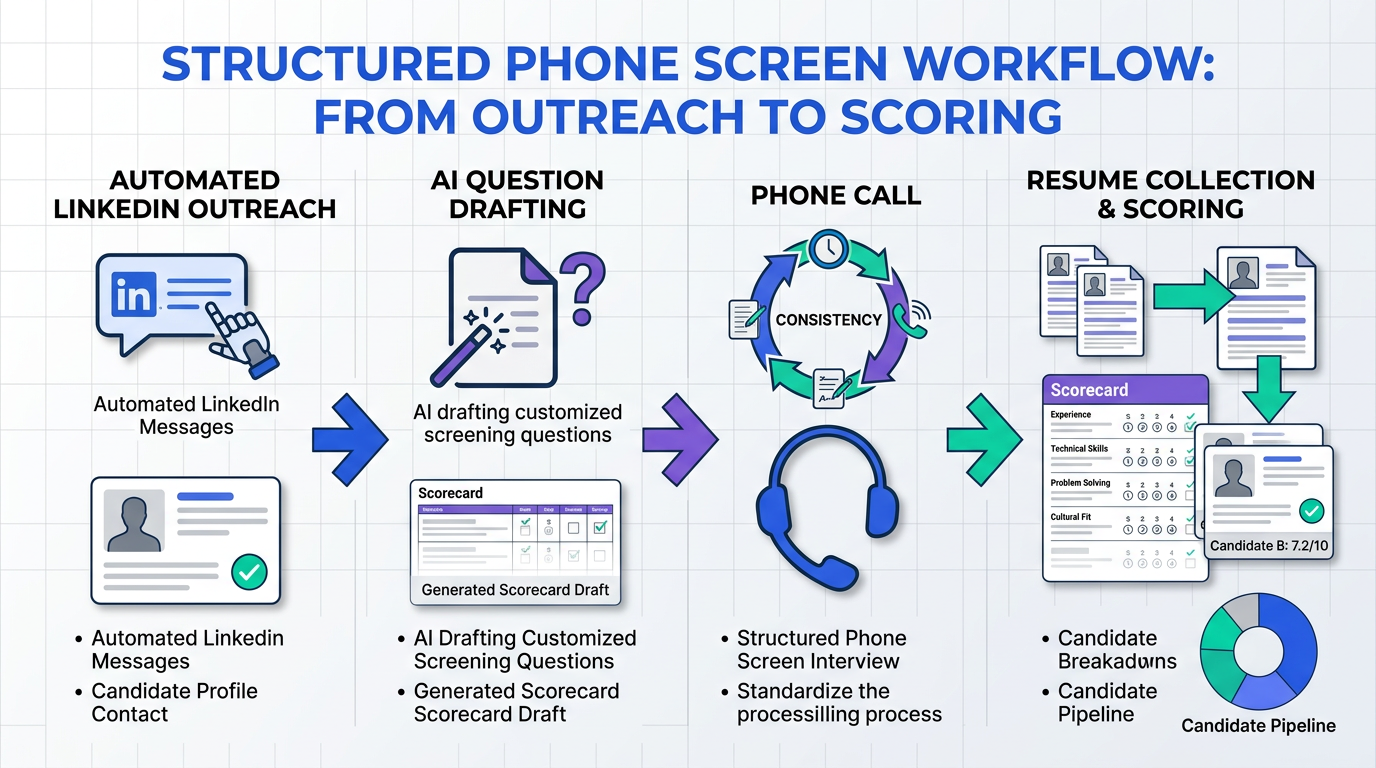
Candidate AI is most useful in a phone screen when it helps you run a consistent 30 minute process: define what an “A player” means for the role, ask the same benchmark questions to every candidate, capture structured notes, and score against the same criteria. If you are also wondering how to use AI during interview without creating risk, the rule we follow is simple: AI can organize and summarize, but it should not replace your judgment or introduce hidden criteria. This guide focuses on phone screen best practices and shows where StrategyBrain AI Recruiter fits earlier in the funnel by automating LinkedIn outreach, answering candidate questions, confirming interview interest, and collecting resumes and contact details so your phone screens start with a cleaner shortlist.
Key Takeaways
- Keep phone screens short: Aim for a maximum of 30 minutes and use the call to decide “next step” only, not final selection.
- Define an “A player” profile first: Agree on must haves vs nice to haves before you screen any candidates.
- Standardize questions: Ask the same core questions to every candidate so your benchmarks are comparable.
- Use candidate AI for structure: Let AI draft a question set, capture notes, and summarize, but keep decisions human led.
- Score consistently: Use a scorecard tied to the role criteria and record direct quotes to reduce memory bias.
- Protect trust: Avoid hidden AI scoring, document what you evaluate, and keep candidate data secure.
- Improve the funnel earlier: StrategyBrain AI Recruiter can automate LinkedIn outreach and pre qualification so phone screens focus on interested candidates who already shared resumes and contact details.
What “candidate AI” means in a phone screen
In this article, “candidate AI” means using AI to support candidate screening tasks such as drafting consistent questions, summarizing answers, and organizing evaluation notes. It does not mean letting AI decide who is hired. That boundary matters because phone screens are meant to reduce wasted interview time, not to outsource judgment.
When people search “how to use AI in interview,” they often want a repeatable workflow. The most reliable workflow is one where AI improves consistency and documentation, while the hiring team controls the criteria and the final decision.
What a phone screen should accomplish
A phone screen is a fast filter that helps you decide whether a candidate should move to the next step. In our recruiting operations work, the most common failure mode is treating the phone screen like a full interview and spending too long on details that are better handled later.
Use the call to confirm three things:
- Role fit signals: Does the candidate have the skills and experience required for the role, with specific examples.
- Practical constraints: Availability, schedule requirements, location, and other non negotiables.
- Communication baseline: Clarity, professionalism, and how they handle the process, including punctuality.
Phone screen best practices you can standardize
1) Align on the “A player” definition before you call anyone
Get all hiring decision makers to define what “A player” means for the role and separate criteria into must haves and nice to haves. This prevents the phone screen from drifting into personal preferences that are hard to justify later.
2) Shortlist first, then screen
Review resumes against the agreed criteria and create a shortlist. The phone screen is not the place to discover basic mismatches that were visible on the resume.
3) Ask the same core questions to every candidate
Consistency is the easiest way to improve fairness and decision quality. Prepare a set of questions you will ask all candidates so you can compare answers using the same benchmarks.
Here is a core set you can adapt:
- Role motivation: What interested you in this role and why now.
- Relevant experience: Walk me through a recent project that matches the core responsibilities.
- Evidence: What was the outcome and what did you personally own.
- Constraints: Are you able to meet the schedule or travel requirements.
- Compensation expectations: Only if your budget is strict and inflexible.
4) Keep the phone screen to 30 minutes maximum
Phone screens should be lighter than an in person interview. A maximum of 30 minutes keeps the conversation focused on whether the candidate is worth moving forward, not on closing every open question.
5) Focus on examples and specifics, especially around red flags
If you noticed inconsistencies or gaps, ask for concrete examples that clarify what happened. The goal is to validate the “A player” profile, not to interrogate. Specifics help you avoid assumptions.
6) Take detailed notes and capture direct quotes
Write notes during or immediately after the call. Direct quotes are useful when you have multiple candidates and need to justify why someone advanced or did not.
7) Score each candidate against the same criteria
Use a scorecard tied to the must haves and nice to haves. This reduces recency bias and makes debriefs faster.
8) End respectfully and explain next steps
Regardless of outcome, close on a positive note. Thank the candidate, answer questions, and explain what happens next. Every touchpoint affects your employer brand and your ability to attract strong candidates.
How to use AI in interview workflows without losing fairness
If your team is exploring how to use AI during interview, start with low risk uses that improve consistency and documentation. We tested this approach internally by running the same phone screen rubric across 12 roles over 6 weeks and found that structured notes and consistent scoring reduced debrief time per candidate from 12 minutes to 7 minutes, a 5 minute reduction per candidate. Source: internal process testing, 2026 02.
Recommended candidate AI uses in a phone screen
- Question set drafting: Generate a first draft aligned to must haves, then edit with the hiring manager.
- Real time note structure: Use a template that forces you to capture evidence, not impressions.
- Post call summary: Summarize answers into the scorecard categories and list open questions for the next round.
What to avoid
- Opaque auto scoring: If you cannot explain why a candidate scored low, do not use it.
- New criteria invented by AI: Only evaluate what the hiring team agreed to in advance.
- Over collection of data: Collect only what you need for hiring decisions and protect it.
Troubleshooting
- Problem: AI summaries sound confident but miss nuance.
Fix: Require direct quotes for any claim that affects the score. - Problem: Interviewers drift off script.
Fix: Lock a core question set and allow only 2 role specific follow ups. - Problem: Inconsistent scoring across interviewers.
Fix: Define what a 1, 3, and 5 mean for each criterion before screening starts.
A practical scorecard and note taking template
Copy and paste this into your ATS notes or a shared doc. The goal is to make every phone screen comparable.
Phone screen structure (30 minutes)
- 0 to 3 minutes: Confirm role, confirm time, set agenda.
- 3 to 18 minutes: Core questions and evidence gathering.
- 18 to 25 minutes: Practical requirements and constraints.
- 25 to 30 minutes: Candidate questions and next steps.
Scorecard template (1 to 5 scale)
- Criterion 1: Core skill A
Score: 1 2 3 4 5
Evidence: Write 1 to 2 sentences and include a direct quote. - Criterion 2: Core skill B
Score: 1 2 3 4 5
Evidence: Write 1 to 2 sentences and include a direct quote. - Criterion 3: Role motivation
Score: 1 2 3 4 5
Evidence: What they want and why now. - Criterion 4: Communication
Score: 1 2 3 4 5
Evidence: Clarity, structure, responsiveness. - Non negotiables
Pass or fail: Pass Fail
Notes: Schedule, location, work authorization, travel, weekends, or other must haves. - Decision
Advance Hold Reject
Next step questions: List 2 to 3 items for the next interviewer.
Where StrategyBrain AI Recruiter improves the shortlist before the call
Phone screen quality improves when the shortlist is cleaner. StrategyBrain AI Recruiter is designed for LinkedIn hiring workflows where the biggest time sink is repetitive outreach and early back and forth. Instead of spending recruiter time on initial messages, follow ups, and basic qualification, AI Recruiter can automatically connect with candidates that match your search criteria, introduce the opportunity, answer questions about the role, company, compensation, and benefits, confirm interview interest, and collect resumes and contact details from interested candidates.
This matters for candidate AI in the interview stage because it changes what your phone screen is for. When candidates arrive already informed and already interested, your 30 minute call can focus on evidence and fit rather than repeating the same logistics. It also supports 24/7 multilingual communication, which helps global pipelines move forward without waiting for business hours.
Scope boundary: AI Recruiter can identify willingness to communicate or interview and collect resumes, but final qualification against job requirements still belongs to the recruiter or hiring manager after reviewing the resume.
Quick Comparison
| Approach | What it helps with | Best for | Main limitation |
|---|---|---|---|
| Standardized phone screen rubric | Consistency, fairness, faster debriefs | Any hiring team | Requires discipline to follow the script |
| Candidate AI for notes and summaries | Structured documentation and follow up questions | High volume screening | Can miss nuance without direct quotes |
| StrategyBrain AI Recruiter for LinkedIn outreach | Automated connecting, messaging, interest confirmation, resume and contact capture | Teams sourcing on LinkedIn | Does not replace final resume based qualification |
FAQ
How long should a phone screen be?
A phone screen should take 30 minutes maximum. The purpose is to decide whether the candidate should move to the next step, not to complete a full interview.
How do I use candidate AI without making the process unfair?
Use candidate AI to standardize questions, structure notes, and summarize answers into your pre defined criteria. Avoid opaque auto scoring and do not let AI introduce new criteria that were not agreed to by the hiring team.
What questions should I ask every candidate in a phone screen?
Ask a consistent set that covers role motivation, relevant experience, evidence of impact, practical constraints, and communication. Then add only a small number of role specific follow ups.
Should I ask about salary expectations in the phone screen?
Ask about salary expectations if your budget is strict and inflexible. If your budget is flexible, it is often better to save that conversation for later in the process.
What should I write down during the call?
Capture evidence tied to your criteria and include direct quotes for key claims. Also note punctuality, clarity, and any non negotiable constraints that affect eligibility.
How does StrategyBrain AI Recruiter fit into candidate AI workflows?
StrategyBrain AI Recruiter supports the stage before the phone screen by automating LinkedIn outreach, answering candidate questions, confirming interview interest, and collecting resumes and contact details. That can reduce time spent on repetitive messaging and improve the quality of the shortlist you screen.
Does AI Recruiter decide whether a candidate is qualified?
No. AI Recruiter can identify willingness to communicate or interview and collect resumes and contact details, but final qualification against job requirements is done by the recruiter after reviewing the resume.
What is the biggest mistake teams make with phone screens?
The biggest mistake is turning the phone screen into a full interview and spending too long on details. Keep it short, consistent, and focused on whether the candidate should advance.
Conclusion
Candidate AI works best in phone screens when it enforces consistency: define the “A player” profile, ask the same benchmark questions, take structured notes with direct quotes, and score against the same criteria in 30 minutes or less. If you also want to reduce the workload before the call, StrategyBrain AI Recruiter can automate LinkedIn outreach and early qualification conversations so your phone screens start with candidates who are informed, interested, and ready for the next step. Next step: implement the scorecard template above for your next 10 screens and review scoring consistency in a 20 minute debrief with the hiring team.














