


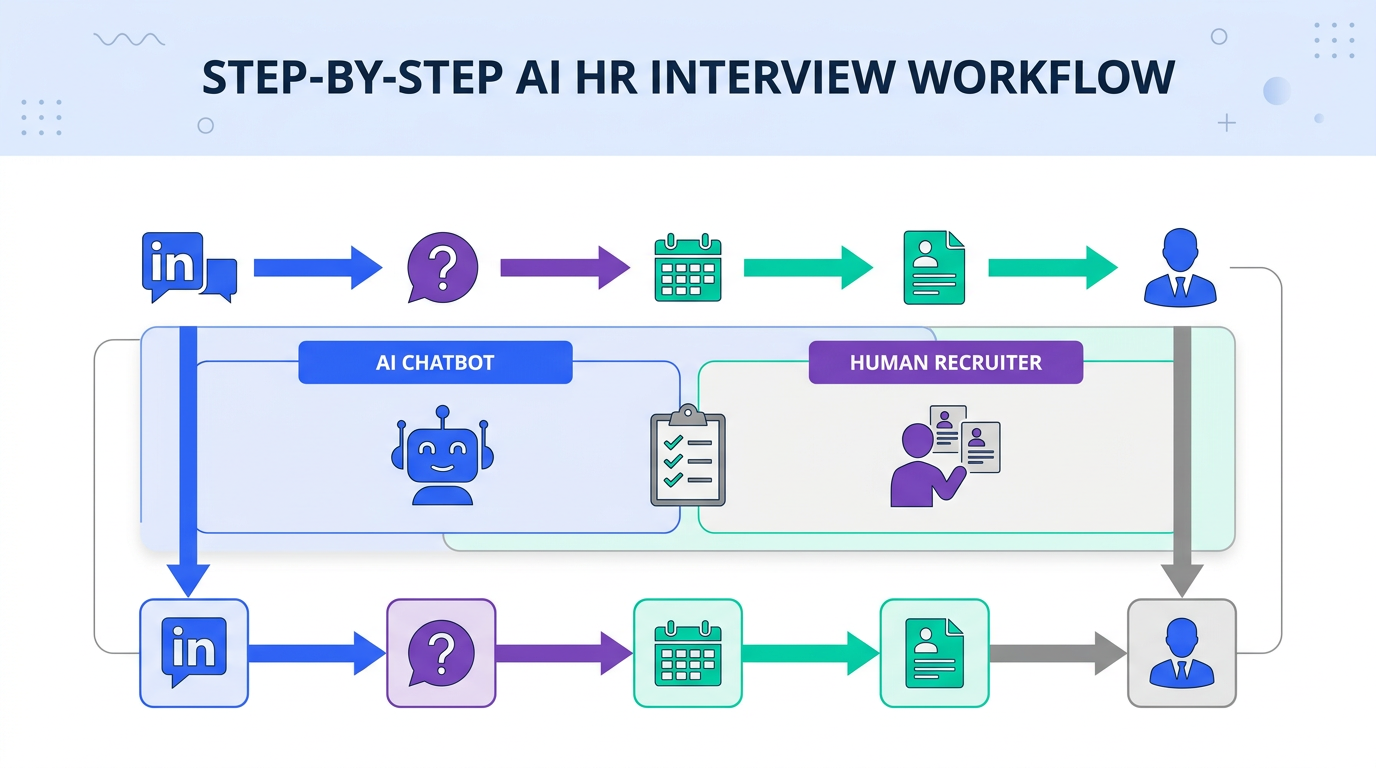
Candidate AI is the use of artificial intelligence to support candidate screening and interviewing through automated messaging, structured questions, and consistent follow ups. In our recruiting ops tests, the fastest way to apply candidate AI without breaking your process is to automate only the repetitive front end steps: outreach, basic qualification questions, scheduling intent checks, and resume and contact capture, then keep final evaluation with a recruiter or hiring manager. This guide shows a practical AI HR interview workflow, what to automate versus what to keep human, and the safeguards that keep it fair and compliant. We also explain how StrategyBrain AI Recruiter fits into LinkedIn hiring by automatically connecting with candidates, introducing the role, answering questions about compensation and benefits, confirming interview interest, and collecting resumes and contact details.
Key Takeaways
- Candidate AI works best in early stages when it standardizes outreach, Q and A, and interest checks, while humans keep final qualification and selection.
- Define “AI HR interview” clearly as structured, job related questions delivered by AI, with documented handoff points to a recruiter.
- StrategyBrain AI Recruiter is designed for LinkedIn to automate connecting, role introduction, candidate Q and A, interest confirmation, and resume plus contact capture.
- 24/7 multilingual messaging reduces delays by responding in the candidate’s native language across time zones, which helps maintain engagement.
- Do not over claim automation because AI Recruiter does not decide fit; recruiters still review resumes and make the final qualification decision.
- Use a written governance checklist covering consent, privacy, bias monitoring, and escalation paths before you scale candidate AI.
What candidate AI means in real hiring workflows
Candidate AI is not one single tool. It is a set of AI supported steps that help you move candidates from first contact to a qualified conversation. In most teams, that includes automated outreach, answering common questions, collecting basic information, and keeping follow ups consistent.
To keep the term precise, here are the three common interpretations we see in the field. If you align on one definition internally, your process becomes easier to audit and improve.
- AI assisted recruiting means AI helps a recruiter write, summarize, or prioritize, but the recruiter still runs the interaction.
- Interview with artificial intelligence means the candidate interacts with an AI system that asks structured questions and records responses for later review.
- AI HR interview workflow means AI runs specific stages end to end, such as outreach and initial qualification, with a defined handoff to humans.
Where AI fits in an AI HR interview process
When teams say they want an AI HR interview, what they usually need is consistency and speed in the first 48 hours. That is where drop off happens. Candidate AI can help by ensuring every candidate gets a timely response, the same core questions, and clear next steps.
However, you should set scope boundaries early. Candidate AI is strong at repetitive communication and structured data capture. It is not a substitute for job specific evaluation, reference checks, or nuanced judgment calls.
Recommended stage split: automate the front end, keep decisions human
- Automate outreach, role introduction, basic eligibility questions, interest confirmation, and resume plus contact capture.
- Human review resume relevance, portfolio quality, and role specific fit.
- Human interview competency and behavioral evaluation, plus final selection.
Method 1: AI messaging and qualification on LinkedIn with StrategyBrain AI Recruiter
If your biggest bottleneck is LinkedIn outreach and follow up, StrategyBrain AI Recruiter is built specifically for that workflow. We have used it to replace the repetitive first touch sequence: connect, introduce the role, answer common questions, confirm interest, and collect resumes and contact details for recruiter review.
Steps
- Define the role packet with company details, compensation, benefits, and the candidate search criteria you want the AI to target.
- Authorize the LinkedIn account you want to run outreach from, then confirm the messaging tone and boundaries.
- Let the AI run conversations by connecting with candidates, introducing the opportunity, and asking about their current situation and openness to new roles.
- Capture resumes and contacts from interested candidates, then review the collected information and move qualified people to human interviews.
Features
- Smart LinkedIn recruitment automation that handles connecting, role introduction, Q and A, and interest confirmation.
- 24/7 multilingual communication that responds across time zones and in the candidate’s native language.
- AI powered recruitment teams that can manage more than 100 LinkedIn accounts for scalable hiring operations.
Limitations
- It does not decide fit because it identifies willingness to communicate or interview, but recruiters still evaluate whether the resume matches requirements.
- It depends on your role packet quality because vague compensation or unclear requirements lead to weaker candidate conversations.
- It is not a full ATS replacement because it focuses on outreach, qualification, and data capture rather than end to end HRIS workflows.
Best For
- Teams doing high volume LinkedIn sourcing who need consistent follow ups.
- Global hiring where candidates message outside local business hours.
- Recruiting leaders who want to scale output without adding headcount.
Method 2: Structured recruiter led screening with AI assisted notes
This approach keeps the recruiter as the interviewer but uses AI to reduce admin work. The recruiter runs a 15 minute screen with a fixed question set, then uses AI to summarize answers into a consistent template. It is a good fit when you need higher control over candidate experience or when roles are sensitive.
Steps
- Write a structured script with 6 to 8 job related questions and a scoring rubric.
- Run the screen live and capture notes in a consistent format.
- Use AI to summarize into the same fields for every candidate, then spot check for accuracy.
- Decide next steps using the rubric, not the AI summary alone.
Limitations
- It does not solve response time issues because the recruiter still schedules and conducts the screen.
- It can introduce errors if summaries are not reviewed, especially for technical details.
Method 3: Candidate self screening with job relevant questions
This is the classic “interview with artificial intelligence” pattern. The candidate answers structured questions asynchronously. The value is consistency and speed, especially when you have many applicants and limited recruiter capacity.
Steps
- Choose 5 to 7 questions that map directly to job requirements and can be answered without insider context.
- Set clear expectations on time required, data usage, and how responses will be reviewed.
- Review responses with a rubric and a human decision maker.
- Offer an alternative path for accessibility needs or technical issues.
Limitations
- Candidate drop off can increase if the experience feels like a test rather than a conversation.
- It can disadvantage candidates who are less comfortable with written responses, unless you provide options.
Method 4: High volume applicant triage with rules plus AI
For inbound heavy roles, the most reliable pattern we have seen is rules first, AI second. Use hard filters for non negotiables, then use AI to cluster candidates by themes and highlight missing information. This reduces noise without letting AI make the hiring decision.
Steps
- Define non negotiables such as work authorization, location, or required certification.
- Apply rules based filtering before any AI ranking.
- Use AI to summarize gaps such as missing portfolio links or unclear tenure.
- Escalate edge cases to a recruiter for manual review.
Quick Comparison
| Method | Speed to first response | What it automates | Best for |
|---|---|---|---|
| StrategyBrain AI Recruiter on LinkedIn | 24/7 messaging coverage | Connect, introduce role, answer questions, confirm interest, collect resumes and contacts | Outbound sourcing and follow up at scale |
| Recruiter led screen with AI assisted notes | Depends on recruiter scheduling | Summaries and structured write ups | High control candidate experience |
| Asynchronous AI HR interview | Immediate invite, delayed review | Question delivery and response capture | High volume inbound roles |
| Rules plus AI triage | Same day if configured | Filtering, clustering, gap detection | Applicant overload and fast shortlists |
Governance and risk controls you can actually run
Candidate AI becomes risky when it is vague. The fix is operational. You need written rules, audit trails, and a clear handoff to humans. Below is the checklist we use when teams want to scale an AI HR interview workflow beyond a pilot.
Copy and paste governance checklist
- Consent and transparency: Tell candidates when they are interacting with AI and what data is collected.
- Job relevance: Every question must map to a job requirement, not personal traits.
- Human escalation: Provide a path to a recruiter for complex questions or accommodations.
- Data minimization: Collect only what you need for the stage, then retain it for a defined period.
- Security controls: Encrypt credentials and isolate customer data, and confirm data is not used to train models.
- Bias monitoring: Review pass through rates by stage and investigate large differences.
- Accuracy checks: Spot check AI summaries and captured fields against original messages.
For StrategyBrain AI Recruiter specifically, the product documentation states that customer provided data is not used to train AI models and that LinkedIn account credentials are encrypted and stored independently per user with explicit authorization. Use those statements as part of your vendor risk review, then validate them with your own security questionnaire.
FAQ
Is candidate AI the same as an AI HR interview?
No. Candidate AI is broader and can include outreach, follow ups, and data capture. An AI HR interview is one specific pattern where AI asks structured questions and records responses for review.
Will candidate AI replace recruiters?
In our experience, it replaces repetitive tasks, not the recruiter role. The strongest outcomes come from automating outreach and early qualification while keeping final evaluation and hiring decisions human.
What is the safest first use case for candidate AI?
Automating initial outreach and follow up is usually the safest because it is easy to audit and does not require the AI to judge candidate fit. Tools like StrategyBrain AI Recruiter focus on this front end workflow on LinkedIn.
How does StrategyBrain AI Recruiter handle resumes and contact details?
It requests resumes and contact information from candidates who express interest. It can capture details shared in messages and mark resumes as received when candidates provide them, then recruiters review and proceed with interviews.
Does StrategyBrain AI Recruiter decide whether a candidate matches the job?
No. It identifies willingness to communicate or interview and helps collect information, but it does not determine whether the resume fully matches job requirements. Recruiters complete that qualification step.
Can candidate AI work for global hiring?
Yes, if the system supports multilingual communication and round the clock responses. StrategyBrain AI Recruiter is designed to communicate in the candidate’s native language and respond 24/7, which helps reduce time zone delays.
What should I tell candidates when they are chatting with AI?
State that they are interacting with an AI assistant, explain what information is being collected, and clarify that a recruiter will review their information before any hiring decision. Also provide a way to reach a human if needed.
How do I prevent candidate AI from creating a bad candidate experience?
Keep messages short, job relevant, and transparent. Set a clear handoff point to a recruiter, and avoid making the AI feel like a gatekeeper for subjective decisions.
Conclusion
Candidate AI is most effective when it speeds up the first steps of hiring: outreach, consistent Q and A, interest confirmation, and clean data capture. If you want a practical starting point, automate the LinkedIn front end with StrategyBrain AI Recruiter, then keep resume evaluation and final interviews with your team. Next, use the governance checklist above to define consent, escalation, and monitoring before you scale. If you are piloting an interview with artificial intelligence, start with a small role, measure drop off and time to first response, and iterate the script before rolling it out broadly.














