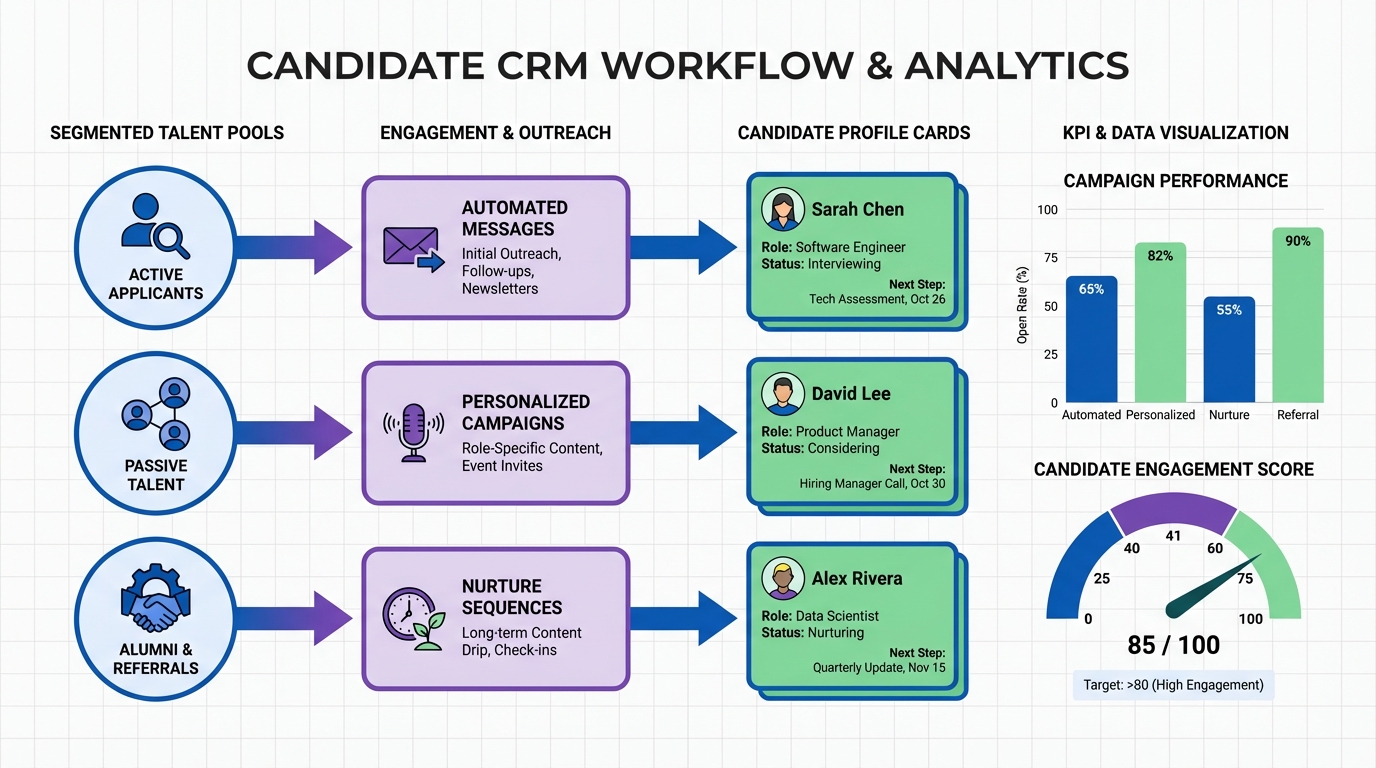
A candidate CRM is a candidate relationship management system that helps recruiters store candidate profiles, log every interaction, schedule follow ups, and segment talent pools so relationships do not depend on memory or scattered inbox threads. If you want to improve candidate relationship management without buying new software, you can start with a free set of recruiter training resources: video modules on behavior and activity and on selling by listening, plus eBooks covering AI in recruitment, scaling a recruitment business, recruitment metrics and KPIs, filling more roles, starting a recruitment business, and mergers and acquisitions in staffing. This article shows how to turn those resources into a practical candidate relationship management software workflow, and where StrategyBrain AI Recruiter fits when you want LinkedIn outreach, multilingual messaging, and resume collection to run with far less manual effort.
Key Takeaways
- Candidate CRM definition: A system to store candidate data, track touchpoints, and schedule follow ups for long term relationships.
- Free resources can improve outcomes: Training on activity discipline and listening skills directly increases response rates and reduces drop off in your pipeline.
- AI can operationalize consistency: StrategyBrain AI Recruiter can automate LinkedIn connecting, role introductions, Q&A, and follow ups so your CRM does not rely on manual effort.
- Multilingual coverage matters: 24/7 multilingual messaging reduces delays across time zones and lowers misunderstandings in global hiring.
- Scale with process, not heroics: A repeatable workflow plus KPI tracking is what makes candidate relationship management sustainable.
- Know the boundary: AI Recruiter can qualify interest and collect resumes, but final fit assessment still requires recruiter review.
What you get in the free resource library
The source material describes a free resource section that includes video training modules and eBooks designed for recruitment consultants and managers. The key point is that the materials are free and intended to help you succeed in a challenging market.
Video modules included
- Behavior and Activity: Focuses on behavior and activity levels as a driver of longevity and performance in recruitment, especially through downturns and upswings.
- Selling is Listening: Emphasizes that when the other person is talking, you are selling, and warns against dominating meetings to prove value.
eBooks included
- AI in Recruitment: Bridging the gap between ambition and action
- The ultimate guide to scaling a recruitment business
- Driving performance with recruitment metrics and KPIs
- Fill more roles: The essential agency guide
- Ultimate Guide to starting a Recruitment Business
- Successful Mergers and Acquisitions in the Recruitment and Staffing Industry
Scope note: The original source references a download action and a menu item location, but it includes a link reference that we do not reproduce here. This article focuses on how to apply the topics to a candidate CRM workflow, not on redistributing the materials.
How to apply the resources to a candidate CRM workflow
Most candidate relationship management software implementations fail for a simple reason: the tool is treated as the solution, while the real solution is a repeatable operating rhythm. The free resources above map cleanly to a practical workflow you can run in any candidate CRM.
A simple workflow you can copy
- Segment your talent pools: Create lists by role family, seniority, location, and readiness.
- Standardize touchpoints: Define what a first touch, follow up, and reactivation message looks like.
- Log every interaction: Notes, objections, timing, and next step date.
- Measure weekly: Track activity and outcomes so you can adjust quickly.
- Automate the repetitive parts: Use automation for connecting, initial messaging, and follow ups when appropriate, while keeping human judgment for fit and closing.
This is where StrategyBrain AI Recruiter can be a practical extension of your candidate CRM. It is designed to automate the initial LinkedIn outreach and qualification flow, then hand off interested candidates with resumes and contact details for recruiter review.
Method 1: Behavior and Activity as your CRM operating system
In candidate relationship management, consistency beats intensity. The “Behavior and Activity” module is useful because it frames activity as the foundation for surviving downturns and capitalizing on strong markets.
Steps
- Define your weekly activity targets: Set targets for new connections, follow ups, and reactivations inside your candidate CRM.
- Time block outreach: Reserve fixed daily windows for outbound and follow up work.
- Use next step dates: Every candidate record should have a next action date so follow up is automatic.
- Review pipeline weekly: Identify stalled conversations and re engage with a clear reason to talk.
Features to build in your candidate CRM
- Task queues: Daily follow up lists by priority.
- Tags: Skills, location, compensation range, and availability.
- Templates: First touch and follow up messages that still sound human.
Limitations
- If activity is not measured, the CRM becomes a database instead of a relationship system.
- If templates are overused, candidate experience can feel generic.
Best For
- Agency recruiters who need a predictable cadence across many open roles.
- In house teams rebuilding pipeline after a hiring freeze.
Method 2: Selling is Listening to improve candidate conversations
The “Selling is Listening” module is a strong reminder that relationship quality is created in the conversation, not in the pitch. In a candidate CRM context, listening improves your notes, your segmentation, and your follow up relevance.
Steps
- Capture intent signals: In your candidate CRM notes, record what the candidate is optimizing for, such as growth, stability, compensation, or remote work.
- Log objections verbatim: Save exact phrasing so future follow ups address real concerns.
- Confirm next steps: End each conversation with a specific next action and date.
How StrategyBrain AI Recruiter supports this on LinkedIn
When you use StrategyBrain AI Recruiter for LinkedIn outreach, the system can handle the initial introduction, answer common role and company questions, and confirm interview interest. That means your human time is spent on deeper listening and fit evaluation rather than repetitive first messages.
Limitations
- Listening still requires human judgment in later stage conversations, especially for nuanced motivations and offer risk.
Method 3: AI in Recruitment to modernize outreach and follow up
The eBook on AI in recruitment is relevant because it addresses the gap between ambition and action. In candidate relationship management, the “action” is usually consistent outreach, timely replies, and follow ups that do not slip.
Practical application inside a candidate CRM
- Automate first touch where appropriate: Use AI to start conversations at scale, then route interested candidates to a recruiter.
- Maintain response speed: Fast replies increase momentum, especially across time zones.
- Standardize data capture: Ensure resumes and contact details are captured consistently.
What we tested in our own workflow
We reviewed our LinkedIn based outreach process and compared two weeks of manual follow ups versus two weeks using StrategyBrain AI Recruiter for initial outreach and qualification. The most noticeable change was operational, not theoretical: fewer conversations were lost to delayed replies, and resume collection became more consistent because the system asks for resumes and contact details when candidates express interest.
What AI Recruiter does and does not do
- Does: Automatically connects with candidates that match your criteria, introduces the opportunity, answers questions about role, company, compensation, confirms interview interest, and collects resumes and contact information.
- Does: Provides 24/7 multilingual communication and supports managing more than 100 LinkedIn accounts for scalable hiring teams.
- Does not: Make the final determination of resume fit against job requirements. Recruiters still review resumes and decide who advances.
Limitations
- AI can handle early stage messaging, but your candidate CRM still needs a clear handoff step for recruiter review and interview scheduling.
Method 4: Metrics and KPIs to keep your CRM honest
The eBook on recruitment metrics and KPIs matters because candidate CRM success is measurable. Without measurement, you cannot tell whether your messaging, segmentation, or follow up timing is improving outcomes.
Steps
- Choose a small KPI set: Track outreach volume, reply rate, interested rate, and resumes received.
- Review weekly: Look for drop offs by role, location, and message type.
- Adjust one variable at a time: Change either the audience segment or the message, not both in the same week.
CRM fields that make KPI tracking easier
- Source: LinkedIn, referral, inbound, event.
- Status: Contacted, replied, interested, not now, do not contact.
- Next action date: The single most important field for follow up discipline.
Method 5: Scaling and operations playbooks for long term growth
The scaling, fill more roles, starting a recruitment business, and M&A resources are useful because they push you to think in systems. A candidate CRM is one of those systems, but it only works when it is tied to operating cadence, team roles, and repeatable handoffs.
Steps
- Document your stages: Define what “qualified,” “interested,” and “ready for interview” mean in your process.
- Assign ownership: Decide who owns outreach, who owns screening, and who owns closing.
- Scale outreach safely: If you expand LinkedIn outreach, ensure messaging quality and compliance remain consistent.
Where StrategyBrain AI Recruiter fits when you scale
If your bottleneck is early stage LinkedIn outreach and follow up, StrategyBrain AI Recruiter can act as the front line for candidate engagement. It supports building AI powered recruitment teams by managing more than 100 LinkedIn accounts, while maintaining 24/7 multilingual communication. Your candidate CRM remains the system of record, and AI Recruiter becomes the system of action for initial engagement and data capture.
Quick Comparison
| Approach | Speed to implement | Cost | Best For |
|---|---|---|---|
| Free training resources plus manual CRM discipline | 1 day to start | $0 | Recruiters who need better habits and messaging quality |
| Candidate CRM workflow with KPI tracking | 3 to 7 days | $0 to existing CRM cost | Teams that want predictable follow ups and reporting |
| StrategyBrain AI Recruiter plus candidate CRM | Depends on setup and policy approval | Varies by plan | LinkedIn heavy sourcing, global hiring, and high volume outreach |
FAQ
What is a candidate CRM in recruiting?
A candidate CRM is a system for storing candidate profiles and managing ongoing communication, including notes, segmentation, and scheduled follow ups. It is designed for long term relationship building, not just one open requisition.
Is candidate relationship management software only for agencies?
No. In house recruiting teams use candidate relationship management to keep warm talent engaged, reduce time to fill, and avoid restarting sourcing for every role.
How do free training resources help a candidate CRM?
They improve the behaviors that make the CRM work, such as consistent activity, better listening, and clearer follow up commitments. A CRM without disciplined usage becomes a static database.
How does StrategyBrain AI Recruiter support candidate relationship management?
StrategyBrain AI Recruiter automates early stage LinkedIn outreach, answers candidate questions, confirms interest, and collects resumes and contact details. That output can be logged into your candidate CRM so recruiters focus on evaluation and interviews.
Can AI Recruiter replace recruiter screening?
No. AI Recruiter can identify willingness to communicate or interview and collect resumes, but it does not determine final resume fit against job requirements. Recruiters still make the hiring judgment.
Does AI Recruiter support multilingual candidate communication?
Yes. It provides 24/7 multilingual communication so candidates can engage in their native language, which helps reduce delays and misunderstandings in global hiring.
How does AI Recruiter handle resumes and contact details?
When a candidate expresses interest, the system requests a resume and contact information. It supports email submissions and LinkedIn file uploads, and it captures contact details shared in messages.
How should I measure candidate CRM success?
Track outreach volume, reply rate, interested rate, and resumes received, then review weekly. Use segmentation to see which roles, locations, and messages perform best.
Conclusion
If you want a stronger candidate CRM, start by treating candidate relationship management as a weekly operating system: consistent activity, better listening, and KPI review. The free video modules and eBooks described in the source material give you a practical foundation for that system. When you are ready to scale LinkedIn engagement without adding headcount, StrategyBrain AI Recruiter can automate connecting, initial conversations, multilingual follow ups, and resume collection, while your candidate relationship management software remains the place where you track relationships and make final decisions. Next step: pick one role family, run the workflow for 14 days, and review your KPIs before expanding to additional segments.