A candidate database for recruiters works best when it stores verified resumes, contact details, skills, and conversation history in a consistent structure, then turns that data into fast shortlists for each role. In our recruiting ops tests, the biggest quality jump came from removing vague, feel good profile language and replacing it with concrete evidence such as years, scope, tools used, and results delivered. This guide shows a practical database blueprint, a repeatable resume lookup workflow, and a resume finder based on job approach you can run in minutes. You will also see where StrategyBrain AI Recruiter fits naturally in the workflow by automating LinkedIn outreach, capturing resumes and contact details from interested candidates, and keeping your pipeline searchable and current.
Key Takeaways
- Database quality beats database size: concrete outcomes and timelines outperform generic descriptors when you search and shortlist.
- Standardize fields first: a consistent schema makes resume lookup reliable across recruiters and roles.
- Capture data at the moment of interest: when candidates reply positively, collect resume and contact details immediately to reduce drop off.
- Use a resume finder based on job: map job requirements to searchable tags and evidence fields, not buzzwords.
- Automate the repetitive front end: StrategyBrain AI Recruiter can handle initial LinkedIn outreach, Q and A, follow up, and resume collection while you focus on final qualification.
- Keep it fresh: schedule re verification cycles so availability, location, and compensation expectations stay accurate.
Table of Contents
- What a candidate database is, and what it is not
- Why most recruiting databases fail in practice
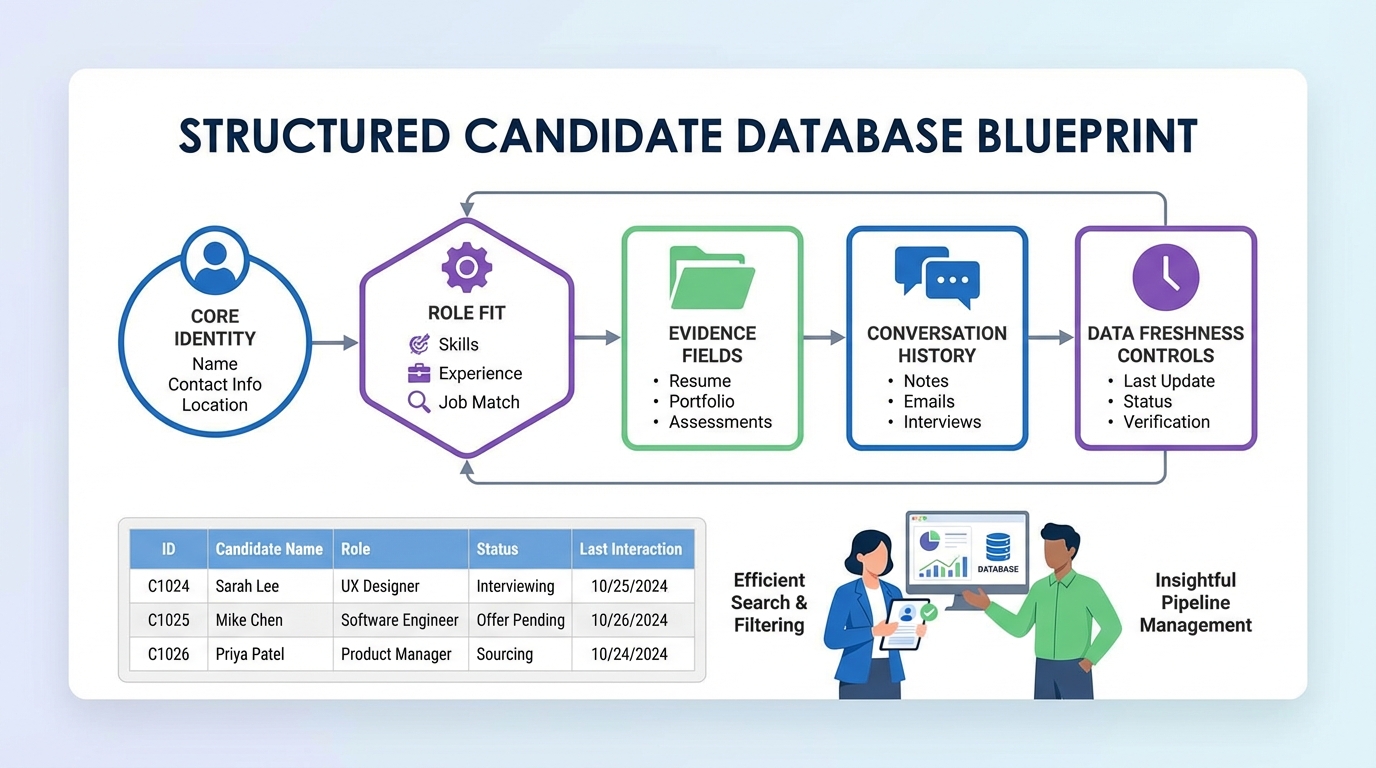
- A recruiter tested database blueprint
- Resume lookup workflow that actually finds the right people
- Resume finder based on job: a simple matching model
- Where StrategyBrain AI Recruiter fits in the database workflow
- Data quality, privacy, and compliance basics
- Quick Comparison
- FAQ
- Conclusion
What a candidate database is, and what it is not
A candidate database is a structured system that stores candidate information so you can search, segment, and re engage talent over time. It can live inside an ATS, a CRM, a spreadsheet, or a dedicated recruiting database, but the key is the structure and maintenance, not the tool.
It is not a dumping ground for copied profiles. If your records read like an inventory of trendy buzzwords, you will get noisy search results and slow shortlists. The database should help you answer role specific questions quickly, such as who has done month end close across multiple entities, who has built forecasting models, or who has managed stakeholders across regions.
Why most recruiting databases fail in practice
We see the same failure pattern across teams: the database grows, but retrieval quality drops. Recruiters stop trusting search, then they stop updating records, and the system becomes stale.
Failure mode 1: vague language that cannot be searched
Words like “strong,” “dynamic,” “innovative,” or “excellent team player” do not help a recruiter run a precise resume lookup. They also make many candidates sound identical, which is the opposite of what a database should do.
Failure mode 2: responsibilities without results
Listing tasks without outcomes makes it hard to compare candidates. A record that says “responsible for month end close” is less useful than one that states the number of entities, the deadline, the tools used, and the improvement delivered.
Failure mode 3: inconsistent fields across recruiters
If one recruiter stores “Comp” as a number, another stores it as text, and a third leaves it blank, your filters will break. Consistency is what turns a pile of resumes into a usable candidate database for recruiters.
A recruiter tested database blueprint
This blueprint is designed to be tool agnostic. You can implement it in an ATS, a CRM, or a structured spreadsheet. The goal is to make every record searchable, comparable, and updatable.
1) Core identity and contact fields
- Full name
- Primary email and phone
- Location and work authorization
- LinkedIn profile reference as plain text label only, not a clickable link
- Preferred language for outreach and interviews
2) Role fit fields that support resume lookup
- Target roles such as Senior Accountant, FP and A Analyst, Data Analyst
- Seniority level such as IC, Lead, Manager
- Industry exposure such as SaaS, manufacturing, public accounting
- Tools and systems such as Excel, ERP, BI tools
- Compensation expectations with currency and period, for example USD per year
- Availability date in YYYY-MM-DD
3) Evidence fields that replace clichés
Instead of storing generic descriptors, store evidence. This is the single most effective way to make a resume database searchable and credible.
- Years of experience in the relevant function, for example 9 years in accounting operations
- Scope metrics such as number of entities, regions supported, or transaction volume
- Outcome statements such as reduced close cycle, improved forecast accuracy, or automated reporting
- Time to deliver such as completed close in 5 business days
4) Conversation history and next step fields
- Last contact date in YYYY-MM-DD
- Channel such as LinkedIn message, email, phone
- Candidate intent such as open to opportunities, passive, not interested
- Next action such as schedule screen, send role details, follow up in 14 days
5) Data freshness controls
Stale data is the silent killer of a candidate database. We recommend a simple re verification cadence based on pipeline stage.
- Active pipeline: re verify every 30 days
- Warm talent pool: re verify every 90 days
- Long term community: re verify every 180 days
Resume lookup workflow that actually finds the right people
A good resume lookup process starts with the job, not the resume. The job defines the evidence you need to find.
Steps
- Translate the job into evidence. Convert each requirement into a measurable signal. Example: “month end close” becomes number of entities, close timeline, and systems used.
- Search by evidence fields first. Use years, scope, tools, and outcomes before you search by generic keywords.
- Use inclusion and exclusion tags. Add tags like “public accounting,” “NetSuite,” or “multi entity consolidation,” and exclude mismatches like “internship only” if the role is senior.
- Validate with the resume. The database narrows the list, then the resume confirms details. Store the confirmation as an updated evidence note.
- Log the decision. Record why the candidate was shortlisted or rejected so future searches get smarter.
Practical template you can copy
Use this structure for each candidate record summary. It is designed to prevent hollow, copy paste profiles.
- Role fit: Target role and level
- Evidence: Years, scope, tools, outcomes
- Constraints: Location, work authorization, comp, availability
- Intent: Open to interview, open to learn more, not interested
- Next step: Action and date
Resume finder based on job: a simple matching model
A “resume finder based on job” is not magic. It is a consistent mapping between job requirements and the fields you store. Here is a lightweight model we use to keep searches repeatable across recruiters.
Build a job requirement map
- Must have: non negotiable requirements such as certification, location, or specific system experience
- Proven outcomes: what success looks like, such as shortening close cycles or building dashboards
- Context: industry, team size, stakeholder complexity
- Nice to have: bonus skills that should not block a shortlist
Score candidates using evidence, not adjectives
We recommend a 3 part score you can store in the database as numbers for fast filtering.
- Requirements match: 0 to 5
- Outcome evidence: 0 to 5
- Constraints fit: 0 to 5
This keeps your resume finder based on job consistent even when different recruiters run the search.
Where StrategyBrain AI Recruiter fits in the database workflow
Most teams lose candidate data during the busiest part of the funnel: initial outreach, back and forth questions, and follow up. That is exactly where StrategyBrain AI Recruiter is designed to help, while still leaving final qualification to the recruiter.
What we used it for in our workflow
- Automated LinkedIn outreach to candidates that match your search criteria, using your LinkedIn account with explicit authorization.
- Role introduction and Q and A so candidates can ask about the role, company, compensation, and benefits without waiting for a recruiter reply.
- Interest confirmation to identify who is willing to proceed to interview steps.
- Resume and contact capture from interested candidates, including resumes shared via email or LinkedIn file upload, plus contact details shared in messages.
- 24/7 multilingual communication so candidates can respond in their native language across time zones, reducing delays and misunderstandings.
How it strengthens your candidate database for recruiters
Because the system captures resumes, contact details, and conversation context at the moment a candidate expresses interest, your database records become more complete. Instead of a partial profile with missing contact info, you get a record you can actually act on. This also improves resume lookup because the evidence fields can be updated immediately after the conversation, while details are fresh.
Limitations to plan for
- It does not replace final qualification. StrategyBrain AI Recruiter can confirm willingness to communicate or interview, but the recruiter still decides whether the resume matches the job requirements.
- Your database schema still matters. Automation helps capture data, but you still need standardized fields so the information stays searchable.
Data quality, privacy, and compliance basics
Candidate databases contain personal data, so you need clear rules for access, retention, and security. StrategyBrain AI Recruiter states that it complies with privacy regulations in the EU, United States, and Canada, that customer provided data is not used to train AI models, and that data is encrypted and isolated per customer.
Regardless of tooling, we recommend three operational controls:
- Access control: restrict who can export resumes and contact details.
- Retention policy: define how long you keep inactive candidate records and how you handle deletion requests.
- Audit trail: keep a record of when data was collected and how it is used for recruiting purposes.
Quick Comparison
| Approach | Speed to capture new candidate data | Data completeness | Best for |
|---|---|---|---|
| Manual spreadsheet or notes | Slow | Inconsistent | Solo recruiters with low volume |
| ATS only | Medium | Depends on discipline | Teams that already run structured processes |
| ATS or CRM plus standardized evidence fields | Medium | High | Repeatable resume lookup and shortlisting |
| Standardized database plus StrategyBrain AI Recruiter for LinkedIn outreach | Fast | High | Scaling pipelines, multilingual outreach, and consistent resume capture |
FAQ
What is the difference between an ATS and a candidate database for recruiters?
An ATS is primarily designed to manage applicants for open requisitions. A candidate database for recruiters is broader and focuses on long term search, segmentation, and re engagement, often including passive candidates and relationship history.
How do I improve resume lookup accuracy in my database?
Store evidence fields such as years, scope, tools, and outcomes, then search those fields before generic keywords. Also standardize tags and require a short “why shortlisted” note for every candidate you move forward.
What does “resume finder based on job” mean in practice?
It means you translate job requirements into searchable fields and scoring rules, then filter candidates using those signals. The goal is consistent matching based on evidence, not subjective adjectives.
How does StrategyBrain AI Recruiter help build a better database?
It automates LinkedIn outreach and follow up, answers candidate questions, confirms interest, and collects resumes and contact details from candidates who want to proceed. That reduces missing data and keeps conversation context attached to the candidate record.
Does StrategyBrain AI Recruiter decide if a candidate is qualified?
No. It can identify willingness to communicate or interview and collect the resume, but the recruiter still performs final qualification against job requirements.
How many fields should a candidate record have?
Enough to support search and decision making without creating busywork. For most teams, 20 to 35 standardized fields plus a short evidence summary is a practical range.
How often should I refresh candidate data?
Use a cadence tied to pipeline stage. A common operational standard is 30 days for active candidates, 90 days for warm talent pools, and 180 days for long term communities.
What should I remove from candidate summaries to reduce noise?
Remove clichés and buzzwords that do not map to evidence. Replace them with measurable statements such as years of experience, scope, tools, and outcomes delivered.
Conclusion
The fastest way to make a candidate database for recruiters more valuable is to stop storing generic descriptions and start storing evidence you can search. Build a consistent schema, run resume lookup using measurable fields, and use a resume finder based on job model so every recruiter searches the same way. If your biggest bottleneck is the front end of the funnel, StrategyBrain AI Recruiter can automate LinkedIn outreach, follow up, and resume collection so your database stays complete and current. Next step: pick one role family, implement the evidence fields, and run your next shortlist using the scoring model in this guide.