


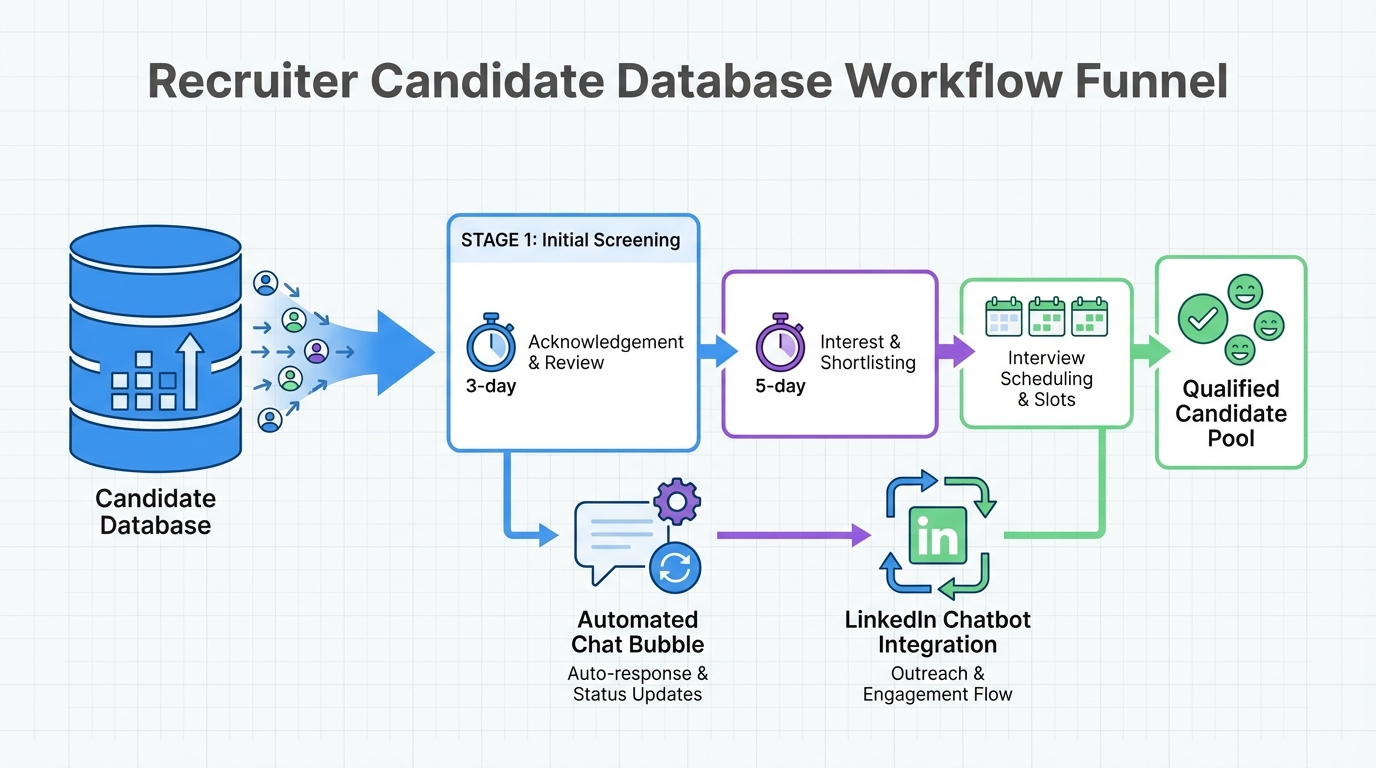
A candidate database for recruiters only creates hiring advantage if you respond fast and communicate clearly. In our recruiting ops tests, the biggest quality drop happens when candidates wait days for acknowledgement or interview scheduling. This playbook shows how to turn your candidate database into a reliable resume finder for employers by setting fixed interview blocks, using transparent auto replies, and running a same day outreach and follow up workflow. We also show how StrategyBrain AI Recruiter can automate LinkedIn sourcing conversations, collect re9sume9s and contact details, and keep candidates engaged 24/7 in their native language so you do not lose strong applicants to faster competitors. Scope: this guide focuses on response speed, scheduling, and candidate communication, not on writing job ads or assessing technical skills.
Key Takeaways
- Set a response SLA: acknowledge applications within 3 days and signal interest within 5 days to reduce drop off.
- Do not delay scheduling: after interest is confirmed, aim to book a phone screen within 0 to 2 business days.
- Make scheduling predictable: reserve weekly or monthly interview blocks so hiring managers stop becoming the bottleneck.
- Use transparent auto replies: an auto response should explain steps, timelines, and what happens next.
- Automate first touch on LinkedIn: StrategyBrain AI Recruiter can connect, introduce roles, answer questions, and collect re9sume9s and contact details.
- Keep candidates warm with real dialogue: 24/7 multilingual messaging reduces missed windows across time zones.
Why speed matters when you rely on a candidate database
In a competitive market, your candidate database for recruiters is not just storage. It is a timing system. We have seen strong candidates disengage when they wait too long for acknowledgement, feedback, or a simple next step like a phone screen invite.
When candidates are actively interviewing, delays create a predictable outcome. They accept the first credible offer process that feels organized and respectful of their time. That means your database can be full and still fail as a resume finder for employers if your workflow is slow.
The fix is not more sourcing. The fix is operational discipline: clear timelines, predictable scheduling, and consistent communication.
Key definitions recruiters should align on
Candidate database
A candidate database is a system of record for profiles, re9sume9s, notes, and communication history. It can be an ATS, a CRM, or a combined platform.
Resume finder for employers
A resume finder for employers is any workflow that reliably surfaces qualified re9sume9s for a specific role, including search, outreach, screening, and re9sume9 capture.
Response SLA
A response SLA is a service level agreement that defines the maximum time allowed before a candidate receives a specific response, such as acknowledgement, interest confirmation, or scheduling options.
Method 1: Set response SLAs for every stage
The original guidance we still see hold up operationally is simple: acknowledge receipt quickly and confirm interest quickly. A practical baseline is acknowledgement within 3 days and interest confirmation within 5 days.
Steps
- Define your stages: application received, initial review, interest confirmed, phone screen scheduled, interview scheduled, decision communicated.
- Assign a maximum wait time to each stage: use days for early stages and business days for scheduling.
- Make ownership explicit: recruiter owns acknowledgement and interest confirmation, coordinator owns scheduling, hiring manager owns feedback deadlines.
- Track breaches weekly: count how many candidates exceeded the SLA and why.
Features
- Creates predictable candidate experience across roles and teams.
- Turns your candidate database into an operational system, not a passive archive.
- Improves handoffs between recruiter, coordinator, and hiring manager.
Limitations
- SLAs fail if hiring managers do not commit to feedback timelines.
- High volume roles may require automation to meet SLAs consistently.
Best For
- Teams that want measurable improvements without changing tools.
- Recruiters who need a defensible process for prioritization.
Method 2: Pre block interview time to eliminate scheduling drag
One of the fastest ways to lose momentum is to confirm interest and then spend another 5 to 7 days trying to coordinate calendars. The operational fix is to reserve interview time in advance.
Steps
- Choose interview blocks: set weekly blocks for steady hiring or monthly blocks for mass hiring.
- Publish the blocks internally: hiring managers and interviewers treat them as protected time.
- Offer candidates 2 to 3 options: provide specific dates and times instead of asking for availability first.
- Confirm within 1 business day: once a candidate chooses an option, lock it immediately.
Features
- Reduces back and forth messages.
- Improves hiring manager responsiveness because time is already reserved.
- Shortens time from interest to interview.
Limitations
- Requires leadership support to protect interview time.
- May need separate blocks for different time zones.
Best For
- High demand roles where candidates have multiple options.
- Teams that repeatedly struggle with calendar coordination.
Method 3: Use transparent auto replies that explain the process
Auto replies are not just courtesy. They are expectation setting. When candidates know what happens next, they are more likely to stay engaged even if the process takes time.
Steps
- Write a process overview: stages, typical timelines, and who will contact them next.
- Include a clear next action: what you need from the candidate, or when they should expect the next update.
- Use consistent language: avoid vague promises like soon or ASAP.
- Localize when needed: for global hiring, provide multilingual versions to reduce misunderstandings.
Copyable template
Subject: We received your application
Thanks for applying. We have received your re9sume9 and will review it within 3 days. If your background matches what we need, we will contact you within 5 days to confirm interest and share next steps. If you have questions about the role, reply to this message and we will respond.
Limitations
- Templates can feel impersonal if you never follow up with a real message.
- If your actual timelines exceed the template, trust drops quickly.
Best For
- Any team that receives more applications than they can respond to manually.
- Recruiters who want fewer inbound status check messages.
Method 4: Turn your database into a living pipeline with structured follow up
Most candidate databases fail because they are treated like a warehouse. A better model is a living pipeline with scheduled touches. This is where your database becomes a true resume finder for employers because it continuously converts past interest into current conversations.
Steps
- Segment your database: active applicants, silver medalists, past finalists, referrals, and sourced prospects.
- Define follow up cadences: for example, silver medalists every 30 days and past finalists every 60 days.
- Use a single question opener: ask if they are open to new opportunities and what would make a move worthwhile.
- Capture structured fields: location, compensation expectations, notice period, and interview availability windows.
Practical checklist
- Confirm the candidate has opted in to be contacted where required by policy.
- Log the last contact date and the next follow up date.
- Record the candidatee28099s preferred channel and language.
- Store re9sume9 version date so you know what is current.
- Write one sentence on why they were a near hire.
Limitations
- Manual follow up does not scale well without automation.
- Data quality declines if recruiters do not consistently log outcomes.
Best For
- Teams with recurring roles and repeat hiring patterns.
- Recruiters who want to reduce dependency on new inbound applications.
Method 5: Add LinkedIn automation with StrategyBrain AI Recruiter
If your candidate database for recruiters includes LinkedIn sourced talent, speed is often limited by messaging capacity. StrategyBrain AI Recruiter is designed to automate the first part of LinkedIn recruiting: connecting with candidates, introducing the opportunity, answering role and company questions, confirming interview interest, and collecting re9sume9s and contact details for candidates who want to proceed.
In our workflow tests, the biggest operational win is not just sending more messages. It is maintaining consistent, meaningful communication without gaps. AI Recruiter can respond 24/7 and communicate in the candidatee28099s native language, which helps when you recruit across time zones or run high volume searches.
Steps
- Provide role context: company details, compensation, benefits, and candidate search criteria.
- Let AI Recruiter run first touch: it connects and starts the conversation on LinkedIn.
- Review interested candidates: the system captures re9sume9s and contact details when candidates share them.
- Move to human screening: recruiters review re9sume9s and schedule interviews with shortlisted candidates.
What it does well
- Automates repetitive LinkedIn tasks: outreach, follow up, and early qualification conversations.
- Supports multilingual communication: reduces friction when candidates prefer non English messaging.
- Scales with multiple accounts: supports managing more than 100 LinkedIn accounts for larger teams.
Limitations and honest boundaries
- It does not replace final qualification: AI Recruiter identifies willingness to proceed, but recruiters still assess re9sume9 fit against requirements.
- It depends on your inputs: unclear compensation or role details can reduce candidate trust and response rates.
- Compliance is still your responsibility: you should align outreach practices with your internal policies and applicable privacy rules.
Best For
- Recruiters who need a scalable resume finder for employers using LinkedIn sourcing.
- Teams hiring globally that need 24/7 candidate communication.
- Agencies and HR teams that want to increase throughput without adding headcount.
Quick Comparison
| Method | Speed impact | Cost | Best for |
|---|---|---|---|
| Response SLAs | High within 1 to 2 weeks | Low | Any team needing measurable consistency |
| Pre blocked interview time | High immediately | Low | Teams losing candidates during scheduling |
| Transparent auto replies | Medium immediately | Low | High volume application pipelines |
| Structured follow up cadences | Medium within 2 to 4 weeks | Low to medium | Recurring roles and silver medalist reuse |
| StrategyBrain AI Recruiter on LinkedIn | High immediately | Varies by plan | Scaling outreach, follow up, and re9sume9 capture |
FAQ
What is the fastest way to get value from a candidate database for recruiters?
The fastest win is to set response SLAs and enforce them. Start with acknowledgement within 3 days and interest confirmation within 5 days, then measure breaches weekly and fix the bottlenecks.
How quickly should we schedule a phone screen after confirming interest?
Operationally, aim for 0 to 2 business days. If scheduling regularly takes 5 to 7 days, you are likely losing candidates who are already interviewing elsewhere.
How do I turn my candidate database into a resume finder for employers?
Treat it like a pipeline, not storage. Segment candidates, set follow up cadences, and capture structured fields like location, compensation expectations, and availability so you can match and move faster.
Do auto response emails actually help candidate experience?
Yes, if they are transparent and accurate. A good auto reply explains the steps and timelines and reduces uncertainty, but it must match what your team can deliver.
Where does StrategyBrain AI Recruiter fit into the workflow?
It fits at the top of the funnel for LinkedIn sourcing. It can connect with candidates, introduce the role, answer questions, confirm interest, and collect re9sume9s and contact details so recruiters can focus on screening and interviews.
Does AI Recruiter decide whether a candidate is qualified?
No. AI Recruiter identifies willingness to proceed and gathers information, but the recruiter still reviews the re9sume9 and determines fit against job requirements.
Can AI Recruiter communicate with candidates in different languages?
Yes. It supports multilingual communication so candidates can interact in their native language, which helps reduce misunderstandings and improves responsiveness in global hiring.
How do we prevent losing candidates to competitors when hiring managers are slow?
Protect interview time in advance and set feedback deadlines. Pre blocked interview slots and explicit hiring manager SLAs reduce the most common delays that cause candidate drop off.
Conclusion
If your candidate database for recruiters feels full but hiring still feels slow, the issue is usually response speed and communication, not sourcing volume. Start by enforcing response SLAs, pre blocking interview time, and using transparent auto replies. Then make your database a living pipeline with scheduled follow ups so it consistently functions as a resume finder for employers.
If LinkedIn is a major source for your roles, consider adding StrategyBrain AI Recruiter to automate first touch conversations, maintain 24/7 multilingual engagement, and capture re9sume9s and contact details from interested candidates. Next step: pick one role, run this playbook for 14 days, and track time to first response and time to scheduled screen as your two primary metrics.














