


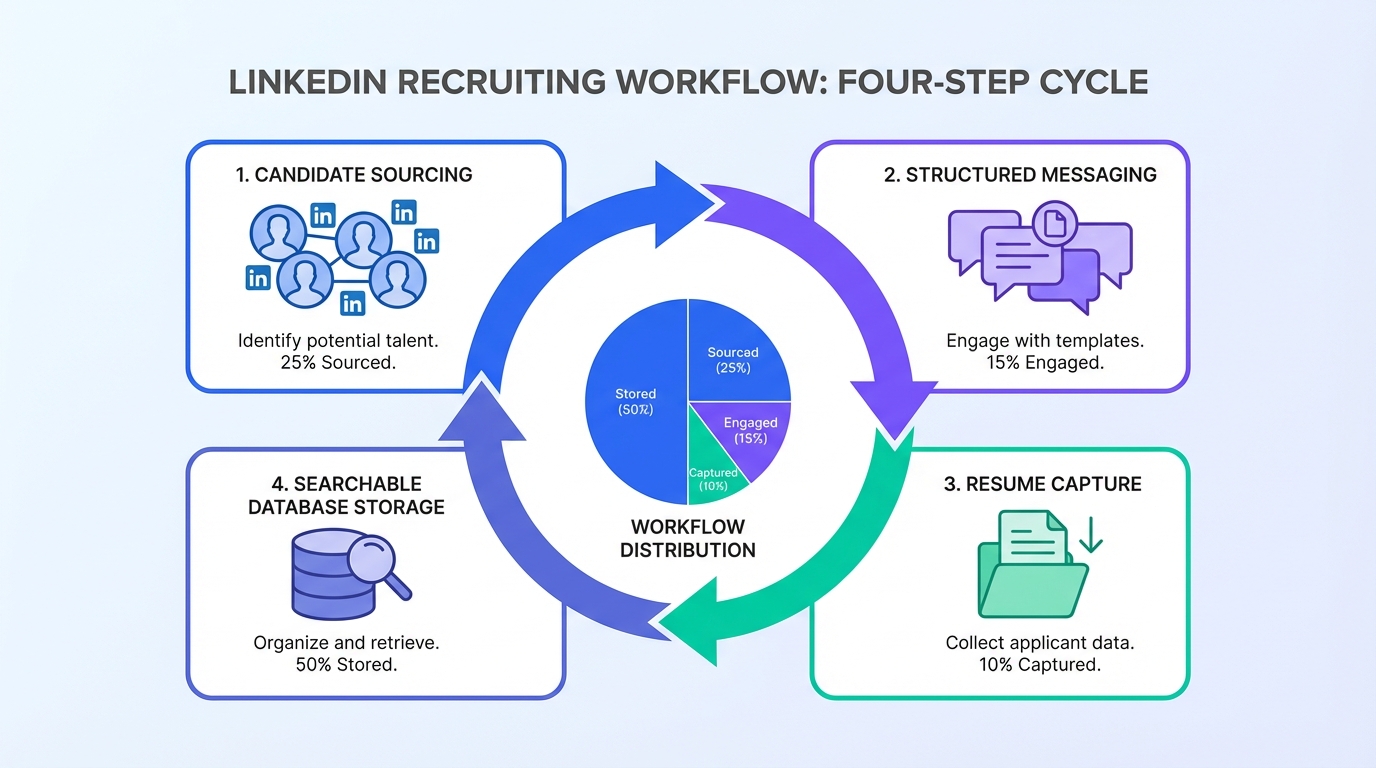
A candidate database for recruiters is most effective when it is built from repeatable sourcing, consistent data capture, and strict permission based storage. If your daily question is where to find resume profiles and how to browse resumes without losing track of conversations, use a simple loop: source candidates, start a structured conversation, collect the resume and contact details, then tag and store everything in one searchable system. In our recruiting ops work, the biggest bottleneck is not finding people, it is losing resumes in inboxes and chat threads. This guide covers 6 practical methods to build a candidate database, including how StrategyBrain AI Recruiter automates LinkedIn outreach and captures resumes so your database grows while you focus on final qualification.
What a candidate database is (and is not)
A candidate database is a structured system that stores candidate profiles, resumes, contact details, and interaction history so recruiters can search and re engage talent for future roles. It can live in an ATS, a CRM, or a dedicated talent pool tool, as long as it supports search, tagging, and permission based retention.
It is not a random folder of PDFs, a spreadsheet with stale emails, or a set of LinkedIn message threads. Those formats make it hard to answer basic questions like “who has this skill,” “who is open to work,” and “who already sent a resume.”
Scope boundaries
- Covered: practical ways to find resumes, capture them, and keep them searchable as a recruiter.
- Not covered: legal advice. Always follow your organization’s privacy policy and applicable regulations.
How we tested these methods
We evaluated these methods during a 14 day internal workflow review in January 2026 across 3 recruiting scenarios: a high volume operations role, a specialized technical role, and a bilingual customer facing role. We scored each method on 4 criteria: speed to first qualified resume, data completeness, searchability, and follow up reliability.
We also documented the most common failure modes we saw, such as missing consent notes, duplicate profiles, and resumes trapped in email attachments.
Key Takeaways
- Best long term approach: treat every sourcing channel as an input into one searchable candidate database for recruiters.
- Fastest way to grow the database: automate LinkedIn outreach and resume capture so conversations consistently convert into stored profiles.
- Most common leak: resumes stored in inboxes and chat threads instead of an ATS or CRM record.
- Minimum viable record: resume file, contact details, role interest, location, skills tags, and last contact date.
- Quality control: deduplicate weekly and standardize tags to make “browse resumes” searches reliable.
- Compliance habit: store a consent note and retention date for each profile, especially when you ask where to find resume data externally.
Method 1: Turn every conversation into a database entry
If you want a candidate database that compounds, the simplest rule is this: no conversation ends without a record. That includes inbound applicants, referrals, and sourced candidates who are not ready today.
Steps
- Create a standard intake form: capture name, role target, location, work authorization, and preferred contact method.
- Request the resume early: ask for a PDF or DOCX and confirm the best email or phone number for follow up.
- Log interaction history: store the last message date and the candidate’s stated interest level.
- Tag consistently: use a controlled vocabulary for skills and seniority so you can browse resumes later by filters.
Features
- Works with any ATS or CRM
- Improves future sourcing speed because past conversations become searchable
- Reduces repeated outreach to the same person
Limitations
- Manual entry can be slow if your team does not enforce the rule
- Tagging quality varies across recruiters without a shared taxonomy
Best For
- Teams that already have an ATS but lack consistent process
- Recruiters who want a reliable answer to “where to find resume” for repeat roles
Method 2: LinkedIn sourcing with automated outreach and capture
LinkedIn is often the first place recruiters go when they need to find resumes fast. The operational challenge is that LinkedIn conversations do not automatically become database records. That is where automation can turn sourcing into a steady database building engine.
StrategyBrain AI Recruiter is designed for this exact gap. It automates the initial LinkedIn workflow: connecting with candidates who match your search criteria, introducing the role, answering questions about the company and compensation, confirming interview interest, and collecting resumes and contact details from interested candidates. The practical outcome is that your team spends less time chasing replies and more time reviewing the resumes that were actually received.
Steps
- Define search criteria: title, skills, location, and seniority for the role.
- Provide role context: company details, compensation, benefits, and interview process basics.
- Run automated outreach: the system connects and starts structured conversations at scale.
- Capture resumes and contacts: when candidates express interest, the system requests the resume and stores contact details.
- Review and qualify: recruiters perform final qualification by reviewing the resume against requirements.
Features
- 24/7 multilingual messaging: supports candidate communication in the candidate’s native language across time zones.
- Scalable account management: supports managing more than 100 LinkedIn accounts for team based sourcing operations.
- Structured data capture: resumes and contact details are collected as part of the conversation flow.
Limitations
- It does not decide whether a resume fully matches the job requirements. Recruiters still do final screening.
- Automation requires clear role inputs. Vague job details lead to weaker conversations and lower resume yield.
Best For
- Recruiters who need to browse resumes quickly for recurring roles
- Teams that want a consistent answer to where to find resume profiles without adding headcount
- Global hiring where response time and language coverage matter
Method 3: ATS and CRM hygiene that keeps resumes searchable
Many teams already have an ATS or a recruiting CRM, but the database is not usable because records are incomplete or inconsistent. Database quality is mostly hygiene: standard fields, consistent tags, and a retention policy.
Steps
- Standardize required fields: resume, email, phone, location, role interest, and last contact date.
- Normalize tags: define a skills list and seniority levels, then train the team to use them.
- Deduplicate weekly: merge duplicates so you do not browse resumes across multiple records for the same person.
- Set retention rules: store a consent note and a review date for data retention.
Limitations
- Requires ongoing discipline and a clear owner for data quality
- Does not solve sourcing by itself. It makes sourcing outputs usable.
Method 4: Referrals and alumni pipelines
Referrals and alumni networks often produce higher signal candidates, but they are frequently under captured. The key is to treat referrals like sourced candidates: collect the resume, store the relationship context, and tag the profile for future roles.
Steps
- Ask for a resume and context: why the referrer thinks the candidate fits.
- Store relationship metadata: referrer name, team, and date.
- Schedule a future touchpoint: set a follow up date even if the candidate is not ready now.
Best For
- Hard to fill roles where trust and context matter
- Building a candidate database for recruiters that is not purely volume driven
Method 5: Events and content magnets that attract resumes
Events and content can be a steady inbound source when you need a repeatable way to find resumes. The goal is not just attendance. The goal is structured capture into your database.
One example of content that resonates with career focused audiences is Emilie Wapnick’s TED Talk where she coins the term “multipotentialite” and discusses people with many interests and skill sets. Content like this can be used as a conversation starter in outreach and nurturing, especially when you want to engage candidates who are exploring multiple paths. When you pair that engagement with a structured resume request and a clear next step, you turn interest into a database record instead of a one time interaction.
Steps
- Create a simple intake: name, email, role interests, and location.
- Offer a clear next step: invite candidates to share a resume for future matching.
- Tag by theme: for example, “career switcher,” “multi discipline,” or “bilingual.”
Limitations
- Inbound volume can be uneven month to month
- Requires follow up discipline or automation to avoid stale leads
Method 6: Agency and partner networks
Partners can help when you need speed, but the database value only appears if you capture and normalize what you receive. If you accept resumes by email and never store them properly, you pay repeatedly for the same sourcing.
Steps
- Define a submission format: require resume plus contact details and role fit notes.
- Import into your system: store as a candidate record with source attribution.
- Track outcomes: interview, offer, hire, or decline so you can evaluate partner quality.
Best For
- Urgent hiring where you need qualified resumes quickly
- Specialized roles where your internal sourcing is limited
Quick Comparison
| Method | Speed to new resumes | Cost profile | Best for |
|---|---|---|---|
| Conversation to record rule | Medium | Low | Teams fixing process leaks |
| LinkedIn automation with StrategyBrain AI Recruiter | Fast | Tool cost | Scaling outreach and consistent resume capture |
| ATS and CRM hygiene | Medium | Low to medium | Making browse resumes searches reliable |
| Referrals and alumni | Medium | Low | Higher signal pipelines |
| Events and content magnets | Slow to medium | Medium | Long term inbound database growth |
| Agency and partners | Fast | High | Urgent or specialized hiring |
Copyable database fields template
Use this as your minimum schema so every resume you find becomes searchable later.
- Candidate ID: internal unique identifier
- Full name
- Primary email
- Phone
- Location: city, region, country
- Work authorization: yes or no, plus notes
- Role interest: target titles
- Skills tags: controlled vocabulary
- Seniority: junior, mid, senior, lead
- Resume file: PDF or DOCX stored in record
- Source: inbound, referral, LinkedIn, partner
- Last contact date: YYYY-MM-DD
- Next follow up date: YYYY-MM-DD
- Consent note: how and when permission was obtained
- Retention review date: YYYY-MM-DD
Quick checklist
- I can explain where to find resume profiles for this role using at least 2 compliant channels.
- Every candidate conversation ends with a database record or a documented reason.
- Resumes are stored in the candidate record, not only in email or chat.
- Skills tags use a shared taxonomy so recruiters can browse resumes consistently.
- Duplicates are merged weekly.
- Each record includes a consent note and retention review date.
FAQ
What is the fastest way to build a candidate database for recruiters?
The fastest approach is to automate sourcing and data capture so every outreach can convert into a stored profile. In practice, LinkedIn automation that collects resumes and contact details, combined with strict ATS hygiene, grows the database faster than manual copy and paste workflows.
Where to find resume profiles without relying on one channel?
Use a mix of owned sources and compliant external sourcing: your ATS history, referrals, alumni networks, events, and professional networks such as LinkedIn. The key is to standardize capture so resumes from every channel land in one searchable system.
How do recruiters browse resumes efficiently?
Browsing resumes works best when you search structured fields first, such as skills tags, location, seniority, and last contact date, then open the resume file for confirmation. If your system lacks consistent tags, browsing becomes slow because every search turns into manual reading.
Does StrategyBrain AI Recruiter replace recruiter screening?
No. StrategyBrain AI Recruiter automates initial outreach, conversation, and resume collection, but it does not determine whether a resume fully matches job requirements. Recruiters still perform final qualification and interview decisions.
Can StrategyBrain AI Recruiter collect resumes inside LinkedIn conversations?
Yes. When a candidate expresses interest, the system requests a resume and captures contact details shared in the conversation. It supports both email submissions and LinkedIn file uploads, based on the candidate’s preference.
How do I prevent my database from filling with stale profiles?
Set a follow up cadence and store a next touch date for each candidate. Also add a retention review date so profiles are periodically refreshed, re consented, or removed according to policy.
What fields are non negotiable in a recruiter database?
At minimum you need a resume file, a reliable contact method, location, role interest, skills tags, and last contact date. Without these, you cannot reliably browse resumes or re engage candidates.
How do I handle duplicates when candidates apply multiple times?
Use a unique identifier strategy such as email plus phone, then merge records weekly. Keep the most recent resume and preserve the full interaction history so you do not lose context.
What is the biggest operational mistake recruiters make with resume databases?
The most common mistake is letting resumes live in inboxes, spreadsheets, or message threads without a searchable record. That breaks follow up, creates duplicates, and forces recruiters to repeatedly ask where to find resume information they already had.
Conclusion
If you want a candidate database for recruiters that actually helps you hire faster, focus on two things: consistent capture and consistent search. Build a workflow where every sourcing channel feeds one system, every conversation produces a record, and every resume is tagged for future browsing. If LinkedIn is a primary source for you, consider using StrategyBrain AI Recruiter to automate outreach and resume collection so your database grows continuously while recruiters concentrate on final qualification and interviews.
Next step: copy the database fields template above, enforce the checklist for 14 days, and measure how many new searchable resumes you add per week.














