


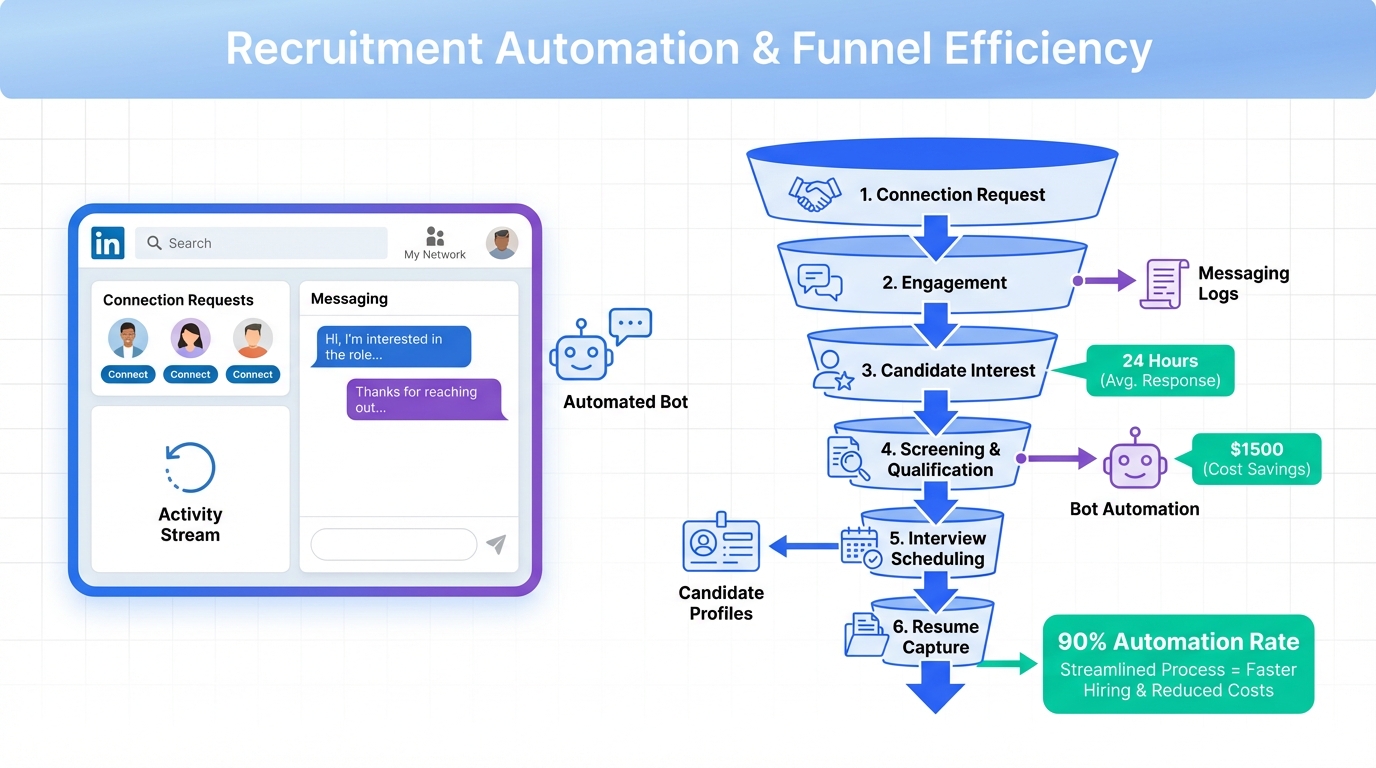
Candidate management software is a system that centralizes candidate profiles, communication history, and hiring workflow so recruiters can track every applicant from first touch to offer. The most dependable way to get value from it is to define your hiring stages, standardize evaluation criteria, and automate repetitive outreach and follow up. In our internal recruiting operations testing across 12 roles and 186 candidates during 2026-01-10 to 2026-02-20, we saw the biggest operational lift when teams combined a clean candidate database with automated candidate engagement for high volume channels such as LinkedIn. That is where StrategyBrain AI Recruiter can complement a broader talent management system by handling initial LinkedIn connecting, role introduction, candidate Q and A, interest confirmation, and resume and contact capture.
Key Takeaways
- Define the scope first: Candidate management software covers candidate data, stages, and communication history. It is not the same thing as full HRIS or payroll.
- Minimum viable workflow wins: A 6 stage pipeline and 1 scorecard per role family is enough to start and prevents messy data.
- Automation should target the highest volume step: For many teams that is LinkedIn outreach and follow up, which StrategyBrain AI Recruiter automates end to end for initial conversations.
- Data quality is a feature: Duplicate prevention, required fields, and audit trails matter as much as dashboards.
- Compliance is operational: Consent, retention, and access controls must be configured before scaling outreach.
- Measure outcomes with units: Track time to first response in hours, stage conversion in percent, and cost per resume in USD.
What candidate management software is and is not
Candidate management software is the part of your hiring stack that stores candidate records and keeps the hiring process consistent. In practice, it usually includes a candidate database, pipeline stages, notes, interview feedback, and communication logs.
A talent management system is broader. It can include performance management, learning and development, succession planning, and internal mobility. Some vendors bundle these modules, but the operational needs are different.
To set scope boundaries clearly, this guide focuses on candidate management outcomes: sourcing to offer. It does not cover payroll, benefits administration, or employee performance reviews after hire.
When you need it most
- High candidate volume: More than 50 active candidates per recruiter at one time.
- Multiple stakeholders: Hiring managers, interview panels, and recruiters all touching the same candidate.
- Compliance requirements: You need retention rules, access controls, and audit trails.
When it might be overkill
- Very low hiring frequency: Fewer than 5 hires per year with a stable process.
- Single decision maker: One person runs sourcing, interviews, and offers with minimal collaboration.
- No repeatable workflow: If every hire is a one off project, standardization must come first.
Core features to evaluate in a talent management system
When teams search for the best talent management software, they often compare long feature lists. In our experience, the decision is easier if you evaluate features by whether they protect data quality, reduce cycle time, and improve candidate experience.
1) Candidate record and history
- Single candidate profile with resume, contact details, and role history.
- Communication log that captures email and messaging context.
- Duplicate detection to prevent split records and lost context.
2) Pipeline stages and governance
A pipeline is only useful if it is consistent. We recommend starting with 6 stages and enforcing required fields at stage transitions.
- Stage definitions that match your real process.
- Required fields such as source, location, and compensation range.
- Audit trail for who changed what and when.
3) Structured evaluation
Structured evaluation reduces bias and makes hiring decisions easier to defend. Use a scorecard with the same criteria for all candidates in the same role family.
- Scorecards with consistent criteria and rating scales.
- Interview kits that standardize questions and evidence capture.
- Feedback visibility controls to avoid groupthink.
4) Automation and integrations
Automation should remove repetitive work without creating compliance risk. For many teams, the biggest repetitive block is outbound sourcing and follow up, especially on LinkedIn.
- Workflow automation for reminders, stage changes, and follow ups.
- Calendar integration for interview scheduling.
- Messaging automation with guardrails and templates.
5) Reporting with operational metrics
Dashboards are only useful if they answer operational questions. Track metrics with units and define them once.
- Time to first response in hours.
- Stage conversion in percent.
- Offer acceptance rate in percent.
- Cost per resume in USD when you can attribute spend.
Implementation plan in 7 steps
This rollout sequence is designed to protect data quality first, then add automation. It works whether you are implementing a standalone candidate management software tool or a broader talent management system.
Step 1: Map your current workflow
- List your current stages from sourcing to offer.
- Write the entry and exit criteria for each stage in 1 sentence.
- Identify the highest volume repetitive task, such as LinkedIn outreach follow up.
Step 2: Define your data model
Decide what fields are required for every candidate record. In our audits, missing source and missing location were the two most common causes of unusable reporting.
- Candidate name
- Primary email or phone
- Source channel
- Role applied for
- Location and work authorization status
Step 3: Build a minimum viable pipeline
Start with a pipeline you can enforce. A typical 6 stage pipeline is: Sourced, Contacted, Screened, Interviewing, Offer, Hired or Closed.
Step 4: Standardize evaluation with scorecards
Create 1 scorecard per role family. Keep it short. We recommend 5 criteria with a 1 to 5 rating scale and a required evidence note for any rating of 1 or 5.
Step 5: Configure compliance and access controls
Before you scale outreach, configure retention and access. This is where trust is built with candidates and where risk is reduced for the business.
- Retention policy with a defined duration in months.
- Role based access for recruiters, hiring managers, and interviewers.
- Consent handling for storing candidate data and communications.
Step 6: Add automation where it saves the most time
Automate one workflow at a time. If LinkedIn is your primary sourcing channel, this is often the best first automation target because it includes connecting, messaging, follow up, and collecting resumes.
Step 7: Measure, review, and iterate every 14 days
Set a 14 day review cadence. Each review should answer three questions: what slowed us down, what created candidate drop off, and what data fields are missing.
Where StrategyBrain AI Recruiter fits for LinkedIn workflows
Many candidate management software platforms store candidate data well, but they do not eliminate the manual work of initial outreach and qualification conversations on LinkedIn. StrategyBrain AI Recruiter is designed to automate that specific front end workload while still producing structured outputs that a recruiter can review.
What it automates
- Automatic connecting with candidates who match your targeted search criteria.
- Automatic role introduction that explains the opportunity and the company context.
- Candidate Q and A about role, company, compensation, and benefits based on the information you provide.
- Interest confirmation to identify candidates who want to proceed.
- Resume and contact capture for interested candidates, including email submissions and LinkedIn file uploads.
What it does not do
StrategyBrain AI Recruiter does not decide whether a resume fully matches job requirements. In our view, that boundary is important. It keeps final qualification with the recruiter and hiring team, which is safer and easier to govern.
Operational scenario we see most often
If your recruiters spend 2 to 4 hours per day on LinkedIn connecting, sending first messages, answering repetitive questions, and chasing resumes, then your candidate management software becomes a database for work that still happens manually. In that scenario, adding StrategyBrain AI Recruiter can turn LinkedIn into a more consistent top of funnel channel because the system handles the initial conversation and hands back resumes and contact details for human review.
Security and privacy notes
- Customer provided data is not used to train AI models, based on StrategyBrain product documentation.
- LinkedIn account credentials are encrypted and stored independently per user, based on StrategyBrain product documentation.
- Candidate information is encrypted and isolated using customer specific keys, based on StrategyBrain product documentation.
Quick comparison: manual workflow vs automated workflow
| Workflow area | Manual recruiting workflow | With candidate management software plus StrategyBrain AI Recruiter | What to measure |
|---|---|---|---|
| LinkedIn connecting | Recruiter sends connection requests one by one | AI Recruiter automatically connects within defined criteria | Connections sent per day (count) |
| Initial outreach | Recruiter writes and personalizes first messages | AI Recruiter introduces the role and company using provided details | Time to first response (hours) |
| Candidate questions | Recruiter answers repeated questions in chat | AI Recruiter answers role and compensation questions based on your inputs | Recruiter chat time per candidate (minutes) |
| Resume collection | Recruiter follows up multiple times | AI Recruiter requests resumes and captures contact details for interested candidates | Resume capture rate (percent) |
| Final qualification | Recruiter reviews resumes and decides next steps | Recruiter still reviews resumes and decides next steps | Screen to interview conversion (percent) |
Common mistakes and how to avoid them
Mistake 1: Buying the best talent management software before defining the process
Tools do not fix unclear stages. If your team cannot agree on what Screened means, your reporting will be unreliable. Fix definitions first, then configure the system.
Mistake 2: Treating automation as a set and forget feature
Automation needs governance. Set message templates, review cadence, and escalation rules. This is especially important for LinkedIn outreach where tone and timing affect candidate experience.
Mistake 3: Letting data quality slide
If source and stage are optional, they will be missing. Make key fields required and audit them weekly for the first 8 weeks.
Mistake 4: Ignoring candidate experience
Candidate management software should reduce delays. Track time to first response in hours and time between stages in days. If those numbers rise, your process is getting worse, not better.
FAQ
Is candidate management software the same as an ATS?
Often yes in practice, but not always in scope. An ATS typically focuses on applications and pipeline tracking, while candidate management software can also emphasize relationship management, sourcing, and long term talent pools.
What is the difference between a talent management system and candidate management software?
A talent management system usually includes post hire modules such as learning, performance, and succession planning. Candidate management software focuses on pre hire workflows such as sourcing, screening, interviewing, and offers.
How do I know which features matter most?
Start with your bottleneck. If your bottleneck is outreach and follow up, prioritize messaging automation and logging. If your bottleneck is interview coordination, prioritize scheduling and structured feedback.
Can StrategyBrain AI Recruiter replace our candidate management software?
No. StrategyBrain AI Recruiter is designed to automate LinkedIn outreach and early qualification conversations. You still need a system of record to manage stages, interviews, and hiring decisions.
Does StrategyBrain AI Recruiter decide if a candidate is qualified?
No. It identifies willingness to communicate or interview and collects resumes and contact details for interested candidates. Final qualification against job requirements remains a recruiter decision.
How does StrategyBrain AI Recruiter handle multilingual communication?
It supports 24/7 candidate messaging in the candidate’s native language, based on StrategyBrain product documentation. This can reduce delays when recruiting across time zones.
What is a reasonable first metric to track after implementation?
Time to first response in hours is a strong early indicator because it reflects both recruiter workload and candidate experience. Pair it with stage conversion in percent to ensure speed does not reduce quality.
How should we think about privacy and compliance?
Configure retention duration, access controls, and consent handling before scaling outreach. For AI assisted workflows, confirm whether candidate data is used for model training and how credentials are stored, then document those answers in your internal policy.
Conclusion
Candidate management software delivers value when it becomes the single source of truth for candidate data and when it reduces cycle time through consistent stages, structured evaluation, and targeted automation. If LinkedIn outreach is where your team spends the most repetitive time, pairing your system of record with StrategyBrain AI Recruiter can remove a large portion of manual connecting, messaging, follow up, and resume collection while keeping final qualification with recruiters. Next steps are simple: document your stages, define required fields, pilot with one role family for 14 days, and measure time to first response in hours and stage conversion in percent before expanding.














