


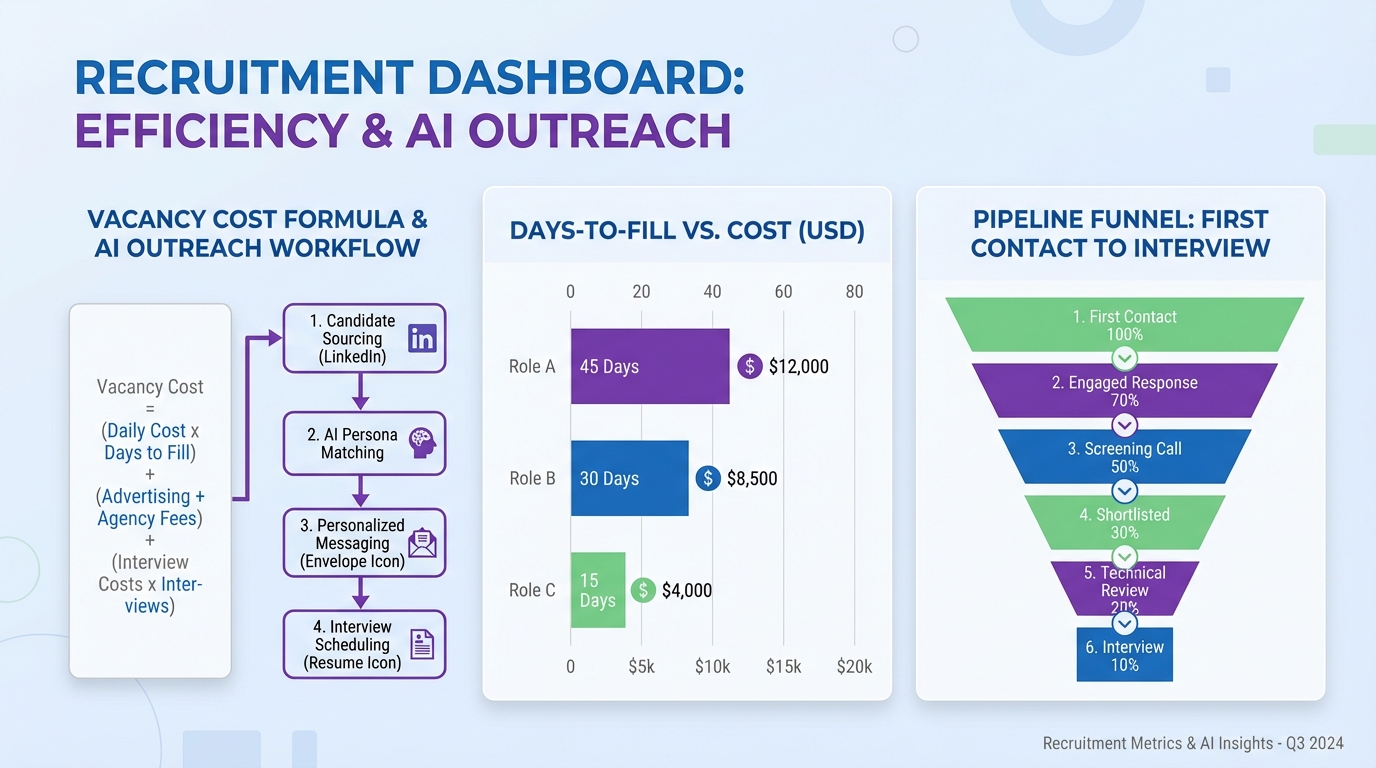
Candidate management software reduces the true cost of vacancies by shortening time to fill, preventing candidate drop off, and making follow up consistent across every role. If you can quantify what an open position costs per day, you can prioritize the roles that damage revenue and customer service the most, then use a tighter candidate management workflow to move qualified people from first touch to interview faster. In this guide, we use a simple productivity based vacancy cost formula, show the operational costs that hiring teams often ignore, and explain how StrategyBrain AI Recruiter can automate LinkedIn outreach, two way Q&A, and resume collection so recruiters focus on interviews instead of repetitive messaging.
Key Takeaways
- Vacancy cost can be calculated per day using billable rate and productivity percentage, then rolled up to weekly and monthly impact.
- Candidate management software pays off fastest when it reduces time to fill for revenue producing or customer facing roles.
- Hidden costs are usually larger than ads because overtime, manager time, and lost customers compound while a role stays open.
- Pipeline discipline beats more sourcing when candidates are already in your funnel but are not being followed up consistently.
- StrategyBrain AI Recruiter can automate LinkedIn candidate engagement including introductions, role Q&A, interest confirmation, and collecting resumes and contact details.
- Global hiring improves with 24/7 multilingual messaging so candidates get timely responses across time zones and languages.
- AI Recruiter is not a final skills assessor; it qualifies interest and captures information so recruiters can review resumes and decide fit.
Why vacancies cost more than you think
In our experience auditing recruiting workflows, the biggest mistake is treating vacancies as a recruiting expense instead of an operating loss. Advertising and job boards are visible line items, but the real damage often shows up elsewhere: missed service calls, delayed projects, lost parts or add on revenue, and customers who switch to a competitor that can respond immediately.
There is also a second layer of cost that is easy to ignore because it is spread across the organization. Senior managers and HR teams spend hours screening, interviewing, and coordinating, and those hours have an opportunity cost. When hiring drags on for months, the internal time cost can rival or exceed external recruiting fees.
Finally, vacancies change how your current team works. Overtime can spike, productivity can drop, and stress can increase. Over time, that pressure can contribute to turnover, which creates additional vacancies and resets the cycle.
A simple vacancy cost formula you can use today
If the role produces revenue directly, you can estimate vacancy cost using a productivity based approach. The original example below uses an HVAC technician, but the same structure works for any billable service role.
Define the terms once, then reuse them
- Billable rate: the hourly rate charged to customers, in dollars per hour.
- Productivity: the percentage of paid time that is billable or productive, expressed as a percent.
- Vacancy cost per day: billable rate multiplied by productive hours per day.
Worked example using the source numbers
Using the provided figures, an HVAC technician billing $110 per hour at 70% productivity yields $616 per day, which rolls up to $3,080 per week and $13,346 per month. Those numbers do not include lost parts revenue or the downstream impact of customers choosing a provider that can deliver service immediately.
What to do if the role is not directly billable
For non billable roles, you can still quantify vacancy cost by choosing a measurable output that leadership agrees matters. Examples include orders processed per day, tickets resolved per day, or projects delivered per month. The key is to pick one unit, assign a value per unit, and keep the calculation consistent so you can compare roles fairly.
Where candidate management software changes the math
Candidate management software is the operational layer that keeps your hiring pipeline moving. It is often part of a broader talent management system, but the candidate management portion is where you win or lose speed. When it works well, it does three things reliably.
- It prevents leakage by ensuring every qualified candidate gets timely follow up and clear next steps.
- It reduces cycle time by standardizing stages, templates, and handoffs so managers do not reinvent the process for each role.
- It creates accountability through stage level metrics such as response time, interview scheduling time, and offer turnaround time.
When you connect those improvements back to vacancy cost per day, the ROI conversation becomes concrete. Cutting even a small number of days from time to fill can outweigh software costs for high impact roles.
Method 1: Measure and prioritize by cost
Before you change tools, make the vacancy cost visible. This is the fastest way to align HR, hiring managers, and finance on which roles deserve the most attention.
Steps
- List open roles and label which ones are revenue producing, customer facing, or safety critical.
- Calculate vacancy cost per day using billable rate and productivity percent where applicable, or an agreed output metric for non billable roles.
- Rank roles by monthly impact so the team focuses on the vacancies that create the largest operational loss.
- Set a target time to fill in days for the top roles and track progress weekly.
Limitations
- Not every role has a clean revenue proxy, so leadership alignment on the chosen metric matters.
- Vacancy cost estimates are directional, not perfect accounting figures, and should be used for prioritization.
Best For
- Organizations that need a finance friendly way to justify process changes.
- Teams with multiple open roles competing for the same recruiting capacity.
Method 2: Build a pipeline that prevents drop off
Most hiring delays are not caused by a lack of candidates. They are caused by slow follow up, unclear ownership, and inconsistent stage definitions. Candidate management software should make the pipeline explicit and repeatable.
Steps
- Define 6 to 8 pipeline stages that match how decisions are actually made, from first contact to offer accepted.
- Assign an owner to each stage so candidates never sit without a next action.
- Set response time standards such as first reply within 24 hours and interview scheduling within 3 business days.
- Use templates for consistency for outreach, interview confirmations, and rejection messages.
Features to look for
- Stage level reporting for time in stage and conversion rates.
- Automated reminders for follow up and interview scheduling.
- Centralized candidate profiles with conversation history and documents.
Pain points we see in real teams
- Hiring managers delay feedback, which stalls the pipeline even when candidates are ready.
- Recruiters duplicate work across spreadsheets, inboxes, and messaging tools, which increases errors.
- Candidates disengage when they wait too long for answers, especially in competitive markets.
Method 3: Automate LinkedIn outreach with AI Recruiter
LinkedIn is often where time to fill is won or lost because initial outreach and back and forth qualification can consume a large share of recruiter hours. StrategyBrain AI Recruiter is designed to automate that early stage candidate management work on LinkedIn while keeping the recruiter in control of final selection.
What AI Recruiter automates in candidate management
- Connecting with candidates who match your targeted search criteria.
- Introducing the opportunity and learning the candidate’s current situation.
- Answering questions about the role, company, and compensation based on the information you provide.
- Confirming interview interest and collecting resumes and contact information from interested candidates.
Steps
- Provide role context including company details, compensation, benefits, and candidate search criteria.
- Let the AI run first touch conversations so candidates get timely replies and clear next steps.
- Review captured resumes and contact details and move shortlisted candidates to interviews.
Why this matters for vacancy cost
When a role costs hundreds of dollars per day in lost productivity, the biggest lever is speed. AI Recruiter focuses on the slowest part of many pipelines: initial outreach, follow up, and qualification conversations. It also supports 24/7 multilingual communication, which helps when candidates respond outside business hours or in a different language.
Limitations
- AI Recruiter identifies willingness to communicate or interview, but it does not decide whether a resume fully matches job requirements.
- Recruiters still need to review resumes and make the final qualification decision.
Best For
- Teams that rely heavily on LinkedIn outreach and want consistent follow up without adding headcount.
- Organizations hiring across time zones that need always on candidate communication.
- Recruiting leaders building scalable processes across many LinkedIn accounts.
Method 4: Reduce overtime and burnout with faster coverage
Vacancies do not only reduce output. They also change how the rest of the team works. High overtime rates can lead to lower productivity, higher payroll costs, and stress at home. Over time, that stress can increase turnover risk, which creates additional hiring demand.
Candidate management software helps here indirectly by reducing the duration of the vacancy. The operational goal is simple: shorten the period where the team is compensating for missing capacity. When you combine a disciplined pipeline with automated outreach and follow up, you reduce the time your team is forced into overtime mode.
Practical checklist you can copy into your process
- Overtime trigger: if overtime exceeds a defined threshold for 2 consecutive weeks, the vacancy becomes a top priority role.
- Manager SLA: interview feedback returned within 24 hours of the interview.
- Candidate SLA: every candidate in process receives a next step message within 1 business day.
- Weekly pipeline review: review stage aging and remove blockers for the top 3 roles by vacancy cost.
Quick Comparison
| Approach | Primary speed lever | Cost visibility | Best for |
|---|---|---|---|
| Vacancy cost calculation | Prioritization in 1 to 2 days | High | Aligning leadership on which roles hurt most |
| Pipeline stage discipline in candidate management software | Reduces delays across every stage | Medium | Teams with inconsistent follow up and unclear ownership |
| StrategyBrain AI Recruiter for LinkedIn | Automates outreach, Q&A, follow up, and resume capture | Medium | High volume LinkedIn recruiting and global candidate communication |
| Overtime and burnout controls | Shortens the high stress vacancy window | Low | Operational teams where vacancies drive overtime and turnover risk |
FAQ
What is candidate management software in a talent management system?
Candidate management software is the part of a talent management system that tracks candidates through stages, stores resumes and communication history, and enforces follow up. It focuses on moving people through the hiring funnel, not on broader HR functions like performance management.
How do I calculate vacancy cost for a billable role?
Use the billable rate in dollars per hour and multiply by productive hours per day, adjusted by productivity percent. The source example uses $110 per hour at 70% productivity to estimate $616 per day, then scales to $3,080 per week and $13,346 per month.
Why do vacancies cause lost revenue beyond the daily productivity number?
Because customers may switch to competitors who can provide immediate service, and you can lose add on revenue such as parts or future purchases. Those losses are harder to measure, but they are real and often compound over time.
Is using a recruiter always more expensive than doing it internally?
Not necessarily. Internal hiring costs include manager time, HR coordination, and the time cost of a long vacancy. If your process takes months, the operational loss from the vacancy can exceed external recruiting fees.
How does StrategyBrain AI Recruiter fit into candidate management?
AI Recruiter automates early stage candidate engagement on LinkedIn by connecting with candidates, introducing the role, answering questions, confirming interest, and collecting resumes and contact details. Recruiters then review the captured information and decide who advances to interviews.
Can AI Recruiter communicate with candidates in different languages?
Yes. It supports 24/7 multilingual communication so candidates can interact in their native language, which helps reduce misunderstandings and delays across time zones.
Does AI Recruiter decide whether a candidate is qualified for the job?
No. It identifies willingness to communicate or interview and captures resumes and contact details, but final qualification based on job requirements is done by the recruiter after reviewing the resume.
How should I prioritize roles when multiple vacancies are open?
Rank vacancies by estimated monthly impact using a consistent vacancy cost method. Then focus your fastest candidate management workflows and automation on the top roles first.
Conclusion
Vacancies are not just an HR inconvenience. They are an operating loss that can be estimated per day, then reduced by tightening candidate management. Start by calculating vacancy cost for your highest impact roles, then use candidate management software to enforce stage ownership and response time standards. If LinkedIn outreach is a bottleneck, StrategyBrain AI Recruiter can automate the repetitive first touch and follow up work, collect resumes and contact details, and keep conversations moving 24/7 in any language. Next step: pick one high cost vacancy, implement the pipeline standards in this guide for 14 days, and measure the change in time to first interview and time to shortlist.














