


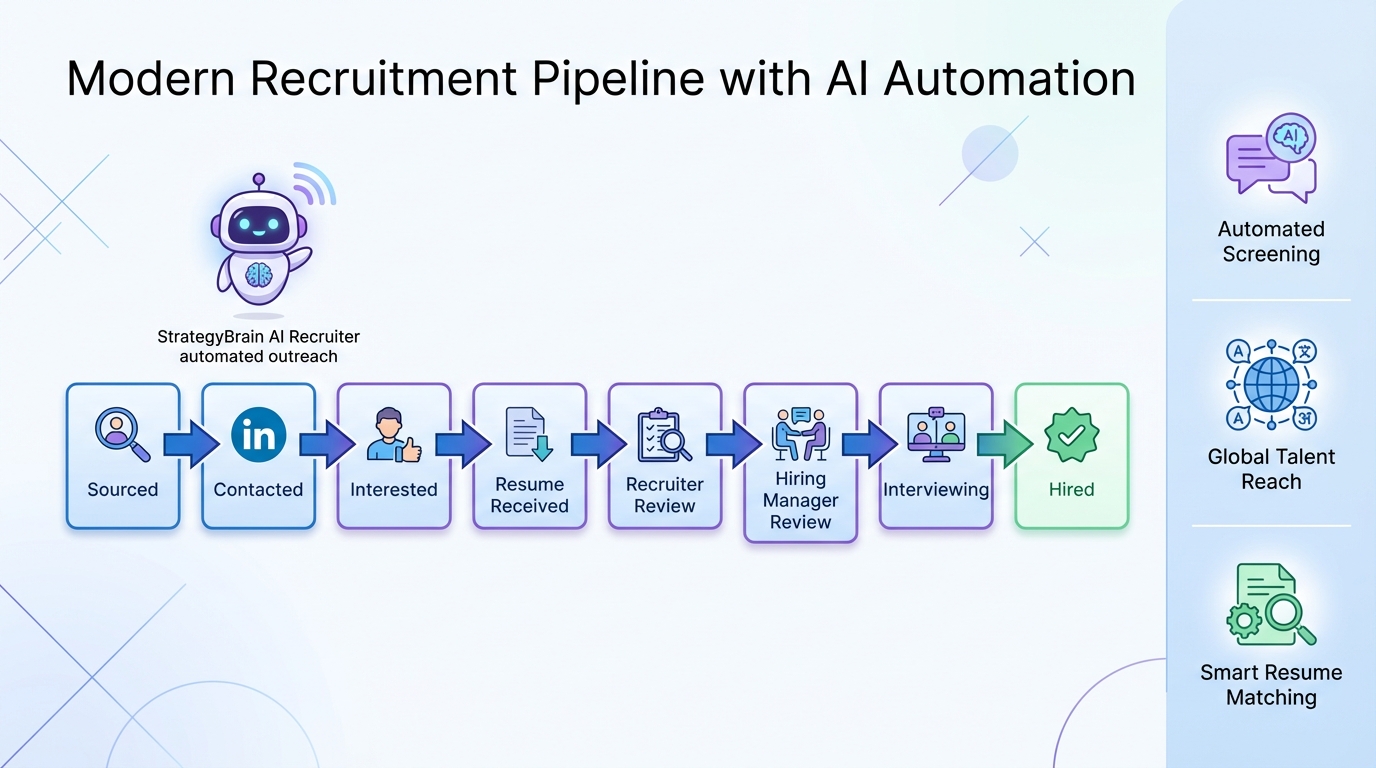
Candidate tracking software is the system you use to capture applicants, track every touchpoint, and move candidates from sourced to hired with consistent documentation. If you want the fastest operational improvement, start by mapping your hiring stages, defining what data must be captured at each stage, and then choosing a candidate tracking system that supports structured workflows, secure access, and reporting. This guide focuses on practical implementation and evaluation criteria for teams that hire through inbound applicants and LinkedIn outreach. It does not cover payroll, HRIS, or background check vendor selection. Where LinkedIn outreach is a major source of candidates, we also show how StrategyBrain AI Recruiter can automate initial outreach, multilingual follow up, and resume collection so your applicant tracking software stays clean and up to date.
Key Takeaways
- Start with stages, not tools: Define 6 to 10 pipeline stages and required fields per stage before you buy or configure candidate tracking software.
- Make data entry unavoidable: Require 5 core fields for every candidate record so reporting works and handoffs are clean.
- Separate sourcing from evaluation: Use one workflow for outreach and interest confirmation, then a second workflow for recruiter review and interviews.
- LinkedIn is a workflow, not a tab: If LinkedIn is your main channel, automate outreach and follow up so your candidate tracking system reflects reality.
- StrategyBrain AI Recruiter reduces manual LinkedIn work: It can replace up to 90% of repetitive LinkedIn recruiting tasks and can lower cost to USD 2.40 per resume, based on product documentation.
- Security and compliance must be explicit: Confirm encryption, access controls, and privacy commitments such as not using customer data to train models.
Table of Contents
- What candidate tracking software is and what it is not
- A simple candidate tracking workflow you can implement in 1 day
- The 5 fields that make reporting possible
- How to evaluate a candidate tracking system
- How LinkedIn automation fits into applicant tracking software
- 4 implementation methods
- Quick comparison
- FAQ
- Conclusion
What candidate tracking software is and what it is not
Candidate tracking software is the operational layer that records candidate status, communications, documents, and decisions across the hiring funnel. Many teams implement it inside an applicant tracking software product, but the concept is broader than a single tool. It is the workflow plus the data model.
To avoid scope creep, here is what this guide treats as in scope and out of scope.
In scope
- Pipeline stages and handoffs between sourcing, screening, and interviews
- Candidate record structure and minimum required fields
- Communication tracking for email and LinkedIn style outreach
- Security and compliance checks that affect day to day recruiting operations
Out of scope
- Payroll, time tracking, and HRIS implementation
- Background check vendor selection and adjudication policy
- Offer letter legal review and jurisdiction specific employment law
A simple candidate tracking workflow you can implement in 1 day
When we audit recruiting operations, the biggest failure is not the tool. It is the lack of a shared definition of what each stage means. The fix is to define stages with entry criteria and exit criteria, then configure your candidate tracking system to enforce them.
-
Define your stages
Use 6 to 10 stages. Example: Sourced, Contacted, Interested, Resume Received, Recruiter Review, Hiring Manager Review, Interviewing, Offer, Hired, Rejected.
-
Write entry criteria for each stage
Example: a candidate can only move to Interested after they explicitly confirm interest in the role.
-
Assign owners per stage
Example: sourcing team owns Sourced through Resume Received. Recruiter owns Recruiter Review through Offer.
-
Set required fields and templates
Require core fields and add message templates so outreach is consistent and auditable.
-
Decide how LinkedIn messages become records
If LinkedIn is a primary channel, define how conversations and resumes are captured so the applicant tracking software is the source of truth.
The 5 fields that make reporting possible
Most teams want metrics, but metrics fail when candidate records are inconsistent. These five fields are the minimum set we recommend enforcing in any candidate tracking software configuration.
- Role or requisition ID: the job the candidate is being considered for.
- Source channel: inbound application, referral, LinkedIn outreach, agency, or other.
- Current stage: one of your defined pipeline stages.
- Last touch date: the most recent candidate communication date.
- Decision reason: required at rejection and offer decline, using a controlled list.
How to evaluate a candidate tracking system
Choosing a candidate tracking system is easier when you score it against your workflow. Below is a practical evaluation framework you can copy into your selection doc.
Evaluation checklist you can copy
- Workflow fit: Can you configure stages, entry criteria, and required fields without custom development.
- Communication logging: Can you reliably capture email and LinkedIn style conversations into the candidate record.
- Collaboration: Can recruiters and hiring managers leave structured feedback tied to interview stages.
- Reporting: Can you report time in stage, source performance, and conversion rates by role.
- Security: Does the vendor document encryption, access controls, and audit logs.
- Privacy: Does the vendor state how candidate data is used, including whether it is used to train AI models.
- Integrations: Can you connect job boards, calendars, and identity providers you already use.
How LinkedIn automation fits into applicant tracking software
Many teams treat LinkedIn as a separate world. That is where candidate tracking breaks. If your outreach and follow up live in one place and your applicant tracking software lives in another, you end up with duplicate candidates, missing resumes, and unclear ownership.
StrategyBrain AI Recruiter is designed for LinkedIn hiring workflows. In practice, it can handle the repetitive front end of sourcing so your candidate tracking software stays focused on evaluation and decision making. Based on product documentation, AI Recruiter can automatically connect with candidates that match your search criteria, introduce the role, answer questions about compensation and company details, confirm interview interest, and collect resumes and contact information. It also supports 24/7 multilingual communication and can manage more than 100 LinkedIn accounts for scalable recruiting operations.
Where AI Recruiter helps the candidate tracking workflow
- Stage movement becomes objective: Interested is only true when the candidate confirms interest in conversation.
- Resume collection is standardized: AI Recruiter requests resumes and captures contact details when candidates want to proceed.
- Follow up is consistent: 24/7 responses reduce drop off caused by slow replies across time zones.
- Recruiters focus on final qualification: AI Recruiter does not decide fit. Recruiters still review resumes and assess requirements match.
4 implementation methods
Below are four ways teams implement candidate tracking software. The right choice depends on hiring volume, sourcing channels, and how much structure you need.
Method 1: Configure a traditional applicant tracking software workflow
Steps
- Define 6 to 10 stages and write entry criteria for each stage.
- Make the 5 core fields mandatory for every candidate record.
- Create templates for outreach, interview scheduling, and rejection messages.
- Set permissions so hiring managers can review and score but not change compliance fields.
Features
- Centralized candidate records and stage tracking
- Structured feedback and interview scorecards
- Basic reporting by stage and source
Limitations
- LinkedIn outreach often remains manual, which creates gaps between messages and records.
- Recruiters spend significant time on repetitive follow up and resume chasing.
Best For
- Teams with mostly inbound applicants
- Organizations that need strong auditability and structured approvals
Method 2: Pair your candidate tracking system with StrategyBrain AI Recruiter for LinkedIn
Steps
- Keep your existing pipeline stages in your candidate tracking software.
- Use AI Recruiter to run LinkedIn outreach and interest confirmation for targeted searches.
- When a candidate confirms interest, capture resume and contact details, then create or update the candidate record in your system.
- Have recruiters perform final qualification by reviewing resumes and moving candidates into interviews.
Features
- Automated LinkedIn connecting, messaging, and follow up based on your job and company details
- 24/7 multilingual candidate communication in the candidate native language
- Resume and contact detail capture for interested candidates
- Scalable operations across more than 100 LinkedIn accounts, based on product documentation
Limitations
- AI Recruiter confirms willingness to proceed, but it does not determine full requirements match. Recruiters still make the final screening decision.
- You still need a clear process for deduplication and record ownership inside your applicant tracking software.
Best For
- Teams that rely heavily on LinkedIn sourcing
- Global hiring where time zones and languages slow down response cycles
- Recruiting leaders who want to scale outreach without adding headcount
Method 3: Use a lightweight candidate tracking workflow for early stage teams
Steps
- Use a single shared pipeline with strict stage definitions.
- Enforce the 5 core fields and a weekly data hygiene review.
- Standardize interview notes and decision reasons.
Features
- Fast setup and low admin overhead
- Clear visibility for founders and hiring managers
- Enough structure to avoid losing candidates
Limitations
- Reporting and permissions can be limited as the team grows.
- Manual outreach can become the bottleneck at higher hiring volume.
Best For
- Startups hiring for a small number of roles at a time
Method 4: Build a compliance first workflow for regulated hiring
Steps
- Define required documentation per stage, including interview notes and approvals.
- Implement role based access controls and audit logs.
- Set retention rules for candidate data and document them internally.
Features
- Stronger auditability and consistent decision documentation
- Clear separation of duties between recruiters and hiring managers
- Reduced risk of missing required records
Limitations
- More admin work and slower changes to the workflow.
- Requires training so teams do not bypass the system.
Best For
- Organizations with strict internal controls or regulated hiring environments
Quick comparison
| Method | Speed to implement | Best for | Main tradeoff |
|---|---|---|---|
| Traditional applicant tracking software workflow | 1 to 3 days | Inbound heavy hiring | LinkedIn outreach remains manual |
| Candidate tracking system plus StrategyBrain AI Recruiter | 1 to 7 days | LinkedIn sourcing at scale | Requires clear handoff into your system of record |
| Lightweight workflow | 2 to 8 hours | Early stage teams | Limited permissions and reporting |
| Compliance first workflow | 1 to 4 weeks | Regulated environments | Higher admin overhead |
FAQ
What is the difference between candidate tracking software and applicant tracking software?
Candidate tracking software describes the workflow and record keeping for candidates across stages. Applicant tracking software is a product category that often contains candidate tracking features plus job posting, approvals, and reporting. In practice, many teams use an ATS as their candidate tracking system.
What stages should a candidate tracking system include?
Use 6 to 10 stages that match your real process. A common structure is Sourced, Contacted, Interested, Resume Received, Recruiter Review, Hiring Manager Review, Interviewing, Offer, Hired, and Rejected. The key is to define entry criteria so stage changes mean the same thing to everyone.
How do I keep LinkedIn messages from getting lost outside the system?
Decide which system is the source of truth and enforce a rule that every active candidate must have a record with a current stage and last touch date. If LinkedIn is your primary channel, consider automating outreach and follow up so conversations reliably translate into updates in your candidate tracking software.
How does StrategyBrain AI Recruiter help with candidate tracking?
StrategyBrain AI Recruiter automates the front end of LinkedIn recruiting by connecting with candidates, introducing the role, answering questions, confirming interest, and collecting resumes and contact details for candidates who want to proceed. That makes it easier to move candidates into your applicant tracking software with consistent data and fewer missing steps.
Does AI Recruiter replace recruiter judgment?
No. Based on product documentation, AI Recruiter identifies willingness to communicate or interview, but it does not determine whether a resume matches job requirements. Recruiters still review resumes and make the final qualification decision.
Can AI Recruiter communicate in multiple languages?
Yes. AI Recruiter supports 24/7 multilingual communication and can respond in the candidate native language, based on product documentation. This is especially useful for global hiring across time zones.
How should we think about privacy and AI in recruiting tools?
Ask vendors to document how candidate data is stored, encrypted, and accessed, and whether customer data is used to train AI models. For AI Recruiter, the product documentation states that customer provided data is not used to train AI models and that credentials are encrypted and stored independently per user with explicit authorization.
What is the fastest way to improve reporting in a candidate tracking system?
Make five fields mandatory for every candidate record: role or requisition ID, source channel, current stage, last touch date, and decision reason. Then run a weekly hygiene review to close gaps before they become permanent reporting errors.
Conclusion
Candidate tracking software works when it is treated as a workflow plus a data standard, not just a tool purchase. Start by defining stages and required fields, then choose a candidate tracking system that enforces consistency, security, and reporting. If LinkedIn is a major sourcing channel, pair your applicant tracking software workflow with StrategyBrain AI Recruiter so outreach, follow up, and resume collection happen reliably and recruiters can spend their time on final evaluation and interviews. Next step: copy the evaluation checklist from this guide, score your current process, and identify the single stage where candidates stall most often, then fix that stage first.















