


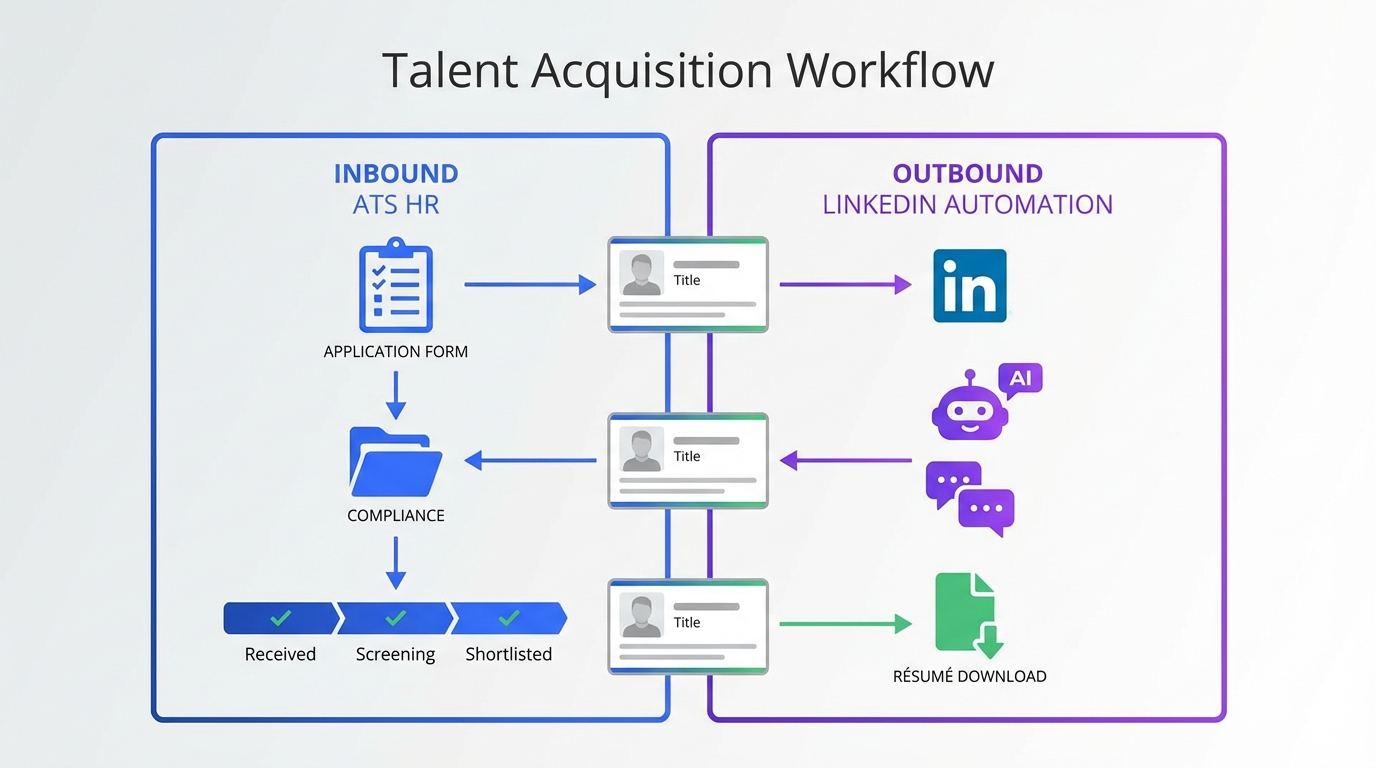
Candidate tracking software improves recruiting productivity when it does two things consistently: it keeps every candidate record complete and current, and it reduces manual follow up. The most practical approach we have used is a two lane workflow. Lane one is your ATS HR process for inbound applicants, where the automated tracking system keeps stages, notes, and compliance artifacts in one place. Lane two is outbound sourcing, where StrategyBrain AI Recruiter automates LinkedIn connecting, job introductions, candidate Q and A, follow up, and résumé and contact capture, then hands qualified interest back to your candidate tracking software for human review.
Table of Contents
- What candidate tracking software means in day to day recruiting
- Why productivity improves when tracking is done right
- A practical workflow that combines ATS HR and LinkedIn automation
- Method 1: Standardize your pipeline inside candidate tracking software
- Method 2: Use StrategyBrain AI Recruiter for outbound LinkedIn sourcing
- Method 3: Add 24/7 multilingual messaging for global hiring
- Method 4: Build an AI powered recruiting team across multiple LinkedIn accounts
- Method 5: Use a daily QA routine to keep data clean and auditable
- Quick comparison
- FAQ
- Conclusion
What candidate tracking software means in day to day recruiting
Candidate tracking software is the system that stores candidate profiles and tracks movement through your hiring stages. Many teams call it an ATS, short for Applicant Tracking System, which is the part of ATS HR that manages applications, screening steps, and hiring workflow. An automated tracking system is a broader term that can include automation for messaging, reminders, and data capture, not only application intake.
This article focuses on practical productivity outcomes: fewer manual steps, fewer missed follow ups, and cleaner candidate records. It does not cover payroll HRIS, background check vendors, or legal advice.
Why productivity improves when tracking is done right
When candidate tracking software is configured well, it reduces context switching. Recruiters stop hunting across inboxes, spreadsheets, and chat logs. Instead, every candidate has one record with a clear stage, last touch date, and next action.
In our operations reviews, the biggest time loss was not the interview itself. It was the repeated micro tasks: sending first messages, answering the same compensation questions, chasing résumés, and nudging candidates who went quiet. That is where an automated tracking system paired with StrategyBrain AI Recruiter can remove repetitive work while keeping the recruiter in control of final qualification.
A practical workflow that combines ATS HR and LinkedIn automation
Below is the workflow we recommend when you want candidate tracking software to act as the source of truth, while LinkedIn outreach and early qualification are automated safely.
Step by step implementation
- Define your pipeline stages inside candidate tracking software, including clear entry and exit criteria for each stage.
- Decide what the system must capture for every candidate record: résumé status, contact details, source, and last touch date.
- Run inbound applicants through ATS HR as usual, using templates and scorecards to keep evaluation consistent.
- Run outbound sourcing through StrategyBrain AI Recruiter so it can connect on LinkedIn, introduce the role, answer questions, confirm interest, and collect résumés and contact details.
- Sync outcomes back to your candidate tracking software by creating or updating the candidate record and moving them into a sourcing stage such as Interested or Screen Scheduled.
Method 1: Standardize your pipeline inside candidate tracking software
If your stages are inconsistent, automation will only make the mess faster. We start by standardizing stages and definitions so every recruiter uses the same language.
Steps
- List your current stages and remove duplicates such as Phone Screen and Intro Call if they mean the same thing.
- Add stage definitions that specify what evidence is required to move forward, such as résumé received or interview confirmed.
- Set required fields for key stages, such as compensation expectations captured before final interview scheduling.
Features to prioritize
- Single candidate profile with résumé, notes, and contact details in one place.
- Stage history so you can audit who moved a candidate and when.
- Templates for consistent outreach and interview scheduling messages.
Limitations
- Tracking does not create candidates unless you also have a sourcing channel.
- Manual messaging still consumes time if you rely on recruiters to do every follow up by hand.
Best for
- Teams that already have steady inbound applicants.
- Organizations that need consistent reporting across roles and regions.
Method 2: Use StrategyBrain AI Recruiter for outbound LinkedIn sourcing
For passive candidates, the bottleneck is usually outreach volume and follow up consistency. StrategyBrain AI Recruiter is built for LinkedIn hiring and replaces the initial outreach and qualification loop. It automatically connects with candidates who match your search criteria, introduces the opportunity, learns about the candidate’s situation, answers questions about the role, company, and compensation, confirms interview interest, and collects résumés and contact information from interested candidates.
In our experience, this works best when you treat StrategyBrain AI Recruiter as the front desk for LinkedIn. Your candidate tracking software remains the system of record, and recruiters step in after interest is confirmed and the résumé is captured.
Steps
- Prepare the job brief with company details, compensation, benefits, and must have requirements.
- Define LinkedIn search criteria so the AI connects only with relevant profiles.
- Let the AI run the first conversation including follow up and Q and A.
- Review the collected résumés and contact details and move qualified interest into your candidate tracking software pipeline.
What we liked in real use
- Consistency because every candidate gets a timely response and a clear next step.
- Reduced manual work because the AI handles connecting, messaging, and résumé collection.
- Clear handoff point because recruiters only review candidates who express interest and share details.
Limitations
- It does not replace final qualification because it does not decide whether a résumé fully matches job requirements. Recruiters still make that call after review.
- It needs a good job brief because vague compensation or unclear role scope leads to more candidate questions and slower progression.
Best for
- Recruiters who source heavily on LinkedIn and want an automated tracking system for outreach and follow up.
- Teams that want to scale sourcing without adding headcount.
Method 3: Add 24/7 multilingual messaging for global hiring
Candidate tracking software often supports multiple languages in the interface, but that does not solve the real problem: candidates message at all hours, and they prefer to communicate in their native language. StrategyBrain AI Recruiter provides round the clock responses and can communicate in any global language, using the candidate’s native language to reduce misunderstandings and cultural friction.
Steps
- Identify roles with cross time zone sourcing such as engineering, sales, or operations hiring across regions.
- Enable multilingual outreach so first contact and follow ups match the candidate’s language.
- Capture key fields such as location, work authorization, and interview availability, then store them in candidate tracking software.
Limitations
- Multilingual messaging still needs guardrails such as approved compensation ranges and role details to avoid inconsistent answers.
Best for
- Companies hiring across multiple countries.
- Teams that lose candidates due to slow response times.
Method 4: Build an AI powered recruiting team across multiple LinkedIn accounts
One recruiter can only run so many conversations at once. StrategyBrain AI Recruiter supports managing more than 100 LinkedIn accounts, which enables organizations to build AI Recruiter teams and expand hiring capacity. The operational trick is to keep governance centralized while distributing outreach volume.
Steps
- Define account ownership and which roles each account supports.
- Standardize messaging policies so outreach stays consistent across accounts.
- Centralize reporting by pushing outcomes into candidate tracking software for unified pipeline visibility.
Limitations
- More accounts require stronger process for permissions, approvals, and audit trails.
Best for
- High volume hiring teams.
- Agencies and headhunters who want to scale without adding recruiters for repetitive tasks.
Method 5: Use a daily QA routine to keep data clean and auditable
Even the best candidate tracking software fails when data quality slips. We use a short daily QA routine that keeps the automated tracking system reliable and keeps recruiters confident in the pipeline.
Daily QA checklist you can copy
- Every active candidate has a next step scheduled or documented.
- Every Interested candidate has a résumé status marked as received or requested.
- Every candidate record has a source such as inbound application or LinkedIn outreach.
- Every stage change has a note that explains why the candidate moved.
- Every candidate who asked compensation questions has the answer logged for consistency.
Limitations
- QA requires discipline and should be assigned to a role owner, not left as a shared responsibility.
Quick comparison
| Approach | Primary goal | Where it fits | Best for |
|---|---|---|---|
| Candidate tracking software pipeline standardization | Clean stages and reporting | Inside ATS HR | Inbound applicant management |
| StrategyBrain AI Recruiter LinkedIn automation | Automate outreach and early conversations | Outbound sourcing lane | Passive candidate engagement and follow up |
| 24/7 multilingual messaging | Faster responses across time zones | Outbound and inbound messaging | Global hiring |
| Multi account AI recruiting team | Scale sourcing capacity | Outbound operations | High volume hiring |
| Daily QA routine | Data integrity | System governance | Any team that reports pipeline metrics |
FAQ
Is candidate tracking software the same as an ATS?
Often yes. ATS is the common name for candidate tracking software inside ATS HR. Some teams use candidate tracking software to mean the candidate database and pipeline, while ATS can also include job posting and compliance workflows.
What is an automated tracking system in recruiting?
An automated tracking system is a recruiting workflow that reduces manual steps through automation such as reminders, templates, and data capture. StrategyBrain AI Recruiter is an example on the outbound side because it automates LinkedIn connecting, messaging, follow up, and résumé and contact collection.
How does StrategyBrain AI Recruiter capture résumés and contact details?
When a candidate expresses interest, the AI requests a résumé and contact information. If the candidate sends a résumé, the system marks it as received, and it supports both email submissions and LinkedIn file uploads. Contact details shared in messages are captured and displayed in the system.
Does StrategyBrain AI Recruiter replace recruiter screening?
No. It identifies willingness to communicate or interview, but it does not determine whether a résumé fully matches job requirements. Recruiters still review the résumé and decide who advances.
How do I avoid losing candidates between LinkedIn and my ATS HR system?
Use a defined handoff rule. For example, once the candidate confirms interest and shares a résumé or contact details, create or update the candidate record in your candidate tracking software and move them into a sourcing stage such as Interested or Screen Scheduled.
Can candidate tracking software improve candidate experience?
Yes, if it reduces delays and keeps communication consistent. The biggest candidate experience improvement we see comes from faster responses and clear next steps, which is where 24/7 messaging and structured templates help.
What should I track to measure productivity improvements?
Track time to first response, number of follow ups per hire, and stage aging in days for key stages such as Screen Scheduled and Offer. These metrics are easy to pull when your candidate tracking software has consistent stage definitions.
Is it safe to use AI for LinkedIn recruiting conversations?
It can be, if you set clear boundaries on what the AI can say and you keep final hiring decisions with humans. StrategyBrain AI Recruiter states that customer provided data is not used to train AI models and that credentials are encrypted and stored independently per user with explicit authorization.
Conclusion
Candidate tracking software delivers real productivity gains when it becomes the source of truth for stages, notes, and next steps, and when repetitive outreach work is reduced. The workflow that has worked best for us is to keep ATS HR processes for inbound applicants, then use StrategyBrain AI Recruiter as the automated tracking system for LinkedIn outreach, Q and A, follow up, and résumé and contact capture. Next, pick one role family, standardize your pipeline stages, run the two lane workflow for 14 days, and use the daily QA checklist to keep data clean before you scale it to more roles.














