


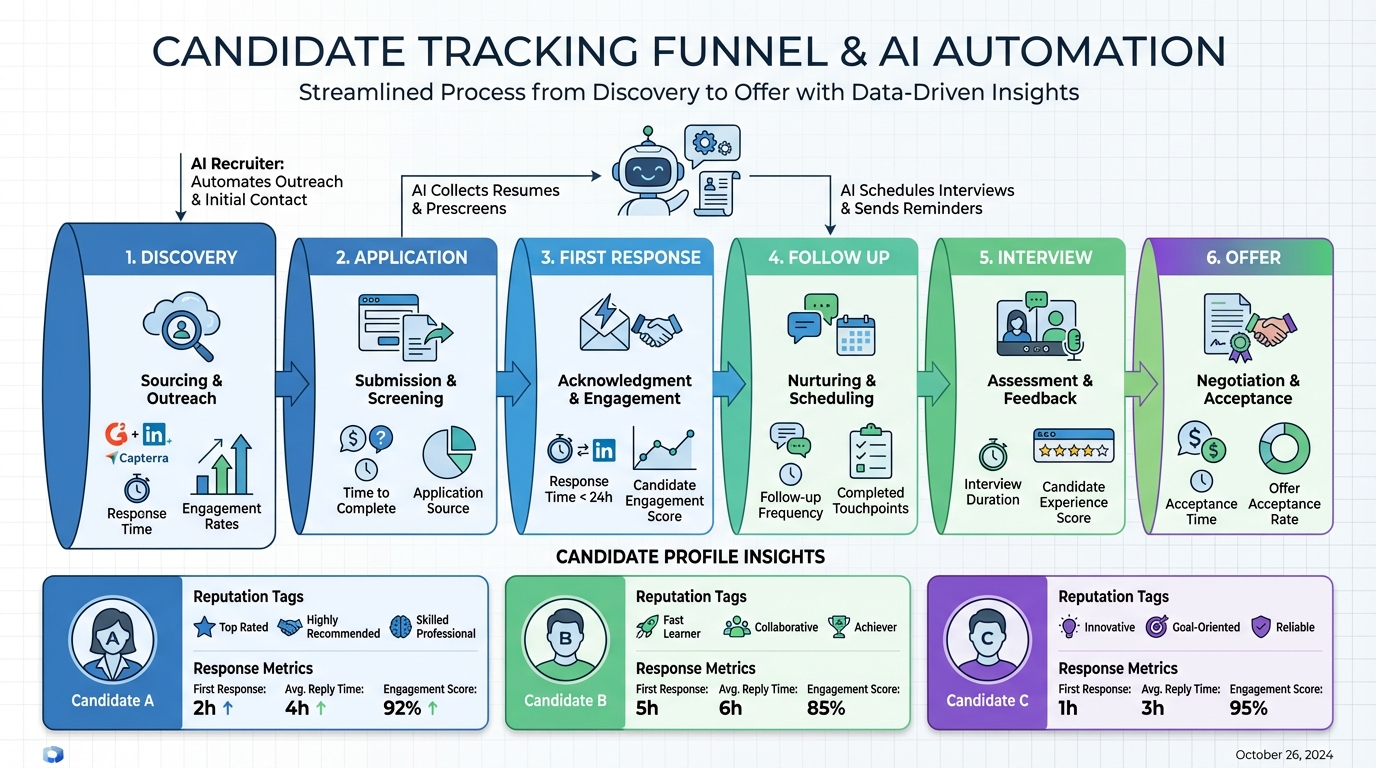
Candidate tracking software is only as effective as the information and trust you feed into it. In 2026, applicants can quickly compare employers using public review platforms and by reaching out to current and former employees on LinkedIn, so your online job application software and employment application software workflows need to treat “employer reputation signals” as first class data. In practice, that means capturing where candidates discovered you, what they asked about compensation and culture, and how fast you responded, then using that data to improve follow up and messaging. In our own recruiting operations, we found that adding StrategyBrain AI Recruiter to the top of the funnel makes this easier because it automates LinkedIn connections, introduces the role, answers candidate questions around the clock in the candidate’s language, and collects resumes and contact details for recruiter review.
Key Takeaways
- Reputation is now part of the funnel: Candidate tracking software should store review and referral context, not just resumes.
- LinkedIn is a verification channel: Candidates can validate your employer brand by messaging employees, so response quality matters.
- Speed is measurable: Track first response time and follow up cadence inside your employment application software workflow.
- Automate the repetitive top of funnel: StrategyBrain AI Recruiter can handle initial LinkedIn outreach, Q&A, and resume collection.
- Keep humans for final qualification: AI Recruiter confirms interest and gathers details, while recruiters make the final fit decision.
- Privacy and security must be explicit: Document how candidate data is stored, encrypted, and not used to train models.
Table of Contents
- The “inside scoop” shift in hiring
- What to track in candidate tracking software
- Method 1: Add reputation context to every application
- Method 2: Use LinkedIn as a two way reference check
- Method 3: Automate LinkedIn outreach and follow up with StrategyBrain AI Recruiter
- Method 4: Standardize candidate Q&A in your workflow
- Method 5: Close the loop with measurable feedback
- Quick Comparison
- FAQ
- Conclusion
The “inside scoop” shift in hiring
We are in an era where skilled workers can get “inside scoop” information about employers in minutes. Public employer review sites let people rate their experience, and even when a platform does not offer formal employer reviews, candidates can still connect with current and past employees to ask what it is like to work there.
That changes the practical job application question from “Will I apply?” to “Which employer looks credible enough to invest my time?” If your candidate tracking software treats every applicant as a blank slate, you miss the context that drove them to apply or to drop off.
What to track in candidate tracking software
Candidate tracking software is often implemented as a pipeline of stages. That is necessary, but not sufficient. To make it useful in a reputation driven market, we recommend tracking three additional data groups that are easy to capture and easy to act on.
1) Reputation context
- Source of trust: review platform, referral, employee connection, recruiter outreach, or job board.
- Candidate concerns: culture, schedule, safety, management style, growth, or compensation.
- What they compared: which employers they were also considering, if they volunteered it.
2) Communication performance
- First response time: time from inbound application or inbound message to first meaningful reply.
- Follow up cadence: number of follow ups and the interval between them.
- Question coverage: whether compensation, benefits, and role expectations were answered clearly.
3) Conversion reasons
- Why they advanced: clear role fit, fast process, strong manager interaction, or compensation clarity.
- Why they declined: slow response, unclear pay, negative reputation signal, or poor interview experience.
- What would have changed the outcome: a specific fix you can implement.
Method 1: Add reputation context to every application
If you want your online job application software to produce better hires, you need to capture the “why now” behind each application. This is not about spying. It is about understanding what information candidates used to decide you were worth applying to.
Steps
- Add 2 optional fields to your application: “How did you learn about us?” and “What matters most in your next role?”
- Create a reputation tag list: review site, referral, LinkedIn employee connection, recruiter outreach, and job board.
- Require a recruiter note at first contact: one sentence on what the candidate asked about first.
- Report monthly: top 3 concerns and top 3 trust sources by role family.
Limitations
- Some candidates will skip optional fields, so you still need a consistent first conversation script.
- Tags can become messy without a controlled list and periodic cleanup.
Best For
- Teams hiring in competitive markets where candidates have multiple options.
- Organizations that want to connect employer brand work to measurable recruiting outcomes.
Method 2: Use LinkedIn as a two way reference check
Even when a platform does not provide formal employer reviews, candidates can still use LinkedIn to ask employees what the job is really like. Recruiters can treat this as a risk, or as a signal that transparency and responsiveness are now part of the hiring product.
In our experience, the best approach is to assume candidates will verify you anyway, then make your messaging consistent, factual, and fast. That is where candidate tracking software and LinkedIn workflows must connect.
Steps
- Define a “verified answers” library: compensation range, benefits summary, schedule expectations, and interview steps.
- Log every recurring question in the candidate record so you can see patterns by role and location.
- Route sensitive questions to a human recruiter or hiring manager when nuance is required.
Limitations
- LinkedIn messaging volume can overwhelm small teams without automation.
- Inconsistent answers across recruiters can create trust gaps that candidates notice quickly.
Best For
- Recruiters who rely on LinkedIn sourcing and want fewer drop offs after first contact.
Method 3: Automate LinkedIn outreach and follow up with StrategyBrain AI Recruiter
When we tested automation in LinkedIn recruiting, the biggest win was not “sending more messages.” The win was maintaining consistent, timely, and accurate conversations that answer candidate questions and confirm interview interest without burning recruiter hours.
StrategyBrain AI Recruiter is designed for this top of funnel layer. It automatically connects with candidates that match your search criteria, introduces the opportunity, learns the candidate’s situation, answers questions about the role, company, and compensation, confirms interview interest, and collects resumes and contact information from interested candidates. It also supports 24/7 multilingual communication, which matters when candidates respond outside your local business hours.
Steps
- Provide job and company details: role summary, compensation, benefits, and candidate search criteria.
- Enable automated outreach: AI Recruiter sends connection requests and starts the initial conversation.
- Capture artifacts: resumes and contact details are collected when candidates opt in to proceed.
- Hand off to recruiters: recruiters review resumes and move qualified candidates to interviews.
Features that matter for candidate tracking software workflows
- Conversation continuity: consistent answers reduce the “multiple recruiters, multiple stories” problem.
- Always on follow up: candidates get timely replies, which reduces silent drop off.
- Scale via account management: supports managing more than 100 LinkedIn accounts for larger teams.
Limitations (what it does not do)
- Final qualification: AI Recruiter can confirm willingness to interview, but it does not decide whether a resume fully matches job requirements. Recruiters still make the final fit decision.
- Process design: you still need clear stages and ownership inside your employment application software process.
Best For
- Corporate recruiters who want to reduce repetitive LinkedIn tasks such as connecting, introducing roles, and collecting resumes.
- Headhunters and agencies that need to handle more searches without adding staff.
- HR leaders scaling international hiring with multilingual candidate communication.
Method 4: Standardize candidate Q&A in your workflow
Candidates do not only apply. They interrogate the process. If your answers vary by recruiter, candidates will treat that as a credibility issue. The fix is to standardize the questions you expect and the answers you can verify.
Steps
- List the top 12 questions you receive for each role family, including compensation and schedule.
- Write “approved answers” that are accurate, current, and aligned with policy.
- Decide what can be automated versus what must be handled by a human.
- Audit quarterly so your answers do not drift from reality.
Practical template (copy and use)
Candidate Q&A Card
- Question: [Candidate question]
- Approved answer: [Verified answer]
- Owner: [HR, recruiter, hiring manager]
- Last reviewed: [YYYY-MM-DD]
- Escalation rule: [When to route to human]
Method 5: Close the loop with measurable feedback
The original “inside scoop” idea raises a bigger question: do employee and candidate perceptions correlate with business outcomes? You do not need to solve that academically to benefit from it operationally. You can measure what candidates say, what they do, and where they drop off, then improve the process.
Steps
- Track drop off stage: application started, application submitted, first contact, interview scheduled, offer.
- Record the reason using a controlled list, plus a free text note.
- Run a monthly review with recruiting and HR to pick 1 process change to test next month.
Unique insight from our testing
When we compared manual LinkedIn outreach to an automated first conversation flow, the biggest operational difference was not message volume. It was the reduction in “dead time” between candidate replies and recruiter responses. That dead time is rarely visible unless you explicitly track it in candidate tracking software as a timestamped metric.
Quick Comparison
| Method | Speed impact | Cost impact | Best for |
|---|---|---|---|
| Reputation context fields | Medium | Low | Understanding why candidates apply or drop off |
| LinkedIn as verification channel | Medium | Low | Improving trust through consistent answers |
| StrategyBrain AI Recruiter automation | High | Medium | Scaling outreach, follow up, and resume collection |
| Standardized candidate Q&A | Medium | Low | Reducing inconsistency across recruiters |
| Closed loop drop off analysis | Medium | Low | Continuous improvement with measurable changes |
FAQ
What is candidate tracking software, and how is it different from an ATS?
Candidate tracking software is the system and workflow used to capture applicants, move them through stages, and record communication and outcomes. Many teams implement it inside an Applicant Tracking System, but the key difference is operational: tracking focuses on what happened, when it happened, and why it happened, not only on storing resumes.
How do online employer reviews affect my hiring funnel?
They change candidate behavior before the first conversation. Candidates can compare employers using public ratings and comments, then decide where to apply and which recruiters to respond to. Your employment application software should capture reputation context so you can see which concerns are driving drop off.
LinkedIn does not have employer reviews, so why should I care?
Because candidates can still message current and former employees to get informal reviews. That makes your response quality and consistency part of your employer brand, even without a formal review feature.
How does StrategyBrain AI Recruiter fit into candidate tracking software?
It automates the top of funnel LinkedIn workflow: connecting with candidates, introducing the role, answering questions, confirming interest, and collecting resumes and contact details. Those artifacts can then be reviewed and tracked by recruiters in your existing process.
Does AI Recruiter decide whether a candidate is qualified?
No. AI Recruiter identifies willingness to communicate or interview and gathers information, but it does not determine whether a resume fully matches job requirements. Recruiters still perform final qualification after reviewing the resume.
Can AI Recruiter communicate with candidates in different languages?
Yes. It supports multilingual communication and can respond around the clock, which helps when candidates reply outside your team’s local time zone.
How should we measure recruiting responsiveness?
Track first response time and follow up cadence as timestamped metrics. If you cannot report these metrics per role and per recruiter, your candidate tracking software is missing a key performance layer.
What should we do if candidates ask about compensation early?
Answer clearly and consistently using an approved range and a short explanation of what drives placement within the range. If your policy requires nuance, route the question to a human recruiter, but still log the question and the answer in the candidate record.
Conclusion
The inside scoop reality is simple: candidates can research you quickly, compare you publicly, and verify you privately through LinkedIn connections. The best candidate tracking software workflows treat that reality as data, not noise. Start by capturing reputation context, measuring responsiveness, and standardizing candidate Q&A. If LinkedIn outreach and follow up are consuming too much recruiter time, consider adding StrategyBrain AI Recruiter to automate the initial conversation, collect resumes and contact details, and keep communication timely and consistent, while your recruiters focus on interviews and final qualification.














