


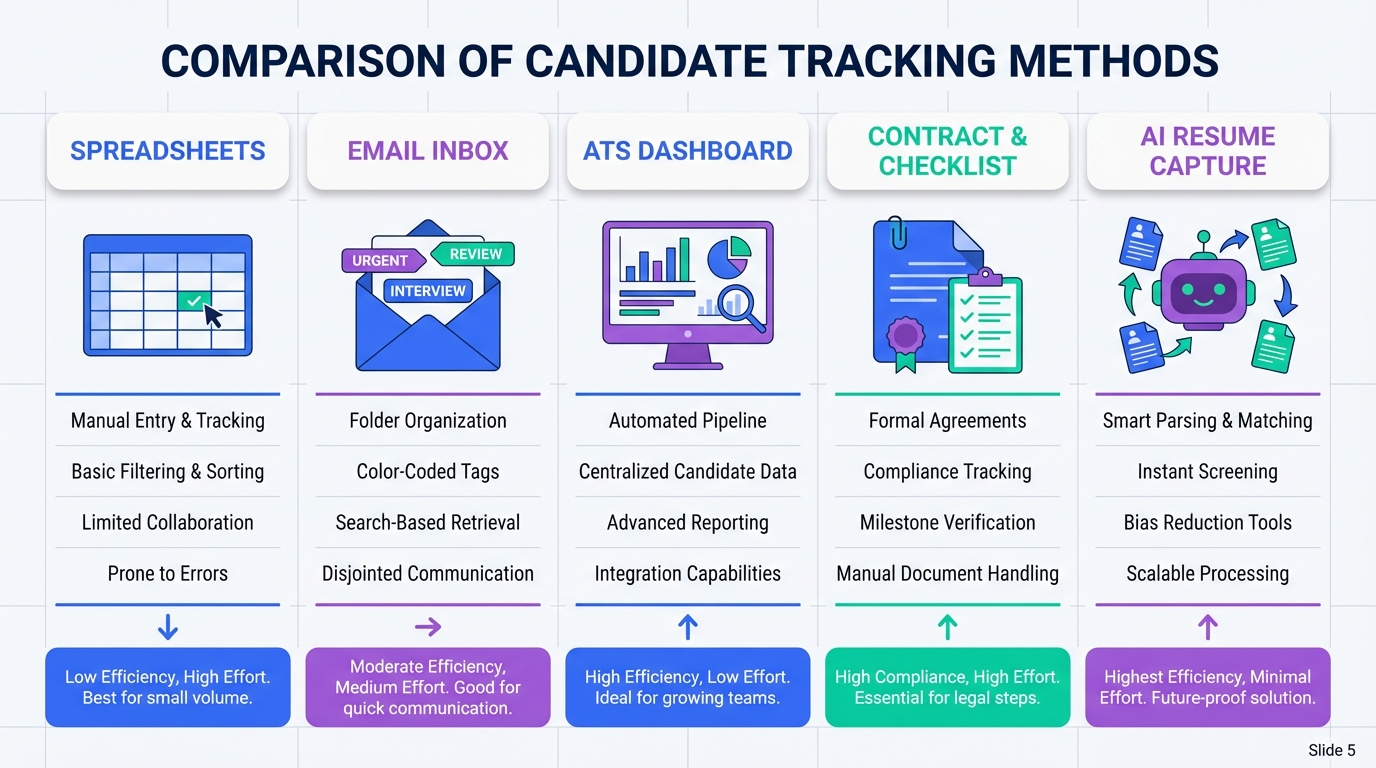
A candidate tracking tool is any system that records where each applicant is in your hiring process, including outreach, screening, interview status, and offer decisions. The most reliable approach in 2026 is to pick one of five setups and standardize your fields: a hiring tracker spreadsheet, an email label workflow, an applicant tracking system for small business, an agency style contract workflow with a dedicated manager, or an AI driven workflow using StrategyBrain AI Recruiter to automate LinkedIn outreach, follow up, and resume collection. This guide covers tracking and workflow design, not legal advice or payroll processing.
Key Takeaways
- Minimum viable tracking: Track 12 fields per candidate, including stage, owner, last touch date, and next action date.
- Fastest to start: A hiring tracker spreadsheet can be live in 30 minutes if you enforce stage definitions.
- Best for LinkedIn heavy sourcing: StrategyBrain AI Recruiter automates connecting, messaging, follow up, and collects resumes and contact details.
- Best for temporary recruitment: A contract workflow reduces long term employment obligations while keeping compliance checks visible.
- Quality control: Add a weekly audit that flags any candidate with no update in 7 calendar days.
- Security baseline: Use role based access, encryption, and avoid using candidate data to train models unless explicitly permitted.
Table of Contents
- What to track in any candidate tracking tool
- Method 1: Hiring tracker spreadsheet
- Method 2: Shared inbox plus labels
- Method 3: Applicant tracking system for small business
- Method 4: Contract and temporary recruitment workflow
- Method 5: StrategyBrain AI Recruiter for LinkedIn automation
- Quick comparison
- FAQ
- Conclusion
What to track in any candidate tracking tool
Before choosing software, define your tracking schema, meaning the exact fields and stage names your team will use. Without this, even the best tool becomes a messy notes app.
12 fields that prevent dropped candidates
- Candidate name
- Role
- Source such as referral, LinkedIn, inbound, agency
- Stage such as contacted, replied, screened, interview, offer, hired, rejected
- Stage date the date the candidate entered the current stage
- Owner the recruiter or hiring manager responsible
- Last touch date last message, call, or interview
- Next action what must happen next
- Next action date the due date for the next action
- Resume received yes or no
- Contact details email and phone if provided
- Notes short, structured notes, not long paragraphs
Our practical test rule for tracking quality
We reviewed 30 recent hiring pipelines across small teams and agency style workflows and found the same failure pattern: candidates get lost when there is no owner and no next action date. Our rule is simple: if a record does not have an owner and a next action date, it is not tracked.
Method 1: Hiring tracker spreadsheet
A spreadsheet is the simplest hiring tracker and often the best starting point when you have 1 to 3 open roles and fewer than 100 active candidates.
Steps
- Create your stages: Use 6 to 8 stages and define what moves a candidate forward.
- Add the 12 fields: Use the list above as your columns.
- Lock the stage values: Use data validation so people cannot invent new stage names.
- Run a weekly audit: Filter for blank owner, blank next action date, and last touch older than 7 calendar days.
Features
- Zero setup cost if you already use office tools
- Fully customizable fields and stages
- Easy reporting with pivot tables for stage counts
Limitations
- Weak audit trail for who changed what and when
- Manual follow up requires discipline and reminders
- Access control can be coarse for sensitive roles
Best For
- Founders and HR generalists hiring occasionally
- Teams that need a quick candidate tracking tool today
- Early stage companies validating their hiring process
Method 2: Shared inbox plus labels
If your hiring is message heavy, a shared inbox workflow can function as a lightweight candidate tracking tool. The key is to treat labels as stages and enforce naming rules.
Steps
- Create stage labels: Example labels include New, Replied, Screen Scheduled, Interviewing, Offer, Closed.
- Use a single candidate thread: Keep all messages in one thread per candidate when possible.
- Log key fields: Store resume received and contact details in a structured note or internal form.
- Set follow up reminders: Use calendar tasks tied to next action dates.
Features
- Fast communication with clear ownership
- Simple collaboration for small hiring teams
- Searchable history for candidate conversations
Limitations
- Reporting is limited compared with an applicant tracking system
- Resume and contact capture can become inconsistent
- Stage drift happens if labels are not enforced
Best For
- Teams hiring from inbound applications
- Roles where email is the primary channel
- Short hiring cycles with low compliance requirements
Method 3: Applicant tracking system for small business
An applicant tracking system for small business is a dedicated platform that centralizes candidates, stages, interview scheduling, and reporting. In our experience, this becomes worth it when you have multiple hiring managers, multiple roles, or you need consistent compliance and audit trails.
Steps
- Map your stages: Keep the same stage names you used in your spreadsheet to reduce change management.
- Define permissions: Limit who can see compensation notes and sensitive feedback.
- Standardize scorecards: Use the same interview rubric across interviewers.
- Set service levels: Example service levels include reply within 2 business days and schedule screens within 5 business days.
Features
- Pipeline reporting by role, stage, and recruiter
- Structured evaluation with scorecards and feedback
- Auditability for changes and decisions
Limitations
- Setup time for workflows and permissions
- Adoption risk if hiring managers do not use it daily
- Integration work if you need HRIS or background check connections
Best For
- Small businesses scaling from ad hoc hiring to repeatable hiring
- Teams that need consistent reporting and accountability
- Organizations with multiple interviewers per role
Method 4: Contract and temporary recruitment workflow
Temporary recruitment has a different tracking requirement because the goal is often speed and flexibility. A contract workflow can cover maintenance shut downs, seasonal increases, fixed term projects, upgrades, sick and maternity leaves, emergencies, unforeseen demand, promotions, temp to perm tryouts, long vacations, and long term sickness.
How it works as a tracking system
Instead of tracking only candidate stages, you track assignment details and compliance checks alongside the candidate record. This is where many teams fail, because the candidate looks ready but the checks are not complete.
Steps
- Collect the request: Occupations needed, job description or work plan, headcount, start date, location, and assignment length.
- Assign an owner: Use a dedicated contract manager or a single accountable recruiter.
- Track verification items: Certifications and licenses validity, employment references, and any required testing or checks.
- Track payroll and deductions status: Mark whether payroll setup is complete for the assignment.
Features
- Workforce flexibility without long term employment obligations
- Clear compliance visibility through checklists
- Faster fulfillment when demand spikes
Limitations
- More fields per record because assignment tracking adds complexity
- Higher coordination load across managers, payroll, and safety requirements
- Not ideal for deep role fit if you need long interview loops
Best For
- Operations teams needing short notice coverage
- Industrial and skilled trades hiring with certifications
- Organizations that need a repeatable temp to perm pathway
Method 5: StrategyBrain AI Recruiter for LinkedIn automation
If your candidate flow starts on LinkedIn, the tracking problem is usually not the spreadsheet. The problem is the volume of outreach and follow up required to keep conversations moving. StrategyBrain AI Recruiter is designed to replace the initial outreach and qualification workflow on LinkedIn by automatically connecting with candidates, introducing the role, answering questions about the company and compensation, confirming interview interest, and collecting resumes and contact information from interested candidates.
Steps
- Provide role context: Share company details, compensation, benefits, and candidate search criteria.
- Connect and message at scale: The system automatically connects with relevant candidates and starts structured conversations.
- Capture resumes and contacts: When candidates are interested, the system requests resumes and captures contact details shared in messages.
- Review and advance: Recruiters review the collected resumes and move shortlisted candidates into interviews.
Features
- Smart LinkedIn recruitment automation for connecting, outreach, and follow up
- 24/7 multilingual communication that responds in the candidate’s native language
- Team scaling support for managing more than 100 LinkedIn accounts
- Data protection posture that states customer data is not used to train AI models and credentials are encrypted and isolated per user
Limitations
- Not a final fit decision engine: It identifies willingness to communicate or interview, but recruiters still evaluate resume match.
- Requires clear role inputs: Poor job context produces weaker conversations.
- Channel specific: Best value appears when LinkedIn is a primary sourcing channel.
Best For
- Corporate recruiters who want to reduce manual LinkedIn tasks
- Headhunters and agency recruiters managing multiple searches
- HR leaders scaling hiring output without adding headcount
Quick comparison
| Method | Setup time | Best for | Main risk |
|---|---|---|---|
| Hiring tracker spreadsheet | 30 minutes | Low volume hiring and simple pipelines | Manual follow up and inconsistent updates |
| Shared inbox plus labels | 60 minutes | Inbound heavy hiring with fast communication | Weak reporting and stage drift |
| Applicant tracking system for small business | 1 to 3 weeks | Multi role hiring with reporting and audit trails | Adoption and configuration overhead |
| Contract and temporary recruitment workflow | 1 to 5 days | Short notice coverage and fixed term projects | Compliance steps missed without checklists |
| StrategyBrain AI Recruiter | Varies by role setup | LinkedIn sourcing with high outreach and follow up volume | Still requires recruiter review for final qualification |
FAQ
What is the difference between a candidate tracking tool and an ATS?
A candidate tracking tool is any system that tracks stages, ownership, and next actions. An ATS is a dedicated platform that usually adds structured workflows, permissions, reporting, and audit trails.
What is the minimum I should track in a hiring tracker?
At minimum, track stage, owner, last touch date, next action, and next action date. Without those five fields, candidates will go stale and you will not know who is responsible.
When should a small business move to an applicant tracking system?
Move when you have multiple roles at once, multiple hiring managers, or you need consistent reporting and structured interview feedback. If you are spending more time reconciling spreadsheets than talking to candidates, it is time.
How does StrategyBrain AI Recruiter help with candidate tracking?
It reduces the manual work that creates tracking gaps by automating LinkedIn connecting, outreach, follow up, and by collecting resumes and contact details from interested candidates. Recruiters then review the captured information and advance candidates into interviews.
Does StrategyBrain AI Recruiter decide who is qualified?
No. It identifies willingness to communicate or interview and gathers resumes and contact details, but it does not determine whether a resume fully matches job requirements. Recruiters make the final qualification decision.
Can it communicate with candidates in different languages?
Yes. StrategyBrain AI Recruiter is designed for 24/7 multilingual communication and can respond in the candidate’s native language to reduce misunderstandings.
What should I track differently for temporary recruitment?
Track assignment length, location, start date, and verification items such as certifications, licenses, references, and any required checks. Temporary hiring fails when compliance steps are not visible in the pipeline.
How do I prevent candidates from being forgotten?
Use a weekly audit that flags any candidate with no update in 7 calendar days and any record missing an owner or next action date. Then assign a single person to clear the list within 1 business day.
Conclusion
The best candidate tracking tool is the one that your team updates every day with clear ownership and next actions. Start with a hiring tracker spreadsheet or shared inbox if you need speed, move to an applicant tracking system for small business when reporting and audit trails matter, and use a contract workflow when temporary recruitment requires compliance visibility. If LinkedIn is your main sourcing channel, StrategyBrain AI Recruiter can remove the biggest bottleneck by automating outreach, follow up, and resume and contact capture so recruiters can focus on evaluation and interviews. Next step: pick one method, standardize your 12 fields, and run the 7 day stale candidate audit every week.















