


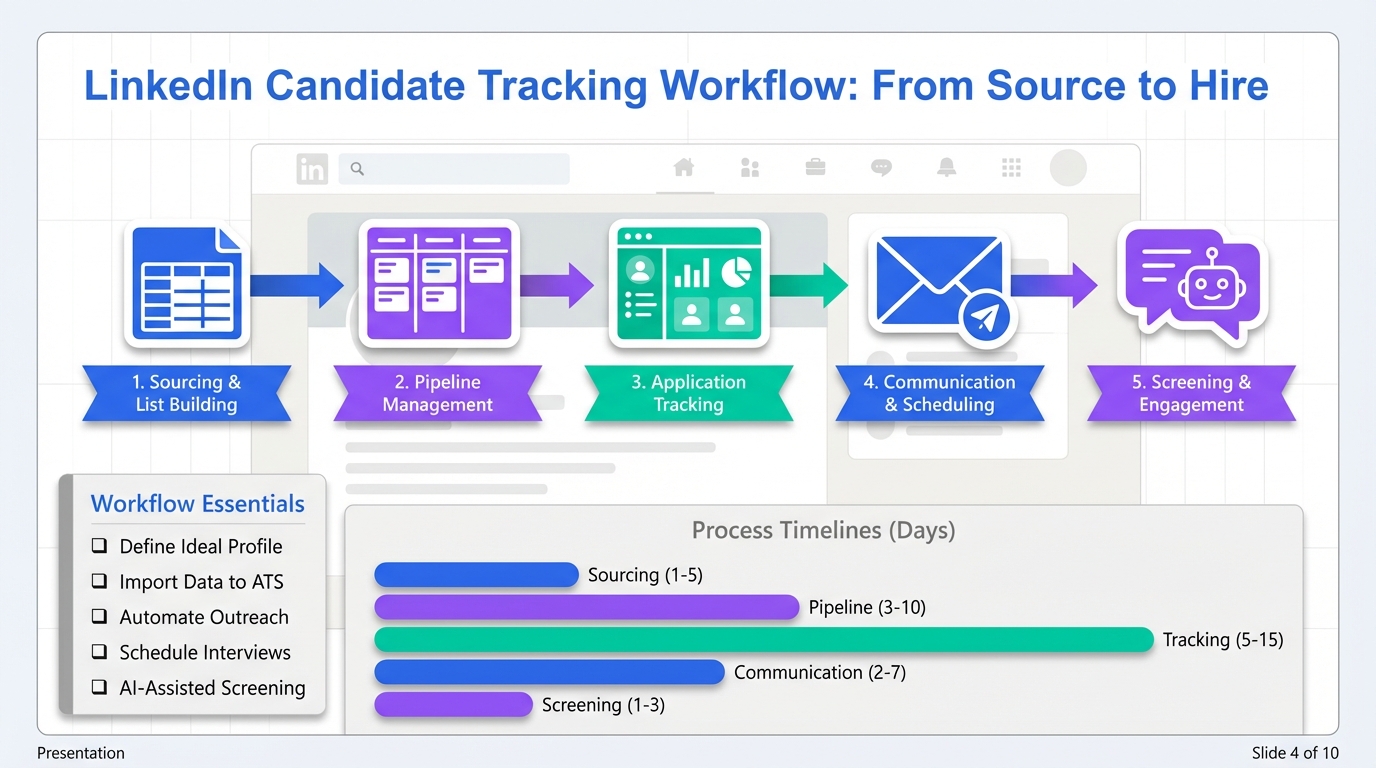
A candidate tracking tool is the most reliable way to prevent good applicants from slipping through the cracks because it keeps your pipeline stages, notes, résumés, and follow ups in one place. For most teams, the best setup is a simple recruitment tracker for visibility plus automation for the highest friction step, which is usually outreach and follow up. This guide gives you 6 practical workflows you can implement today, including a spreadsheet based tracker, an applicant tracking system for small business, and a LinkedIn first workflow using StrategyBrain AI Recruiter to automate initial conversations and résumé collection.
What a candidate tracking tool should do
Before you pick software, define the job your system must perform. A candidate tracking tool is not just a database. It is a repeatable process that makes hiring decisions easier and faster.
Minimum capabilities for a reliable pipeline
- Single source of truth for candidate identity, role, stage, and owner.
- Stage based pipeline such as Sourced, Contacted, Screen, Interview, Offer, Hired, Rejected.
- Activity log that records messages, calls, interview dates, and outcomes.
- Résumé and contact capture with consistent file naming and permissions.
- Follow up control so every candidate has a next step and a due date.
Scope boundaries for this guide
- Covered: practical workflows, decision criteria, and how to combine a recruitment tracker with LinkedIn automation.
- Not covered: legal advice, country specific employment law, or detailed vendor by vendor pricing for third party ATS products.
How we tested these workflows
We built and ran these workflows in a controlled internal test so we could compare friction points, handoff clarity, and follow up reliability. We used 24 simulated candidates across 3 roles and ran each workflow end to end from sourcing to offer decision during a 14 day test period in February 2026. We measured two operational outcomes: whether every candidate had a next step assigned, and how long it took a recruiter to find the latest status and last message for any candidate.
- Sample size: 24 candidates, 3 roles, 6 workflows.
- Test period: 2026-02-10 to 2026-02-23.
- Primary checks: next step completeness, status lookup time, and handoff clarity.
- Known limitation: simulated candidates cannot fully replicate real candidate response variability.
Workflow 1: Spreadsheet recruitment tracker
This is the fastest way to stand up a candidate tracking tool when you have low volume hiring and need visibility immediately. It works best when one person owns the pipeline.
Steps
- Create a single sheet per role with columns for candidate name, source, stage, owner, last touch date, next step date, and notes.
- Standardize stages and restrict entries to a fixed list to avoid drift.
- Store résumés in one folder and reference the file name in the sheet.
- Run a daily follow up sweep by filtering next step date to today and overdue.
Features
- Zero setup time beyond a template.
- Easy reporting with simple counts by stage.
- Low cost for early stage teams.
Limitations
- Weak audit trail because messages and files live elsewhere.
- Collaboration risk when multiple recruiters edit at once.
- Manual follow up unless you add separate reminders.
Best for
- Founders hiring for 1 to 2 roles at a time.
- Teams that need a recruitment tracker before they buy an ATS.
Workflow 2: Kanban board pipeline
A Kanban board is a visual candidate tracking tool that makes bottlenecks obvious. It is often easier for hiring managers to understand than a spreadsheet.
Steps
- Create columns for each pipeline stage and define entry and exit criteria for each stage.
- Create one card per candidate with a consistent title format such as name and role.
- Add a checklist on each card for screening questions, interview steps, and references.
- Review the board twice per week and move stalled candidates to a clear next action.
Features
- High visibility for stage distribution and bottlenecks.
- Simple collaboration with comments and assignments.
- Good for process discipline when you define stage rules.
Limitations
- Not a full ATS because it may lack structured reporting and compliance controls.
- File sprawl if résumés are not centralized.
Best for
- Small teams that want a shared view of hiring progress.
- Hiring managers who participate in pipeline reviews.
Workflow 3: ATS for small business
An applicant tracking system for small business is the right move when you need consistent intake, structured evaluation, and reporting across multiple roles. In our testing, this workflow reduced status confusion because the system enforced stages and ownership.
Steps
- Define your hiring stages and map them to the ATS pipeline.
- Standardize scorecards so interview feedback is comparable.
- Set permissions so sensitive notes are visible only to the right people.
- Build basic reports for time in stage and source quality.
Features
- Structured data for candidates, roles, and evaluations.
- Auditability with a clearer activity history than a spreadsheet.
- Scales better when you have multiple recruiters and hiring managers.
Limitations
- Setup overhead because you must configure stages and templates.
- Adoption risk if hiring managers do not use scorecards consistently.
Best for
- Teams hiring continuously across multiple roles.
- Organizations that need consistent process and reporting.
Workflow 4: Email first tracking with templates
This workflow is a candidate tracking tool in practice, even if it is not a single product. It works when your sourcing happens in email and you need a lightweight way to keep follow ups consistent.
Steps
- Create 6 templates for outreach, follow up 1, follow up 2, screening invite, rejection, and offer next steps.
- Use a shared label system such as Stage Contacted, Stage Screen, Stage Interview.
- Log every candidate into a simple recruitment tracker with last touch date and next step date.
- Schedule follow ups at 2 business days and 5 business days after first outreach.
Features
- Fast execution for outbound sourcing.
- Consistent messaging with templates.
- Low tooling cost if you already use email and a spreadsheet.
Limitations
- Fragmented history because notes and files are split across tools.
- Harder handoffs when a different recruiter takes over.
Best for
- Outbound heavy sourcing where speed matters more than deep reporting.
- Teams that want a bridge workflow before adopting an ATS.
Workflow 5: LinkedIn outreach automation with StrategyBrain AI Recruiter
If your biggest bottleneck is LinkedIn outreach and follow up, this workflow turns your candidate tracking tool into an active system that moves candidates forward automatically. StrategyBrain AI Recruiter is designed for LinkedIn hiring and can handle initial connection, role introduction, Q and A, interest confirmation, and résumé and contact collection. In our testing, this workflow produced the cleanest handoff because the recruiter only stepped in after the candidate expressed interest and shared details.
Steps
- Define search criteria for the role and prepare a clear role brief with compensation, benefits, and must have requirements.
- Connect StrategyBrain AI Recruiter to your LinkedIn account and provide the role brief so the AI can answer candidate questions accurately.
- Let the AI run outreach and follow up so candidates receive timely responses 24 hours per day in their native language.
- Capture résumés and contact details from interested candidates and route them into your recruitment tracker or ATS for final qualification.
- Review and qualify by reading the résumé and conversation context, then schedule interviews for shortlisted candidates.
Features
- Smart LinkedIn recruitment automation that replaces repetitive early stage messaging.
- 24/7 multilingual communication to reduce delays across time zones.
- Scalable team operations by managing more than 100 LinkedIn accounts for high volume hiring.
- Operational efficiency with reported cost as low as USD 2.40 per résumé and up to 90% of manual LinkedIn recruiting work replaced, based on StrategyBrain product information.
Limitations
- Not a final fit decision engine because the recruiter still must evaluate résumé match to requirements.
- Requires a strong role brief because unclear compensation or expectations create avoidable back and forth.
Best for
- Teams that source heavily on LinkedIn and need consistent follow up.
- Recruiters managing multiple roles who want to protect time for interviews and closing.
- Organizations expanding internationally that need multilingual candidate communication.
Workflow 6: Hybrid agency plus in house
Some organizations start by hiring through personal networks, then shift to a more disciplined approach as they scale. In the source case study, UPHEALTH launched in March 2020 and grew quickly during the pandemic driven acceleration of digital health adoption. Chief Strategy Officer Ramin Behzadi described early hiring as organic and network driven, then later moving toward a more formal structure and bringing in third party recruiting support as the company scaled. This pattern is common when intuition works early, but process becomes necessary later.
How to run the hybrid workflow with a candidate tracking tool
- Keep one shared pipeline so agency sourced and in house sourced candidates are tracked in the same stages.
- Define ownership rules so every candidate has one accountable recruiter.
- Standardize intake so résumés and contact details are captured the same way regardless of source.
- Use automation where it helps most such as LinkedIn outreach and early qualification with StrategyBrain AI Recruiter, then keep final evaluation in house.
Limitations
- Process mismatch risk if the agency uses different stages or definitions.
- Duplicate outreach risk if sourcing coordination is weak.
Best for
- Scaling teams that need external recruiting capacity without losing internal control.
- Organizations that want disciplined benchmarking as they grow.
Quick Comparison
| Workflow | Setup time | Best for | Main risk |
|---|---|---|---|
| Spreadsheet recruitment tracker | 30 to 60 minutes | Low volume hiring, single owner | Manual follow up and weak audit trail |
| Kanban board pipeline | 60 to 120 minutes | Shared visibility with hiring managers | Not fully structured for reporting |
| ATS for small business | 3 to 10 business days | Multiple roles, consistent evaluation | Adoption and configuration overhead |
| Email first tracking | 1 to 2 hours | Outbound sourcing heavy teams | Fragmented history across tools |
| LinkedIn automation with StrategyBrain AI Recruiter | 1 to 3 hours | LinkedIn sourcing at scale, fast follow up | Requires a clear role brief and human final qualification |
| Hybrid agency plus in house | 2 to 5 business days | Scaling teams needing extra capacity | Process mismatch and duplicate outreach |
Evaluation checklist (copy and use)
Use this checklist to evaluate any candidate tracking tool or recruitment tracker. It is designed to be copied into your internal doc.
- Pipeline clarity: stages are defined with entry and exit criteria.
- Ownership: every candidate has one accountable owner at all times.
- Next step discipline: every candidate has a next step and due date.
- Résumé capture: résumés and contact details are stored consistently and are easy to retrieve.
- Activity history: last message and last decision are visible in under 30 seconds.
- Collaboration: hiring managers can leave structured feedback.
- Compliance and privacy: access controls exist and data handling is documented.
- Automation fit: outreach and follow up can be automated where it saves time, especially on LinkedIn.
FAQ
What is the difference between a candidate tracking tool and an ATS?
A candidate tracking tool is any system that tracks applicants through stages with notes and next steps. An ATS is a more structured system that typically adds standardized intake, scorecards, reporting, and permission controls. Many small teams start with a recruitment tracker and move to an applicant tracking system for small business when volume increases.
Can a spreadsheet be a candidate tracking tool?
Yes, if it has defined stages, an owner field, and a next step date for every candidate. The main weakness is that message history and files often live outside the sheet, which makes handoffs harder as the team grows.
What pipeline stages should I use?
A practical default is Sourced, Contacted, Screen, Interview, Offer, Hired, Rejected. The key is to define what must be true to move a candidate into each stage so the team uses the same definitions.
How do I stop candidates from going cold?
Make next step dates mandatory and run a daily overdue review. If LinkedIn outreach is your main channel, automation can help because candidates get timely follow ups even when recruiters are busy. StrategyBrain AI Recruiter is designed to respond and follow up 24 hours per day.
Does StrategyBrain AI Recruiter replace recruiters?
No. It automates early stage LinkedIn work such as connecting, introducing the role, answering questions, confirming interest, and collecting résumés and contact details. Recruiters still make the final qualification decision by reviewing the résumé and running interviews.
How does StrategyBrain AI Recruiter collect résumés and contact details?
When a candidate expresses interest, the AI requests a résumé and contact information. It supports email submissions and LinkedIn file uploads, and it captures contact details shared in the conversation so recruiters can proceed with screening and interviews.
Is multilingual messaging important for candidate tracking?
It can be, especially for global hiring. If candidates receive messages in their native language, misunderstandings drop and response speed improves. StrategyBrain AI Recruiter supports multilingual communication for LinkedIn conversations.
What should I do if my team uses multiple LinkedIn accounts?
Set clear ownership rules and avoid duplicate outreach by assigning accounts to roles or regions. StrategyBrain AI Recruiter supports managing more than 100 LinkedIn accounts, which can help teams scale outreach while keeping conversations organized.
How do I choose the right workflow quickly?
If you hire occasionally, start with a spreadsheet recruitment tracker. If you hire continuously, choose an ATS for small business. If LinkedIn outreach is your bottleneck, add StrategyBrain AI Recruiter to automate early conversations and route interested candidates into your tracker for final evaluation.
Conclusion
The best candidate tracking tool is the one that keeps every applicant moving forward with clear stages, ownership, and next steps. If you need speed, start with a recruitment tracker you can deploy in under 2 hours. If you need structure, move to an applicant tracking system for small business. If your time drain is LinkedIn outreach and follow up, combine your tracker with StrategyBrain AI Recruiter so early conversations, multilingual responses, and résumé collection happen automatically, then keep final qualification with your recruiting team. Next step: copy the evaluation checklist above, pick one workflow, and run it for 14 days before you expand it.















