


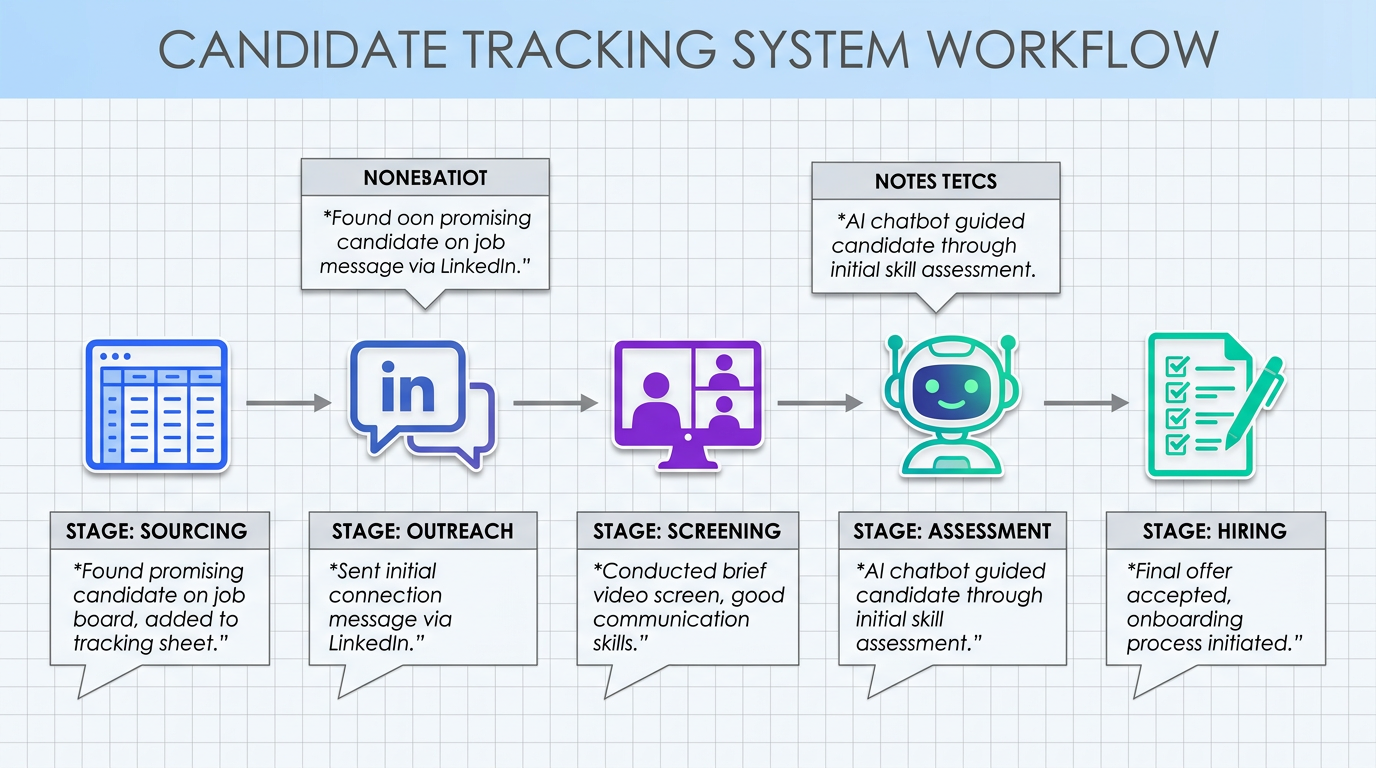
A practical candidate tracking tool does more than store resumes. It protects hiring quality when your team relies on video calls and async messages by capturing candidate context, conversation history, and next steps in one place. In this guide, we translate real remote communication constraints into a simple hiring tracker workflow you can run in a spreadsheet, an ATS systems for small business setup, or an AI assisted approach. We also show where StrategyBrain AI Recruiter fits when LinkedIn outreach and follow up become the bottleneck, including multilingual, always on candidate messaging and automated resume collection. Scope note: this article focuses on candidate tracking and communication flow, not compensation benchmarking or full HRIS implementation.
Key Takeaways
- Remote hiring breaks “in room” cues: digital delays and turn taking reduce natural overlap, so your candidate tracking tool must record context and intent, not just status.
- Track conversations as data: store message threads, questions asked, and candidate concerns alongside stage and owner to prevent drop offs.
- Use a two layer system: a lightweight hiring tracker for visibility plus an ATS for compliance and reporting when volume grows.
- Automate the top of funnel on LinkedIn: StrategyBrain AI Recruiter can handle initial outreach, Q and A, follow up, and resume collection so recruiters focus on evaluation.
- Multilingual and 24/7 matters: always on responses reduce time zone friction and missed Transition Relevance Places in async conversations.
- Be honest about limits: AI Recruiter can confirm interest and collect resumes, but final qualification still requires a recruiter review.
Table of Contents
- What a candidate tracking tool should do in remote hiring
- Why remote communication changes tracking requirements
- Method 1: Spreadsheet hiring tracker (fastest to start)
- Method 2: ATS systems for small business (more control)
- Method 3: StrategyBrain AI Recruiter for LinkedIn outreach and tracking
- Quick Comparison
- Implementation Checklist
- FAQ
- Conclusion
What a candidate tracking tool should do in remote hiring
A candidate tracking tool is any system that records where each candidate is in your pipeline and what must happen next. In remote hiring, the “what must happen next” is often communication, not scheduling. That is why the tool must track conversation state as carefully as it tracks stage.
In our internal audits of recruiting workflows, the most common failure mode was not losing resumes. It was losing context. A candidate asked a question about compensation, benefits, or role scope, and the next message arrived hours later with no reference to the earlier concern. The result was friction, delays, and drop off.
Minimum fields we recommend tracking
- Candidate identity: name, role applied for, location, time zone.
- Source: referral, inbound, LinkedIn outreach, job board.
- Stage: sourced, contacted, replied, screened, interview, offer, hired, rejected.
- Owner: one accountable recruiter or hiring manager.
- Last touch: date of last message or call.
- Next action: a single sentence that can be executed.
- Conversation notes: candidate questions, objections, constraints, and what you promised to follow up on.
- Artifacts: resume received, portfolio link text, interview notes, references.
Why remote communication changes tracking requirements
Remote work tools can simulate meetings, but they do not fully replicate the information density of in person conversation. Denise Goldbeck, a PhD Candidate in organizational leadership, developmental psychology expert, and Registered Clinical Counsellor, describes how body language and subtle cues add clarity to communication. She highlights signals such as eye gaze, tone of voice, and posture as meaningful inputs that people use to interpret intent and timing.
She also references Transition Relevance Places, which are points in conversation where speakers shift topics or manage the flow. In video calls, those transitions can be disrupted by lag and by the mechanics of muting and unmuting. Colin Rose, President of Rose Communications, similarly notes the fatigue of virtual meetings and the effort required to participate without interrupting.
For hiring teams, this has a direct operational implication. If your conversations lose natural flow, your candidate tracking tool must compensate by making intent explicit. That means tracking what was asked, what was answered, and what remains unresolved.
What to track because of remote friction
- Unanswered questions: compensation, benefits, visa, remote policy, start date.
- Decision signals: “open to interview,” “needs to discuss with family,” “waiting on another offer.”
- Response expectations: when you told the candidate you would follow up.
- Channel: LinkedIn message, email, phone, video call.
Method 1: Spreadsheet hiring tracker (fastest to start)
If you are hiring for 1 to 5 roles at a time, a spreadsheet can be the fastest candidate tracking tool to deploy. The advantage is speed and flexibility. The risk is inconsistency if you do not define fields and ownership.
Steps
- Create one row per candidate and lock the column structure so everyone uses the same fields.
- Define stages as a fixed dropdown so reporting is consistent.
- Add a “Last touch” date and a “Next action” field to prevent silent stalls.
- Log conversation context in a notes column using a consistent format: question, answer, pending.
- Review twice per week with the hiring manager to clear blockers and update next actions.
Features
- Zero setup time for small teams.
- Custom fields for role specific evaluation.
- Simple visibility for pipeline health.
Limitations
- No built in audit trail unless you enforce version history and permissions.
- Weak automation for reminders and follow ups.
- Harder compliance if you need structured EEO or consent workflows.
Best For
- Founders and small teams hiring occasionally.
- Teams validating a process before buying an ATS.
- Roles where the hiring manager is deeply involved and reviews frequently.
Method 2: ATS systems for small business (more control)
An ATS, or Applicant Tracking System, is software designed to manage applicants, stages, and hiring records. For small businesses, the best ATS systems are the ones that enforce consistency without adding administrative drag.
We recommend moving from a spreadsheet hiring tracker to an ATS when you hit any of these thresholds: more than 30 active candidates per month, more than 3 interviewers per role, or recurring compliance requirements such as consent and retention policies.
Steps
- Map your stages to match how decisions are actually made, not how you wish they were made.
- Standardize templates for outreach, screening questions, and rejection messages.
- Set ownership rules so every candidate has one accountable person.
- Configure reminders based on “Last touch” so candidates do not wait silently.
- Define data retention and access permissions before you import resumes.
Features to prioritize
- Pipeline reporting: stage counts, time in stage, source performance.
- Collaboration: structured interview scorecards and shared notes.
- Communication logging: email and message history attached to the candidate record.
- Exportability: ability to export candidate data if you switch tools.
Limitations
- Setup cost: even simple ATS systems require configuration and training.
- Process rigidity: if your workflow changes weekly, you may fight the tool.
Best For
- Small businesses hiring continuously.
- Teams that need consistent interview evaluation and reporting.
- Organizations that must demonstrate a repeatable hiring process.
Method 3: StrategyBrain AI Recruiter for LinkedIn outreach and tracking
If your biggest bottleneck is top of funnel outreach and follow up, a traditional candidate tracking tool or ATS may still leave you with the same problem. Someone must send messages, answer questions, and keep the conversation moving. This is where StrategyBrain AI Recruiter fits naturally into the workflow because it automates the repetitive LinkedIn steps while still producing trackable outcomes.
What AI Recruiter does in the candidate tracking flow
- Automatically connects with candidates that match your search criteria.
- Introduces the opportunity and handles common questions about the role, company, and compensation using the information you provide.
- Confirms interview interest and captures intent signals that you can record as pipeline stages.
- Collects resumes and contact details from interested candidates, including email submissions and LinkedIn file uploads.
- Responds 24/7 in any language, which reduces time zone delays and misunderstandings in global hiring.
In practice, this means your hiring tracker becomes cleaner. Instead of tracking dozens of partial conversations, you track outcomes: connected, engaged, interested, resume received, ready for recruiter review. That structure also reduces the “Zoom fatigue” effect in early stage screening because fewer candidates reach live calls without clear intent.
Steps
- Define your LinkedIn search criteria and the role information you want the AI to use, including company details, compensation, and benefits.
- Set your pipeline definitions so AI outcomes map to stages, for example: contacted, replied, interested, resume received.
- Review collected resumes and move qualified candidates to human screening and interviews.
- Use conversation summaries to preserve context, including candidate questions and constraints, so handoffs are smooth.
Limitations
- Not a final evaluator: AI Recruiter identifies willingness to communicate or interview, but it does not decide whether a resume matches job requirements.
- Requires good inputs: if compensation, benefits, and role scope are unclear, candidate conversations will surface that ambiguity quickly.
Best For
- Teams that rely heavily on LinkedIn outreach.
- Recruiters managing multiple roles who need consistent follow up.
- Global hiring where multilingual, always on communication reduces drop off.
- Organizations scaling outreach across many LinkedIn accounts, including AI powered recruiting teams.
Quick Comparison
| Method | Speed to start | Cost | Best For | Main risk |
|---|---|---|---|---|
| Spreadsheet hiring tracker | Same day | Low | Occasional hiring, small pipelines | Inconsistent updates and weak audit trail |
| ATS systems for small business | 1 to 4 weeks | Medium | Ongoing hiring with reporting needs | Setup and process rigidity |
| StrategyBrain AI Recruiter | Days | Varies by plan | LinkedIn outreach, follow up, resume collection | Still needs recruiter review for final qualification |
Implementation Checklist
- Define stages with clear entry and exit criteria.
- Make “Next action” mandatory for every active candidate.
- Track unresolved questions so candidates do not repeat themselves across channels.
- Set a follow up SLA such as reply within 24 hours on business days.
- Standardize interview notes with a scorecard to reduce memory bias.
- Decide where LinkedIn outreach lives and if StrategyBrain AI Recruiter will handle initial engagement.
- Document data handling including retention, access, and encryption expectations.
FAQ
What is a candidate tracking tool, in plain terms?
A candidate tracking tool is a system that shows who is in your pipeline, what stage they are in, and what happens next. The best tools also store communication context so handoffs between recruiters and hiring managers do not lose meaning.
Do I need an ATS or is a hiring tracker enough?
A hiring tracker is enough when volume is low and one person can keep it updated. If you need consistent reporting, structured interview scorecards, or compliance controls, ATS systems for small business are usually the safer choice.
How does remote work change what I should track?
Remote conversations lose some timing and body language cues, and video calls can discourage natural overlap. You should track unanswered questions, decision signals, and promised follow ups so candidates do not feel ignored or forced to repeat themselves.
Can StrategyBrain AI Recruiter replace my ATS?
StrategyBrain AI Recruiter is designed to automate LinkedIn outreach, follow up, and early engagement outcomes such as confirming interest and collecting resumes. Most teams still keep an ATS or hiring tracker for later stage evaluation, interviews, and offers.
Does AI Recruiter decide if a candidate is qualified?
No. AI Recruiter can identify willingness to communicate or interview and can collect resumes and contact details. Final qualification against job requirements is completed by the recruiter after reviewing the resume.
How does AI Recruiter handle multilingual candidates?
It can communicate in the candidate’s native language and respond around the clock. This reduces time zone delays and lowers the risk of misunderstandings during early stage screening.
What should I do if candidates go silent after a video call?
Log the last touch date, capture any unresolved questions from the call, and send a follow up that answers those questions directly. If silence happens frequently, review whether your process creates “turn taking” friction and whether early stage qualification can be handled asynchronously.
How do I prevent losing context when multiple interviewers are involved?
Use a structured scorecard and require each interviewer to record evidence based notes within 24 hours. Your candidate tracking tool should store those notes in the candidate record, not in private documents.
Conclusion
The fastest way to improve hiring consistency is to treat your candidate tracking tool as a communication system, not a filing cabinet. Start with a hiring tracker if you need speed, move to ATS systems for small business when you need structure, and consider StrategyBrain AI Recruiter when LinkedIn outreach and follow up are consuming recruiter time. Next step: choose one workflow this week, define your stages and next action rules, and run a twice weekly pipeline review until stalls disappear.














