


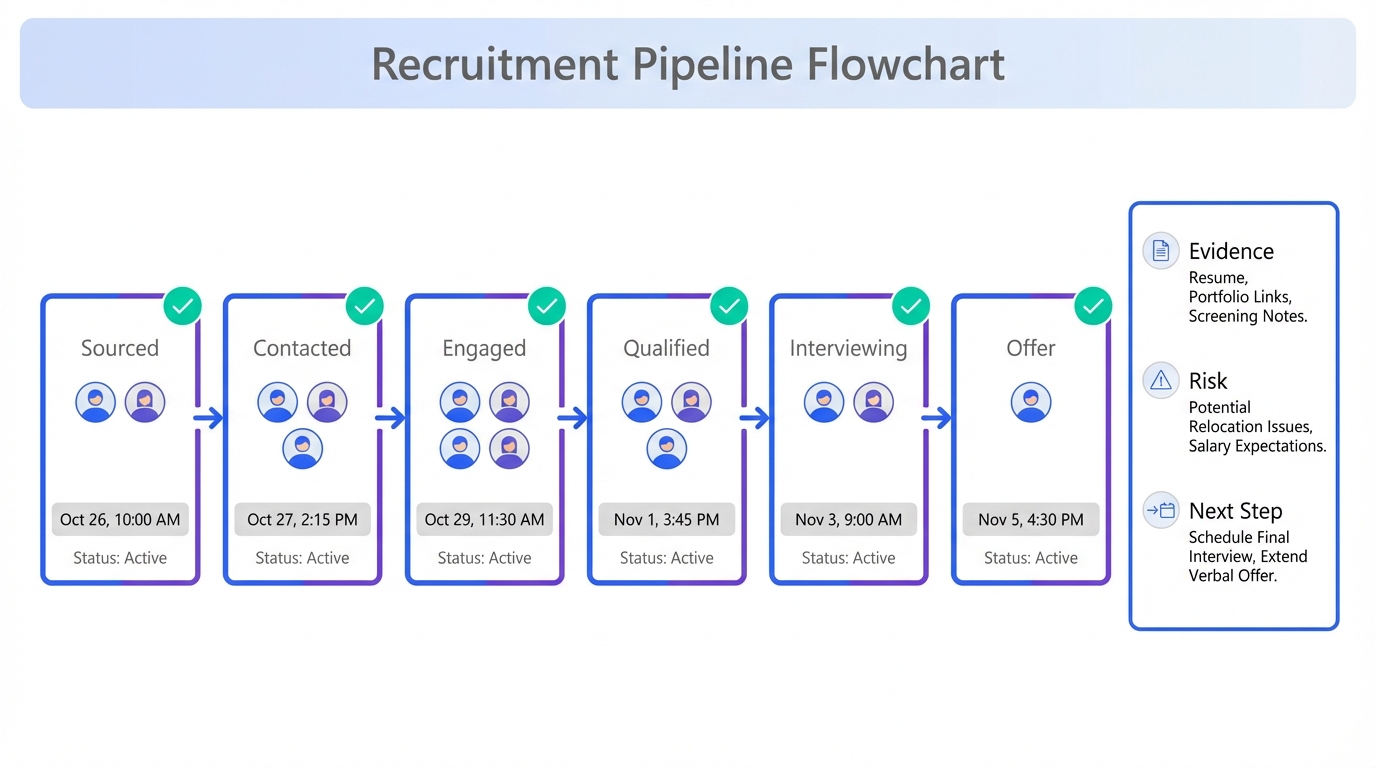
To make a candidate tracking tool actually improve hiring outcomes, start by defining 6 to 10 pipeline stages, then enforce two rules: every candidate must have a next step and every stage change must have a timestamped note. In our recruiting operations, the biggest failures are not “lack of applicants” alone, but lost context, inconsistent compensation discussions, and slow follow up when candidates are hesitant to move. This guide translates a real expert panel discussion from the forestry sector into a repeatable recruitment tracker workflow, and shows where StrategyBrain AI Recruiter can take over the repetitive LinkedIn outreach and early qualification so your tracker stays clean and current. This article focuses on process and tracking design, not a full applicant tracking system for small companies implementation or a vendor price comparison.
Table of Contents
- Why tracking matters when supply is thin
- What to track in a candidate tracking tool
- A practical recruitment tracker workflow
- Expert panel insights you can operationalize
- Where StrategyBrain AI Recruiter fits in LinkedIn hiring
- Copyable templates for stages and notes
- Common mistakes and fixes
- FAQ
- Conclusion
Key Takeaways
- Track the constraint, not everything: when qualified candidates are scarce, the highest leverage fields are stage, next step, and response latency in hours.
- Use consistent stages: 6 to 10 stages reduce ambiguity and make handoffs auditable across recruiters and hiring managers.
- Capture “hesitancy signals”: note risk concerns, remote or hybrid expectations, and timing so you can tailor follow up.
- Compensation needs structure: record external equity, internal equity, ability to pay, and skill performance as separate fields to avoid ad hoc decisions.
- Referral programs need tracking: if you offer a referral bonus, track referrer, eligibility, and payout status to keep trust high.
- Automate first contact when it is the bottleneck: StrategyBrain AI Recruiter can handle LinkedIn connecting, role intro, Q and A, and resume collection so your tracker stays current.
Why tracking matters when supply is thin
In the forestry panel discussion, leaders described a familiar pattern: demand for talent stays high while the available pool feels thinner, and many candidates prefer stability over switching roles. When that happens, the hiring system breaks in predictable places. First, follow up slows down. Second, the team loses context across conversations. Third, compensation and onboarding decisions become inconsistent because notes are incomplete.
A candidate tracking tool is not just a database. It is an operational control system. It should tell you, at any moment, which candidates are active, what the next action is, and what risk factors might cause a candidate to disengage.
What to track in a candidate tracking tool
Define “tracking” as capturing the minimum information needed to move a candidate forward without rework. A recruitment tracker that tries to store everything becomes slow and inconsistent. Instead, track a small set of fields that are easy to keep current.
Core fields that should exist for every candidate
- Stage: one of your defined pipeline stages.
- Owner: the recruiter accountable for next action.
- Next step: a single sentence action, written as a verb phrase.
- Next step due date: YYYY-MM-DD.
- Last contact timestamp: ISO date time in your system.
- Source: referral, LinkedIn, inbound, agency, campus, other.
- Role fit notes: 3 to 6 bullets, not paragraphs.
Fields that reduce “candidate hesitancy” drop off
- Motivation: active search, passive, exploratory.
- Risk concerns: stability, remote setup, onboarding, commute, benefits.
- Timing: earliest start date and constraints.
- Decision drivers: compensation, schedule, growth, mission, location.
Compensation tracking that stays defensible
One panelist described evaluating compensation through four categories. In a tracker, treat these as separate fields so the rationale is visible later.
- External equity: market alignment notes.
- Internal equity: fairness within the organization.
- Ability to pay: budget and constraints.
- Skill and performance: evidence from interviews and work samples.
A practical recruitment tracker workflow
This workflow is designed to work whether you use a spreadsheet, a lightweight tracker, or an applicant tracking system for small companies. The key is consistency, not tool complexity.
Steps
- Define your stages: choose 6 to 10 stages and write a one sentence definition for each.
- Set entry and exit criteria: for every stage, define what must be true to move forward.
- Standardize notes: require 3 bullets after every meaningful interaction.
- Enforce next step discipline: no candidate can sit in a stage without a next step and due date.
- Review cadence: run a pipeline review 2 times per week, 30 minutes each.
- Close the loop: when a candidate is rejected or withdraws, record the reason using a controlled list.
Features your tracker should support
- Stage history: who moved the candidate and when.
- Searchable notes: so hiring managers can self serve context.
- Reminders: due dates that trigger follow up.
- Role templates: reusable stage definitions per role family.
Limitations to plan for
- Manual trackers drift: if updates rely on memory, data quality drops within 14 days.
- Too many stages slow teams: more than 10 stages often creates debate instead of action.
- Unstructured notes become unusable: long paragraphs reduce reuse and increase bias.
Expert panel insights you can operationalize
The source discussion, dated 28 June 2021, captured three hiring realities that still show up in many markets: labor shortage, hesitancy to switch roles, and the need to prioritize candidate quality over volume. Below is how we translate those realities into tracker design.
Labor shortage means your tracker must prevent “silent loss”
When resumes are thin, every qualified candidate is expensive to lose. In practice, silent loss happens when a candidate is waiting on a reply, a scheduling link, or a compensation clarification. Add a field for response latency measured in hours, and review it in pipeline meetings. If latency exceeds 48 hours for active candidates, treat it as an operational incident.
Hesitancy to switch positions requires risk notes, not just skills notes
Panelists described passive candidates who hesitate because of uncertainty, and candidates who reconsider offers due to risk. In your recruitment tracker, add a controlled list for “hesitancy signals” so the team can respond consistently. Examples include remote onboarding concerns, stability concerns, and uncertainty about work model.
Quality over quantity needs explicit benchmarks
One leader described using core expectations as benchmarks, including professionalism, behavior, mentality, and emotional outlook. Whether you agree with those exact labels or not, the operational lesson is clear: define your evaluation dimensions and store them as structured fields. That reduces recency bias and makes debriefs faster.
Compensation calculations should be recorded as a decision trail
Compensation decisions were described as needing fiscal responsibility and fairness. In a candidate tracking tool, record the rationale in the four category structure described earlier. This is especially useful when market conditions change and you need to explain why an offer was set at a specific level.
Referral programs need governance fields
The panel mentioned a referral program boosted to $1700 for employees who recruit a successful applicant. If you run a similar program, track referrer, eligibility, and payout status. This prevents disputes and keeps employee trust high.
Remote and hybrid work affects onboarding risk
Remote work constraints were discussed, including internet availability and the challenge of integrating into a new company when people work from home. Add a field for “onboarding risk” with a short note. Then, when a candidate is close to offer, you can proactively address integration and setup.
Where StrategyBrain AI Recruiter fits in LinkedIn hiring
Many teams buy an applicant tracking system for small companies and still struggle because the top of funnel is the real constraint. If your bottleneck is LinkedIn sourcing and first contact, a candidate tracking tool alone will not fix it. You need consistent outreach, fast replies, and reliable resume capture so the tracker stays accurate.
StrategyBrain AI Recruiter is designed to automate the repetitive LinkedIn steps that usually create tracker chaos. It can connect with candidates that match your search criteria, introduce the role, answer questions about the company, role, and compensation, confirm interview interest, and collect resumes and contact details from interested candidates. Because it responds 24 hours a day in the candidate’s language, it reduces the “waiting gap” that often causes passive candidates to disengage.
How we have seen this improve tracking hygiene
- Fewer stale records: conversations continue even when recruiters are offline, so stages move forward instead of sitting idle.
- Cleaner notes: early qualification details are captured consistently, which reduces re interviewing the same basics.
- More predictable handoffs: recruiters can focus on resume review and interviews, while the tracker reflects real candidate intent.
Scope boundary and limitation
StrategyBrain AI Recruiter can identify willingness to communicate or interview, but it does not decide whether a resume fully matches job requirements. Final qualification remains a recruiter and hiring manager responsibility. That division of labor is important to document in your process so stakeholders do not assume the tool replaces evaluation.
Copyable templates for stages and notes
Use these templates to standardize your candidate tracking tool. They are intentionally short so teams actually use them.
Template A: Pipeline stages for most roles
- Sourced: identified and added to tracker.
- Contacted: first message sent, awaiting reply.
- Engaged: two way conversation started.
- Qualified: basic requirements confirmed, resume received or profile reviewed.
- Interviewing: interviews scheduled or completed.
- Offer: offer in progress or delivered.
- Hired: accepted and start date confirmed.
- Closed: rejected or withdrew with reason recorded.
Template B: Three bullet note format
- Evidence: what the candidate said or what you observed.
- Risk: what could block acceptance or progress.
- Next: the next step and due date.
Template C: Rejection and withdrawal reasons
- Compensation misalignment
- Work model mismatch
- Timing constraints
- Role scope mismatch
- Candidate withdrew due to risk concerns
- Not selected after interview
Common mistakes and fixes
Mistake: treating the tracker as a filing cabinet
If your recruitment tracker only stores resumes, it will not change outcomes. Fix this by requiring next step and due date for every active candidate.
Mistake: mixing subjective impressions with facts
Unstructured notes increase bias and reduce reuse. Fix this by separating evidence, risk, and next step in every note.
Mistake: ignoring onboarding and work model risk until the offer stage
Remote and hybrid concerns can derail late stage candidates. Fix this by capturing work model expectations and onboarding risk during engagement.
Mistake: slow follow up in a hesitant market
When candidates are risk averse, delays amplify uncertainty. Fix this by tracking response latency in hours and setting a 48 hour maximum for active candidates.
FAQ
What is a candidate tracking tool?
A candidate tracking tool is a system that records where each candidate is in your hiring pipeline, what the next action is, and the notes needed to make consistent decisions. It can be a spreadsheet, a lightweight recruitment tracker, or a full applicant tracking system.
Do small teams need an applicant tracking system for small companies?
Not always. If you hire a few roles per year, a structured tracker with consistent stages can work. If you hire continuously, need compliance controls, or have multiple stakeholders, an applicant tracking system for small companies is usually easier to govern.
How many pipeline stages should I use?
Use 6 to 10 stages. Fewer than 6 often hides bottlenecks, and more than 10 often creates debate and inconsistent movement.
What should I write in candidate notes?
Use a three bullet structure: evidence, risk, and next step. This keeps notes short, factual, and actionable for anyone who reads them later.
How do I track candidates who are hesitant to switch jobs?
Add a “hesitancy signals” field and record the specific concern, such as stability, onboarding, or work model. Then tailor follow up to reduce uncertainty with clear answers and timelines.
How does StrategyBrain AI Recruiter help with tracking?
It automates LinkedIn connecting, role introduction, Q and A, interest confirmation, and resume and contact collection. That reduces stale records and keeps your tracker aligned with real candidate intent.
Does StrategyBrain AI Recruiter replace recruiter judgment?
No. It can identify willingness to communicate or interview and collect information, but it does not determine full job fit from the resume. Recruiters and hiring managers still make the final qualification decision.
How do I keep my tracker accurate over time?
Run a 30 minute pipeline review twice per week and enforce the rule that every active candidate must have a next step and due date. Accuracy is a process outcome, not a software feature.
Conclusion
A candidate tracking tool works when it is built around the realities of your market. When supply is thin and candidates hesitate to move, the winning system is the one that prevents silent loss, captures risk signals early, and keeps compensation and onboarding decisions consistent. Start with clear stages, structured notes, and strict next step discipline. If LinkedIn sourcing and first contact are your constraint, integrate StrategyBrain AI Recruiter into the workflow so outreach, replies, and resume capture stay consistent and your recruitment tracker reflects what is actually happening. Next step: copy the stage template above, run your first twice weekly pipeline review, and measure response latency in hours for the next 14 days.














