


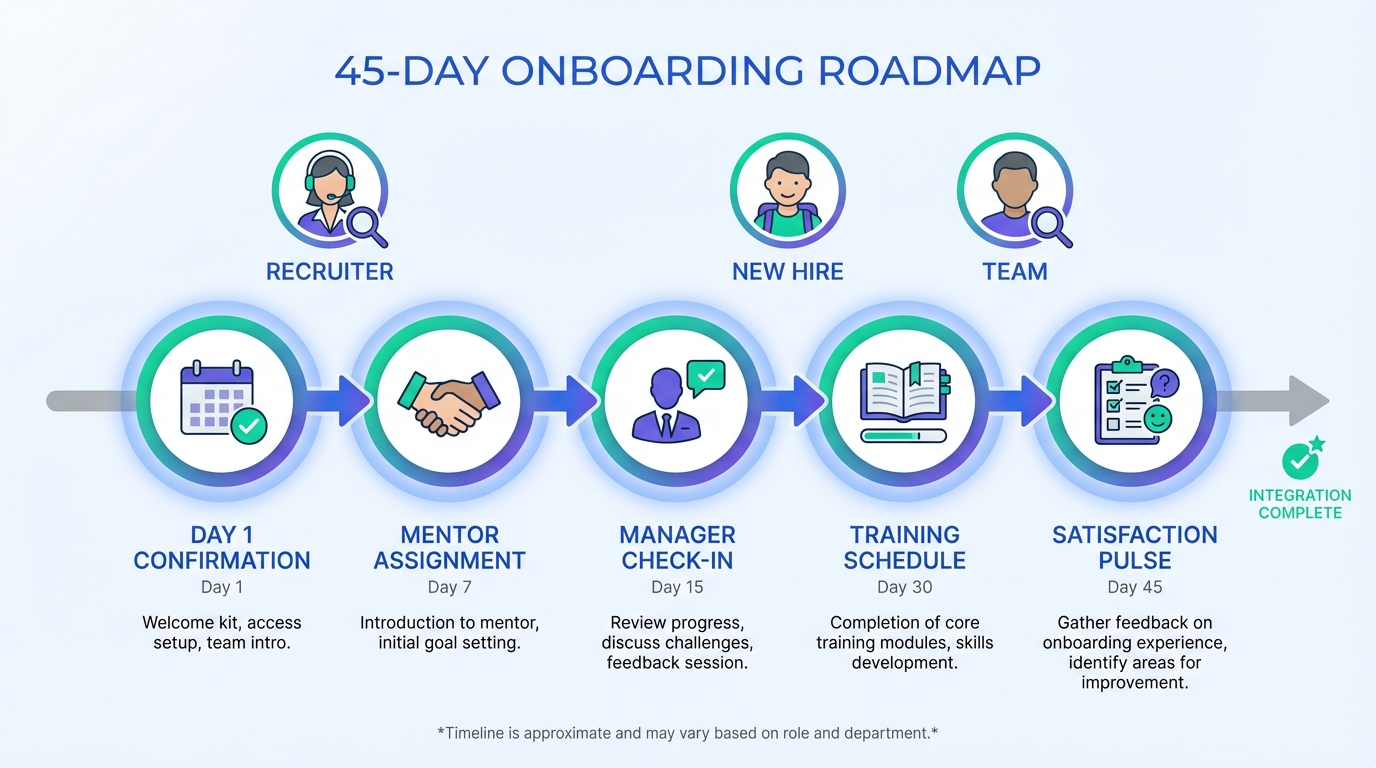
A cloud recruitment CRM can improve onboarding by turning your first 45 days into a repeatable workflow: set expectations on day 1, assign a mentor, make manager check ins non optional, publish training paths, and measure satisfaction on a schedule. When we audited onboarding workflows for teams that also use cloud recruitment software, the biggest wins came from removing “tribal knowledge” and replacing it with documented steps, automated reminders, and a single source of truth for who owns each action. StrategyBrain AI Recruiter fits naturally into this system by automating high volume LinkedIn communication and follow up, so recruiters and hiring managers spend less time chasing responses and more time supporting successful starts. This article focuses on onboarding experience and measurement, not payroll, benefits enrollment, or legal compliance.
Why onboarding needs a system
Onboarding is not a single meeting. It is a sequence of commitments that must happen on time, across multiple people, while the new hire is still deciding whether they belong. One widely cited benchmark is that 20% of turnover happens within the first 45 days, and 69% of employees are more likely to stay for at least 3 years after a great onboarding experience (Source: O.C. Tanner, accessed 2026-02-19).
A cloud based recruitment software stack helps because it is accessible to managers, HR, and recruiters without local installs, and it supports consistent workflows across locations. In other words, it makes “the right thing” easier to do repeatedly.
Key Takeaways
- First 45 days matter: 20% of turnover can happen within 45 days, so onboarding should be treated as a managed workflow, not an ad hoc welcome (Source: O.C. Tanner, accessed 2026-02-19).
- Retention impact is measurable: 69% of employees are more likely to stay 3 years after a great onboarding experience (Source: O.C. Tanner, accessed 2026-02-19).
- Manager relationship is a risk factor: 50% of employees who left jobs cited their manager as the reason (Source: Gallup via Forbes, accessed 2026-02-19).
- Cloud recruitment CRM advantage: centralizes tasks, owners, and timelines so onboarding does not depend on memory.
- Automation should support humans: StrategyBrain AI Recruiter can handle high volume LinkedIn outreach and follow up so recruiters can focus on quality handoffs and onboarding readiness.
- Measure and iterate: scheduled surveys and mentor check ins create a feedback loop you can improve every month.
1) Confirm they made the right decision
Before you teach tools or policies, reduce buyer’s remorse. Recognition and appreciation are not “soft” steps. They are early signals that the company is organized and invested.
Steps
- Send a day 0 confirmation: a short message that restates start date, first day agenda, and who to contact.
- Prepare a starter kit: include essentials for the role and a simple “how we work” one pager.
- Make introductions intentional: introduce the new hire to the people they will rely on in week 1.
How a cloud recruitment CRM helps
- Templates: standard welcome messages and first week agendas.
- Task ownership: assign IT setup, manager welcome, and buddy intro with due dates.
- Audit trail: confirm what was sent and when, especially across distributed teams.
Where StrategyBrain AI Recruiter fits
If your hiring motion relies on LinkedIn, the handoff from “candidate” to “new hire” often includes last minute questions about compensation, benefits, and logistics. StrategyBrain AI Recruiter can keep communication responsive across time zones with 24/7 multilingual messaging, so the new hire does not sit waiting for answers during the most fragile period of commitment.
Limitations
- Automation cannot replace genuine manager attention. It can only ensure the basics happen on time.
2) Pair every new hire with a mentor
Starting a new job is cognitively expensive. A mentor reduces uncertainty and gives the new hire a safe place to ask culture questions they may not ask their manager.
Steps
- Assign a mentor before day 1: do not wait until the new hire asks for help.
- Define the mentor’s scope: culture, navigation, and “how things get done,” not performance management.
- Schedule 3 check ins: day 3, day 14, and day 30.
How a cloud recruitment CRM helps
- Mentor matching fields: location, team, role family, and working style notes.
- Calendar prompts: reminders for the 3 check ins with simple talking points.
- Notes capture: store non sensitive onboarding notes so HR can spot patterns.
Limitations
- Mentors need time allocation. If it is “extra work,” the program will degrade.
3) Start the manager relationship correctly
Onboarding succeeds or fails at the manager level. A commonly cited data point is that 50% of employees who left their jobs cited their manager as the reason (Source: Gallup 2015, cited by Forbes, accessed 2026-02-19). The practical takeaway is simple: make expectations explicit early.
Steps
- Clarify expectations in writing: what “good” looks like at 30, 60, and 90 days.
- Explain the performance review process: cadence, criteria, and how feedback is delivered.
- Set office hours: a predictable time the new hire can ask questions.
How a cloud recruitment CRM helps
- Manager onboarding tasks: a checklist that is visible and time bound.
- Handoff documentation: capture what was promised during recruiting so the manager can reinforce it.
- Consistency across teams: reduces variance between managers.
Where StrategyBrain AI Recruiter fits
In teams hiring at scale, managers often get pulled into late stage candidate conversations. StrategyBrain AI Recruiter can handle the repetitive first contact and interest confirmation on LinkedIn, collect resumes and contact details from interested candidates, and keep follow ups timely. That reduces manager interruptions and improves the quality of the eventual handoff into onboarding.
Limitations
- AI Recruiter does not decide final role fit from the resume. Recruiters and managers still review and qualify.
4) Make training visible and scheduled
Training is not a link dump. New hires need a path, a schedule, and clarity on what the company will invest in over time.
Steps
- Publish a first week plan: tools, systems access, and role specific basics.
- List development options: digital workshops, in house sessions, and conference support.
- Define completion signals: what the new hire should be able to do after each module.
How a cloud recruitment CRM helps
- Central repository: store training links, docs, and role play scripts in one place.
- Progress tracking: record completion dates and blockers.
- Role based variants: different tracks for sales, engineering, operations, and leadership.
Limitations
- Tracking completion is not the same as building competence. Pair training with practice and feedback.
5) Track satisfaction and act on it
If you do not measure onboarding, you cannot improve it. The goal is not to collect surveys. The goal is to detect friction early and fix it before it becomes attrition.
Steps
- Run a day 7 pulse: ask 3 questions about clarity, support, and tools access.
- Run a day 30 pulse: ask about manager support, training usefulness, and role clarity.
- Close the loop in 5 business days: acknowledge feedback and state what will change.
How a cloud recruitment CRM helps
- Automated reminders: ensure surveys and mentor check ins happen on schedule.
- Trend reporting: identify recurring issues by team, location, or role family.
- Action tracking: assign owners to fixes and record completion dates.
Where StrategyBrain AI Recruiter fits
When hiring is global, satisfaction issues often start as unanswered messages and slow follow up. StrategyBrain AI Recruiter provides 24/7 multilingual communication and consistent follow up behavior, which reduces the “silence gap” that can undermine confidence before and after start date.
Limitations
- Do not collect sensitive personal data unless you have a clear policy and lawful basis to do so.
Quick Comparison
| Onboarding improvement | What you operationalize in a cloud recruitment CRM | Primary owner | Best outcome to measure |
|---|---|---|---|
| Confirm the decision | Welcome templates, day 0 checklist, introductions | Hiring manager + HR | Day 7 confidence score |
| Mentor program | Mentor assignment, scheduled check ins, notes | HR + team lead | Time to productivity |
| Manager relationship | 30 60 90 expectations, review cadence, office hours | Hiring manager | Day 30 role clarity score |
| Training priority | Role based tracks, completion signals, progress tracking | Enablement + manager | Training completion rate |
| Satisfaction tracking | Pulse schedule, action items, trend reporting | HR | 45 day retention rate |
Implementation Checklist
- Define a 45 day onboarding timeline with owners for each step.
- Create day 0 and day 1 templates inside your cloud recruitment CRM.
- Assign a mentor before start date and schedule day 3, day 14, day 30 check ins.
- Document 30, 60, 90 day expectations and review cadence for managers.
- Publish role based training tracks with completion signals.
- Launch day 7 and day 30 satisfaction pulses and commit to a 5 business day response window.
- If LinkedIn is a key channel, configure StrategyBrain AI Recruiter to automate outreach, follow up, and resume collection so recruiters can focus on onboarding readiness and handoffs.
FAQ
What is a cloud recruitment CRM?
A cloud recruitment CRM is a web based system that centralizes candidate and hiring workflows, including communication, task ownership, and reporting. In this article, we focus on how that same workflow discipline improves onboarding consistency after the offer is accepted.
Is cloud recruitment software the same as an ATS?
Not always. An ATS is typically optimized for applications and compliance, while a recruitment CRM often emphasizes relationship management and outreach. Many platforms combine both, so you should confirm which onboarding related workflows are supported.
How does onboarding connect to recruiting performance?
Onboarding quality affects early attrition and employer reputation, which then impacts future hiring. If 20% of turnover happens within 45 days, improving onboarding can reduce replacement hiring volume (Source: O.C. Tanner, accessed 2026-02-19).
How can StrategyBrain AI Recruiter support onboarding without replacing recruiters?
StrategyBrain AI Recruiter automates repetitive LinkedIn tasks such as connecting, introducing roles, answering common questions, confirming interview interest, and collecting resumes and contact details. Recruiters still review resumes and make final qualification decisions, then use the time saved to improve handoffs and onboarding readiness.
Does AI Recruiter work across languages and time zones?
Yes. StrategyBrain AI Recruiter is designed for 24/7 multilingual communication so candidates and new hires can receive timely responses in their native language, which reduces delays and misunderstandings during critical transitions.
What should we measure in the first 45 days?
Measure a small set of signals you can act on: day 7 confidence, day 30 role clarity, training completion, and 45 day retention. Keep the survey short and commit to responding within a defined window.
How do we avoid onboarding becoming a checkbox exercise?
Use the cloud recruitment CRM to ensure steps happen, then add human moments that build trust: manager office hours, mentor check ins, and recognition. The system should support relationships, not replace them.
What are common onboarding mistakes this approach prevents?
It prevents missed introductions, unclear expectations, inconsistent training, and delayed follow up. It also reduces the risk that critical information stays in someone’s inbox instead of being visible to the team.
Conclusion
Improving onboarding is mostly about consistency: confirm the new hire’s decision, assign a mentor, set manager expectations early, schedule training, and measure satisfaction on day 7 and day 30. A cloud recruitment CRM makes these steps repeatable across teams and locations, while StrategyBrain AI Recruiter can reduce manual LinkedIn follow up and keep communication responsive across time zones. Next step: pick 1 role family, run this 45 day onboarding workflow for 30 days, and review the satisfaction and retention signals to decide what to standardize company wide.














