


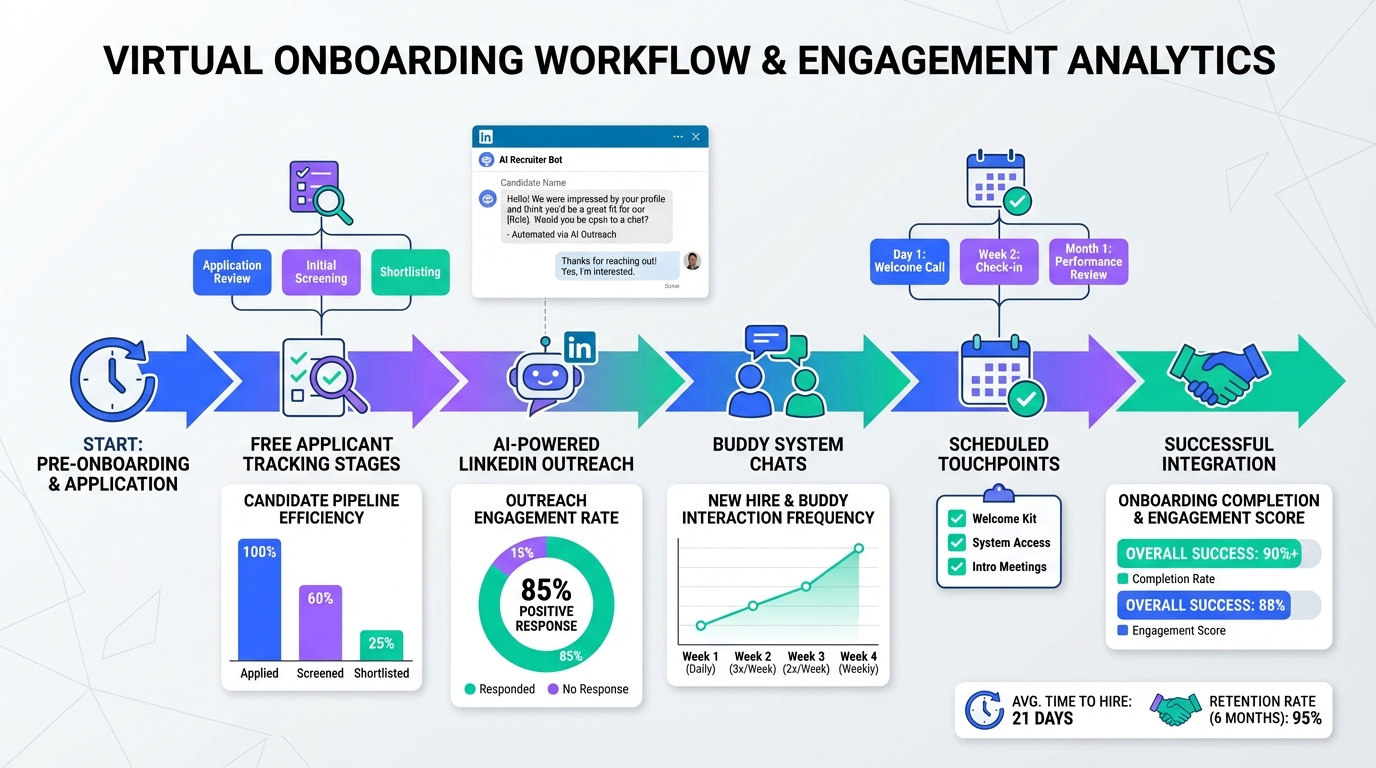
Freeware recruitment software can support virtual onboarding by giving you a simple, trackable workflow for new hire tasks, documents, and check ins, even when your team is remote. The most reliable setup is to use a free applicant tracking system software workflow for hiring and handoff, then run onboarding with a structured schedule that intentionally creates relationship building moments, role training, and a buddy system. In our internal onboarding process reviews, the biggest gains came from scheduling short touchpoints that replace water cooler moments and using templates so managers do not miss critical check ins. This guide covers virtual onboarding structure, practical templates, and where StrategyBrain AI Recruiter can reduce manual LinkedIn outreach and follow up before day one. It does not cover payroll, benefits administration, or HRIS implementation.
Key Takeaways
- Virtual onboarding fails most often on relationships: new hires need planned interactions with managers and coworkers, not only training materials.
- Schedule spontaneity: put social time and quick questions on the calendar so remote employees do not need to “book a meeting” to ask for help.
- Use freeware recruitment software for handoff: treat onboarding tasks as a continuation of the hiring workflow so nothing is lost between offer and day one.
- Buddy systems work when they are specific: define who, when, and what the buddy covers in the first 30 days.
- StrategyBrain AI Recruiter reduces manual pre start follow up: it can automate LinkedIn connecting, initial role introduction, Q and A, and resume and contact capture.
- Be honest about limits: no free applicant tracking system software will replace culture building, and AI does not replace final qualification by a recruiter.
Why virtual onboarding is harder
Even in ideal circumstances, onboarding is hard. When onboarding is remote, the challenge is not only training content. It is the loss of informal moments where a new employee learns how people actually work together. In a physical office, a new hire can observe tone, pace, and norms. In a remote setup, those signals are hidden unless you create opportunities for them.
In practice, the “water cooler” effect changes everything. Educational materials, audio visual training, and instant messaging can help, but they do not automatically create belonging. When a new hire has to schedule a formal call to ask a quick question, they often delay asking. That delay can turn small confusion into avoidable mistakes and stress.
Another common friction point is that many people learn by doing. Remote onboarding can over rely on reading and presentations. If you do not pair learning with guided practice and feedback, the new hire may feel isolated and unsure whether they are meeting expectations.
What to standardize first
If you are using freeware recruitment software or an applicant tracking system free tier, your goal is not to build a perfect system. Your goal is to standardize the few steps that prevent early churn and confusion.
Define the minimum onboarding outcomes
- Belonging: the new hire has at least 2 trusted contacts by the end of week 2.
- Role clarity: the new hire can explain success criteria for the first 30 days in 3 to 5 sentences.
- Work enablement: accounts, tools, and access are ready before day one.
Define terms once so everyone uses the same language
- ATS: an applicant tracking system that stores candidates, stages, and hiring activity.
- Handoff: the moment a candidate becomes a new hire and ownership shifts from recruiting to the hiring manager and onboarding owner.
- Buddy system: a designated peer who answers day to day questions and helps the new hire navigate culture and norms.
Method 1: Run onboarding like a scheduled relationship system
The most consistent virtual onboarding programs treat relationships as a deliverable. That means you schedule them, track them, and make them easy to complete.
Steps
- Schedule manager touchpoints for the first 15 business days: 15 minutes daily for days 1 to 5, then 15 minutes on days 7, 10, and 15.
- Schedule two coworker introductions per week: 20 minutes each, with a prompt list so it is not awkward.
- Block “ask me anything” time: 30 minutes twice per week where the new hire can drop in without a formal agenda.
- Document norms: write down response time expectations, meeting etiquette, and where decisions are recorded.
Features
- Predictable support: new hires do not need to guess when it is acceptable to ask questions.
- Culture visibility: repeated interactions reveal how the team communicates and resolves issues.
- Lower manager load: templates reduce the cognitive overhead of “what should I cover today”.
Limitations
- Calendar pressure: if you do not protect these blocks, they will be the first meetings to get cancelled.
- Not a substitute for real work: you still need hands on tasks and feedback loops.
Best For
- Teams onboarding remotely for 30 days or longer.
- Managers who want a repeatable process that scales.
Method 2: Use a buddy system that is actually operational
A buddy system fails when it is vague. It succeeds when the buddy has a clear scope, a schedule, and permission to be candid about how things work.
Steps
- Assign the buddy before day one: introduce them during the pre start period.
- Give the buddy a checklist: tools, people, unwritten rules, and “how we communicate here”.
- Set a cadence: 15 minutes daily for the first 5 business days, then 15 minutes twice per week until day 30.
- Define escalation: the buddy answers day to day questions, the manager handles performance and priorities.
Features
- Psychological safety: new hires often ask peers questions they avoid asking managers.
- Faster unblocking: fewer delays waiting for formal meetings.
- Better retention signals: early belonging reduces the risk of silent disengagement.
Limitations
- Buddy selection matters: a disengaged buddy can do more harm than no buddy.
- Needs time allocation: buddies need explicit permission to spend time on onboarding.
Best For
- Remote first teams where informal learning is otherwise limited.
- Roles with many internal tools and processes.
Method 3: Build a lightweight workflow in an applicant tracking system free setup
Many teams treat onboarding as separate from hiring. That is where details get lost. If you are using free applicant tracking system software, you can still create a clean handoff by adding a simple onboarding stage and task list.
Steps
- Add an “Onboarding” stage: move the candidate into onboarding immediately after offer acceptance.
- Create a standard task set: accounts, equipment, first week schedule, buddy assignment, and manager check ins.
- Attach key documents: role scorecard, first 30 day plan, and team norms.
- Track completion dates: use due dates so tasks are not “invisible”.
Features
- Continuity: the same record holds hiring context and onboarding commitments.
- Accountability: tasks have owners and deadlines.
- Auditability: you can review what was done for each hire.
Limitations
- Free tiers vary: some freeware recruitment software limits automation, users, or task features.
- Not an HRIS: do not force payroll and benefits into an ATS if it creates compliance risk.
Best For
- Small teams that need structure without buying a full HR suite.
- Recruiters who want fewer handoff errors between offer and day one.
Method 4: Add StrategyBrain AI Recruiter to reduce pre start drop off
Virtual onboarding starts before day one. The pre start period is where candidates go quiet, ask last minute questions, or delay sending documents. This is also where manual follow up consumes recruiter time. StrategyBrain AI Recruiter is designed for LinkedIn hiring workflows and can automate the initial outreach and qualification conversation, then collect resumes and contact details from interested candidates so the handoff is cleaner.
How it fits with freeware recruitment software
- Before offer: AI Recruiter can connect with candidates that match your search criteria, introduce the role, answer questions about role, company, compensation, and confirm interview interest.
- At handoff: it can capture resumes and contact details so your ATS record is complete before scheduling interviews.
- Across time zones: it supports 24/7 multilingual communication, which reduces delays when candidates respond outside business hours.
Steps
- Prepare a role brief: company details, compensation, benefits, and candidate search criteria.
- Define the conversation boundaries: what the AI can answer and what must be escalated to a recruiter.
- Set the resume capture method: email submission or LinkedIn file upload, then confirm how your team stores the file.
- Review and shortlist: recruiters review collected resumes and contact shortlisted candidates for interviews.
Limitations
- Final qualification remains human: AI Recruiter can confirm willingness to interview, but it does not decide whether a resume fully matches job requirements.
- Process discipline still required: automation helps, but you still need a clear onboarding plan to build belonging and role clarity.
Best For
- Teams doing high volume LinkedIn sourcing and follow up.
- Global hiring where multilingual candidate communication reduces misunderstandings.
- Organizations managing multiple LinkedIn accounts and wanting a scalable outreach workflow.
Quick Comparison
| Method | Speed to implement | Cost | Best for |
|---|---|---|---|
| Scheduled relationship onboarding | 1 business day | $0 | Reducing isolation and confusion in week 1 |
| Operational buddy system | 1 to 2 business days | $0 | Faster day to day support and culture learning |
| Applicant tracking system free onboarding stage | 1 to 3 business days | $0 to low cost | Preventing handoff errors and missed tasks |
| StrategyBrain AI Recruiter for LinkedIn outreach and follow up | Varies by team setup | Paid product with a free trial option | Reducing manual outreach, 24/7 multilingual candidate messaging, resume and contact capture |
Copy and paste templates
Manager daily check in prompt (15 minutes)
- What did you work on since yesterday, and what is the next small deliverable?
- What is blocked, and what is one action I can take today to unblock it?
- What did you learn about how we work that surprised you?
- Who should you meet next, and why?
Buddy checklist for week 1
- Show where decisions are documented and where questions should be asked.
- Explain response time norms for chat and email.
- Share 3 unwritten rules that help people succeed on the team.
- Introduce 2 people the new hire should feel comfortable messaging directly.
Virtual onboarding quick checklist
- Before day one: accounts created, equipment shipped, calendar invites sent.
- Day one: manager welcome, buddy intro, team intro, first task assigned.
- Week one: two coworker chats, first feedback loop, norms documented.
- Day 15: review success criteria, adjust plan, confirm support network.
- Day 30: performance check, learning plan, next scope expansion.
FAQ
What is freeware recruitment software?
Freeware recruitment software is recruiting software you can use at no cost, often with limits on users, features, or volume. In practice, it is commonly used as an entry level applicant tracking system free setup for small teams.
Is an applicant tracking system free plan enough for onboarding?
It can be enough for onboarding task tracking and handoff if you keep the workflow simple. It will not replace culture building, manager coaching, or hands on training.
What is the biggest risk in virtual onboarding?
The biggest risk is relationship gaps. Without planned interactions, new hires can feel isolated and may hesitate to ask for help, which slows learning and reduces engagement.
How do I replace water cooler moments in remote work?
You schedule them. Short, recurring touchpoints and casual coworker chats create the same learning and bonding opportunities that would otherwise happen spontaneously.
Does StrategyBrain AI Recruiter replace recruiters?
No. It automates repetitive LinkedIn tasks such as connecting, introducing roles, answering common questions, confirming interest, and collecting resumes and contact details. Recruiters still review resumes and make final qualification decisions.
Can StrategyBrain AI Recruiter communicate in multiple languages?
Yes. It supports multilingual candidate communication, which helps reduce delays and misunderstandings when hiring across countries and time zones.
How does AI Recruiter capture resumes and contact details?
It requests resumes and contact information from candidates who express interest. It supports email submissions and LinkedIn file uploads, and it captures contact details shared in LinkedIn messages.
How do I keep onboarding consistent across managers?
Use templates and a minimum schedule for the first 15 business days. Consistency comes from standard prompts, defined outcomes, and a visible task list, not from long documents.
What should I avoid in virtual onboarding?
Avoid relying only on presentations and reading. Also avoid leaving support to chance, because remote employees cannot easily observe norms or ask quick questions without a plan.
Conclusion
Virtual onboarding is achievable when you treat relationships, clarity, and enablement as planned deliverables. Start with a simple schedule that replaces informal office moments, add a buddy system with clear scope, and use freeware recruitment software or a free applicant tracking system software workflow to keep handoffs and tasks visible. If LinkedIn outreach and pre start follow up are consuming recruiter time, StrategyBrain AI Recruiter can automate connecting, initial conversations, Q and A, and resume and contact capture while your team focuses on final qualification and interviews. Next step: copy the checklists above, run them for your next hire, and review what you would standardize after day 30.














