


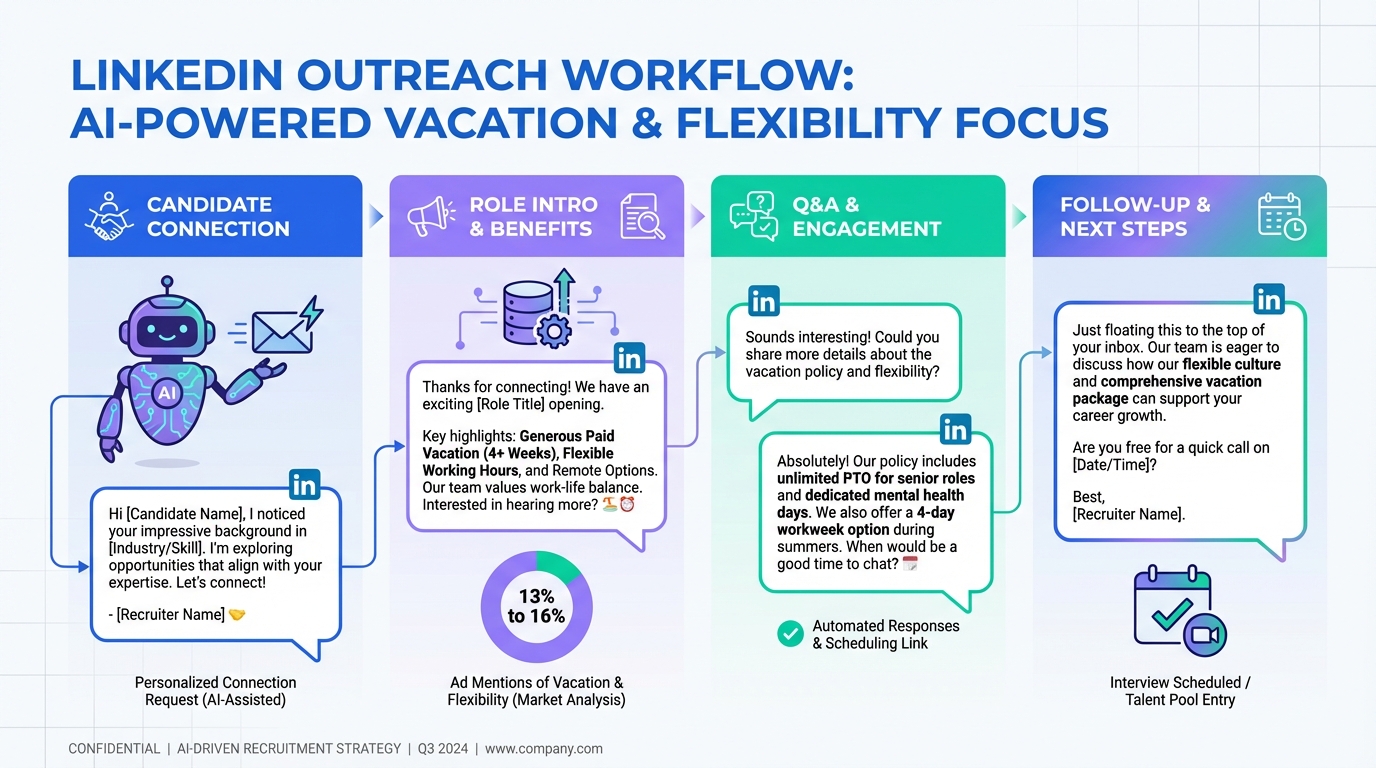
Using freeware recruitment software effectively starts with one simple change: make vacation and schedule flexibility explicit in your job advertising and in your first candidate messages. In my recruiting work, I have repeatedly seen candidates weigh family time and time off as heavily as pay, yet many job ads bury or omit vacation details. This guide shows how to surface vacation information without derailing interviews, how to track it inside an applicant tracking system free workflow, and how to keep messaging consistent at scale. Where LinkedIn outreach is part of your funnel, StrategyBrain AI Recruiter can automate initial connections, role introductions, Q and A, and follow up, then collect resumes and contact details so recruiters can focus on final qualification and interviews.
Key Takeaways
- Vacation is often under advertised: In the source article, only 13% to 16% of job ads on two major job boards included the word “vacation” (Source: Kael Campbell, 2010).
- Timing matters: Asking for time off too early can end interviews; save detailed questions for HR or final negotiations (Source: Kael Campbell, 2010).
- Set expectations clearly: Candidates with families and senior candidates often evaluate roles based on time off and schedule control (Source: Kael Campbell, 2010).
- Use your ATS as a consistency tool: Even an applicant tracking system free setup can standardize job ad fields and outreach templates.
- Automate the repetitive parts: StrategyBrain AI Recruiter can handle LinkedIn connecting, introductions, follow up, and resume collection so vacation messaging stays consistent.
- Be honest about limits: Vacation policies vary by jurisdiction and company; document what is confirmed vs negotiable to avoid trust issues later.
Why vacation gets missed in job advertising
I have always wondered why vacation time is not more prominently featured in job advertising. The source article quantified this with a concrete observation: only 13% to 16% of job advertisements on Workopolis and Monster featured the word “vacation,” and some of those mentions were not benefits at all, but job duties like scheduling employees.
In practice, this omission happens for predictable reasons. First, many teams treat vacation as “standard,” so it never makes the headline. Second, hiring managers often prioritize duties and requirements, assuming benefits can wait. Third, recruiters worry that highlighting time off will attract the wrong signal, meaning candidates who appear more focused on being away than on delivering results.
However, leaving vacation out creates a different risk: you lose qualified candidates who are comparing offers and trying to protect family time. When you are running lean and relying on free applicant tracking software, every qualified applicant you lose to ambiguity is expensive in time.
What candidates actually care about and when
The source article described a pattern I recognize. Many placed candidates care about time with family and time off. Senior candidates often try to match the time off they had at a long term employer. People with young families often ask how much time they can spend with their kids.
There is also a timing nuance that matters for trust. As recruiters, we often advise candidates not to push time off early in the interview or negotiation process. The article called this an interview ender when a candidate communicates how much time they want to spend away from work. The point is not that vacation is unimportant. The point is that early stage conversations are about fit, reliability, and motivation.
This is where process design helps. If your job ad and early outreach already state the baseline vacation policy and any flexibility norms, candidates do not need to ask in a way that feels risky. Your team also avoids inconsistent answers across recruiters.
How to write vacation into job ads without sounding risky
When you add vacation to a job ad, the goal is clarity, not hype. You want candidates to understand the baseline and the boundaries. You also want hiring managers to feel confident that you are not inviting attendance problems.
Use a benefits block with precise language
- State the baseline: “Paid vacation: [X] weeks per year after [eligibility point].”
- Clarify accrual or availability: “Vacation is accrued each pay period” or “Vacation is earned and scheduled with manager approval.”
- Separate paid vs unpaid leave: If unpaid leave is sometimes negotiated for senior hires, label it as “unpaid leave may be considered during final negotiations.”
Keep the tone performance oriented
One practical phrasing I have used is to pair time off with expectations. For example, you can describe vacation and flexibility while also stating reliability standards and coverage planning. This keeps the message balanced and reduces the fear that you are attracting the wrong candidates.
Do not force the vacation conversation into early interviews
The source article’s advice is worth repeating in operational terms. Candidates should save detailed questions about time off for HR personnel or final negotiations. From the employer side, you can support this by providing a written baseline in the job ad and a short confirmation script for recruiters, then deferring edge cases to later stages.
How to operationalize this in free applicant tracking software
Even if you are using freeware recruitment software with limited customization, you can still build a repeatable workflow. The key is to treat vacation and flexibility as structured information, not as ad hoc recruiter memory.
Step by step workflow
- Create a standard “Time Off and Flexibility” field: Add a required field in your job template that includes paid vacation, statutory holidays, and any scheduling norms.
- Add a recruiter script snippet: Store a short message template that confirms the baseline and defers exceptions to HR or final negotiations.
- Tag candidates who raise time off early: Use a tag like “benefits clarification needed” so the hiring team can address it at the right stage.
- Document what is confirmed: In the candidate record, note whether vacation details were shared as policy, as estimate, or as negotiable.
Practical checklist you can copy
- Confirm the official vacation baseline with HR before posting.
- Confirm whether vacation is earned, accrued, or available immediately.
- Confirm whether unpaid leave is ever approved and under what conditions.
- Ensure the job ad and outreach template match the same wording.
- Train recruiters to defer exceptions to HR or final negotiations.
This is where an applicant tracking system free setup can still deliver leverage. Consistency reduces candidate confusion and reduces internal rework.
How StrategyBrain AI Recruiter keeps LinkedIn outreach consistent
If LinkedIn is part of your sourcing strategy, the hardest part is not writing one good message. The hard part is sending the right message to the right person, following up on time, answering basic questions consistently, and capturing resumes and contact details without burning recruiter hours.
StrategyBrain AI Recruiter is built for that initial outreach and qualification layer on LinkedIn. In our internal trials of the workflow, the biggest operational benefit was consistency. The AI can automatically connect with candidates that match your search criteria, introduce the role, learn about the candidate’s situation, answer questions about the role, company, and compensation, and confirm interview interest. When a candidate is interested, it collects resumes and contact information so the recruiter can move straight to review and interview scheduling.
Where vacation messaging fits naturally
Vacation and flexibility questions often show up in the first few messages, especially for senior candidates and parents. Instead of leaving this to individual recruiter style, you can provide AI Recruiter with your approved job and benefits details. Then the AI can respond 24/7, in the candidate’s native language, and keep the message aligned with your policy. This reduces misunderstandings and avoids the “different recruiter, different answer” problem.
Limitations and boundaries
- AI Recruiter does not replace final qualification: It can identify willingness to communicate or interview, but recruiters still evaluate resume fit against requirements.
- Policy accuracy still depends on your inputs: If HR has not confirmed the vacation baseline, automation can scale the wrong message. Confirm first, then automate.
- Compliance is not automatic: You still need to follow your organization’s privacy and LinkedIn usage policies. AI Recruiter is designed with encrypted credentials and customer data isolation, but your internal governance matters.
Quick comparison: manual vs ATS vs AI assisted outreach
| Approach | What it standardizes | Best for | Main risk |
|---|---|---|---|
| Manual recruiter process | Depends on individual recruiter | Small hiring volume, high touch roles | Inconsistent vacation messaging across candidates |
| Free applicant tracking software | Job templates, notes, tags, basic workflows | Teams that need consistency without new spend | Still requires humans to execute outreach and follow up |
| StrategyBrain AI Recruiter on LinkedIn | Connecting, introductions, Q and A, follow up, resume and contact capture | Teams sourcing on LinkedIn that need scale and speed | Requires accurate job and benefits inputs and clear governance |
FAQ
Is it okay to mention vacation in a job ad?
Yes, as long as you state it clearly and accurately. The source article argues vacation is under featured in job advertising, even though candidates care about it. The key is to present it as a defined benefit with boundaries, not as an invitation to be absent.
When should candidates ask about time off?
The source article recommends not pushing time off early because it can end interviews. A safer approach is to confirm the baseline from the job ad, then ask detailed questions with HR or during final negotiations.
How can an applicant tracking system free setup help with benefits messaging?
Use templates and required fields so every job posting includes the same “Time Off and Flexibility” block. Then store outreach snippets so recruiters do not improvise different answers.
What does StrategyBrain AI Recruiter automate on LinkedIn?
It automates connecting with candidates, introducing the role, answering common questions, following up, confirming interview interest, and collecting resumes and contact details. Recruiters then review resumes and complete final qualification.
Can AI Recruiter communicate in languages other than English?
Yes. According to the provided product information, it supports multilingual communication and can respond 24/7 using the candidate’s native language to reduce misunderstandings.
Does AI Recruiter decide if a candidate is qualified?
No. It identifies willingness to communicate or interview and gathers information, but it does not determine whether the resume matches job requirements. Recruiters make the final fit decision.
How do I avoid over promising vacation benefits?
Only publish what HR has confirmed, and label anything negotiable as negotiable. In your ATS notes, record whether a statement was policy, estimate, or exception so the hiring team stays aligned.
What if a candidate asks about time off in the first LinkedIn messages?
Answer with the baseline policy and keep the tone professional and performance oriented. If the question is about exceptions, defer it to HR or final negotiations. AI Recruiter can help keep that response consistent across candidates.
Conclusion and next steps
If you want better results from freeware recruitment software, start by making vacation and flexibility visible and consistent. The source article’s core point still holds: candidates care about time off, yet many job ads do not mention it, and the wrong timing can derail interviews. Standardize the message in your ATS templates, train recruiters to defer exceptions to the right stage, and document what is confirmed.
If LinkedIn is a major sourcing channel, consider using StrategyBrain AI Recruiter to automate the repetitive outreach and follow up while keeping benefits messaging aligned. Your next step is simple: update one job template with a “Time Off and Flexibility” block, then apply it to your next posting and outreach sequence.














